
- Posts: 135
- Thank you received: 3
Checkout issue
- simonkloostra
-
 Topic Author
- Offline
Less
More
14 years 9 months ago #33180
by simonkloostra
Checkout issue was created by simonkloostra
I am currently struggling with the checkout options, not sure whether I'm doing something wrong or whether it's a bug.... I am working on a local copy of my site, as I do not want to play around before it's finished.
I use the following workflow: login,address,shipping,payment,confirm_cart_status_fields_terms,end
Version is Essential 1.5.5.
Registration is switched off, as I want guest checkout. That is why I also set Registration to No.
When I first sign in using a normal Joomla log-in annd then enter the shop, I can order and checkout without problem, but when I'm not signed in the shop doesn't work. When I add a product to my cart, the "Add to cart" button brings me to the home-page of my site and nothing happens, cart still empty. I played around with the setings for Signon, Registration and workflow, but no changes.
See attached a screenshot of my checkout configuration:
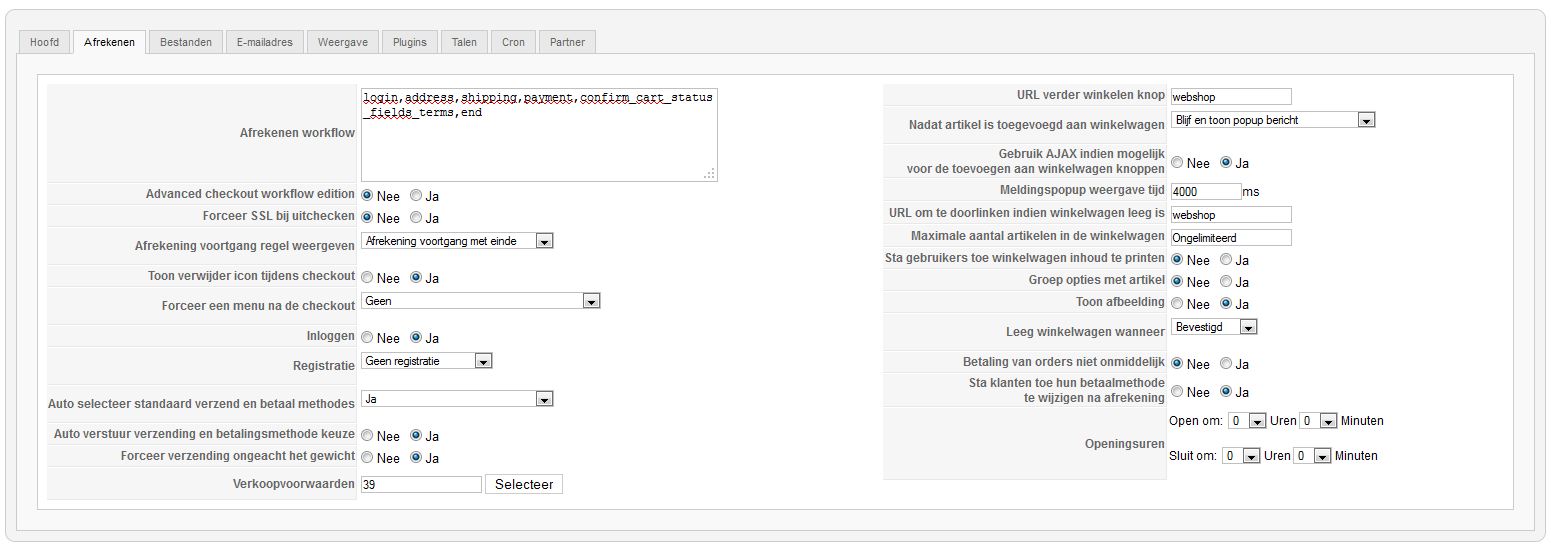
I use the following workflow: login,address,shipping,payment,confirm_cart_status_fields_terms,end
Version is Essential 1.5.5.
Registration is switched off, as I want guest checkout. That is why I also set Registration to No.
When I first sign in using a normal Joomla log-in annd then enter the shop, I can order and checkout without problem, but when I'm not signed in the shop doesn't work. When I add a product to my cart, the "Add to cart" button brings me to the home-page of my site and nothing happens, cart still empty. I played around with the setings for Signon, Registration and workflow, but no changes.
See attached a screenshot of my checkout configuration:
Please Log in or Create an account to join the conversation.
- simonkloostra
-
Topic Author
- Offline
Less
More
- Posts: 135
- Thank you received: 3
14 years 9 months ago #33185
by simonkloostra
Replied by simonkloostra on topic Re: Checkout issue
Pfff, figured it out, user-registration within Joomla needs to be switched on.... Now more problems though, the checkout bounces me back to step 1 when I would expect the final confirmation step.... Will see if I can find it and otherwise post my issue. Not sure if I really enjoy settinng this up....
Please Log in or Create an account to join the conversation.
- simonkloostra
-
Topic Author
- Offline
Less
More
- Posts: 135
- Thank you received: 3
14 years 9 months ago - 14 years 9 months ago #33195
by simonkloostra
Replied by simonkloostra on topic Re: Checkout issue
Managed to sort everything out on a local copy of my website with a backup made just before. Managed to sort it al out locally.Problem seemed to be that in Joomla I had to allow user-registration, setting Activation to none, meaning user are immediately enabled without havinng to check their mail. Should be irreelevant I would say, as I have set registration to none, but this seems to be the way things work.
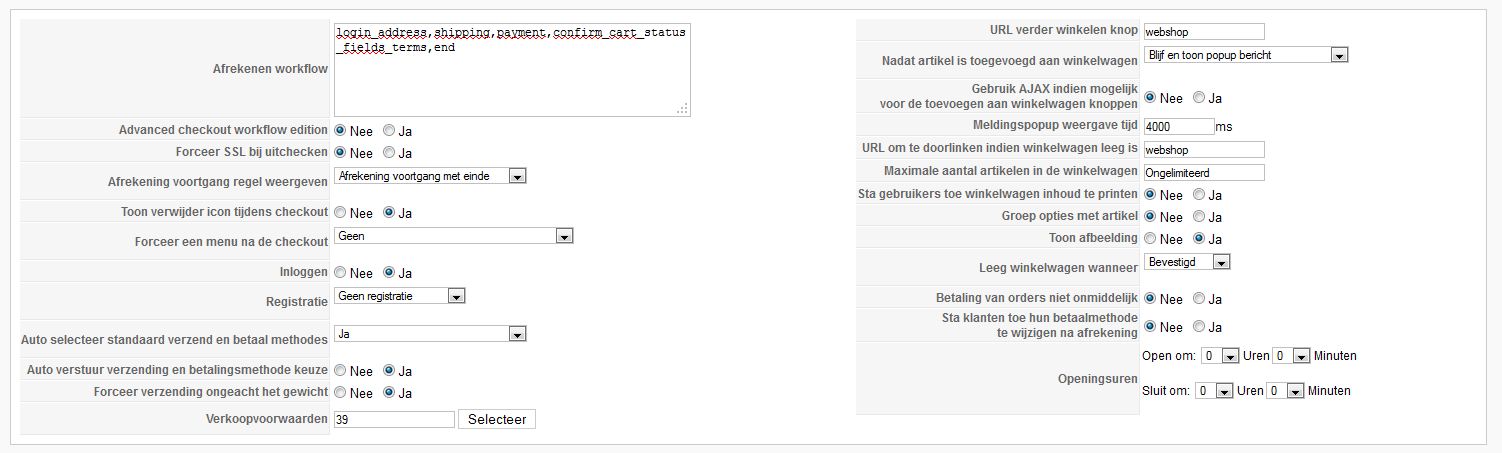
In Hikaashop I use workflow login_address,shipping,payment,confirm_cart_status_fields_terms,end
Also: Signon Yes, No registration, Autoselect for payment/shipment Yes and Autosend payment/shipment also Yes.
Wrestled with this all evening, but finally got it.
Then opened up my live site quickly to check te checkout, made the same changes as on my local site, and again the initial problem, "Add to cart" immediately sends me to the home page!!!
I checked and checked and checked, but all settings are identical. Also the rest of the system is identical, since the backup of the local copy was made just before restoring and testing it locally.
In Hikaashop I use workflow login_address,shipping,payment,confirm_cart_status_fields_terms,end
Also: Signon Yes, No registration, Autoselect for payment/shipment Yes and Autosend payment/shipment also Yes.
Wrestled with this all evening, but finally got it.
Then opened up my live site quickly to check te checkout, made the same changes as on my local site, and again the initial problem, "Add to cart" immediately sends me to the home page!!!
I checked and checked and checked, but all settings are identical. Also the rest of the system is identical, since the backup of the local copy was made just before restoring and testing it locally.
Last edit: 14 years 9 months ago by simonkloostra. Reason: typo's
Please Log in or Create an account to join the conversation.
- simonkloostra
-
Topic Author
- Offline
Less
More
- Posts: 135
- Thank you received: 3
14 years 9 months ago #33200
by simonkloostra
Replied by simonkloostra on topic Re: Checkout issue
And a screendump:
Please Log in or Create an account to join the conversation.

14 years 9 months ago #33229
by nicolas
Replied by nicolas on topic Re: Checkout issue
Hi,
It's hard to say without a link to the website but what you're describing doesn't come from all these settings.
If a product cannot be added to the cart it comes from one of these points:
Custom item fields not added properly in the database (you can check that by turning on the debug mode in the joomla configuration)
Update problems of the database after an update of HikaShop (you can check that by turning on the debug mode in the joomla configuration)
You have some caching activated (you should check that the joomla cache option in the configuration and the joomla system cache plugin are both disabled)
So you should first check on that.
It's hard to say without a link to the website but what you're describing doesn't come from all these settings.
If a product cannot be added to the cart it comes from one of these points:
Custom item fields not added properly in the database (you can check that by turning on the debug mode in the joomla configuration)
Update problems of the database after an update of HikaShop (you can check that by turning on the debug mode in the joomla configuration)
You have some caching activated (you should check that the joomla cache option in the configuration and the joomla system cache plugin are both disabled)
So you should first check on that.
Please Log in or Create an account to join the conversation.
14 years 9 months ago #33230
by nicolas
Replied by nicolas on topic Re: Checkout issue
Hi,
It's hard to say without a link to the website but what you're describing doesn't come from all these settings.
If a product cannot be added to the cart it comes from one of these points:
Custom item fields not added properly in the database (you can check that by turning on the debug mode in the joomla configuration)
Update problems of the database after an update of HikaShop (you can check that by turning on the debug mode in the joomla configuration)
You have some caching activated (you should check that the joomla cache option in the configuration and the joomla system cache plugin are both disabled)
So you should first check on that.
It's hard to say without a link to the website but what you're describing doesn't come from all these settings.
If a product cannot be added to the cart it comes from one of these points:
Custom item fields not added properly in the database (you can check that by turning on the debug mode in the joomla configuration)
Update problems of the database after an update of HikaShop (you can check that by turning on the debug mode in the joomla configuration)
You have some caching activated (you should check that the joomla cache option in the configuration and the joomla system cache plugin are both disabled)
So you should first check on that.
Please Log in or Create an account to join the conversation.
- simonkloostra
-
Topic Author
- Offline
Less
More
- Posts: 135
- Thank you received: 3
14 years 9 months ago #33327
by simonkloostra
Replied by simonkloostra on topic Re: Checkout issue
Thanks, switching off caching solved the issue. My checkout works ass desired no, so I will proceed to fill my shop.
Please Log in or Create an account to join the conversation.
Time to create page: 0.232 seconds