
Can't style popup add to basket

14 years 6 months ago #45003
by gasoline
I'll keep on trying!
Can't style popup add to basket was created by gasoline
When I add a item to my cart there opens a popup with 2 links. Go on shopping & To Cart.
This file has the url domainname.ext/productcategoriename/checkout/notice/tmpl-component
However in the source I see in the head section
So no link to my own template and also this popup does not see the system template because it is going to:
productcategoriename/templates/system/css/template.css instead of templates/system/css/template.css
How can I change this so this popup does use my own template css file(s)?
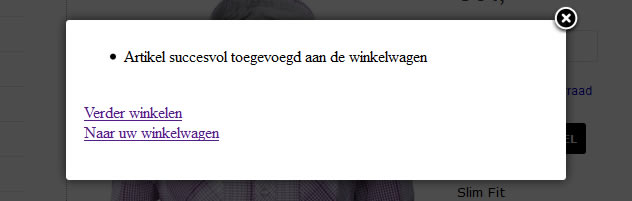
This file has the url domainname.ext/productcategoriename/checkout/notice/tmpl-component
However in the source I see in the head section
Code:
<link rel="stylesheet" href="/templates/system/css/template.css" type="text/css" />
productcategoriename/templates/system/css/template.css instead of templates/system/css/template.css
How can I change this so this popup does use my own template css file(s)?
I'll keep on trying!
Please Log in or Create an account to join the conversation.

14 years 6 months ago #45164
by nicolas
Replied by nicolas on topic Re: Can't style popup add to basket
Hi,
The link to the checkout should be fine. It doesn't work ? What happens when you click on it ? If you want your checkout to be displayed in a specific menu, you should use the option "force a menu on checkout" of the Checkout tab of the configuration.
The popup is actually displayed by the component.php file of your template. If the CSS of your template is not in the popups, it's highly likely that the component.php file of your template is not correctly done. I would advise you to contact your template provider's support so that they can tell you what to do as we don't know how they did it.
The link to the checkout should be fine. It doesn't work ? What happens when you click on it ? If you want your checkout to be displayed in a specific menu, you should use the option "force a menu on checkout" of the Checkout tab of the configuration.
The popup is actually displayed by the component.php file of your template. If the CSS of your template is not in the popups, it's highly likely that the component.php file of your template is not correctly done. I would advise you to contact your template provider's support so that they can tell you what to do as we don't know how they did it.
Please Log in or Create an account to join the conversation.
Time to create page: 0.207 seconds