
- Posts: 3
- Thank you received: 0
Cart Item Count
- love_to_you_to@yahoo.com
-
 Topic Author
- Offline
Less
More
14 years 5 months ago #46868
by love_to_you_to@yahoo.com
Cart Item Count was created by love_to_you_to@yahoo.com
Hi Nicolas,
This question might have been answered previously but I am not finding it. I am new to hikashop and want to display the cart icon on the top of the screen with the number of items in the cart.
I created a custom html module and positioned it on top which takes me to the checkout process but I am unable to display the cart count in that.
Could you please help me with the code snippet which I can use to fulfill this requirement?
Thanks,
Lovely Singh
This question might have been answered previously but I am not finding it. I am new to hikashop and want to display the cart icon on the top of the screen with the number of items in the cart.
I created a custom html module and positioned it on top which takes me to the checkout process but I am unable to display the cart count in that.
Could you please help me with the code snippet which I can use to fulfill this requirement?
Thanks,
Lovely Singh
Please Log in or Create an account to join the conversation.

14 years 5 months ago #46991
by nicolas
Replied by nicolas on topic Re: Cart Item Count
Why not just use the hikashop cart module with the "mini cart" option turned on ? That will display a text with the cart item count and the total price. The message can them be customized with a translation override:
www.hikashop.com/en/download/languages.html#modify
www.hikashop.com/en/download/languages.html#modify
Please Log in or Create an account to join the conversation.
- love_to_you_to@yahoo.com
-
Topic Author
- Offline
Less
More
- Posts: 3
- Thank you received: 0
14 years 5 months ago #47135
by love_to_you_to@yahoo.com
Replied by love_to_you_to@yahoo.com on topic Re: Cart Item Count
Thanks a lot Nicolas, it worked. But was wondering if there was an option to display image instead of text (as I was not able to find it).
Please Log in or Create an account to join the conversation.
14 years 5 months ago #47380
by nicolas
Replied by nicolas on topic Re: Cart Item Count
With the translation override system, you can replace the text with HTML code and that way having an image instead of the text.
Please Log in or Create an account to join the conversation.
14 years 3 months ago #53960
by michael
Replied by michael on topic Re: Cart Item Count
Hi Nicolas,
Sorry to ask question here!
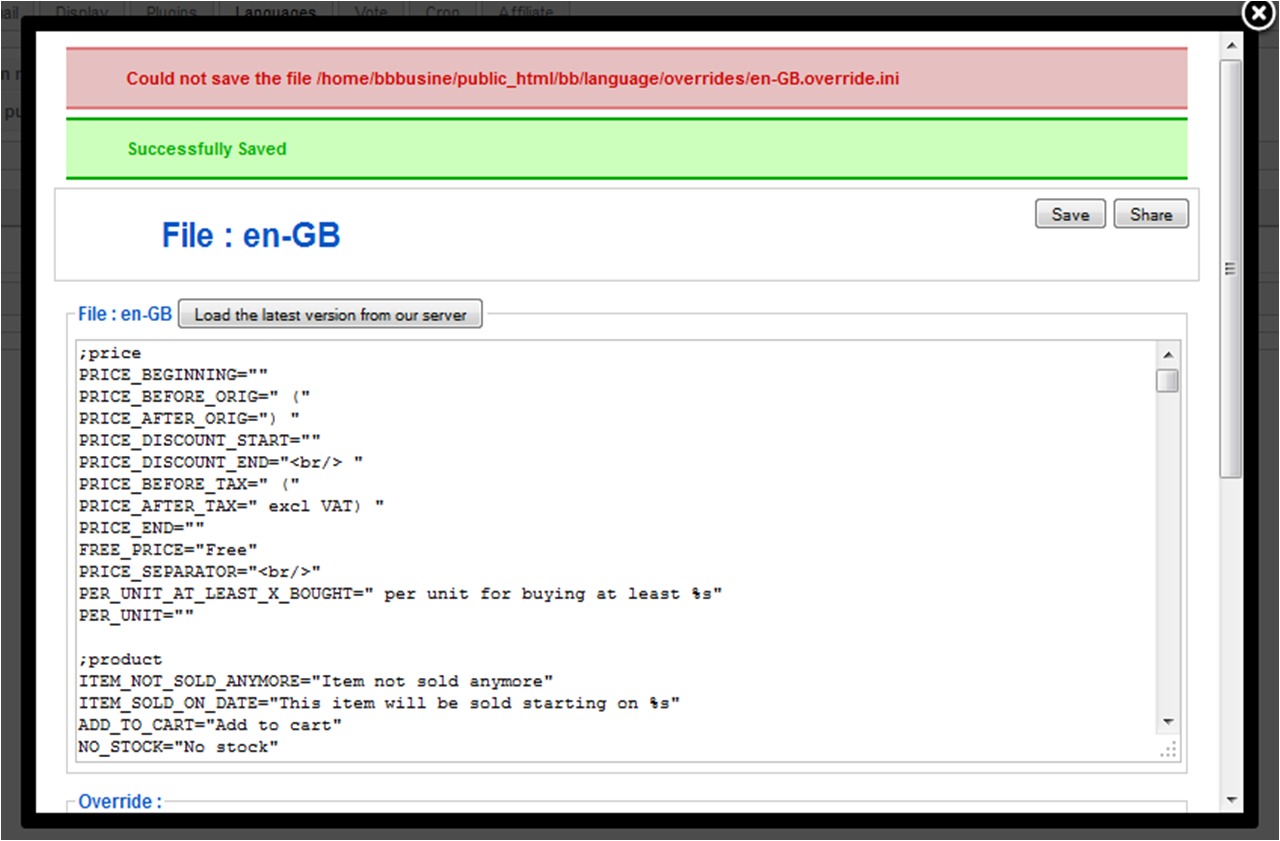
I have added a cart icon,as you mentioned, but when I save the file, it show an error message with 2nd line success message:
"Could not save the file ...my directory.../language/overrides/en-GB.override.ini"
"Successfully Saved"
The codes I use is :
<img src="../images/sc-cart1.png" width=22> My Cart (0)

Any impact?
Thank You!
Sorry to ask question here!
I have added a cart icon,as you mentioned, but when I save the file, it show an error message with 2nd line success message:
"Could not save the file ...my directory.../language/overrides/en-GB.override.ini"
"Successfully Saved"
The codes I use is :
<img src="../images/sc-cart1.png" width=22> My Cart (0)
Any impact?
Thank You!
Please Log in or Create an account to join the conversation.
14 years 3 months ago #54011
by nicolas
Replied by nicolas on topic Re: Cart Item Count
If you enter your modification in the main area of the translation file, you will loose it next time your update HikaShop. Instead, you should add it in the "override" area, at the bottom of the popup.
Regarding that error, that's because the permissions of the "languages" folder of your website are not correct. You should try to make it 777 and that should hopefully solve the problem of saving the override file.
Regarding that error, that's because the permissions of the "languages" folder of your website are not correct. You should try to make it 777 and that should hopefully solve the problem of saving the override file.
Please Log in or Create an account to join the conversation.
14 years 3 months ago #54530
by michael
Replied by michael on topic Re: Cart Item Count
Resolved
Thank you very much again
Thank you very much again
Please Log in or Create an account to join the conversation.
14 years 2 months ago - 14 years 2 months ago #58249
by takis


Replied by takis on topic Re: Cart Item Count
Last edit: 14 years 2 months ago by takis.
Please Log in or Create an account to join the conversation.
Time to create page: 0.185 seconds