

- Posts: 44
- Thank you received: 1
Changing values in configuration not accepted
14 years 5 months ago #47034
by sarawhite
Changing values in configuration not accepted was created by sarawhite
I am trying to change some settings in the Configuration ->Checkout screen but after saving they still are the same.
Any ideas?
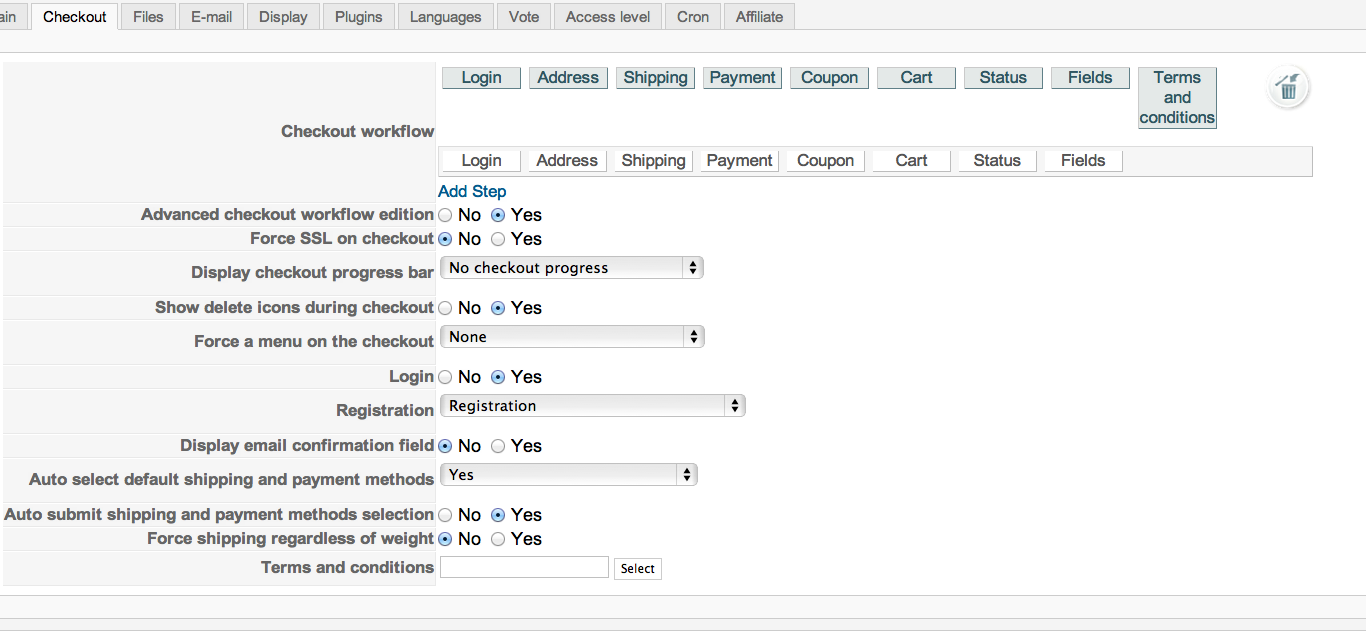
Any ideas?
Please Log in or Create an account to join the conversation.
14 years 5 months ago #47035
by sarawhite
Replied by sarawhite on topic Re: Changing values in configuration not accepted
PS: I am using the latest version 1.5.7 and Joomla 2.5.4.
Please Log in or Create an account to join the conversation.

14 years 5 months ago #47116
by nicolas
Replied by nicolas on topic Re: Changing values in configuration not accepted
Do you have an error ?
Did you try with another browser ?
If you activate the debug mode of the joomla configuration, do you have an error ?
Did you try with another browser ?
If you activate the debug mode of the joomla configuration, do you have an error ?
Please Log in or Create an account to join the conversation.
14 years 5 months ago #47655
by sarawhite
Replied by sarawhite on topic Re: Changing values in configuration not accepted
Hi,
I tried it on Firefox as well (used Chrome before) and it did not change the values either.
Then I activated the debug system and there is no error.
Thanks
I tried it on Firefox as well (used Chrome before) and it did not change the values either.
Then I activated the debug system and there is no error.
Thanks
Please Log in or Create an account to join the conversation.
14 years 5 months ago #47811
by nicolas
Replied by nicolas on topic Re: Changing values in configuration not accepted
Could you provide a back end access to your website via our contact form (with a link to this thread) so that we can look at that ?
Please Log in or Create an account to join the conversation.
14 years 5 months ago #48095
by sarawhite
Replied by sarawhite on topic SOLVED Changing values in configuration not accept
Hikasupport answered:
I think that it comes from the suhosin module of PHP that is installed of your server.
Please ask your hosting company to increase the suhosin.post.max_varsoption to 500 and it should then work.
I did that, the web hosting company applied the change and hey presto
IT WORKS NOW.
I think that it comes from the suhosin module of PHP that is installed of your server.
Please ask your hosting company to increase the suhosin.post.max_varsoption to 500 and it should then work.
I did that, the web hosting company applied the change and hey presto
IT WORKS NOW.
Please Log in or Create an account to join the conversation.
14 years 4 months ago #48824
by webmuse
Replied by webmuse on topic Re: Changing values in configuration not accepted
I'm having a similar issue, except suhosin is missing in the PHP Info list.
Is post.max_varsoption a valid setting within the php.ini file?
Since you have so many config variables, maybe you would consider splitting this into multiple editable pages, so it would work on almost any system server? Just a thought.
I'm also getting an error message about the Checkout Workflow being invalid, but I suspect that this is caused by the reason - the number of post variables allowed being exceeded.
HikaShop Starter 1.5.7
Joomla! version 2.5.3
PHP version 5.2.17
Thanks for your help,
WebMuse
Is post.max_varsoption a valid setting within the php.ini file?
Since you have so many config variables, maybe you would consider splitting this into multiple editable pages, so it would work on almost any system server? Just a thought.
I'm also getting an error message about the Checkout Workflow being invalid, but I suspect that this is caused by the reason - the number of post variables allowed being exceeded.
HikaShop Starter 1.5.7
Joomla! version 2.5.3
PHP version 5.2.17
Thanks for your help,
WebMuse
Please Log in or Create an account to join the conversation.
14 years 4 months ago #48866
by nicolas
Replied by nicolas on topic Re: Changing values in configuration not accepted
If you don't have suhosin, it can't come from that option, which is only in suhosin.
It must come from your browser's cache/cookies. Try with another browser.
It must come from your browser's cache/cookies. Try with another browser.
Please Log in or Create an account to join the conversation.
14 years 4 months ago #48906
by webmuse
Replied by webmuse on topic Re: Changing values in configuration not accepted
I attempted again, after I had turned off SEO in global configuration (for another reason), and now its working. Thanks for your quick response.
Please Log in or Create an account to join the conversation.
Time to create page: 0.215 seconds