

- Posts: 136
- Thank you received: 1
Version 1.5.7 - Error during checkout
14 years 4 months ago #51372
by jacorr27
Version 1.5.7 - Error during checkout was created by jacorr27
Hi,
I have just upgraded my dev environment to the latest business version 1.5.7 and am now experiencing a problem at the checkout.
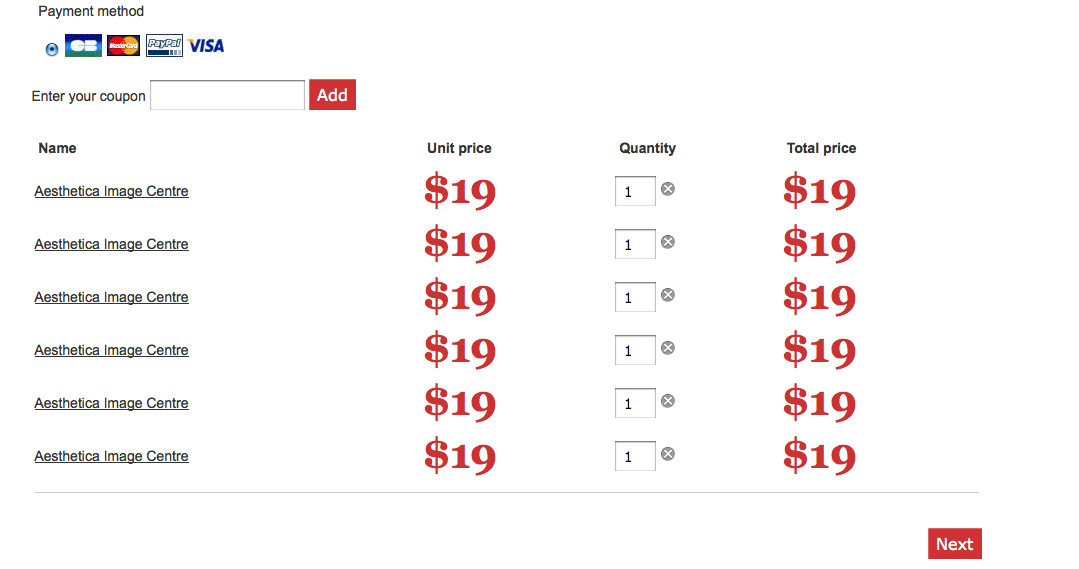
When a user logs in to purchase a product, at the confirm screen - clicking next does not proceed them to the next step it simply adds another duplicate product and gets stuck there.
Any idea why this would happen?
Our settings should be only to ever have 1 item in the cart. I don't see how that would affect this though.
Please have a look at my dev environment dev.bellabuy.com.au
I have also attached screenshot of what is happening.
Thank you in advance.
Jac
I have just upgraded my dev environment to the latest business version 1.5.7 and am now experiencing a problem at the checkout.
When a user logs in to purchase a product, at the confirm screen - clicking next does not proceed them to the next step it simply adds another duplicate product and gets stuck there.
Any idea why this would happen?
Our settings should be only to ever have 1 item in the cart. I don't see how that would affect this though.
Please have a look at my dev environment dev.bellabuy.com.au
I have also attached screenshot of what is happening.
Thank you in advance.
Jac
Please Log in or Create an account to join the conversation.

14 years 4 months ago #51460
by nicolas
Replied by nicolas on topic Re: Version 1.5.7 - Error during checkout
Please turn on the "debug mode" option of the joomla configuration and try again.
That will probably display a MySQL error because some columns in the database are missing:
www.hikashop.com/en/support/documentatio...lity-issues.html#SQL
That will probably display a MySQL error because some columns in the database are missing:
www.hikashop.com/en/support/documentatio...lity-issues.html#SQL
Please Log in or Create an account to join the conversation.
14 years 4 months ago #51580
by jacorr27
Replied by jacorr27 on topic Re: Version 1.5.7 - Error during checkout
Thanks Nicolas. I have turned on debug mode, but can not see anything as referenced in your documentation. Is there something else you can suggest?
Please Log in or Create an account to join the conversation.
14 years 4 months ago #51609
by nicolas
Replied by nicolas on topic Re: Version 1.5.7 - Error during checkout
Could you turn off the "Use AJAX when possible for add to cart buttons" option of the Checkout tab of the configuration while keeping the debug mode turned on and try again ?
That might help display the error.
That might help display the error.
Please Log in or Create an account to join the conversation.
14 years 4 months ago #51634
by jacorr27
Replied by jacorr27 on topic Re: Version 1.5.7 - Error during checkout
I have turned off the AJAX setting where you've suggested and still no luck with any errors displaying.
Please Log in or Create an account to join the conversation.
14 years 4 months ago #51713
by nicolas
Replied by nicolas on topic Re: Version 1.5.7 - Error during checkout
Could you provide a back end acess to your dev website via our contact form so that we can look at the problem ?
Please Log in or Create an account to join the conversation.
14 years 4 months ago #51723
by jacorr27
Replied by jacorr27 on topic Re: Version 1.5.7 - Error during checkout
Thank you, I have just emailed your the details for the dev site.
Please Log in or Create an account to join the conversation.
14 years 3 months ago #51869
by jacorr27
Replied by jacorr27 on topic Re: Version 1.5.7 - Error during checkout
Hi Nicolas,
Have you had a chance to have a look at this error on my dev site?
As a side note - the only reason I was upgrading was to try and resolve a "token invalid" error message that is being returned when you try to reset a password. Upgrading to the latest version of joomla and hikashop hasn't resolved this issue. I've tried a number of resolutions with no luck. I'm not sure if you could shed any light on that issue either?
Thank you in advance
Have you had a chance to have a look at this error on my dev site?
As a side note - the only reason I was upgrading was to try and resolve a "token invalid" error message that is being returned when you try to reset a password. Upgrading to the latest version of joomla and hikashop hasn't resolved this issue. I've tried a number of resolutions with no luck. I'm not sure if you could shed any light on that issue either?
Thank you in advance
Please Log in or Create an account to join the conversation.
14 years 3 months ago #51900
by nicolas
Replied by nicolas on topic Re: Version 1.5.7 - Error during checkout
Hi,
I just checked your website.
It comes from a customization of the file "cart" of the view "checkout" that was done via the menu Displa>Views. Removing the customization solves the problem.
Regarding your "token valid" error, it has nothing to do with HikaShop, so updating HikaShop won't solve it.
That's a common issue on joomla 1.5: docs.joomla.org/Why_do_you_get_a_Token_E..._a_password_reset%3F
I just checked your website.
It comes from a customization of the file "cart" of the view "checkout" that was done via the menu Displa>Views. Removing the customization solves the problem.
Regarding your "token valid" error, it has nothing to do with HikaShop, so updating HikaShop won't solve it.
That's a common issue on joomla 1.5: docs.joomla.org/Why_do_you_get_a_Token_E..._a_password_reset%3F
Please Log in or Create an account to join the conversation.
14 years 3 months ago #52147
by jacorr27
Replied by jacorr27 on topic Re: Version 1.5.7 - Error during checkout
Thank you Nicolas.
I have now upgraded my production website and just have a couple of small issues I'm trying to resolve and wondered if you could please help?
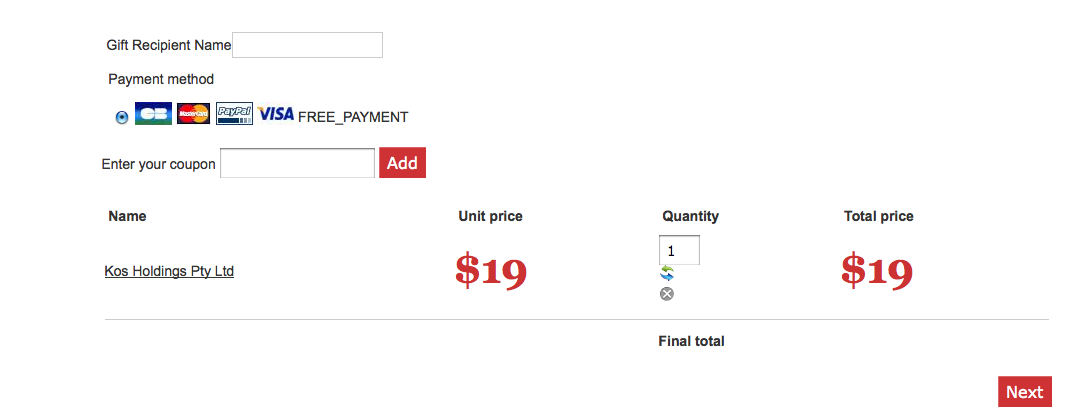
1 - FREE_PRODUCT text on checkout, how can I remove this?
2 - Refresh button under quantity - can I remove this?
3 - Final Total text - can I also hide this as well without messing things up?
Screenshot attached.
I have now upgraded my production website and just have a couple of small issues I'm trying to resolve and wondered if you could please help?
1 - FREE_PRODUCT text on checkout, how can I remove this?
2 - Refresh button under quantity - can I remove this?
3 - Final Total text - can I also hide this as well without messing things up?
Screenshot attached.
Please Log in or Create an account to join the conversation.
14 years 3 months ago #52148
by jacorr27
Replied by jacorr27 on topic Re: Version 1.5.7 - Error during checkout
Sorry number 1 should read FREE_PAYMENT, not FREE_PRODUCT
Please Log in or Create an account to join the conversation.
14 years 3 months ago #52221
by nicolas
Replied by nicolas on topic Re: Version 1.5.7 - Error during checkout
Hi,
That's because you're missing the new translation key FREE_PAYMENT in your translation file.
Just add it via the Languages tab of the configuration.
You can remove the refresh button with that CSS:
.hikashop_cart_product_quantity_refresh{display:none;}
You can remove the Final total text with that CSS:
#hikashop_checkout_cart_final_total_title{display:none;}
That's because you're missing the new translation key FREE_PAYMENT in your translation file.
Just add it via the Languages tab of the configuration.
You can remove the refresh button with that CSS:
.hikashop_cart_product_quantity_refresh{display:none;}
You can remove the Final total text with that CSS:
#hikashop_checkout_cart_final_total_title{display:none;}
Please Log in or Create an account to join the conversation.
14 years 3 months ago #52316
by jacorr27
Replied by jacorr27 on topic Re: Version 1.5.7 - Error during checkout
I have added as you've suggested to the Languages tab, thank you.
Just still having trouble with modifying the CSS. (I'm a complete novice!)
Where exactly should I be placing the code? In the Cart View?
Just still having trouble with modifying the CSS. (I'm a complete novice!)
Where exactly should I be placing the code? In the Cart View?
Please Log in or Create an account to join the conversation.
14 years 3 months ago #52333
by nicolas
Replied by nicolas on topic Re: Version 1.5.7 - Error during checkout
In the front end CSS file of HikaShop that you can edit via the Display tab of the configuation.
Please Log in or Create an account to join the conversation.
14 years 3 months ago #52419
by jacorr27
Replied by jacorr27 on topic Re: Version 1.5.7 - Error during checkout
I added this code to the end of my custom CSS file but the items are still there. I'm obviously doing something wrong.
.hikashop_cart_product_quantity_refresh{display:none;}
#hikashop_checkout_cart_final_total_title{display:none;}
.hikashop_cart_product_quantity_refresh{display:none;}
#hikashop_checkout_cart_final_total_title{display:none;}
Please Log in or Create an account to join the conversation.
14 years 3 months ago #52584
by nicolas
Replied by nicolas on topic Re: Version 1.5.7 - Error during checkout
You actually broke the class attribute of the HTML by adding that CSS in your view file...
Because of that the same CSS code that you added in the CSS file of HikaShop cannot work.
You will have to edit the file 'cart' of the view "checkout" and revert the modification you did there.
Because of that the same CSS code that you added in the CSS file of HikaShop cannot work.
You will have to edit the file 'cart' of the view "checkout" and revert the modification you did there.
Please Log in or Create an account to join the conversation.
14 years 3 months ago #52592
by jacorr27
Replied by jacorr27 on topic Re: Version 1.5.7 - Error during checkout
Hi Nicolas,
I have removed all customization on the cart view, the code now is in the CSS file and still the items appear on the checkout.
I have removed all customization on the cart view, the code now is in the CSS file and still the items appear on the checkout.
Please Log in or Create an account to join the conversation.
14 years 3 months ago #52671
by nicolas
Replied by nicolas on topic Re: Version 1.5.7 - Error during checkout
It works. I can't see anymore the elements on your website and I can see that the CSS is in the CSS file of HikaShop.
Just refresh your browser's cache and you will see it too...
Just refresh your browser's cache and you will see it too...
The following user(s) said Thank You: jacorr27
Please Log in or Create an account to join the conversation.
Time to create page: 0.286 seconds