

- Posts: 60
- Thank you received: 1
How do assign templates to views?
14 years 2 months ago #56894
by nikmackey
How do assign templates to views? was created by nikmackey
I have created two versions of our Joomla template. One intended for Product listings and other website content and another for the rest of Hikashop. I have set up a menu item for the product listing which is fine. But I can't find how to assign the alternate template to the rest of the shop.
I would like a user to click on a product in the product listing so that when they view the Product item it is in the Hikashop template version.
I hope that makes sense
Crispin Jones
I would like a user to click on a product in the product listing so that when they view the Product item it is in the Hikashop template version.
I hope that makes sense
Crispin Jones
Please Log in or Create an account to join the conversation.

14 years 2 months ago #56924
by nicolas
Replied by nicolas on topic Re: How do assign templates to views?
You will have to change the Itemid parameter in the links to the product page in you product view files via the menu Display->Views.
If you're using the default settings, it will be the file "listing_img_title" where you will have to change:
$link = hikashop_completeLink('product&task=show&cid='.$this->row->product_id.'&name='.$this->row->alias.$this->itemid.$this->category_pathway);
to:
$link = hikashop_completeLink('product&task=show&cid='.$this->row->product_id.'&name='.$this->row->alias.'&Itemid=XXX'.$this->category_pathway);
where XXX is the id of a menu item (a product listing menu item for example) for which your hikashop template is assigned.
If you're using the default settings, it will be the file "listing_img_title" where you will have to change:
$link = hikashop_completeLink('product&task=show&cid='.$this->row->product_id.'&name='.$this->row->alias.$this->itemid.$this->category_pathway);
to:
$link = hikashop_completeLink('product&task=show&cid='.$this->row->product_id.'&name='.$this->row->alias.'&Itemid=XXX'.$this->category_pathway);
where XXX is the id of a menu item (a product listing menu item for example) for which your hikashop template is assigned.
The following user(s) said Thank You: nikmackey
Please Log in or Create an account to join the conversation.
14 years 2 months ago #56984
by nikmackey
Replied by nikmackey on topic Re: How do assign templates to views?
Hi
Thank you for your response. I'm still a little confused as looking through the views many of the templates seem to be linked to a selection of the available templates. I've included a screen grab. Even, apparently, frontend, views are linked to administrator templates. The attached is filtered for frontend.
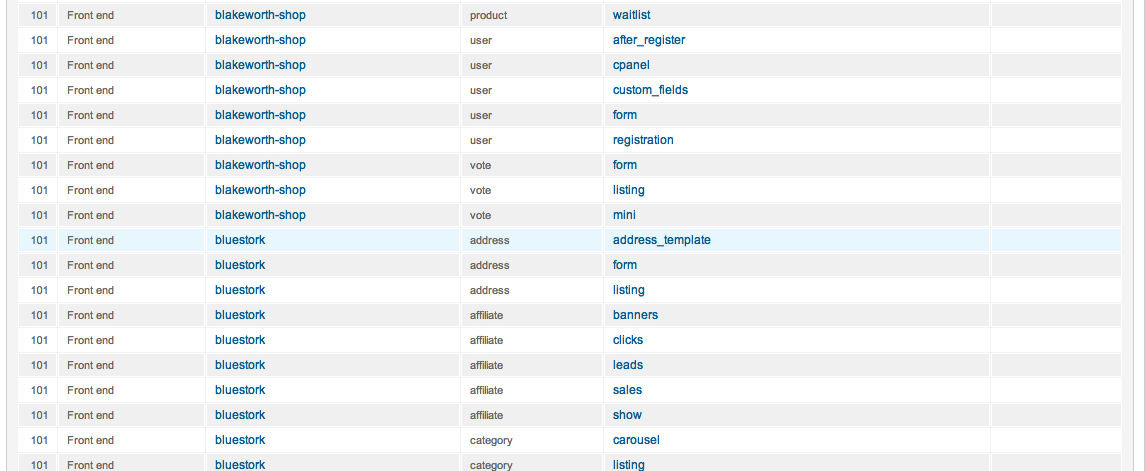
As I'm going to have to show my client how to manage this and I don't really expect them to customise the code, is their a simple way they could manage this aspect of the site. I have set up specific menu items where relevant so that templates can be assigned. To make your suggestion work I gather I would need to create a menu item for each product. But your suggestion would appear create a fixed path ...$this->xxx.$this... where I would be using a specific menu id rather than using the reference ...$this->itemid.$this...
Have I got this completely wrong?
Thanks
Crispin
Thank you for your response. I'm still a little confused as looking through the views many of the templates seem to be linked to a selection of the available templates. I've included a screen grab. Even, apparently, frontend, views are linked to administrator templates. The attached is filtered for frontend.
As I'm going to have to show my client how to manage this and I don't really expect them to customise the code, is their a simple way they could manage this aspect of the site. I have set up specific menu items where relevant so that templates can be assigned. To make your suggestion work I gather I would need to create a menu item for each product. But your suggestion would appear create a fixed path ...$this->xxx.$this... where I would be using a specific menu id rather than using the reference ...$this->itemid.$this...
Have I got this completely wrong?
Thanks
Crispin
Please Log in or Create an account to join the conversation.
14 years 2 months ago #56988
by nikmackey
Replied by nikmackey on topic Re: How do assign templates to views?
I have made the change you suggested with little useful effect so it maybe I misunderstood your suggestion.
I have confirmed that the modified view is the active template.
Whatever Joomla template I set to the menu item appears to be the one that applies through out the shopping process.
This is not an issue unique to your product I know.
Crispin
I have confirmed that the modified view is the active template.
Whatever Joomla template I set to the menu item appears to be the one that applies through out the shopping process.
This is not an issue unique to your product I know.
Crispin
Please Log in or Create an account to join the conversation.
14 years 2 months ago #57039
by nicolas
Replied by nicolas on topic Re: How do assign templates to views?
Well, for the checkout page, there is the option "force a menu on checkout" in the configuration in order to do that automatically.
But for the product pages, that modification will be required.
As I said, XXX needs to be the id of a products listing menu item. You don't have to have one menu per product or whatever. Just create one with the default options and use its id.
Please make sure that the modification saved. If you don't see the modification, it could also be that you're not using the "image and title" item box layout for your listing. In that case, you should edit the view file you're using... There are 10 possibilities... I wouldn't be able to tell you which one without looking at your shop.
But for the product pages, that modification will be required.
As I said, XXX needs to be the id of a products listing menu item. You don't have to have one menu per product or whatever. Just create one with the default options and use its id.
Please make sure that the modification saved. If you don't see the modification, it could also be that you're not using the "image and title" item box layout for your listing. In that case, you should edit the view file you're using... There are 10 possibilities... I wouldn't be able to tell you which one without looking at your shop.
The following user(s) said Thank You: nikmackey
Please Log in or Create an account to join the conversation.
14 years 2 months ago #57088
by nikmackey
Replied by nikmackey on topic Re: How do assign templates to views?
Am I really being that thick?
I have made the changed you suggest.
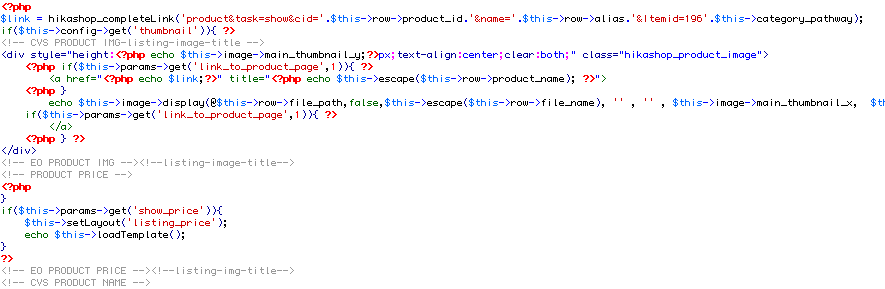
Using a menu item I have created in the Hikashop admin

The template used for the listing page is assigned. The template intended for the Item page is default
The listing page [url=http://http://cavespidertemp1.co.uk/index.php?option=com_hikashop&view=product&layout=listing&Itemid=170] cavespidertemp1.co.uk/index.php?option=c...t=listing&Itemid=170 [/url]
I have placed a marker in the code so that I could be sure the relevant HS template view was applied. <!-- CVS PRODUCT IMG-amended listing-image-title -->
Plainly I have missed something obvious
Thanks for your help
Crispin
I have made the changed you suggest.
Using a menu item I have created in the Hikashop admin
The template used for the listing page is assigned. The template intended for the Item page is default
The listing page [url=http://http://cavespidertemp1.co.uk/index.php?option=com_hikashop&view=product&layout=listing&Itemid=170] cavespidertemp1.co.uk/index.php?option=c...t=listing&Itemid=170 [/url]
I have placed a marker in the code so that I could be sure the relevant HS template view was applied. <!-- CVS PRODUCT IMG-amended listing-image-title -->
Plainly I have missed something obvious
Thanks for your help
Crispin
Please Log in or Create an account to join the conversation.
14 years 2 months ago #57089
by nikmackey
Replied by nikmackey on topic Re: How do assign templates to views?
I do note that the 'Choose options' link is still showing 'itemid=170'. I don't know where this is coming from now. I have actually replaced the code on all the template views files in the views - product
Cheers
Crispin
Cheers
Crispin
Please Log in or Create an account to join the conversation.
14 years 2 months ago #57166
by nicolas
Replied by nicolas on topic Re: How do assign templates to views?
Hi,
The problem is that you have deactivated the "link to product pages" option of your listing so the image/name is not clickable. So the $link variable is not used.
And only the add to cart button is displayed. And since your products have variants, instead of the add to cart button, you have the choose options button displayed which has his own link.
So you need to go edit the file "quantity" of the view "product" via the menu Display->Views and change the line:
echo $this->cart->displayButton(JText::_('CHOOSE_OPTIONS'),'choose_options',$this->params,hikashop_completeLink('product&task=show&product_id='.$this->row->product_id.$this->itemid),'window.location = \''.str_replace("'","\'",hikashop_completeLink('product&task=show&product_id='.$this->row->product_id.$this->itemid)).'\';return false;','');
to:
echo $this->cart->displayButton(JText::_('CHOOSE_OPTIONS'),'choose_options',$this->params,hikashop_completeLink('product&task=show&product_id='.$this->row->product_id.'&Itemid=XXX'),'window.location = \''.str_replace("'","\'",hikashop_completeLink('product&task=show&product_id='.$this->row->product_id.$this->itemid)).'\';return false;','');
Then it will work for the choose options button too.
The problem is that you have deactivated the "link to product pages" option of your listing so the image/name is not clickable. So the $link variable is not used.
And only the add to cart button is displayed. And since your products have variants, instead of the add to cart button, you have the choose options button displayed which has his own link.
So you need to go edit the file "quantity" of the view "product" via the menu Display->Views and change the line:
echo $this->cart->displayButton(JText::_('CHOOSE_OPTIONS'),'choose_options',$this->params,hikashop_completeLink('product&task=show&product_id='.$this->row->product_id.$this->itemid),'window.location = \''.str_replace("'","\'",hikashop_completeLink('product&task=show&product_id='.$this->row->product_id.$this->itemid)).'\';return false;','');
to:
echo $this->cart->displayButton(JText::_('CHOOSE_OPTIONS'),'choose_options',$this->params,hikashop_completeLink('product&task=show&product_id='.$this->row->product_id.'&Itemid=XXX'),'window.location = \''.str_replace("'","\'",hikashop_completeLink('product&task=show&product_id='.$this->row->product_id.$this->itemid)).'\';return false;','');
Then it will work for the choose options button too.
The following user(s) said Thank You: nikmackey
Please Log in or Create an account to join the conversation.
14 years 2 months ago #57371
by nikmackey
Replied by nikmackey on topic Re: How do assign templates to views?
Almost there I thinks, but not quite
For test purposes I activated the Link to product pages which works and links using the correct templates. The choose options button though it shows itemid=195 does work work as we want.
The home page here
cavespidertemp1.co.uk/index.php?option=c...t=listing&Itemid=170
The product link generates this url which now works as we'd like.
cavespidertemp1.co.uk/index.php?option=c...ng-blooms&Itemid=195
The 'Choose options' button generates this URL which doesn't work as we'd like.
cavespidertemp1.co.uk/index.php?option=c...uct_id=31&Itemid=195
And by the way, thank you very very much for all your help on this.
Crispin
For test purposes I activated the Link to product pages which works and links using the correct templates. The choose options button though it shows itemid=195 does work work as we want.
The home page here
cavespidertemp1.co.uk/index.php?option=c...t=listing&Itemid=170
The product link generates this url which now works as we'd like.
cavespidertemp1.co.uk/index.php?option=c...ng-blooms&Itemid=195
The 'Choose options' button generates this URL which doesn't work as we'd like.
cavespidertemp1.co.uk/index.php?option=c...uct_id=31&Itemid=195
And by the way, thank you very very much for all your help on this.
Crispin
Please Log in or Create an account to join the conversation.
14 years 2 months ago #57372
by nikmackey
Replied by nikmackey on topic Re: How do assign templates to views?
I have just changed your suggested change to quantity.php
echo $this->cart->displayButton(JText::_('CHOOSE_OPTIONS'),'choose_options',$this->params,hikashop_completeLink('product&task=show&product_id='.$this->row->product_id.'&Itemid=XXX'),'window.location = \''.str_replace("'","\'",hikashop_completeLink('product&task=show&product_id='.$this->row->product_id.$this->itemid)).'\';return false;','');
$this->cart->displayButton(JText::_('CHOOSE_OPTIONS'),'choose_options',$this->params,hikashop_completeLink('product&task=show&product_id='.$this->row->product_id.'&Itemid=195'),'window.location = \''.str_replace("'","\'",hikashop_completeLink('product&task=show&product_id='.$this->row->product_id.'&Itemid=195')).'\';return false;','');
Replacing the second reference to itemid. I do hope this won't effect anything else.
Thanks again for your help.
Crispin
echo $this->cart->displayButton(JText::_('CHOOSE_OPTIONS'),'choose_options',$this->params,hikashop_completeLink('product&task=show&product_id='.$this->row->product_id.'&Itemid=XXX'),'window.location = \''.str_replace("'","\'",hikashop_completeLink('product&task=show&product_id='.$this->row->product_id.$this->itemid)).'\';return false;','');
$this->cart->displayButton(JText::_('CHOOSE_OPTIONS'),'choose_options',$this->params,hikashop_completeLink('product&task=show&product_id='.$this->row->product_id.'&Itemid=195'),'window.location = \''.str_replace("'","\'",hikashop_completeLink('product&task=show&product_id='.$this->row->product_id.'&Itemid=195')).'\';return false;','');
Replacing the second reference to itemid. I do hope this won't effect anything else.
Thanks again for your help.
Crispin
Please Log in or Create an account to join the conversation.
14 years 2 months ago #57420
by nicolas
Replied by nicolas on topic Re: How do assign templates to views?
No, that code is only for that button, so you won't have any problem with the change.
Please Log in or Create an account to join the conversation.

14 years 1 month ago #62204
by flashx
Replied by flashx on topic Re: How do assign templates to views?
oh man this is WAAAYY confusing! how is there just not a button to assign to a template!!?  Did you end up getting this working? if so, can you step me through it?
thanks
Did you end up getting this working? if so, can you step me through it?thanks
Please Log in or Create an account to join the conversation.
14 years 1 month ago #62213
by nicolas
Replied by nicolas on topic Re: How do assign templates to views?
It's not complex. There is one line of code to change in one view file as I explain in my first message:
www.hikashop.com/forum/2-general-talk-ab...s.html?lang=en#56924
www.hikashop.com/forum/2-general-talk-ab...s.html?lang=en#56924
The following user(s) said Thank You: flashx
Please Log in or Create an account to join the conversation.
14 years 1 month ago #62331
by flashx
Replied by flashx on topic Re: How do assign templates to views?
OMG I finally get it! taken me days but I now understand! Thanks nicolas! here i was putting the name of the menu item in thinking that was the id! fark!!!! im such a sausage!
thanks again!
thanks again!
Please Log in or Create an account to join the conversation.
Time to create page: 0.301 seconds