

- Posts: 27
- Thank you received: 0
display terms and condition in pop up
14 years 2 months ago #56956
by chubby
display terms and condition in pop up was created by chubby
hi may i ask how to display terms and condition in pop up during check out?
Please Log in or Create an account to join the conversation.

14 years 2 months ago #56959
by nicolas
Replied by nicolas on topic Re: display terms and condition in pop up
Hi,
Add the terms and conditions view in your checkout workflow and set your terms and conditions article in the corresponding option in the Checkout tab of the configuration.
Add the terms and conditions view in your checkout workflow and set your terms and conditions article in the corresponding option in the Checkout tab of the configuration.
Please Log in or Create an account to join the conversation.
14 years 2 months ago #56963
by chubby
Replied by chubby on topic Re: display terms and condition in pop up
oops din notice it..thx ya
Please Log in or Create an account to join the conversation.
14 years 2 months ago #57059
by chubby
Replied by chubby on topic Re: display terms and condition in pop up
i would like to know where can i adjust d image size?(refer to d attach file) because it quite small at here
Please Log in or Create an account to join the conversation.
14 years 2 months ago #57124
by nicolas
Replied by nicolas on topic Re: display terms and condition in pop up
Go in the tab "Files" in the configuration and change the "product page image width/height" options.
Please Log in or Create an account to join the conversation.
14 years 2 months ago #57177
by chubby
Replied by chubby on topic Re: display terms and condition in pop up
thx ya but may i ask wat is d number around dere (45_42_49) i think i din set this up anyway can i disable it?
Please Log in or Create an account to join the conversation.
14 years 2 months ago #57179
by chubby
Replied by chubby on topic Re: display terms and condition in pop up
i got set a contact page in hikashop for user incase they hv any remark so can gv us detail, i try to write stg in it n press OK but nothing out x matter in backend or in company mail may i noe wat is the problem?
Please Log in or Create an account to join the conversation.
14 years 2 months ago #57255
by nicolas
Replied by nicolas on topic Re: display terms and condition in pop up
That number is the product code. You can remove it by turning off the "show product code" option of the configuration.
When the contact form is validated, it sends an email. If you don't get the email, it's either that:
-it goes in your spam box
-the email settings of the joomla configuration are not correct (check that you can send other emails on your website. If not contact your hosting company for the settings to use there).
-the email settings of the hikashop configuration are not correct (contact your hosting company for the settings to use there)
When the contact form is validated, it sends an email. If you don't get the email, it's either that:
-it goes in your spam box
-the email settings of the joomla configuration are not correct (check that you can send other emails on your website. If not contact your hosting company for the settings to use there).
-the email settings of the hikashop configuration are not correct (contact your hosting company for the settings to use there)
Please Log in or Create an account to join the conversation.
14 years 2 months ago #57297
by chubby
Replied by chubby on topic Re: display terms and condition in pop up
ok so if it send ady can i make stg like thank you page or inform that his email been sent?because i hv try it and it jus kind of refresh the page only so it will be confusing for user as well.
2)is there possible i add on a button for user to upload their photo either is from hikashop or other add on?
2)is there possible i add on a button for user to upload their photo either is from hikashop or other add on?
Please Log in or Create an account to join the conversation.
14 years 2 months ago #57298
by chubby
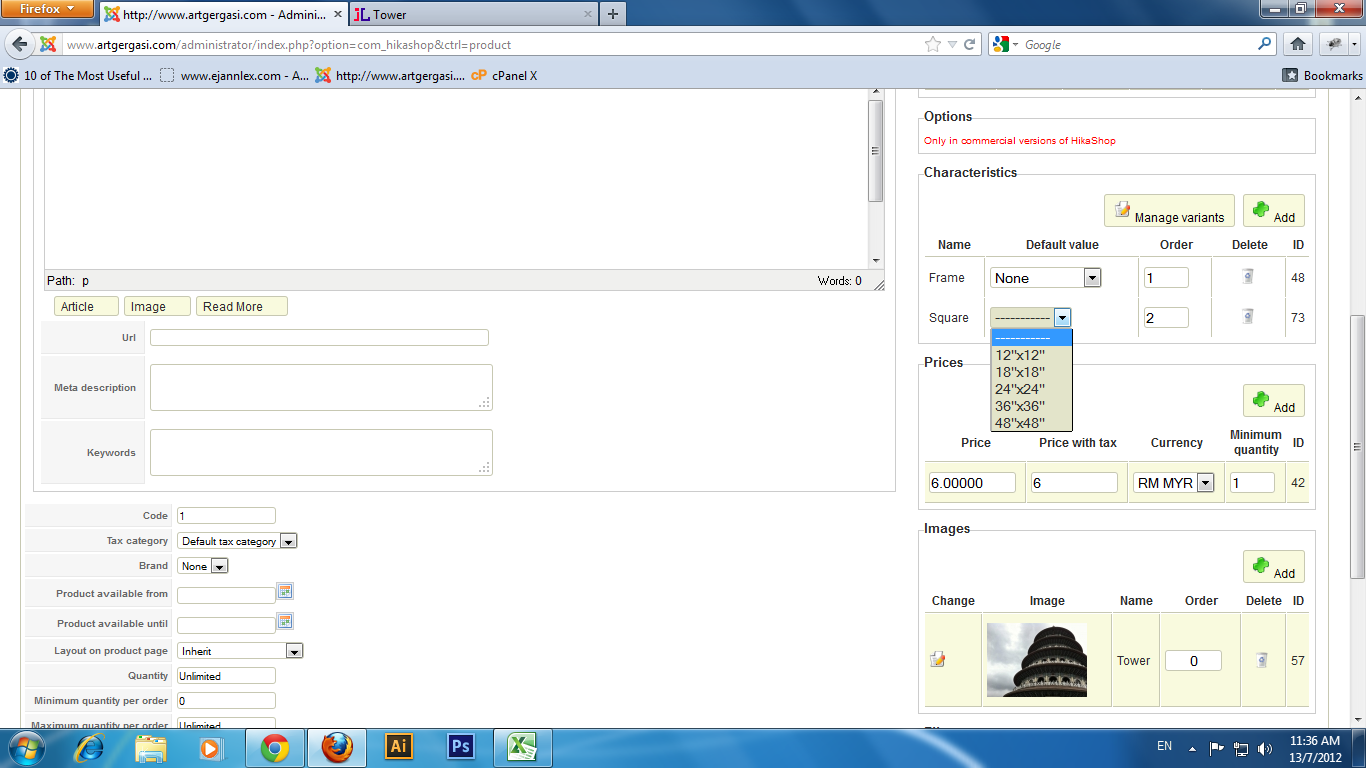
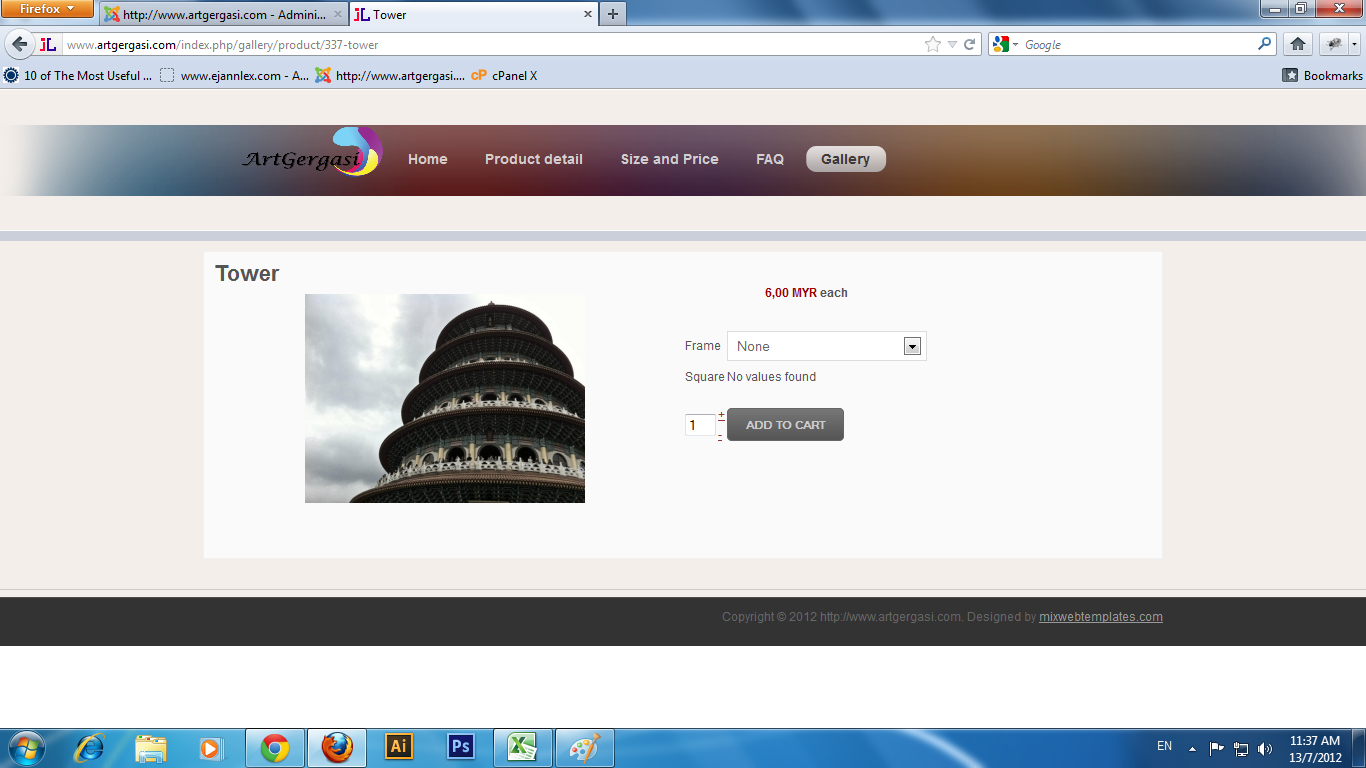
Sorry ya i noe getting annoying cos too many problem i hv but may i noe y d product dere show no value found? i hv set d price like in d attachment there...
Replied by chubby on topic Re: display terms and condition in pop up
Sorry ya i noe getting annoying cos too many problem i hv but may i noe y d product dere show no value found? i hv set d price like in d attachment there...
Please Log in or Create an account to join the conversation.
14 years 2 months ago #57366
by nicolas
Replied by nicolas on topic Re: display terms and condition in pop up
1. There is a message which either says that the message has been sent or that there was an error.
If you don't see it, it's potentially coming from your template:
www.hikashop.com/en/support/documentatio...issues.html#messages
Maybe it's something else like a javascript error. In that case, we would need to look at the page in order to tell you what to do. Could you give a link to the page ?
2. If you want to have your users upload images, you can create custom fields of the table "item" and of the type "image" via the menu Display->Custom fields with the Business edition.
3. That's because you added the characteristics in two times. You should add them both at once. Please follow these steps and it will work:
1. Delete all the variants of the product on the listing of variants that you can access via the button "manage variants" on the product edition screen.
2. Delete the characteristics of the product.
3. Save the product.
4. Add the characteristics again.
5. The system will regenerate all the variants automatically and you should be able to see the dropdowns properly on the front end.
If you don't see it, it's potentially coming from your template:
www.hikashop.com/en/support/documentatio...issues.html#messages
Maybe it's something else like a javascript error. In that case, we would need to look at the page in order to tell you what to do. Could you give a link to the page ?
2. If you want to have your users upload images, you can create custom fields of the table "item" and of the type "image" via the menu Display->Custom fields with the Business edition.
3. That's because you added the characteristics in two times. You should add them both at once. Please follow these steps and it will work:
1. Delete all the variants of the product on the listing of variants that you can access via the button "manage variants" on the product edition screen.
2. Delete the characteristics of the product.
3. Save the product.
4. Add the characteristics again.
5. The system will regenerate all the variants automatically and you should be able to see the dropdowns properly on the front end.
Please Log in or Create an account to join the conversation.
14 years 2 months ago #57588
by chubby
Replied by chubby on topic Re: display terms and condition in pop up
Please Log in or Create an account to join the conversation.
14 years 2 months ago #57663
by nicolas
Replied by nicolas on topic Re: display terms and condition in pop up
I see that you're using the contact form of HikaShop as a contact form, not for a product contact form.
Why not just use the joomla contact form system in that case ? It would make more sense.
Anyway, I don't see any javascript error. So it really sounds like this problem :
www.hikashop.com/en/support/documentatio...issues.html#messages
So you should check your template.
Why not just use the joomla contact form system in that case ? It would make more sense.
Anyway, I don't see any javascript error. So it really sounds like this problem :
www.hikashop.com/en/support/documentatio...issues.html#messages
So you should check your template.
Please Log in or Create an account to join the conversation.
14 years 2 months ago #57737
by chubby
Replied by chubby on topic Re: display terms and condition in pop up
okok thanks i switch to rsform and it did solve my problem..anyway thx alot ya~
Please Log in or Create an account to join the conversation.
Less
More
- Posts: 112
- Thank you received: 3
10 years 10 months ago #219458
by tbroderick
Replied by tbroderick on topic Re: display terms and condition in pop up
Is there a way to add the T&C at time of checkout for a specific product? I have a website with 3 offers. Only one of the offers requires that the T&C be acknowledged.
Please Log in or Create an account to join the conversation.
10 years 10 months ago #219461
by nicolas
Replied by nicolas on topic Re: display terms and condition in pop up
There is no option for that. I guess it would require creating a new plugin implementing the checkout API of HikaShop to actually add a new step view in the checkout.
Please Log in or Create an account to join the conversation.
Time to create page: 0.236 seconds