
- Posts: 13
- Thank you received: 0
No Cart Module Present
- Cedar Gate Media
-
 Topic Author
- Offline
Less
More
13 years 10 months ago #77283
by Cedar Gate Media
No Cart Module Present was created by Cedar Gate Media
Hi there,
I would like to display a cart module within my product pages so that when a shopper is ready to checkout they can click on the cart module and begin the checkout process. I've looked everywhere for the "cart module" but no such module can be found listed in either my joomla module manager or in Hikashop/Display/Content Modules... Am I missing something?
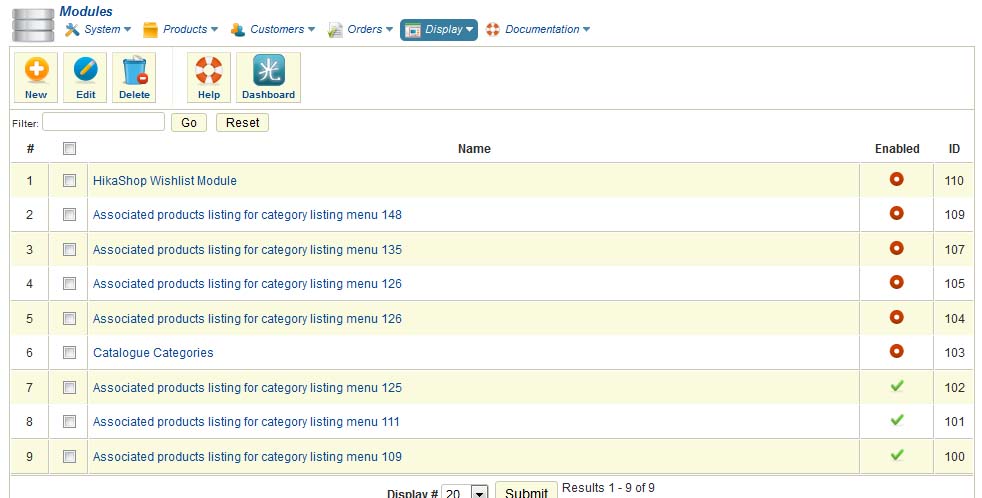
Also, my checkout process has only one step and then the customer is taken to a third party hosted checkout. The button to be clicked to take the person to the hosted checkout says "Next"... I would like to change it to "Proceed to Checkout" or something like that. How can I change that?
The temporary site can be found at www.cedargatestudio.com
Thank you for any help you can provide.
Cheers
I would like to display a cart module within my product pages so that when a shopper is ready to checkout they can click on the cart module and begin the checkout process. I've looked everywhere for the "cart module" but no such module can be found listed in either my joomla module manager or in Hikashop/Display/Content Modules... Am I missing something?
Also, my checkout process has only one step and then the customer is taken to a third party hosted checkout. The button to be clicked to take the person to the hosted checkout says "Next"... I would like to change it to "Proceed to Checkout" or something like that. How can I change that?
The temporary site can be found at www.cedargatestudio.com
Thank you for any help you can provide.
Cheers
Please Log in or Create an account to join the conversation.

13 years 10 months ago #77331
by Jerome
Jerome - Obsidev.com
HikaMarket & HikaSerial developer / HikaShop core dev team.
Replied by Jerome on topic No Cart Module Present
Hi,
If the HikaShop cart module is not present, you would have to create a new one.
In Joomla modules, create a new module and select the type "HikaShop Cart Module".
Give it a name and save it. At this moment the Joomla module would be create and an HikaShop module would be assigned to it.
Regards,
If the HikaShop cart module is not present, you would have to create a new one.
In Joomla modules, create a new module and select the type "HikaShop Cart Module".
Give it a name and save it. At this moment the Joomla module would be create and an HikaShop module would be assigned to it.
Regards,
Jerome - Obsidev.com
HikaMarket & HikaSerial developer / HikaShop core dev team.
The following user(s) said Thank You: Cedar Gate Media
Please Log in or Create an account to join the conversation.
Time to create page: 0.203 seconds