

- Posts: 7
- Thank you received: 0
Custom Fields missing in my installation
13 years 9 months ago #82476
by pulse
Custom Fields missing in my installation was created by pulse
Hi I want to ask the customer their existing serial number so I can sell them an upgrade
I read in the forums and documentation about "Custom Fields" but they are no where to be found under my installation (I've been searching over 2 hours already! Please help I'm afraid since I upgraded to Business I've lost menus; I remember seeing more menus before.
When i open the product and Click Manage Variants I get
Successfully Saved
Before configuring the variant of your product, you need first to create one or several characteristics with the menu Products->Characteristics, and then add one or several characteristics to your product
If I click Add under Characteristics I get an empty list.
Thanks!
I read in the forums and documentation about "Custom Fields" but they are no where to be found under my installation (I've been searching over 2 hours already! Please help I'm afraid since I upgraded to Business I've lost menus; I remember seeing more menus before.
When i open the product and Click Manage Variants I get
Successfully Saved
Before configuring the variant of your product, you need first to create one or several characteristics with the menu Products->Characteristics, and then add one or several characteristics to your product
If I click Add under Characteristics I get an empty list.
Thanks!
Please Log in or Create an account to join the conversation.

13 years 9 months ago #82561
by Xavier
Replied by Xavier on topic Custom Fields missing in my installation
Hi,
For the missing menus, check if you don't set ACL rights, or try to install again hikashop over your current version.
Concerning the characteristics, you have to go in HikaShop > Products > Characteristic, click on "New" and add a name and values to this characteristic.
Then in the product page, select the characteristic and you will have he variants.
For the missing menus, check if you don't set ACL rights, or try to install again hikashop over your current version.
Concerning the characteristics, you have to go in HikaShop > Products > Characteristic, click on "New" and add a name and values to this characteristic.
Then in the product page, select the characteristic and you will have he variants.
Please Log in or Create an account to join the conversation.
13 years 9 months ago #82671
by pulse
Replied by pulse on topic Custom Fields missing in my installation
Cant reach HikaShop > Products > Characteristic (Is not there)
All I see is a tree with my products
Is Hikashop designed to work in Joomla 1.7.3?
Perhaps Im in the wrong place.
I go to /administrator and log in (as Super User)
Then in the menu Components > Hikashop > Products
Thats as far as menu takes me no Characteristic menu/button or list
I reinstalled the module no change.
I reinstalled the old (not business version) hikashop starter too 1.5.7 and 2.0.0_2012-11-26 and 2.0.0_2012-12-18 (1.5.7 wont work)
No change
All I see is a tree with my products
Is Hikashop designed to work in Joomla 1.7.3?
Perhaps Im in the wrong place.
I go to /administrator and log in (as Super User)
Then in the menu Components > Hikashop > Products
Thats as far as menu takes me no Characteristic menu/button or list
I reinstalled the module no change.
I reinstalled the old (not business version) hikashop starter too 1.5.7 and 2.0.0_2012-11-26 and 2.0.0_2012-12-18 (1.5.7 wont work)
No change
Please Log in or Create an account to join the conversation.
13 years 9 months ago #82814
by Xavier
Replied by Xavier on topic Custom Fields missing in my installation
HikaShop is designed to work with Joomla 1.5 - 1.6 - 1.7 - 2.5 - 3.0
You seem to have a strange problem, do you have the latest package from our website ?
Are you going in this menu:
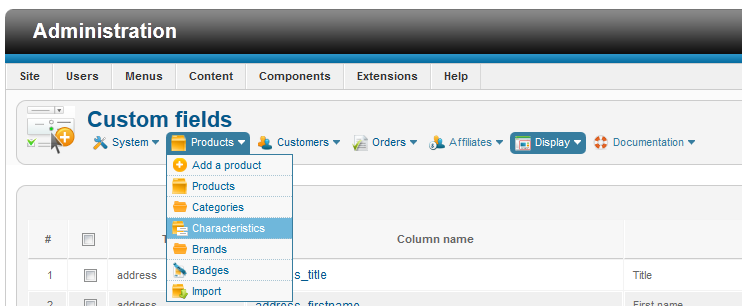
You seem to have a strange problem, do you have the latest package from our website ?
Are you going in this menu:
Please Log in or Create an account to join the conversation.
13 years 8 months ago #85546
by pulse
Replied by pulse on topic Custom Fields missing in my installation
Nope, I dont see that menu at all, i tested the installation file in another site and i can see those menus.I copied the url:
xxx.xxx.xxxxx/administrator/index.php?op..._hikashop&ctrl=field
and the used it on the site and I can reach it.
Not the most elegant but it works.
xxx.xxx.xxxxx/administrator/index.php?op..._hikashop&ctrl=field
and the used it on the site and I can reach it.
Not the most elegant but it works.
Please Log in or Create an account to join the conversation.
13 years 8 months ago #85603
by Xavier
Replied by Xavier on topic Custom Fields missing in my installation
Do you had edited a backend view in Display > Views ?
The following user(s) said Thank You: pulse
Please Log in or Create an account to join the conversation.
13 years 8 months ago #85843
by pulse
Replied by pulse on topic Custom Fields missing in my installation
Probably did, I tried different templates and still can't see the menus. We are giving this project to an expert that speaks joomla. It takes me days just to figure out how to center a title. You can close this ticket. Thank you for your time. it must be frustrating trying to explain a newbie how to make it work. Cheers.
Please Log in or Create an account to join the conversation.

13 years 8 months ago #85855
by Jerome
Jerome - Obsidev.com
HikaMarket & HikaSerial developer / HikaShop core dev team.
Replied by Jerome on topic Custom Fields missing in my installation
Hi,
You can send me an access to your backend by private message and I will check your configuration.
Regards,
You can send me an access to your backend by private message and I will check your configuration.
Regards,
Jerome - Obsidev.com
HikaMarket & HikaSerial developer / HikaShop core dev team.
Please Log in or Create an account to join the conversation.
13 years 8 months ago #86046
by Jerome
Jerome - Obsidev.com
HikaMarket & HikaSerial developer / HikaShop core dev team.
Replied by Jerome on topic Custom Fields missing in my installation
Hi,
I don't know why but your Joomla does not display the "title" in the backend.
So I have changed the configuration of "Menu position" to "Above the main area".
Now the complete HikaShop menu is displayed in your backend, so you can access easily to all features of HikaShop in your backend.
Regards,
I don't know why but your Joomla does not display the "title" in the backend.
So I have changed the configuration of "Menu position" to "Above the main area".
Now the complete HikaShop menu is displayed in your backend, so you can access easily to all features of HikaShop in your backend.
Regards,
Jerome - Obsidev.com
HikaMarket & HikaSerial developer / HikaShop core dev team.
Please Log in or Create an account to join the conversation.
Time to create page: 0.257 seconds