
- Posts: 48
- Thank you received: 0
BUG? Images switched off in Listing - still shown
- theweasel68
-
 Topic Author
- Offline
Less
More
13 years 7 months ago - 13 years 7 months ago #89662
by theweasel68
BUG? Images switched off in Listing - still shown was created by theweasel68
Hi,
I have switched off the product image showing in the standard PRODUCT LISTING VIEW as well as in the customized product listing view (DAILY SPECIAL RECIPES).
Still, the product images are shown.
I think that is a bug in HikaShop?
Thx
EDIT: the type of layout is TABLE
I have switched off the product image showing in the standard PRODUCT LISTING VIEW as well as in the customized product listing view (DAILY SPECIAL RECIPES).
Still, the product images are shown.
I think that is a bug in HikaShop?
Thx
EDIT: the type of layout is TABLE
Last edit: 13 years 7 months ago by theweasel68.
Please Log in or Create an account to join the conversation.

13 years 7 months ago #89681
by Eliot
Replied by Eliot on topic BUG? Images switched off in Listing - still shown
Hi there,
What do you mean by switched off? You just have to select another type of layout in your menu/module to not display the image (like product_title).
By the way I don't think table is the layout used on the given link, check your module/menu option
What do you mean by switched off? You just have to select another type of layout in your menu/module to not display the image (like product_title).
By the way I don't think table is the layout used on the given link, check your module/menu option
Please Log in or Create an account to join the conversation.
- theweasel68
-
Topic Author
- Offline
Less
More
- Posts: 48
- Thank you received: 0
13 years 7 months ago #89687
by theweasel68
Replied by theweasel68 on topic BUG? Images switched off in Listing - still shown
Hi,
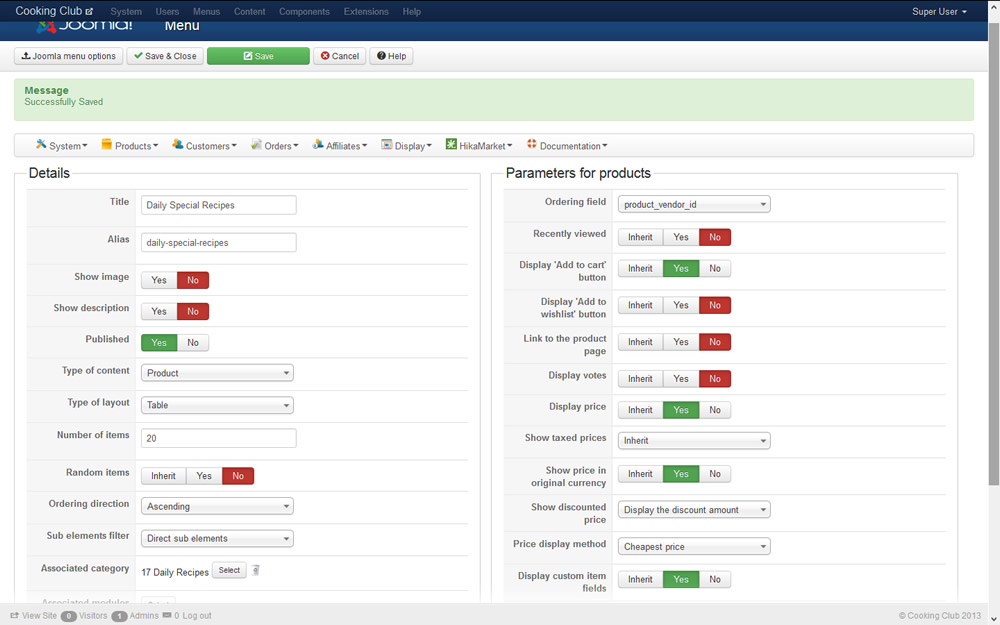
please see attached screenshot of the listing setting for this page, where "Show image" is set to "off", and layout is set to "table"....
Cheers
please see attached screenshot of the listing setting for this page, where "Show image" is set to "off", and layout is set to "table"....
Cheers
Please Log in or Create an account to join the conversation.

13 years 7 months ago #89691
by nicolas
Replied by nicolas on topic BUG? Images switched off in Listing - still shown
There is no option to remove the image column of table listings.
The "show image" option there is to display or not the current category image at the top.
You can add the CSS below in your template CSS file to hide the images on that listing:
.hikashop_product_image, .hikashop_product_image_row{ display: none; }
The "show image" option there is to display or not the current category image at the top.
You can add the CSS below in your template CSS file to hide the images on that listing:
.hikashop_product_image, .hikashop_product_image_row{ display: none; }
Please Log in or Create an account to join the conversation.
Time to create page: 0.203 seconds