

- Posts: 27
- Thank you received: 0
How to change default language for my site
13 years 6 months ago #95729
by bern
How to change default language for my site was created by bern
My client is using Hikashop Business version which has been purchased recently. I have been trying my best to change the default language to Australian English. I just cannot do this. I need help to fix this? 
Please Log in or Create an account to join the conversation.

13 years 6 months ago #95802
by Xavier
Replied by Xavier on topic How to change default language for my site
Hi,
First of all, you have to enable multi langue in the Joomla options. Add a new language.
Then in HikaShop, go in Configuration > Languages, and you will be able to change the default language.
To use multi language website, you need too a third component to manage that, FaLang is the most used, they made a plugin for HikaShop compatibility.
First of all, you have to enable multi langue in the Joomla options. Add a new language.
Then in HikaShop, go in Configuration > Languages, and you will be able to change the default language.
To use multi language website, you need too a third component to manage that, FaLang is the most used, they made a plugin for HikaShop compatibility.
Please Log in or Create an account to join the conversation.
13 years 6 months ago #95884
by bern
Replied by bern on topic How to change default language for my site
Hi I need more information on how to fix this. I have tried and but I am not getting anywhere. Please provide more information to fix this.
Please Log in or Create an account to join the conversation.
13 years 6 months ago #95888
by bern
Replied by bern on topic How to change default language for my site
My client site is an Australian based site and as such we'd like to change English to Australian. Need to resolve this ASAP.
Please Log in or Create an account to join the conversation.
13 years 6 months ago #96015
by Xavier
Replied by Xavier on topic How to change default language for my site
You have to go in the language manager of Joomla. The site language needs to be changed, not the HikaShop one.
If you have more questions, thanks to post in the joomla forum, or make a google search.
If you have more questions, thanks to post in the joomla forum, or make a google search.
Please Log in or Create an account to join the conversation.
13 years 6 months ago #96435
by bern
Replied by bern on topic How to change default language for my site
I don't think its Joomla. Because initial installation of Joomla was English (AU). It is not Joomla, It is Hikashop that is not showing English Australian. The settings of Hikashop are in EN(UK). Please check this with Hikashop.
The Joomla Language settings is OK. (AU English).
The Joomla Language settings is OK. (AU English).
Please Log in or Create an account to join the conversation.
13 years 6 months ago #96486
by Xavier
Replied by Xavier on topic How to change default language for my site
Which settings are you talking about ?
You don't have to do anything in HikaShop to have Australian language if you have set it in Joomla.
In HikaShop the Australian English and British English are the same for the language files.
You don't have to do anything in HikaShop to have Australian language if you have set it in Joomla.
In HikaShop the Australian English and British English are the same for the language files.
Please Log in or Create an account to join the conversation.
13 years 6 months ago #96952
by bern
Replied by bern on topic How to change default language for my site
I give you an example, the word CHECK, in Australian English it you spell CHECK as CHEQUE.
When I specify the method of payments and I selected payment by Cheque, It is not showing Cheque but Check. Now I have gone back to Joomla to check this it is showing EN(UK) as language. All I want to do is change this to EN(AU) if at all there is a way like this.
When I specify the method of payments and I selected payment by Cheque, It is not showing Cheque but Check. Now I have gone back to Joomla to check this it is showing EN(UK) as language. All I want to do is change this to EN(AU) if at all there is a way like this.
Please Log in or Create an account to join the conversation.
13 years 5 months ago #97243
by bern
Replied by bern on topic How to change default language for my site
Hi Xavier,
are you going to look into this issue? The method of payment Check, needs to be changed to Cheque for our site. Please respond to this post.
bern.
are you going to look into this issue? The method of payment Check, needs to be changed to Cheque for our site. Please respond to this post.
bern.
Please Log in or Create an account to join the conversation.
13 years 5 months ago #97356
by Xavier
Replied by Xavier on topic How to change default language for my site
Hi,
In Configuration > Languages, you should have a add button. Click on that button to create the australian language file, then edit it and add an overrive fot the check payment method.
to replace CHECK by CHEQUE, and you can do that for the other overrides.
In Configuration > Languages, you should have a add button. Click on that button to create the australian language file, then edit it and add an overrive fot the check payment method.
to replace CHECK by CHEQUE, and you can do that for the other overrides.
Please Log in or Create an account to join the conversation.
13 years 5 months ago #97817
by bern
Replied by bern on topic How to change default language for my site
There is no Add button in Hikashop-->Configuration--->Languages. Which add button are you referring to?
Please Log in or Create an account to join the conversation.
13 years 5 months ago #97884
by Xavier
Replied by Xavier on topic How to change default language for my site
Hi,
When using a language in Joomla, HikaShop automatically add it in the HikaShop language files.
Then you have to edit this language file to have your translations.
They will be automatically loaded if the language site in en-AU.
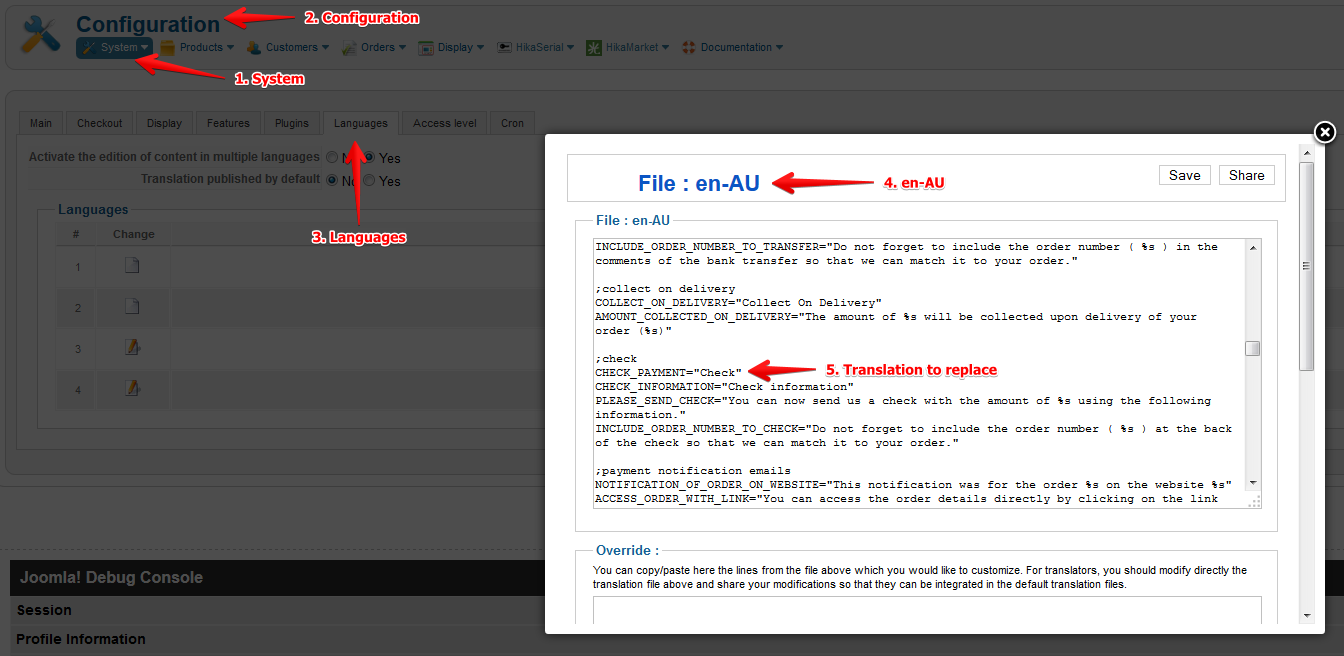
By default Joomla is installed in english and then it change to an other language.
When using a language in Joomla, HikaShop automatically add it in the HikaShop language files.
Then you have to edit this language file to have your translations.
They will be automatically loaded if the language site in en-AU.
By default Joomla is installed in english and then it change to an other language.
Please Log in or Create an account to join the conversation.
Time to create page: 0.342 seconds