
- Posts: 235
- Thank you received: 4
Information button next to options
- janvankuijk
-
 Topic Author
- Offline
Less
More
13 years 2 months ago #114816
by janvankuijk
Information button next to options was created by janvankuijk
Did anybody know how to get the information button next to the product options?
The blue 'i' over her: demo.hikashop.com/index.php?option=com_h...ow&Itemid=91&lang=en
Jan
The blue 'i' over her: demo.hikashop.com/index.php?option=com_h...ow&Itemid=91&lang=en
Jan
Please Log in or Create an account to join the conversation.

13 years 2 months ago #114883
by Jerome
Jerome - Obsidev.com
HikaMarket & HikaSerial developer / HikaShop core dev team.
Replied by Jerome on topic Information button next to options
Hi,
In the view "product | option".
You will find this part of code in the file:
The variable "$options" is just just after to display the blue "i" button.
The tooltip is the variable "$description".
Regards,
In the view "product | option".
You will find this part of code in the file:
Code:
$options='';
if(!empty($optionInfo->product_description) || !empty($optionInfo->product_url)){
$options='<img src="'.HIKASHOP_IMAGES.'icons/icon-16-info.png" alt="Information"/>';
$description = '';
if(!empty($optionInfo->product_description)){
$description = $this->escape(strip_tags(JHTML::_('content.prepare',$optionInfo->product_description)));
$options='<span class="hikashop_option_info" title="'.$description.'">'.$options.'</span>';
}
if(!empty($optionInfo->product_url)){
JHTML::_('behavior.modal');
if(empty($description)){
$description = $optionInfo->product_name;
}
$options='<a class="hikashop_option_info_link modal" rel="{handler: \'iframe\', size: {x: 450, y: 480}}" title="'.$description.'" href="'.$optionInfo->product_url.'">'.$options.'</a>';
}
}
The tooltip is the variable "$description".
Regards,
Jerome - Obsidev.com
HikaMarket & HikaSerial developer / HikaShop core dev team.
Please Log in or Create an account to join the conversation.
- janvankuijk
-
Topic Author
- Offline
Less
More
- Posts: 235
- Thank you received: 4
13 years 2 months ago #114898
by janvankuijk
Replied by janvankuijk on topic Information button next to options
Can you please tell in which menu-option I can find the 'view product | option'?
Jan
Jan
Please Log in or Create an account to join the conversation.
13 years 2 months ago #114900
by Jerome
Jerome - Obsidev.com
HikaMarket & HikaSerial developer / HikaShop core dev team.
Replied by Jerome on topic Information button next to options
Hi,
You have to edit the view for your specific front-end template.
www.hikashop.com/en/support/documentatio...-display.html#layout
www.hikashop.com/en/support/documentation/faq.html#pagination
Regards,
You have to edit the view for your specific front-end template.
www.hikashop.com/en/support/documentatio...-display.html#layout
www.hikashop.com/en/support/documentation/faq.html#pagination
Regards,
Jerome - Obsidev.com
HikaMarket & HikaSerial developer / HikaShop core dev team.
Please Log in or Create an account to join the conversation.
- janvankuijk
-
Topic Author
- Offline
Less
More
- Posts: 235
- Thank you received: 4
13 years 2 months ago #114909
by janvankuijk
Replied by janvankuijk on topic Information button next to options
Hi,
No. I only used a Hikashop-theme. Nothing more.
Jan
No. I only used a Hikashop-theme. Nothing more.
Jan
Please Log in or Create an account to join the conversation.

13 years 2 months ago #114935
by nicolas
Replied by nicolas on topic Information button next to options
Hi,
To have the blue (i) icon next to the options, you either need to enter a description in your options product, or enter a link in the URL field of the option product.
To have the blue (i) icon next to the options, you either need to enter a description in your options product, or enter a link in the URL field of the option product.
Please Log in or Create an account to join the conversation.
- janvankuijk
-
Topic Author
- Offline
Less
More
- Posts: 235
- Thank you received: 4
13 years 2 months ago #115007
by janvankuijk
Replied by janvankuijk on topic Information button next to options
OK.
Now I have the text of the option product: kaak3x.concept-joomla.nl/webshop/product...nische-vlaggenmasten
How can I make it clickable like this: demo.hikashop.com/index.php?option=com_h...ow&Itemid=91&lang=en
Jan
Now I have the text of the option product: kaak3x.concept-joomla.nl/webshop/product...nische-vlaggenmasten
How can I make it clickable like this: demo.hikashop.com/index.php?option=com_h...ow&Itemid=91&lang=en
Jan
Please Log in or Create an account to join the conversation.

13 years 2 months ago #115041
by Xavier
Replied by Xavier on topic Information button next to options
Hi,
This should display the popup onclick by default.
Thanks to check in the file "product / option" if the code previously given is present.
To see the content of this view, you have to go through the menu Display > Views, then click on the edit button of the corresponding view.
This should display the popup onclick by default.
Thanks to check in the file "product / option" if the code previously given is present.
To see the content of this view, you have to go through the menu Display > Views, then click on the edit button of the corresponding view.
Please Log in or Create an account to join the conversation.
- janvankuijk
-
Topic Author
- Offline
Less
More
- Posts: 235
- Thank you received: 4
13 years 2 months ago #115049
by janvankuijk
Replied by janvankuijk on topic Information button next to options
Hi.
I checked. The code is there!
Jan
I checked. The code is there!
Jan
Please Log in or Create an account to join the conversation.
13 years 2 months ago #115053
by Xavier
Replied by Xavier on topic Information button next to options
Hi,
After checking the code, you have to put a value in the product url field.
After checking the code, you have to put a value in the product url field.
Please Log in or Create an account to join the conversation.
- janvankuijk
-
Topic Author
- Offline
Less
More
- Posts: 235
- Thank you received: 4
13 years 2 months ago #115065
by janvankuijk
Replied by janvankuijk on topic Information button next to options
YES!
The pop-up text is a "joomla content item". I was looking to connect to the Hikashop product.
It's working.
Thanks a lot!
Jan
The pop-up text is a "joomla content item". I was looking to connect to the Hikashop product.
It's working.
Thanks a lot!
Jan
Please Log in or Create an account to join the conversation.
11 years 5 months ago #198485
by simmiepam
Replied by simmiepam on topic Information button next to options
Xavier
What is the "option product" you're speaking about?
Is this in the product near where the MetaData field is? Or in the characteristic?
I see a field for URL in the product...but no such field is in the characteristic variable.
What is the "option product" you're speaking about?
Is this in the product near where the MetaData field is? Or in the characteristic?
I see a field for URL in the product...but no such field is in the characteristic variable.
Please Log in or Create an account to join the conversation.
11 years 5 months ago #198592
by Jerome
Jerome - Obsidev.com
HikaMarket & HikaSerial developer / HikaShop core dev team.
Replied by Jerome on topic Information button next to options
Hi,
Here a sample of a product with options.
demo.hikashop.com/index.php/en/hikashop/...ct-page/with-options
You will see a little "i" in our demo website ; if you set a "product url" to the corresponding product (which is used as an option), the "i" will become a link which will open a popup to the corresponding url.
It allows you to link an article or anything you want in order to provide more details about the option.
Regards,
Here a sample of a product with options.
demo.hikashop.com/index.php/en/hikashop/...ct-page/with-options
You will see a little "i" in our demo website ; if you set a "product url" to the corresponding product (which is used as an option), the "i" will become a link which will open a popup to the corresponding url.
It allows you to link an article or anything you want in order to provide more details about the option.
Regards,
Jerome - Obsidev.com
HikaMarket & HikaSerial developer / HikaShop core dev team.
Please Log in or Create an account to join the conversation.
11 years 5 months ago #198612
by simmiepam
Replied by simmiepam on topic Information button next to options
Jerome....please bear with me....I need more clarification.
Where exactly is this "product URL" field that I type in? Is this on the product page?
Pam
Where exactly is this "product URL" field that I type in? Is this on the product page?
Pam
Please Log in or Create an account to join the conversation.
11 years 5 months ago #198623
by Jerome
Jerome - Obsidev.com
HikaMarket & HikaSerial developer / HikaShop core dev team.
Replied by Jerome on topic Information button next to options
Hi,
www.hikashop.com/support/documentation/i...duct-form.html#infos
Regards,
www.hikashop.com/support/documentation/i...duct-form.html#infos
Url : The url of the product is a url to the manufacturer website in order to get more information for your customers. This url, if filled in, will be displayed on the product page.
Regards,
Jerome - Obsidev.com
HikaMarket & HikaSerial developer / HikaShop core dev team.
Please Log in or Create an account to join the conversation.
11 years 5 months ago #198740
by simmiepam
Replied by simmiepam on topic Information button next to options
Hi Jerome
Still confused.
How does that get the little blue information button next to my product characteristic values?
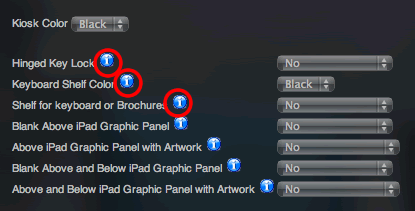
Still confused.
How does that get the little blue information button next to my product characteristic values?
Please Log in or Create an account to join the conversation.
11 years 5 months ago #198743
by simmiepam
Replied by simmiepam on topic Information button next to options
Nevermind....I think I figurered it out
It's not a characteristic...it's a product option
But there causes me a new confusion. I have to look into how each of those are used.
Thanks
Pam
It's not a characteristic...it's a product option
But there causes me a new confusion. I have to look into how each of those are used.
Thanks
Pam
The following user(s) said Thank You: Jerome
Please Log in or Create an account to join the conversation.
Time to create page: 0.285 seconds