
- Posts: 132
- Thank you received: 3
Customer Info does not passed to Stripe
- alexmartin
-
 Topic Author
- Offline
Less
More
9 years 7 months ago - 9 years 7 months ago #261618
by alexmartin
Customer Info does not passed to Stripe was created by alexmartin
-- HikaShop version -- : HikaShop Business: 3.0.0
-- Joomla version -- : 3.6.5
-- PHP version -- : 7
-- Browser(s) name and version -- : FireFox
-- Error-message(debug-mod must be tuned on) -- : no errors
Hi,
I have brand new installation of joomla and hikashop for business. No other components or plugins installed.
I use Stripe payment method in testing mode.
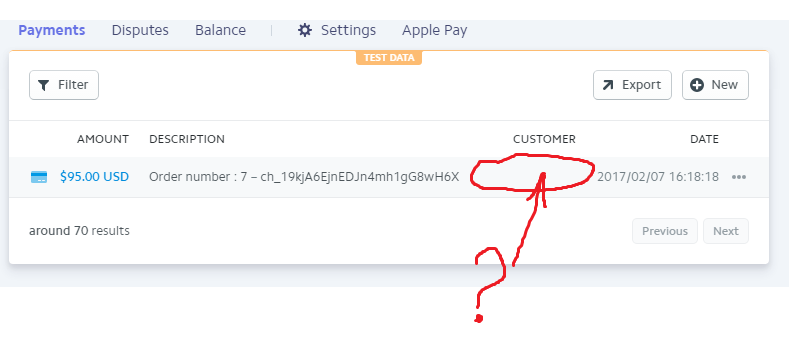
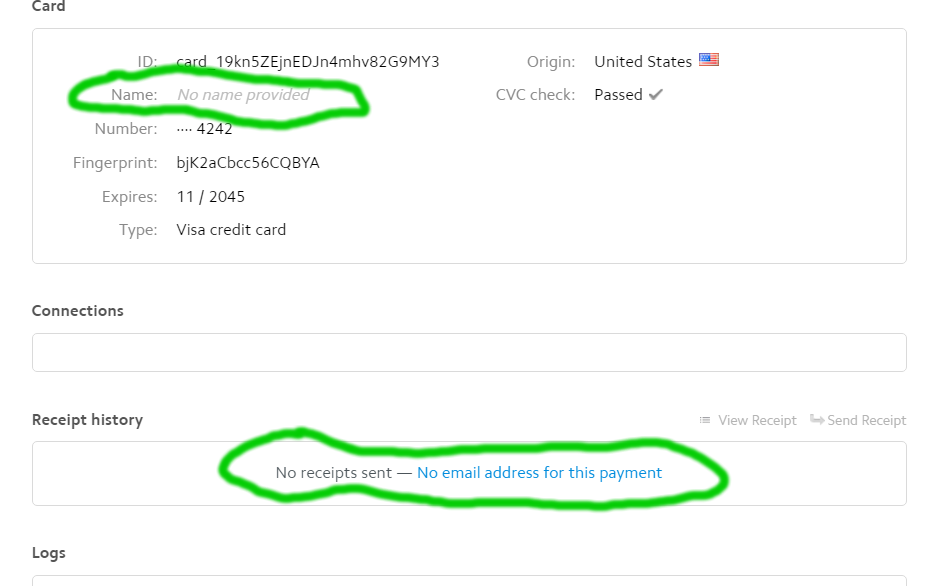
Test works well , except that user data such as Name and Email does not show in Stripe account after successful payment done. It does not passed to stripe.
I used stripe in the past and it was working well and passed user name and email. Wot is wrong now?
Please help to fix the problem.
Second:
-- Joomla version -- : 3.6.5
-- PHP version -- : 7
-- Browser(s) name and version -- : FireFox
-- Error-message(debug-mod must be tuned on) -- : no errors
Hi,
I have brand new installation of joomla and hikashop for business. No other components or plugins installed.
I use Stripe payment method in testing mode.
Test works well , except that user data such as Name and Email does not show in Stripe account after successful payment done. It does not passed to stripe.
I used stripe in the past and it was working well and passed user name and email. Wot is wrong now?
Please help to fix the problem.
Second:
Last edit: 9 years 7 months ago by alexmartin.
Please Log in or Create an account to join the conversation.

9 years 7 months ago #261642
by nicolas
Replied by nicolas on topic Customer Info does not passed to Stripe
Hi,
I've checked on our end, but we never sent such information to Stripe.
Would this difference come from a merchant account setting requesting it on stripe's end or something ?
I've checked on our end, but we never sent such information to Stripe.
Would this difference come from a merchant account setting requesting it on stripe's end or something ?
Please Log in or Create an account to join the conversation.
- alexmartin
-
Topic Author
- Offline
Less
More
- Posts: 132
- Thank you received: 3
9 years 7 months ago - 9 years 7 months ago #261742
by alexmartin
Replied by alexmartin on topic Customer Info does not passed to Stripe
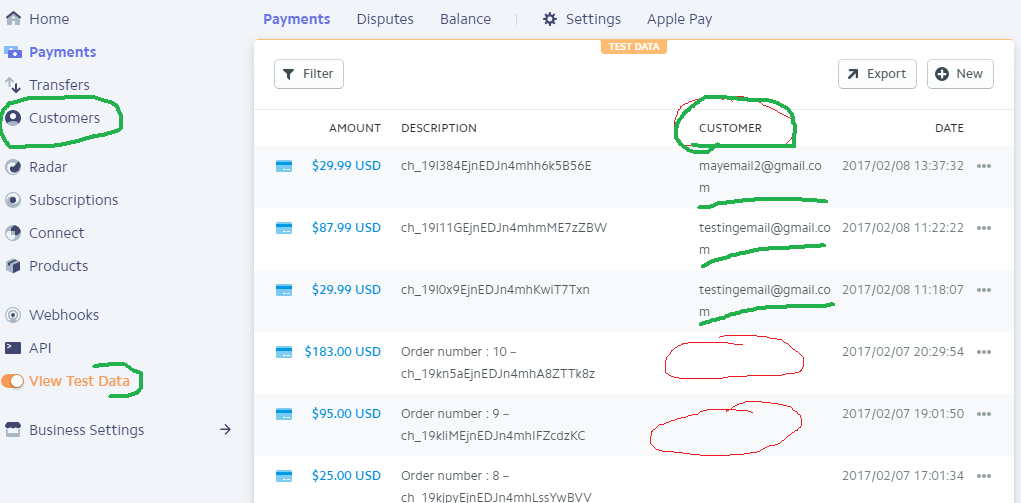
Correct, Hikashop Stripe plugin is INCOMPLETE because when Hikashop processing information to Stripe it does not pass email and as a result Stripe fail to create a CUSTOMER record. And Hikashop has this Stripe plugin not fixed for years. So you are correct, it never passed information to create CUSTOMER record on the Stripe.
YOU ASKED : Would this difference come from a merchant account setting requesting it on stripe's end or something ?
THE ANSWER: not at all. The difference comes from the plugin and not from merchant account setting.
No customer record and no history for that person created on the Stripe as a result of HikaShop plugin. Stripe use that email record to send emails to the customer and also make possible to ad subscription plan from the stripe admin.
Mean time I have tested PayCart Stripe plugin with PayCart. I have not changed any settings on my Stripe admin. And PayCart Stripe plugin works correctly and send email to stripe and create CUSTOMER record that can be added to subscription plan.
The bottom line is that Hikashop Stripe plugin is INCOMPLETE.
Would you be kind please fix this problem please?
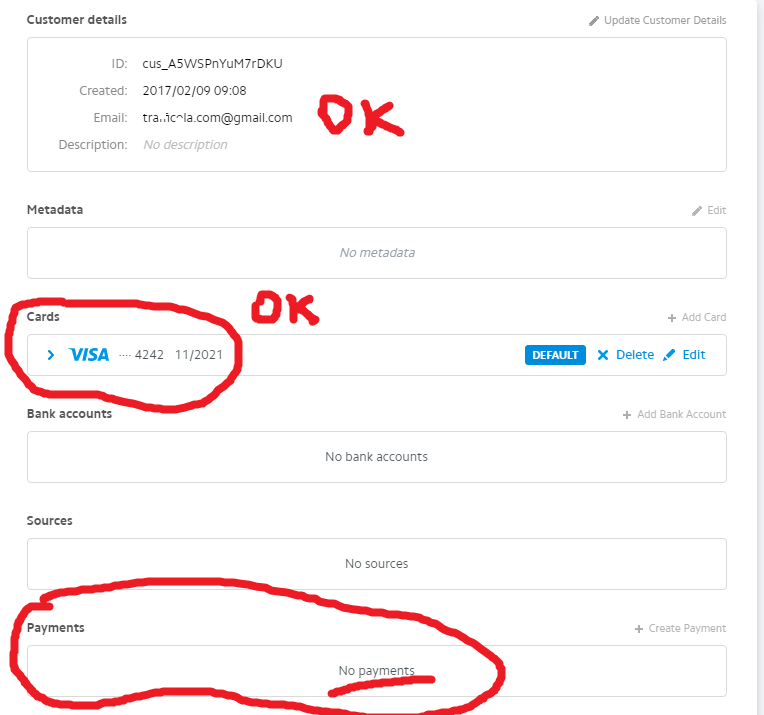
Please see Image 1
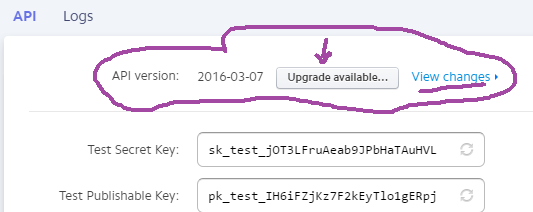
Second, STRIPE have NEW API not reversable version of API and it is a good time to Update Stripe plugin for new API they have
Please see image 2
and reference: stripe.com/docs/upgrades?since=2016-03-07#api-changelog
Looking forward. Thank you.
YOU ASKED : Would this difference come from a merchant account setting requesting it on stripe's end or something ?
THE ANSWER: not at all. The difference comes from the plugin and not from merchant account setting.
No customer record and no history for that person created on the Stripe as a result of HikaShop plugin. Stripe use that email record to send emails to the customer and also make possible to ad subscription plan from the stripe admin.
Mean time I have tested PayCart Stripe plugin with PayCart. I have not changed any settings on my Stripe admin. And PayCart Stripe plugin works correctly and send email to stripe and create CUSTOMER record that can be added to subscription plan.
The bottom line is that Hikashop Stripe plugin is INCOMPLETE.
Would you be kind please fix this problem please?
Please see Image 1
Second, STRIPE have NEW API not reversable version of API and it is a good time to Update Stripe plugin for new API they have
Please see image 2
and reference: stripe.com/docs/upgrades?since=2016-03-07#api-changelog
Looking forward. Thank you.
Last edit: 9 years 7 months ago by alexmartin.
Please Log in or Create an account to join the conversation.
9 years 7 months ago #261812
by nicolas
Replied by nicolas on topic Customer Info does not passed to Stripe
Hi,
No one reported that for years and the payments worked fine without that, and you said that it was working before (not saying that it was working before with another shopping cart), which is why I thought that it might be a setting on your merchant account.
Thank you for your feedback.
I've looked at the modifications necessary to support that and it looks quite simple. I've done the changes and published a new version have a look here:
github.com/HikaShop/hikashoppayment-stripe/releases/tag/1.0.1
Regarding the update of the API, I don't see the point. It won't add anything new for you and could necessite changes in the plugin and might break it and thus require some testing. We usually only update payment plugins libraries when there is a real need for it. But thank you for your concern.
PS: please don't change the styling of the text of your message in the future.
No one reported that for years and the payments worked fine without that, and you said that it was working before (not saying that it was working before with another shopping cart), which is why I thought that it might be a setting on your merchant account.
Thank you for your feedback.
I've looked at the modifications necessary to support that and it looks quite simple. I've done the changes and published a new version have a look here:
github.com/HikaShop/hikashoppayment-stripe/releases/tag/1.0.1
Regarding the update of the API, I don't see the point. It won't add anything new for you and could necessite changes in the plugin and might break it and thus require some testing. We usually only update payment plugins libraries when there is a real need for it. But thank you for your concern.
PS: please don't change the styling of the text of your message in the future.
Please Log in or Create an account to join the conversation.
- alexmartin
-
Topic Author
- Offline
Less
More
- Posts: 132
- Thank you received: 3
9 years 7 months ago - 9 years 7 months ago #261851
by alexmartin
Replied by alexmartin on topic Customer Info does not passed to Stripe
I appreciate you taking care of this plugin and upon my test i have got mixed result:
1) STRIPE ACCOUNT:
- Stripe created the customer record - that is a good news.
- No Payment - Payment Status is missed and there were NO Payment made - that is a bad news
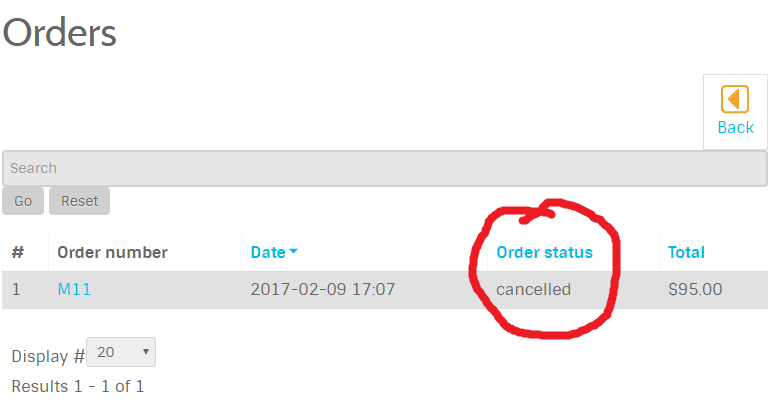
2) MY WEBSITE - User account control panel/ ORDERS
- product Order Status is cancelled
3) Here is the admin message immediately after payment:
Error charge : Unknown column 'id' in 'field list' SQL=UPDATE `#__hikashop_user` SET `user_cms_id`='428',`user_email`=emailofthetester@gmail.com',`user_partner_email`='',`user_params`='O:8:\"stdClass\":1:{s:18:\"stripe_customer_id\";s:18:\"cus_A5WSPnYuM7rDKU\";}',`user_partner_id`='0',`user_partner_price`='0.00000',`user_partner_paid`='0',`user_created_ip`='159.83.252.234',`user_unpaid_amount`='0.00000',`user_partner_currency_id`='0',`user_created`='1486589850',`user_partner_activated`='0',`id`='428',`name`='Ttraffol',`username`='traff',`email`='emailoftheteste@gmail.com',`password`='$2y$10$NZNAUQR3oNH76dTcxPcvCOH7VgNhXc/0M89iW33nExq4A5RC2z2dm',`block`='0',`sendEmail`='0',`registerDate`='2017-02-08 21:37:30',`lastvisitDate`='2017-02-09 17:06:08',`activation`='',`params`='{\"admin_style\":\"\",\"admin_language\":\"\",\"language\":\"\",\"editor\":\"\",\"helpsite\":\"\",\"timezone\":\"\"}',`lastResetTime`='0000-00-00 00:00:00',`resetCount`='0',`otpKey`='',`otep`='',`requireReset`='0' WHERE `user_id`='9'
Thank you again for your attention to this payment plugin. Please advise or fix.
Looking Forward. Thank you.
Website Order Status:
1) STRIPE ACCOUNT:
- Stripe created the customer record - that is a good news.
- No Payment - Payment Status is missed and there were NO Payment made - that is a bad news
2) MY WEBSITE - User account control panel/ ORDERS
- product Order Status is cancelled
3) Here is the admin message immediately after payment:
Error charge : Unknown column 'id' in 'field list' SQL=UPDATE `#__hikashop_user` SET `user_cms_id`='428',`user_email`=emailofthetester@gmail.com',`user_partner_email`='',`user_params`='O:8:\"stdClass\":1:{s:18:\"stripe_customer_id\";s:18:\"cus_A5WSPnYuM7rDKU\";}',`user_partner_id`='0',`user_partner_price`='0.00000',`user_partner_paid`='0',`user_created_ip`='159.83.252.234',`user_unpaid_amount`='0.00000',`user_partner_currency_id`='0',`user_created`='1486589850',`user_partner_activated`='0',`id`='428',`name`='Ttraffol',`username`='traff',`email`='emailoftheteste@gmail.com',`password`='$2y$10$NZNAUQR3oNH76dTcxPcvCOH7VgNhXc/0M89iW33nExq4A5RC2z2dm',`block`='0',`sendEmail`='0',`registerDate`='2017-02-08 21:37:30',`lastvisitDate`='2017-02-09 17:06:08',`activation`='',`params`='{\"admin_style\":\"\",\"admin_language\":\"\",\"language\":\"\",\"editor\":\"\",\"helpsite\":\"\",\"timezone\":\"\"}',`lastResetTime`='0000-00-00 00:00:00',`resetCount`='0',`otpKey`='',`otep`='',`requireReset`='0' WHERE `user_id`='9'
Thank you again for your attention to this payment plugin. Please advise or fix.
Looking Forward. Thank you.
Website Order Status:
Last edit: 9 years 7 months ago by alexmartin.
Please Log in or Create an account to join the conversation.

9 years 7 months ago #261852
by Jerome
Jerome - Obsidev.com
HikaMarket & HikaSerial developer / HikaShop core dev team.
Replied by Jerome on topic Customer Info does not passed to Stripe
Hi,
Nicolas made a mistake for the user saving.
I changed the too early and untested release he made.
github.com/HikaShop/hikashoppayment-stripe
Regards,
Nicolas made a mistake for the user saving.
I changed the too early and untested release he made.
github.com/HikaShop/hikashoppayment-stripe
Regards,
Jerome - Obsidev.com
HikaMarket & HikaSerial developer / HikaShop core dev team.
Please Log in or Create an account to join the conversation.
- alexmartin
-
Topic Author
- Offline
Less
More
- Posts: 132
- Thank you received: 3
9 years 7 months ago - 9 years 7 months ago #261853
by alexmartin
Replied by alexmartin on topic Customer Info does not passed to Stripe
Ok, i removed previous version and installed new version and made a test.
STRIPE admin : the same issues: payment not processed on the STRIPE
WEBSITE: Order Status: created
Error message:
Error charge : You cannot use a Stripe token more than once: tok_19lMemEjnEDJn4mhEYp8vFQH.
STRIPE admin : the same issues: payment not processed on the STRIPE
WEBSITE: Order Status: created
Error message:
Error charge : You cannot use a Stripe token more than once: tok_19lMemEjnEDJn4mhEYp8vFQH.
Last edit: 9 years 7 months ago by alexmartin.
Please Log in or Create an account to join the conversation.
9 years 7 months ago #261855
by Jerome
Jerome - Obsidev.com
HikaMarket & HikaSerial developer / HikaShop core dev team.
Replied by Jerome on topic Customer Info does not passed to Stripe
Hi,
Can you please edit your stripe plugin and replace
By
Regards,
Can you please edit your stripe plugin and replace
Code:
'email' => $this->user->user_email,
'source' => $token,
Code:
'email' => $this->user->user_email,
Regards,
Jerome - Obsidev.com
HikaMarket & HikaSerial developer / HikaShop core dev team.
Please Log in or Create an account to join the conversation.
- alexmartin
-
Topic Author
- Offline
Less
More
- Posts: 132
- Thank you received: 3
9 years 7 months ago #261885
by alexmartin
Replied by alexmartin on topic Customer Info does not passed to Stripe
Thank you very much for attempting to fix the problem but it does not fixed the problem
I made the change you asked and the problem remains. I have tested it twice.
The order status is cancelled. No record in the Stripe being made.
It looks like some one need to take a fresh look and clean up the code and make at least one successful test.
Looking Forward.
Thank you
I made the change you asked and the problem remains. I have tested it twice.
The order status is cancelled. No record in the Stripe being made.
It looks like some one need to take a fresh look and clean up the code and make at least one successful test.
Looking Forward.
Thank you
Please Log in or Create an account to join the conversation.
9 years 7 months ago #261901
by nicolas
Replied by nicolas on topic Customer Info does not passed to Stripe
Hi,
Jerome almost had the solution. The token doesn't have to be removed from the customer creation but from the charge creation:
stackoverflow.com/questions/30746307/str...token-more-than-once
And thus it's not the line:
'source' => $token,
but the line:
'card' => $token,
that needs to be removed and it should work properly.
Jerome almost had the solution. The token doesn't have to be removed from the customer creation but from the charge creation:
stackoverflow.com/questions/30746307/str...token-more-than-once
And thus it's not the line:
'source' => $token,
but the line:
'card' => $token,
that needs to be removed and it should work properly.
The following user(s) said Thank You: Jerome
Please Log in or Create an account to join the conversation.
9 years 7 months ago #261902
by nicolas
Replied by nicolas on topic Customer Info does not passed to Stripe
Hi,
I've published a new release of the plugin to add that change and also support the update of the credit card so that it always uses the credit card entered by the customer and not the old one stored with the customer :
github.com/HikaShop/hikashoppayment-stripe/releases/tag/1.0.2
I've published a new release of the plugin to add that change and also support the update of the credit card so that it always uses the credit card entered by the customer and not the old one stored with the customer :
github.com/HikaShop/hikashoppayment-stripe/releases/tag/1.0.2
The following user(s) said Thank You: alexmartin
Please Log in or Create an account to join the conversation.
- alexmartin
-
Topic Author
- Offline
Less
More
- Posts: 132
- Thank you received: 3
9 years 7 months ago #261905
by alexmartin
Replied by alexmartin on topic Customer Info does not passed to Stripe
Awesome update and it works really well.
Thank you Nicolas and Jerome for fanatical support I have experienced over many years.
Thank you Nicolas and Jerome for fanatical support I have experienced over many years.
The following user(s) said Thank You: nicolas
Please Log in or Create an account to join the conversation.

9 years 7 months ago - 9 years 7 months ago #262148
by huwhuw
Replied by huwhuw on topic Customer Info does not passed to Stripe
hi Nicolas
I had the same issue as the previous poster - using Hikashop Business 3.0.0 and J!3.6.5
I installed the original stripe plugin payment - it worked but no customer info recorded in Stripe Dashboard.
I updated the stripe plugin to the latest git commit i now get
"Error charge : Must provide source or customer."
I am not selling shippable goods.
Also dont know if it makes any difference but users pre-register via hikashop registration before being allowed to purchase and add to cart
I had the same issue as the previous poster - using Hikashop Business 3.0.0 and J!3.6.5
I installed the original stripe plugin payment - it worked but no customer info recorded in Stripe Dashboard.
I updated the stripe plugin to the latest git commit i now get
"Error charge : Must provide source or customer."
I am not selling shippable goods.
Also dont know if it makes any difference but users pre-register via hikashop registration before being allowed to purchase and add to cart
Last edit: 9 years 7 months ago by huwhuw.
Please Log in or Create an account to join the conversation.
9 years 7 months ago #262154
by Jerome
Jerome - Obsidev.com
HikaMarket & HikaSerial developer / HikaShop core dev team.
Replied by Jerome on topic Customer Info does not passed to Stripe
Hi,
Please download manually the Stripe plugin using the "download zip" feature in Github.
github.com/HikaShop/hikashoppayment-stripe
The last commit should fix the issue you got.
I deleted old untested 1.0.1 and 1.0.2 ; So when we have good feedback about the current "trunk", we will create a real stable 1.0.1 release.
Regards,
Please download manually the Stripe plugin using the "download zip" feature in Github.
github.com/HikaShop/hikashoppayment-stripe
The last commit should fix the issue you got.
I deleted old untested 1.0.1 and 1.0.2 ; So when we have good feedback about the current "trunk", we will create a real stable 1.0.1 release.
Regards,
Jerome - Obsidev.com
HikaMarket & HikaSerial developer / HikaShop core dev team.
Please Log in or Create an account to join the conversation.
9 years 7 months ago - 9 years 7 months ago #262264
by huwhuw
Replied by huwhuw on topic Customer Info does not passed to Stripe
Thanks Jerome
Yes that works now and it records the email of the user in the stripe dashboard - so at least it is possible to identify who made the payment - can you fix the following:
Yes that works now and it records the email of the user in the stripe dashboard - so at least it is possible to identify who made the payment - can you fix the following:
- It seems to be missing the name hook
- Also order id was "K9" but stripe records "9" only in the Dashboard
Last edit: 9 years 7 months ago by huwhuw.
Please Log in or Create an account to join the conversation.
9 years 7 months ago #262281
by Jerome
Jerome - Obsidev.com
HikaMarket & HikaSerial developer / HikaShop core dev team.
Replied by Jerome on topic Customer Info does not passed to Stripe
Hi,
order_id is 9
order_number is K9
regards.
order_id is 9
order_number is K9
regards.
Jerome - Obsidev.com
HikaMarket & HikaSerial developer / HikaShop core dev team.
Please Log in or Create an account to join the conversation.
9 years 1 month ago #277321
by Perger
Replied by Perger on topic Customer Info does not passed to Stripe
i have the same issue - no name is passing to Stripe. the download link above is broken can you provide me with a new link.
i have previously downloaded donwlaod link in page [ www.hikashop.com/support/2-uncategorised...ent-stripe-form.html ] and does NOT work.
i have previously downloaded donwlaod link in page [ www.hikashop.com/support/2-uncategorised...ent-stripe-form.html ] and does NOT work.
Please Log in or Create an account to join the conversation.
9 years 4 weeks ago #277523
by Jerome
Jerome - Obsidev.com
HikaMarket & HikaSerial developer / HikaShop core dev team.
Replied by Jerome on topic Customer Info does not passed to Stripe
Hello,
Which link is broken ?
The github repository is still the place where you have to download the latest version of the stripe plugin, since that plugin has been removed from the HikaShop packages.
Regards,
Which link is broken ?
The github repository is still the place where you have to download the latest version of the stripe plugin, since that plugin has been removed from the HikaShop packages.
Regards,
Jerome - Obsidev.com
HikaMarket & HikaSerial developer / HikaShop core dev team.
Please Log in or Create an account to join the conversation.
9 years 3 weeks ago #277689
by Perger
Replied by Perger on topic Customer Info does not passed to Stripe
link is broken below
github.com/HikaShop/hikashoppayment-stripe/releases/tag/1.0.2
link below doesn't transfer information to stripe
github.com/HikaShop/hikashoppayment-stripe
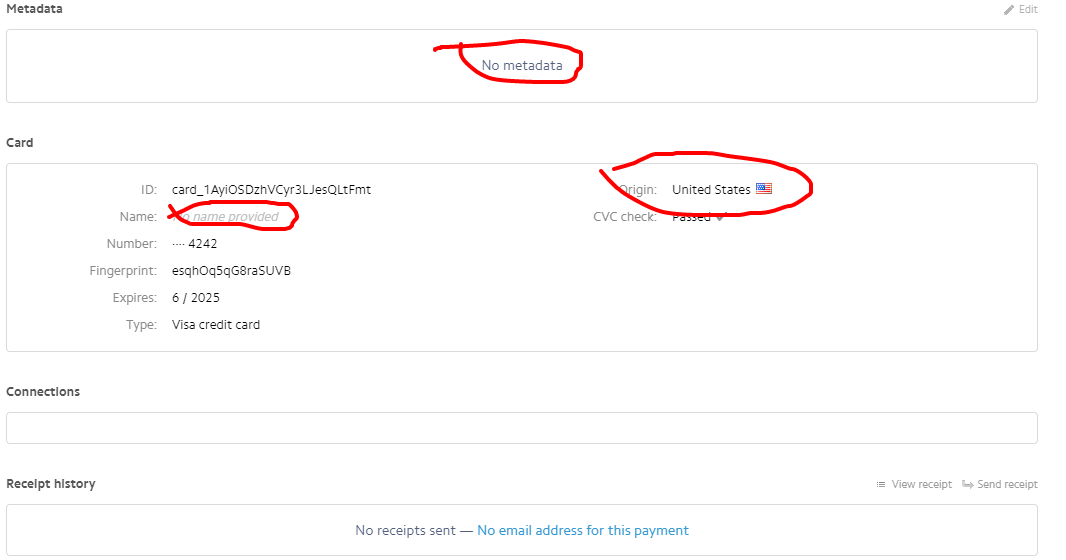
I have the latest version of hikashop and joomla just need it to work with Stripe. please provide the link to a useful Stripe plug in.
github.com/HikaShop/hikashoppayment-stripe/releases/tag/1.0.2
link below doesn't transfer information to stripe
github.com/HikaShop/hikashoppayment-stripe
I have the latest version of hikashop and joomla just need it to work with Stripe. please provide the link to a useful Stripe plug in.
Please Log in or Create an account to join the conversation.
9 years 3 weeks ago #277690
by Jerome
Jerome - Obsidev.com
HikaMarket & HikaSerial developer / HikaShop core dev team.
Replied by Jerome on topic Customer Info does not passed to Stripe
Hi,
I published the version 1.0.2 of the Stripe plugin for the support of the customer address.
But the plugin 1.0.1 got the support of the customer. So I don't know which version you installed.
Regards,
I published the version 1.0.2 of the Stripe plugin for the support of the customer address.
But the plugin 1.0.1 got the support of the customer. So I don't know which version you installed.
Regards,
Jerome - Obsidev.com
HikaMarket & HikaSerial developer / HikaShop core dev team.
Please Log in or Create an account to join the conversation.
Time to create page: 0.305 seconds