

- Posts: 490
- Thank you received: 2
how to use points to pay
7 years 9 months ago #301821
by ronron
how to use points to pay was created by ronron
-- HikaShop version -- : 3.5.0
-- Joomla version -- : 3.7
-- PHP version -- : 5.6
-- Error-message(debug-mod must be tuned on) -- : none
hi
how do i use user points in such away that your earn points for every purchase but the value of the points is only 1 percent of the total purchase
something like if i buy 1200 i get 1.2 points. i can then use the 1.2 points on my next purchase
thanks
-- Joomla version -- : 3.7
-- PHP version -- : 5.6
-- Error-message(debug-mod must be tuned on) -- : none
hi
how do i use user points in such away that your earn points for every purchase but the value of the points is only 1 percent of the total purchase
something like if i buy 1200 i get 1.2 points. i can then use the 1.2 points on my next purchase
thanks
Please Log in or Create an account to join the conversation.

7 years 9 months ago #301832
by nicolas
Replied by nicolas on topic how to use points to pay
Hi,
There is no decimal for points. So what you could do is that in the user points plugin (menu System>Plugins) you set a rate of 1€ spent = 1 point earned.
Then, in the user points payment plugin (menu System>Payment methods), you set a rate of 1 point = 0.01 €. That way, you would need 100 points to buy a product costing 1 € and you would get your 1% factor for the points.
There is no decimal for points. So what you could do is that in the user points plugin (menu System>Plugins) you set a rate of 1€ spent = 1 point earned.
Then, in the user points payment plugin (menu System>Payment methods), you set a rate of 1 point = 0.01 €. That way, you would need 100 points to buy a product costing 1 € and you would get your 1% factor for the points.
Please Log in or Create an account to join the conversation.
7 years 8 months ago #302164
by ronron
Replied by ronron on topic how to use points to pay
how can i set the points so that the system will tell unregistered buyers something like
If you register you can earn points and pay for it.
If you are registered where can i edit it to make it something like this
You already have 3690 points. This is equivalent to (36.90 USD). You can use your points to pay for your order.
thanks
If you register you can earn points and pay for it.
If you are registered where can i edit it to make it something like this
You already have 3690 points. This is equivalent to (36.90 USD). You can use your points to pay for your order.
thanks
Please Log in or Create an account to join the conversation.
7 years 8 months ago #302171
by nicolas
Replied by nicolas on topic how to use points to pay
Hi,
1. You'll have to edit a view file of the checkout and add some code to display that message based on whether the user is logged in or not.
2. There is already a view you can use in your checkout workflow for that. In the settings of the user points plugin via the Joomla plugins manager, you have options to have a checkout view. Then, you can add that view to your checkout workflow.
With the settings of the plugin, you can manage what the view will display.
1. You'll have to edit a view file of the checkout and add some code to display that message based on whether the user is logged in or not.
2. There is already a view you can use in your checkout workflow for that. In the settings of the user points plugin via the Joomla plugins manager, you have options to have a checkout view. Then, you can add that view to your checkout workflow.
With the settings of the plugin, you can manage what the view will display.
Please Log in or Create an account to join the conversation.
7 years 8 months ago - 7 years 8 months ago #302484
by ronron
can you please tell me which file?
can you please tell me what view? this is my configuration i dont see any options for the view
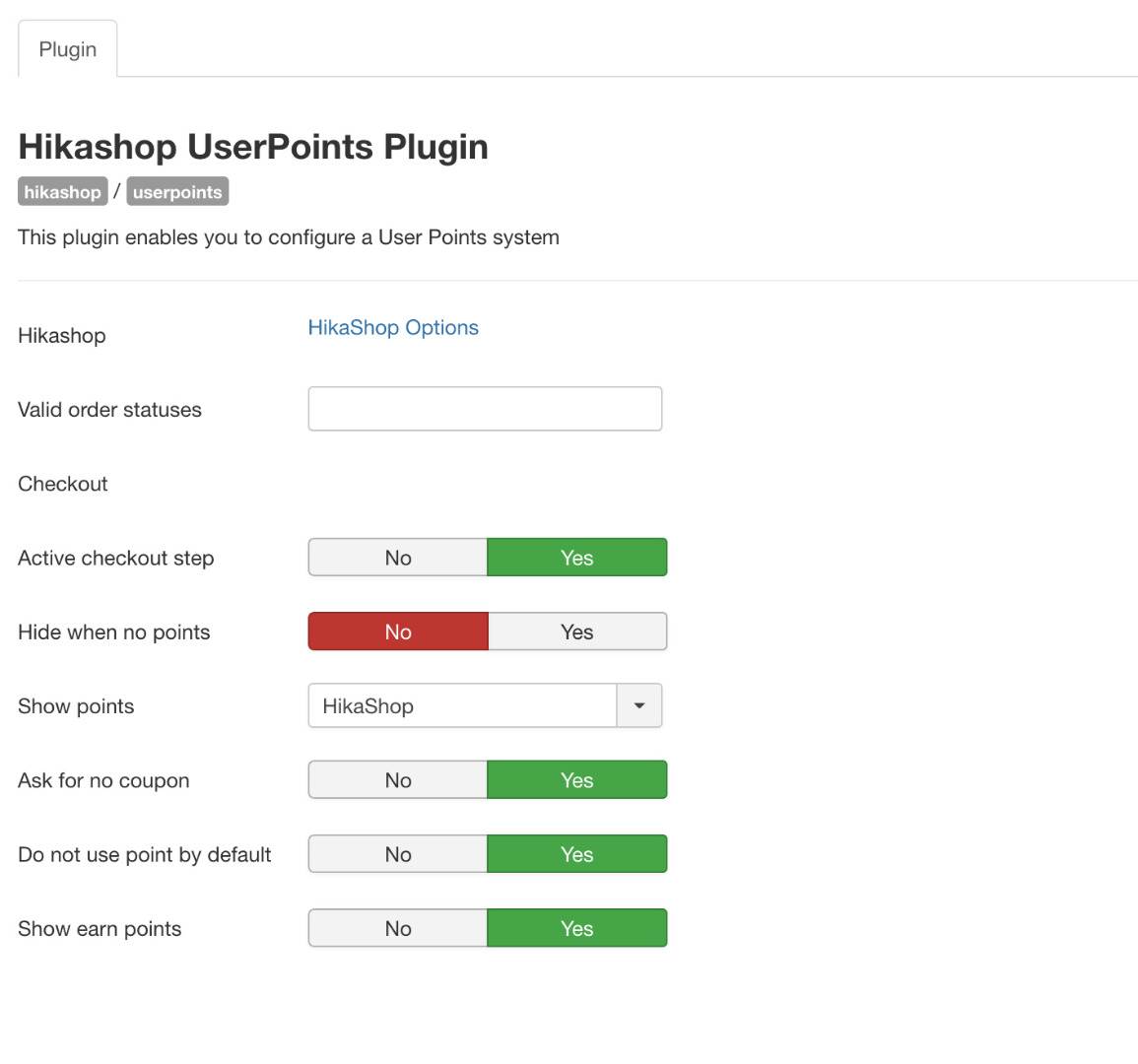
3. in the presentation of points how can i generate 1percent of the total checkout value and this amount will also be the exact value. at the moment my configiration presents points and 1 percent of this is converted or can be used for payment, this presents confusion to the buyer.
4. how do i manually edit the points?
5. can i reset all the points?
thanks
Replied by ronron on topic how to use points to pay
1. You'll have to edit a view file of the checkout and add some code to display that message based on whether the user is logged in or not.
can you please tell me which file?
2. There is already a view you can use in your checkout workflow for that. In the settings of the user points plugin via the Joomla plugins manager, you have options to have a checkout view. Then, you can add that view to your checkout workflow.
With the settings of the plugin, you can manage what the view will display.
can you please tell me what view? this is my configuration i dont see any options for the view
3. in the presentation of points how can i generate 1percent of the total checkout value and this amount will also be the exact value. at the moment my configiration presents points and 1 percent of this is converted or can be used for payment, this presents confusion to the buyer.
4. how do i manually edit the points?
5. can i reset all the points?
thanks
Last edit: 7 years 8 months ago by ronron.
Please Log in or Create an account to join the conversation.

7 years 8 months ago #302515
by Jerome
Jerome - Obsidev.com
HikaMarket & HikaSerial developer / HikaShop core dev team.
Replied by Jerome on topic how to use points to pay
Hello,
1 - We don't know what or where you want to do ; so we can't tell you which one.
2 - You have the "active checkout step" so it means that you that "checkout step" available in your checkout workflow configuration.
3 - Sorry but I don't understand your question or what you want to do.
4 - Edit the value in the backend. Don't forget that it's a user custom field.
5 - Sure. Perform the action in your database or using a mass action. Once again, it's a user custom field
Regards,
1 - We don't know what or where you want to do ; so we can't tell you which one.
2 - You have the "active checkout step" so it means that you that "checkout step" available in your checkout workflow configuration.
3 - Sorry but I don't understand your question or what you want to do.
4 - Edit the value in the backend. Don't forget that it's a user custom field.
5 - Sure. Perform the action in your database or using a mass action. Once again, it's a user custom field
Regards,
Jerome - Obsidev.com
HikaMarket & HikaSerial developer / HikaShop core dev team.
Please Log in or Create an account to join the conversation.
Time to create page: 0.202 seconds