

- Posts: 205
- Thank you received: 12
"Bank Account information" field question [TO BE SOLVED ON NEXT UPDATE]
6 years 4 months ago #319218
by liaskas
"Bank Account information" field question was created by liaskas
-- HikaShop version -- : 4.3.0
-- Joomla version -- : 3.9.18
-- PHP version -- : 7.2.30
This is the field that shows when creating a "bank transfer" payment method for both...
HikaShop (backend)
HikaMarket (when vendor creates his own bank transfer payment method)
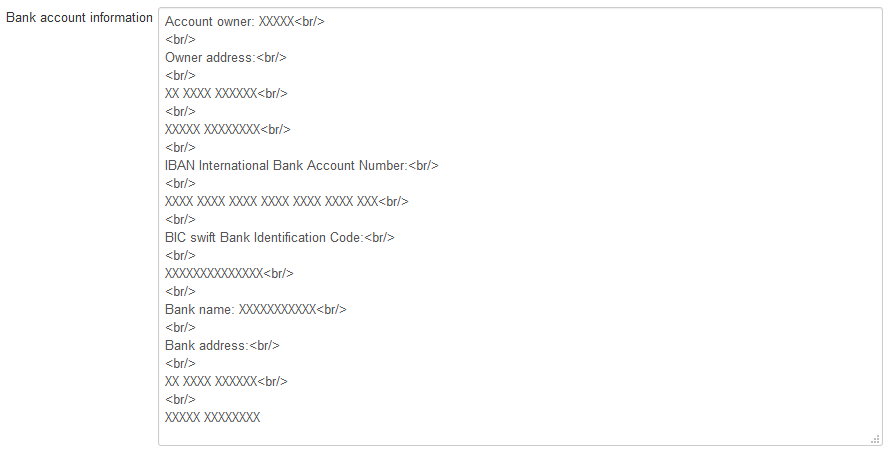
The problem here is that we can not expect from our vendors to know what these HTML codes ( < br / > ) is... so most of the times these codes are erased from the vendor and the result is to have "Bank Account information" that are not readable.
How can we have an editor for this field, like we have right above for the "Description" of the payment method that the vendor fills?
Thank you in advance!
-- Joomla version -- : 3.9.18
-- PHP version -- : 7.2.30
This is the field that shows when creating a "bank transfer" payment method for both...
HikaShop (backend)
HikaMarket (when vendor creates his own bank transfer payment method)
The problem here is that we can not expect from our vendors to know what these HTML codes ( < br / > ) is... so most of the times these codes are erased from the vendor and the result is to have "Bank Account information" that are not readable.
How can we have an editor for this field, like we have right above for the "Description" of the payment method that the vendor fills?
Thank you in advance!
Please Log in or Create an account to join the conversation.

6 years 4 months ago - 6 years 4 months ago #319239
by Ch3vr0n
Replied by Ch3vr0n on topic "Bank Account information" field question
<br/> means line break (as in the text that follows after it, will be placed on a new line)
text<br/>text will appear as
text
text
text<br/><br/>text will appear as
text
text
Basically the first <br/> moves the following text to the following line. Each consecutive <br/> adds a blank line after it. So 2x <br/> is 1 line break, 1 blank line. 3x <br/> 1 line break, 2 blank lines. If they're stripped from the field, it's not so much a problem with the field, but the text editor that's been configured not to allow html.
text<br/>text will appear as
text
text
text<br/><br/>text will appear as
text
text
Basically the first <br/> moves the following text to the following line. Each consecutive <br/> adds a blank line after it. So 2x <br/> is 1 line break, 1 blank line. 3x <br/> 1 line break, 2 blank lines. If they're stripped from the field, it's not so much a problem with the field, but the text editor that's been configured not to allow html.
Last edit: 6 years 4 months ago by Ch3vr0n.
Please Log in or Create an account to join the conversation.
6 years 4 months ago #319240
by liaskas
Replied by liaskas on topic "Bank Account information" field question
Thank you for your reply Ch3vr0n but maybe i was not clear on my question. The problem is not with us but with our vendors!
Do we have to send such explanation to all of our vendors that try to set their "Bank transfer information"?
The question is... how can we have an editor there, like we have everywhere else!
Do we have to send such explanation to all of our vendors that try to set their "Bank transfer information"?
The question is... how can we have an editor there, like we have everywhere else!
Please Log in or Create an account to join the conversation.

6 years 4 months ago #319258
by Jerome
Jerome - Obsidev.com
HikaMarket & HikaSerial developer / HikaShop core dev team.
Replied by Jerome on topic "Bank Account information" field question
Hello,
HikaMarket do display the plugin fields are they are describe in the plugin configuration variable.
"Banktransfer" to have the field "information" as "big-textarea" to let the user (backend/front-end) use a big textarea to enter its raw content.
HikaMarket does support various kind of fields, such as "input", "boolean", "checkbox", "price", "textarea"... but also "wysiwyg".
That kind of field is use for the plugin description.
If you change the HikaShop bank transfer plugin to use "wysiwyg" instead of "big-textarea", you should have something closer to what you want.
BUT !
1 - Save the in front-end will not get the "wysiwyg" data due to a constraint of the Joomla wysiwyg editors. (I made a patch for that, not available yet)
2 - because that plugin is a core plugin, the best is to not edit it but to duplicate it ; otherwise you will loose your modification at the next update.
3 - HikaShop backend do not handle "wysiwyg" type, thus you won't be able to see the field value in the backend and will generate some unwanted side-effect if you try to save it.
So, the best solution would be to add the support in the HikaShop core for "wysiwyg" fields.
Thanks to that, HIkaShop will be able to handle that new type, like HikaMarket does.
Regards,
HikaMarket do display the plugin fields are they are describe in the plugin configuration variable.
"Banktransfer" to have the field "information" as "big-textarea" to let the user (backend/front-end) use a big textarea to enter its raw content.
HikaMarket does support various kind of fields, such as "input", "boolean", "checkbox", "price", "textarea"... but also "wysiwyg".
That kind of field is use for the plugin description.
If you change the HikaShop bank transfer plugin to use "wysiwyg" instead of "big-textarea", you should have something closer to what you want.
BUT !
1 - Save the in front-end will not get the "wysiwyg" data due to a constraint of the Joomla wysiwyg editors. (I made a patch for that, not available yet)
2 - because that plugin is a core plugin, the best is to not edit it but to duplicate it ; otherwise you will loose your modification at the next update.
3 - HikaShop backend do not handle "wysiwyg" type, thus you won't be able to see the field value in the backend and will generate some unwanted side-effect if you try to save it.
So, the best solution would be to add the support in the HikaShop core for "wysiwyg" fields.
Thanks to that, HIkaShop will be able to handle that new type, like HikaMarket does.
Regards,
Jerome - Obsidev.com
HikaMarket & HikaSerial developer / HikaShop core dev team.
Please Log in or Create an account to join the conversation.
6 years 4 months ago #319267
by liaskas
Replied by liaskas on topic "Bank Account information" field question
Thank you for your reply....
but we can not understand anything! The question was:
How can the Vendor that creates his Baknk Transfer method get a more user friendly editor. Vendors are not expected to know coding, not even simple like <br />.
This issue does not exist in Hikashop, because in HikaShop the vendor is just one.
With HikaMarket it is a problem!
Is there a setting or a patch for that or not?
Please do not tell us about tech modifications as we are not programmers!
Thank you...
but we can not understand anything! The question was:
How can the Vendor that creates his Baknk Transfer method get a more user friendly editor. Vendors are not expected to know coding, not even simple like <br />.
This issue does not exist in Hikashop, because in HikaShop the vendor is just one.
With HikaMarket it is a problem!
Is there a setting or a patch for that or not?
Please do not tell us about tech modifications as we are not programmers!
Thank you...
Please Log in or Create an account to join the conversation.
6 years 4 months ago #319276
by Jerome
Jerome - Obsidev.com
HikaMarket & HikaSerial developer / HikaShop core dev team.
Replied by Jerome on topic "Bank Account information" field question
You have to wait for next HikaShop update.
Jerome - Obsidev.com
HikaMarket & HikaSerial developer / HikaShop core dev team.
The following user(s) said Thank You: liaskas
Please Log in or Create an account to join the conversation.
6 years 4 months ago #319302
by liaskas
Replied by liaskas on topic "Bank Account information" field question [TO BE SOLVED ON NEXT UPDATE]
Thank you for your reply Jerome...
we will wait for the next update.
we will wait for the next update.
Please Log in or Create an account to join the conversation.
Time to create page: 0.195 seconds