Stripe and refresh

3 years 11 months ago #346417
by Jerome
Jerome - Obsidev.com
HikaMarket & HikaSerial developer / HikaShop core dev team.
Replied by Jerome on topic Stripe and refresh
Hello,
I might be a side effect of the "checkout" mode.
Do you have the same issue if you're in "end" mode ?
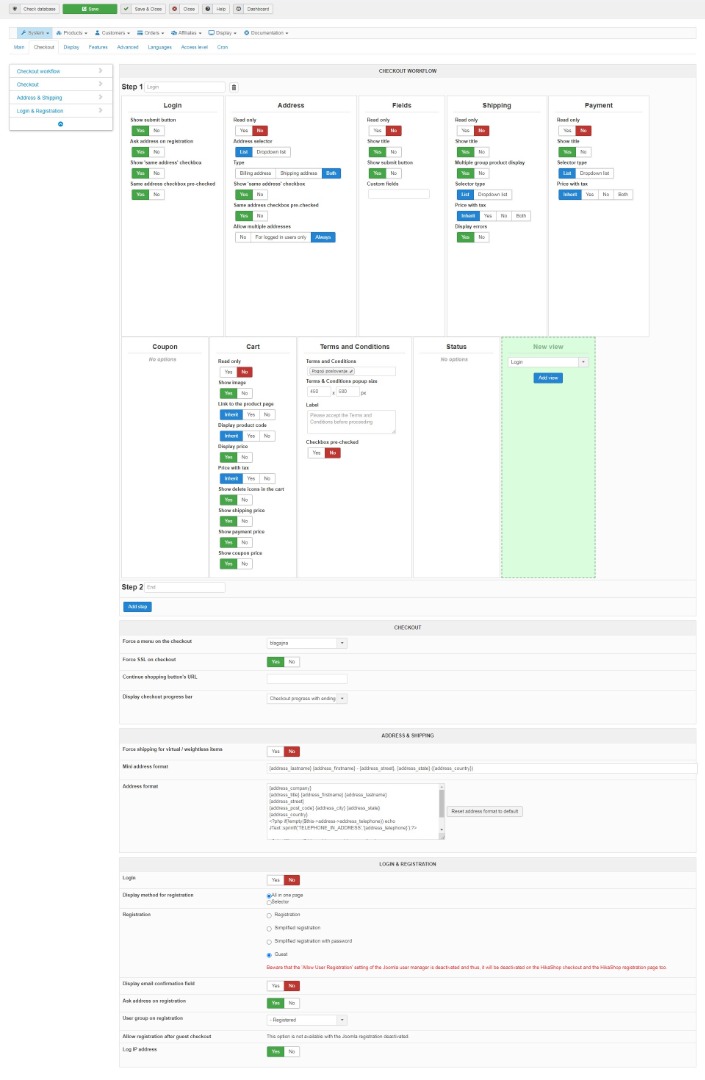
What is your HikaShop checkout workflow configuration ?
Regards,
I might be a side effect of the "checkout" mode.
Do you have the same issue if you're in "end" mode ?
What is your HikaShop checkout workflow configuration ?
Regards,
Jerome - Obsidev.com
HikaMarket & HikaSerial developer / HikaShop core dev team.
Please Log in or Create an account to join the conversation.

3 years 11 months ago #346447
by mojweb
Replied by mojweb on topic Stripe and refresh
With end mode there is no issue with that.
Please Log in or Create an account to join the conversation.
3 years 11 months ago #346556
by mojweb
Replied by mojweb on topic Stripe and refresh
Any thoughts on that?
Please Log in or Create an account to join the conversation.
3 years 11 months ago #346566
by Jerome
Jerome - Obsidev.com
HikaMarket & HikaSerial developer / HikaShop core dev team.
Replied by Jerome on topic Stripe and refresh
Hello,
You're in one page checkout.
I suspect that the payment form is displayed when the billing address is not yet available.
Since the Stripe JavaScript is not refreshed if you change the billing address ; when you got the Stripe payment form, it's possible that it contains no address details.
I do think that having 2 steps should avoid the issue ; but modifying the plugin in order to perform a refresh of the Stripe payment form if you change the billing address, it might have some unwanted side effects.
But it might be a solution to update the Stripe Customer object via API just before trying to confirm the Payment Intent.
Regards,
You're in one page checkout.
I suspect that the payment form is displayed when the billing address is not yet available.
Since the Stripe JavaScript is not refreshed if you change the billing address ; when you got the Stripe payment form, it's possible that it contains no address details.
I do think that having 2 steps should avoid the issue ; but modifying the plugin in order to perform a refresh of the Stripe payment form if you change the billing address, it might have some unwanted side effects.
But it might be a solution to update the Stripe Customer object via API just before trying to confirm the Payment Intent.
Regards,
Jerome - Obsidev.com
HikaMarket & HikaSerial developer / HikaShop core dev team.
Please Log in or Create an account to join the conversation.
3 years 11 months ago #346578
by mojweb
Replied by mojweb on topic Stripe and refresh
2 steps is not an option for us.
So without plugin modify is not posible to solve this?
What modification we are talking about?
Thank you.
So without plugin modify is not posible to solve this?
What modification we are talking about?
Thank you.
Please Log in or Create an account to join the conversation.
3 years 11 months ago #346663
by Jerome
Jerome - Obsidev.com
HikaMarket & HikaSerial developer / HikaShop core dev team.
Replied by Jerome on topic Stripe and refresh
Hello,
I'm talking about development for the plugin, something which would require several hours of work and a lot (a very lot) of tests.
Because if the billing address is not set for the customer when the payment form is displayed, that information won't be send to Stripe.
Regards,
I'm talking about development for the plugin, something which would require several hours of work and a lot (a very lot) of tests.
Because if the billing address is not set for the customer when the payment form is displayed, that information won't be send to Stripe.
Regards,
Jerome - Obsidev.com
HikaMarket & HikaSerial developer / HikaShop core dev team.
Please Log in or Create an account to join the conversation.
Time to create page: 0.064 seconds