

- Posts: 431
- Thank you received: 22
Stripe and refresh
5 years 5 months ago #333088
by mojweb
Stripe and refresh was created by mojweb
-- HikaShop version -- : 4.4.2
-- PHP version -- : 7.3.27
Im testing Stripe V3 with Connect (we have some Visa problems) and found some strange behavior.
When customer enters credit card WRONG credentials and for some reason hit F5 (refresh), site refresh and go to home page. Order is listed as created and confirmation mail is sent to customer.
It should show some error or something?
-- PHP version -- : 7.3.27
Im testing Stripe V3 with Connect (we have some Visa problems) and found some strange behavior.
When customer enters credit card WRONG credentials and for some reason hit F5 (refresh), site refresh and go to home page. Order is listed as created and confirmation mail is sent to customer.
It should show some error or something?
Please Log in or Create an account to join the conversation.

5 years 5 months ago #333096
by Jerome
Jerome - Obsidev.com
HikaMarket & HikaSerial developer / HikaShop core dev team.
Replied by Jerome on topic Stripe and refresh
Hello,
Depending the "mode" of the payment method, the checkout do not accept page refresh.
If you do have a plugin which is using the "confirm / end" page (like Paypal or Stripe), the order is created and the customer see the end page with a form.
For paypal, the form is auto-submitted and the customer is redirected to the paypal website.
For Stripe Connect, the payment form is directly in the page.
That's why the customer should not refresh the page but the Stripe Connect form do authorize to change the values and perform another try ; there is no need to refresh the page.
Since the order is created when you're in that page, if you "lost" the payment form, you can go in the order history and use the "pay later" HikaShop feature in order to re-launch the payment process.
Please note that a future update of the Stripe Connect plugin will propose the second payment mode ; where the customer will be able to enter its credit card details during the payment method selection in the checkout process.
Regards,
Depending the "mode" of the payment method, the checkout do not accept page refresh.
If you do have a plugin which is using the "confirm / end" page (like Paypal or Stripe), the order is created and the customer see the end page with a form.
For paypal, the form is auto-submitted and the customer is redirected to the paypal website.
For Stripe Connect, the payment form is directly in the page.
That's why the customer should not refresh the page but the Stripe Connect form do authorize to change the values and perform another try ; there is no need to refresh the page.
Since the order is created when you're in that page, if you "lost" the payment form, you can go in the order history and use the "pay later" HikaShop feature in order to re-launch the payment process.
Please note that a future update of the Stripe Connect plugin will propose the second payment mode ; where the customer will be able to enter its credit card details during the payment method selection in the checkout process.
Regards,
Jerome - Obsidev.com
HikaMarket & HikaSerial developer / HikaShop core dev team.
Please Log in or Create an account to join the conversation.
5 years 5 months ago #333112
by mojweb
Replied by mojweb on topic Stripe and refresh
Thanks for the answer.
When to expect new Stripe plugin version? Is there joomla update system for that plugin or we must manualy update?
When to expect new Stripe plugin version? Is there joomla update system for that plugin or we must manualy update?
Please Log in or Create an account to join the conversation.
5 years 1 month ago #335785
by mojweb
Replied by mojweb on topic Stripe and refresh
Bump
Please Log in or Create an account to join the conversation.
4 years 2 months ago #344131
by Jerome
Jerome - Obsidev.com
HikaMarket & HikaSerial developer / HikaShop core dev team.
Replied by Jerome on topic Stripe and refresh
Hello,
A beta version of Stripe v3 is available.
It contains the support of the payment form during the checkout, with Stripe Connect support (which was the biggest problem)
Regards,
A beta version of Stripe v3 is available.
It contains the support of the payment form during the checkout, with Stripe Connect support (which was the biggest problem)
Regards,
Jerome - Obsidev.com
HikaMarket & HikaSerial developer / HikaShop core dev team.
Please Log in or Create an account to join the conversation.
4 years 1 month ago - 4 years 1 month ago #345325
by mojweb
Replied by mojweb on topic Stripe and refresh
1. Update to latest Stripe plugin still not working right.
When customer confirms checkout, it redirect to credit card input fields. OK
But if customer not enter any data or wrong data and click Pay, order get status created. (Customer see error like "Your card number is incomplet"). Not OK.
I have Verified status as Confirmed in plugin setings. Invalid - canceled and Pending as pending.
2. You talk about second payment mode? I have only one option "End page".
When customer confirms checkout, it redirect to credit card input fields. OK
But if customer not enter any data or wrong data and click Pay, order get status created. (Customer see error like "Your card number is incomplet"). Not OK.
I have Verified status as Confirmed in plugin setings. Invalid - canceled and Pending as pending.
2. You talk about second payment mode? I have only one option "End page".
Last edit: 4 years 1 month ago by mojweb.
Please Log in or Create an account to join the conversation.
4 years 1 month ago #345326
by Jerome
Jerome - Obsidev.com
HikaMarket & HikaSerial developer / HikaShop core dev team.
Replied by Jerome on topic Stripe and refresh
Hello,
You can download and install the beta version of Stripe Connect.
That plugin includes the newest version of the SDK and the new mode with the checkout integration.
When the customer has the message "your card number is incomplet", that message should be in the Stripe context ; which means that he can still modify its informations and re-submit the data.
The Stripe submission is made with "Ajax", so the customer does not leave the payment page.
Regards,
You can download and install the beta version of Stripe Connect.
That plugin includes the newest version of the SDK and the new mode with the checkout integration.
When the customer has the message "your card number is incomplet", that message should be in the Stripe context ; which means that he can still modify its informations and re-submit the data.
The Stripe submission is made with "Ajax", so the customer does not leave the payment page.
Regards,
Jerome - Obsidev.com
HikaMarket & HikaSerial developer / HikaShop core dev team.
Please Log in or Create an account to join the conversation.
4 years 3 weeks ago #345615
by mojweb
Replied by mojweb on topic Stripe and refresh
OK. I installed beta version and try checkout payment mode.
It loads in Iframe and it is very poor designed. Most of the elements cant be designed.
There is a button "Submit" and I cant translate it.
It loads in Iframe and it is very poor designed. Most of the elements cant be designed.
There is a button "Submit" and I cant translate it.
Please Log in or Create an account to join the conversation.
4 years 3 weeks ago #345616
by Jerome
Jerome - Obsidev.com
HikaMarket & HikaSerial developer / HikaShop core dev team.
Replied by Jerome on topic Stripe and refresh
Hello,
The submit button is handled directly by the Stripe JavaScript.
Regarding the iframe, I'm sorry but I don't understand what you're referring to.
Regards,
The submit button is handled directly by the Stripe JavaScript.
Regarding the iframe, I'm sorry but I don't understand what you're referring to.
Regards,
Jerome - Obsidev.com
HikaMarket & HikaSerial developer / HikaShop core dev team.
Please Log in or Create an account to join the conversation.
4 years 3 weeks ago #345627
by mojweb
Replied by mojweb on topic Stripe and refresh
If I cant translate the button, this type is useless then.
Please Log in or Create an account to join the conversation.
4 years 3 weeks ago #345645
by Jerome
Jerome - Obsidev.com
HikaMarket & HikaSerial developer / HikaShop core dev team.
Replied by Jerome on topic Stripe and refresh
Hello,
In order to be clearer : Please provide a screenshot of your issue.
Because if we can't understand what you're talking about, the answer we're giving you won't help.
Regards,
In order to be clearer : Please provide a screenshot of your issue.
Because if we can't understand what you're talking about, the answer we're giving you won't help.
Regards,
Jerome - Obsidev.com
HikaMarket & HikaSerial developer / HikaShop core dev team.
Please Log in or Create an account to join the conversation.
4 years 3 weeks ago #345649
by mojweb
Replied by mojweb on topic Stripe and refresh
I manage to somehow design the look.
But submit button cant be translated.
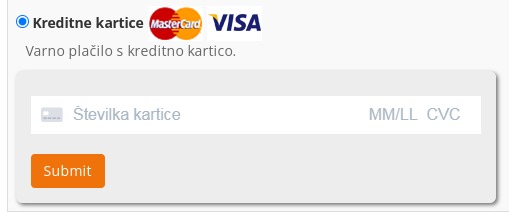
This is end page mode and translation is working.
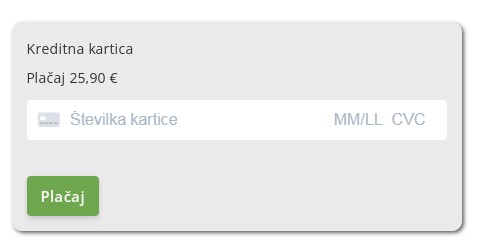
But submit button cant be translated.
This is end page mode and translation is working.
Please Log in or Create an account to join the conversation.
4 years 3 weeks ago #345650
by Jerome
Jerome - Obsidev.com
HikaMarket & HikaSerial developer / HikaShop core dev team.
Replied by Jerome on topic Stripe and refresh
Hello,
Regarding your screenshot, that orange button is the HikaShop checkout payment button.
So it's using the "HIKA_SUBMIT" translation.
For more details see the view : checkout / show_block_payment
Regards,
Regarding your screenshot, that orange button is the HikaShop checkout payment button.
So it's using the "HIKA_SUBMIT" translation.
For more details see the view : checkout / show_block_payment
Regards,
Jerome - Obsidev.com
HikaMarket & HikaSerial developer / HikaShop core dev team.
Please Log in or Create an account to join the conversation.
4 years 2 weeks ago #345739
by mojweb
Replied by mojweb on topic Stripe and refresh
OK. Language override didnt find it.
Now I have new translation and cant find what it means...
STRIPE_CONNECT_INCORRECT_STATUS ?
Now I have new translation and cant find what it means...
STRIPE_CONNECT_INCORRECT_STATUS ?
Please Log in or Create an account to join the conversation.
4 years 2 weeks ago #345742
by Jerome
Jerome - Obsidev.com
HikaMarket & HikaSerial developer / HikaShop core dev team.
Replied by Jerome on topic Stripe and refresh
Hello,
You can use the translation
That message can be displayed if you enabled the "requires capture" (which is not yet compatible with the plugin) ; or you have an incorrect Payment Intent Status.
For the first one, an entry log is added into your HikaShop payment log. For the second one the entry log is missing, I'll add it and update the plugin as soon as possible.
Regards,
You can use the translation
Code:
STRIPE_CONNECT_INCORRECT_STATUS="Incorrect status '%s'"
For the first one, an entry log is added into your HikaShop payment log. For the second one the entry log is missing, I'll add it and update the plugin as soon as possible.
Regards,
Jerome - Obsidev.com
HikaMarket & HikaSerial developer / HikaShop core dev team.
Please Log in or Create an account to join the conversation.
4 years 2 weeks ago #345757
by mojweb
Replied by mojweb on topic Stripe and refresh
Sorry, I need litle more info.
If a customer get STRIPE_CONNECT_INCORRECT_STATUS error, what is that mean?
What the incorrect Payment Intent Status mean?
If a customer get STRIPE_CONNECT_INCORRECT_STATUS error, what is that mean?
What the incorrect Payment Intent Status mean?
Please Log in or Create an account to join the conversation.
4 years 2 weeks ago #345759
by Jerome
Jerome - Obsidev.com
HikaMarket & HikaSerial developer / HikaShop core dev team.
Replied by Jerome on topic Stripe and refresh
Hello,
As I tried to explained in my previous message, it can be two different solutions.
But you have to add the translation I gave you if you want to have more details.
You also have to check your HikaShop payment log in order to see if you have the message telling you that the payment intent is in "require capture" mode.
Regards,
As I tried to explained in my previous message, it can be two different solutions.
But you have to add the translation I gave you if you want to have more details.
You also have to check your HikaShop payment log in order to see if you have the message telling you that the payment intent is in "require capture" mode.
Regards,
Jerome - Obsidev.com
HikaMarket & HikaSerial developer / HikaShop core dev team.
Please Log in or Create an account to join the conversation.
4 years 4 hours ago #346302
by mojweb
Replied by mojweb on topic Stripe and refresh
I have an error in payment log now:
Update Payment Intent Error
You cannot change `transfer_group` via API once it has been set.
What this mean?
Update Payment Intent Error
You cannot change `transfer_group` via API once it has been set.
What this mean?
Please Log in or Create an account to join the conversation.
3 years 11 months ago #346303
by Jerome
Jerome - Obsidev.com
HikaMarket & HikaSerial developer / HikaShop core dev team.
Replied by Jerome on topic Stripe and refresh
Hello,
It means that when the plugin is trying to update/refresh the payment intent (to avoid the expiration), it also try to create a "transfer group" if not present (and needed).
So, it would imply that Stripe is not returning the transfer group within the payment intent and the plugin is trying to create one.
Transfer group is required when you want to pay multiple accounts in the same time.
You can try a little patch in the plugin in order to see if it successfuly fix your issue, you need to replace
By
So the transfer group will be always created at the payment intent initialization.
Regards,
It means that when the plugin is trying to update/refresh the payment intent (to avoid the expiration), it also try to create a "transfer group" if not present (and needed).
So, it would imply that Stripe is not returning the transfer group within the payment intent and the plugin is trying to create one.
Transfer group is required when you want to pay multiple accounts in the same time.
You can try a little patch in the plugin in order to see if it successfuly fix your issue, you need to replace
Code:
if($count_vendors > 0) {
$intentData['transfer_group'] = 'hk'.uniqid();
}
Code:
$intentData['transfer_group'] = 'hk'.uniqid();
Regards,
Jerome - Obsidev.com
HikaMarket & HikaSerial developer / HikaShop core dev team.
Please Log in or Create an account to join the conversation.
3 years 11 months ago #346388
by mojweb
Replied by mojweb on topic Stripe and refresh
i don't quite understand that, will try.
Now we have another problem. Since I set plugin to Payment mode Checkout...Stripe is not giving information about customers with payments. Now we dont know who is paying what. Is this related to your last answer or another issue?
Now we have another problem. Since I set plugin to Payment mode Checkout...Stripe is not giving information about customers with payments. Now we dont know who is paying what. Is this related to your last answer or another issue?
Please Log in or Create an account to join the conversation.
Time to create page: 0.109 seconds