

- Posts: 431
- Thank you received: 22
Blank page at Stripe end checkout
3 years 10 months ago #347084
by mojweb
Blank page at Stripe end checkout was created by mojweb
-- HikaShop version -- : 4.4.5
-- Joomla version -- : 3.10
-- PHP version -- : 7.3
Some customers have problem with Stripe checkout. We use end page mode.
It is hard to debug but I manage to find errors base on order timestamp and customer feedback.
When customer is redirected to Stripe pay, only blank page. This happens only for some customers.
This is from error log.
-- Joomla version -- : 3.10
-- PHP version -- : 7.3
Some customers have problem with Stripe checkout. We use end page mode.
It is hard to debug but I manage to find errors base on order timestamp and customer feedback.
When customer is redirected to Stripe pay, only blank page. This happens only for some customers.
This is from error log.
Code:
2022-11-24T18:48:29+00:00 CRITICAL xx.xx.xx.xx error Uncaught Throwable of type Exception thrown. Stack trace: #0 [ROOT]/libraries/src/MVC/View/HtmlView.php(701): include()
#1 [ROOT]/administrator/components/com_hikashop/helpers/helper.php(2616): Joomla\CMS\MVC\View\HtmlView->loadTemplate(NULL)
#2 [ROOT]/libraries/src/MVC/View/HtmlView.php(230): hikashopView->loadTemplate(NULL)
#3 [ROOT]/administrator/components/com_hikashop/helpers/helper.php(2571): Joomla\CMS\MVC\View\HtmlView->display(NULL)
#4 [ROOT]/components/com_hikashop/views/product/view.html.php(29): hikashopView->display(NULL)
#5 [ROOT]/libraries/src/MVC/Controller/BaseController.php(664): ProductViewProduct->display()
#6 [ROOT]/administrator/components/com_hikashop/helpers/helper.php(2308): Joomla\CMS\MVC\Controller\BaseController->display(false, false)
#7 [ROOT]/administrator/components/com_hikashop/helpers/helper.php(2049): hikashopController->display()
#8 [ROOT]/libraries/src/MVC/Controller/BaseController.php(702): hikashopController->show()
#9 [ROOT]/administrator/components/com_hikashop/helpers/helper.php(2286): Joomla\CMS\MVC\Controller\BaseController->execute('show')
#10 [ROOT]/components/com_hikashop/hikashop.php(88): hikashopController->execute('show')
#11 [ROOT]/libraries/src/Component/ComponentHelper.php(402): require_once('/home/site/...')
#12 [ROOT]/libraries/src/Component/ComponentHelper.php(377): Joomla\CMS\Component\ComponentHelper::executeComponent('/home/site/...')
#13 [ROOT]/libraries/src/Application/SiteApplication.php(194): Joomla\CMS\Component\ComponentHelper::renderComponent('com_hikashop')
#14 [ROOT]/libraries/src/Application/SiteApplication.php(233): Joomla\CMS\Application\SiteApplication->dispatch()
#15 [ROOT]/libraries/src/Application/CMSApplication.php(225): Joomla\CMS\Application\SiteApplication->doExecute()
#16 [ROOT]/index.php(49): Joomla\CMS\Application\CMSApplication->execute()
#17 {main}
Please Log in or Create an account to join the conversation.

3 years 10 months ago #347087
by nicolas
Replied by nicolas on topic Blank page at Stripe end checkout
Hi,
This stack trace has to be on a product details page. So I don't think the error matches with the blank page issue.
I suppose updating your HikaShop will fix the error in the stack trace since no one else reported the issue yet, but I doubt it will help with the blank page.
Regarding the issue with Stripe, if you can't get the error message, make sure you have the latest version of the plugin by redownloading it on our website and installing it again on yours.
This stack trace has to be on a product details page. So I don't think the error matches with the blank page issue.
I suppose updating your HikaShop will fix the error in the stack trace since no one else reported the issue yet, but I doubt it will help with the blank page.
Regarding the issue with Stripe, if you can't get the error message, make sure you have the latest version of the plugin by redownloading it on our website and installing it again on yours.
Please Log in or Create an account to join the conversation.
3 years 10 months ago #347102
by mojweb
Replied by mojweb on topic Blank page at Stripe end checkout
We use stripeconnect_hikashoppayment_beta from 28.9.2022
You have any idea where to look for errors (logs...)?
You have any idea where to look for errors (logs...)?
Please Log in or Create an account to join the conversation.

3 years 10 months ago #347119
by Jerome
Jerome - Obsidev.com
HikaMarket & HikaSerial developer / HikaShop core dev team.
Replied by Jerome on topic Blank page at Stripe end checkout
Hello,
In the HikaShop Payment log.
CF : www.hikashop.com/support/documentation/5...nfig.html#main_files
Regards,
In the HikaShop Payment log.
CF : www.hikashop.com/support/documentation/5...nfig.html#main_files
Regards,
Jerome - Obsidev.com
HikaMarket & HikaSerial developer / HikaShop core dev team.
Please Log in or Create an account to join the conversation.
3 years 10 months ago #347137
by mojweb
Replied by mojweb on topic Blank page at Stripe end checkout
In payment log I dont see any error related to blank page.
In fact, there is no error at all for that day.
This is log for few days:
In my understanding blank page usualy means 500 error.
In fact, there is no error at all for that day.
This is log for few days:
Code:
1.28.22 00:02:54 - StripeConnect
Confirm Payment Intent Error
Your card was declined. This transaction requires authentication.
11.28.22 15:20:39
Image /home/xxx/public_html/images/hikashop/upload/mark_-_slika.jpg could not be opened when trying to generate its thumbnail
11.28.22 16:02:19 - StripeConnect
Confirm Payment Intent Error
Your card has insufficient funds.
11.29.22 10:51:09 - StripeConnect
Confirm Payment Intent Error
Your card has insufficient funds.
11.29.22 10:51:19 - StripeConnect
Confirm Payment Intent Error
Your card has insufficient funds.
12.01.22 11:50:09 - StripeConnect
Confirm Payment Intent Error
Your card was declined.
12.02.22 09:17:48
Image /home/xxx/public_html/images/hikashop/upload/milan3.jpg could not be opened when trying to generate its thumbnail
In my understanding blank page usualy means 500 error.
Please Log in or Create an account to join the conversation.
3 years 10 months ago #347149
by mojweb
Replied by mojweb on topic Blank page at Stripe end checkout
Maybe one more thint related to this. As I can see mootols is loanding on checkout
Code:
IP - - [02/Dec/2022:09:12:24 +0100] "GET /media/system/js/mootools-core.js?38711ef5085f99f6c9a266c0e16105f4 HTTP/1.1" 200 26915 "https://www.domain.com/blagajna/checkout/confirm" "Mozilla/5.0 (Linux; Android 12; M2101K9G Build/SKQ1.211006.001; wv) AppleWebKit/537.36 (KHTML, like Gecko) Version/4.0 Chrome/107.0.5304.141 Mobile Safari/537.36 [FB_IAB/FB4A;FBAV/393.0.0.35.106;]"
Please Log in or Create an account to join the conversation.
3 years 10 months ago #347168
by Jerome
Jerome - Obsidev.com
HikaMarket & HikaSerial developer / HikaShop core dev team.
Replied by Jerome on topic Blank page at Stripe end checkout
Hello,
A 500 error can be catch by Joomla or your webserver and display an error page.
A blank page can be just a blank page (a webpage with no visible content).
Your mootool loading with a referral on the checkout page won't help since we need the status of the confirm page (the http code, its length).
But if you have a JS, it might indicates that the customer got some HTML (with JavaScript)
Now it can be interesting to have details regarding your plugin configuration and the "status" of the order in the backend, if the order is created.
Regards,
A 500 error can be catch by Joomla or your webserver and display an error page.
A blank page can be just a blank page (a webpage with no visible content).
Your mootool loading with a referral on the checkout page won't help since we need the status of the confirm page (the http code, its length).
But if you have a JS, it might indicates that the customer got some HTML (with JavaScript)
Now it can be interesting to have details regarding your plugin configuration and the "status" of the order in the backend, if the order is created.
Regards,
Jerome - Obsidev.com
HikaMarket & HikaSerial developer / HikaShop core dev team.
Please Log in or Create an account to join the conversation.
3 years 9 months ago #347258
by mojweb
Replied by mojweb on topic Blank page at Stripe end checkout
This is config for Stripe plugin.
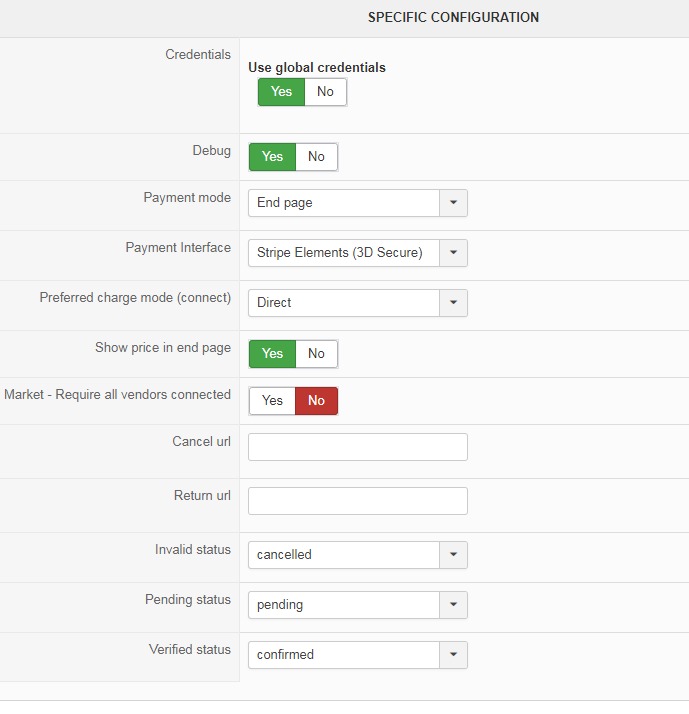
Orders with problem, get status "created" on order.
Orders with problem, get status "created" on order.
Please Log in or Create an account to join the conversation.
3 years 9 months ago #347287
by Jerome
Jerome - Obsidev.com
HikaMarket & HikaSerial developer / HikaShop core dev team.
Replied by Jerome on topic Blank page at Stripe end checkout
Hello,
Since the order is created and we can see some logs in the HikaShop payment log (even if it's a day before) ; it looks like the plugin was working.
Did you changed something ? Did you installed or update another plugin ?
The problem might not be related to Stripe plugin.
You can change the configuration in order to try the "checkout mode" (instead of the "end page" mode) ; so you'll get the Stripe form sooner in your workflow.
But with the current elements and without any access to your website, I'm sorry but I can't say that your problem is caused by the Stripe Plugin.
You could have an HikaShop mass action which is performing some actions when an order is created and gives the customer something similar to a blank page.
Regards,
Since the order is created and we can see some logs in the HikaShop payment log (even if it's a day before) ; it looks like the plugin was working.
Did you changed something ? Did you installed or update another plugin ?
The problem might not be related to Stripe plugin.
You can change the configuration in order to try the "checkout mode" (instead of the "end page" mode) ; so you'll get the Stripe form sooner in your workflow.
But with the current elements and without any access to your website, I'm sorry but I can't say that your problem is caused by the Stripe Plugin.
You could have an HikaShop mass action which is performing some actions when an order is created and gives the customer something similar to a blank page.
Regards,
Jerome - Obsidev.com
HikaMarket & HikaSerial developer / HikaShop core dev team.
Please Log in or Create an account to join the conversation.
3 years 9 months ago #347340
by mojweb
Replied by mojweb on topic Blank page at Stripe end checkout
Jerome, I can give you admin access. Can you help?
Please Log in or Create an account to join the conversation.
3 years 9 months ago #347343
by nicolas
Replied by nicolas on topic Blank page at Stripe end checkout
Hi,
Well, first, can you provide the URL of the shop and instructions to reproduce the issue ? It would help to better understand what's going on.
Well, first, can you provide the URL of the shop and instructions to reproduce the issue ? It would help to better understand what's going on.
Please Log in or Create an account to join the conversation.
3 years 9 months ago #347367
by mojweb
Replied by mojweb on topic Blank page at Stripe end checkout
I cant give you instructions. It hapens to one or two customers per day. I have compared all posible scenarios (shipping, coupons...).
Every day we have some customers with Stripe who get order status created. There is no error log matching with this orders.
Every day we have some customers with Stripe who get order status created. There is no error log matching with this orders.
This message contains confidential information
Please Log in or Create an account to join the conversation.
3 years 9 months ago #347368
by nicolas
Replied by nicolas on topic Blank page at Stripe end checkout
Hi,
If it works with most customers and we can't reproduce consistently the problem then it's hard to say what it could be, especially without any error message.
For the orders with the issue, if you manually confirm the order in the backend, it works fine ?
Also, you're saying "There is no error log". So far, you've provided a copy/paste from the payment log file of HikaShop and of the web server's access log file. But if someone has a completely blank page on your website, it should be a PHP Fatal error which would be logged and it would be logged in the PHP error log, not the payment log file of HikaShop nor the web server's access log file. Could you check the PHP error log of your hosting for Fatal error messages ?
If it works with most customers and we can't reproduce consistently the problem then it's hard to say what it could be, especially without any error message.
For the orders with the issue, if you manually confirm the order in the backend, it works fine ?
Also, you're saying "There is no error log". So far, you've provided a copy/paste from the payment log file of HikaShop and of the web server's access log file. But if someone has a completely blank page on your website, it should be a PHP Fatal error which would be logged and it would be logged in the PHP error log, not the payment log file of HikaShop nor the web server's access log file. Could you check the PHP error log of your hosting for Fatal error messages ?
Please Log in or Create an account to join the conversation.
3 years 9 months ago - 3 years 9 months ago #347377
by mojweb
Replied by mojweb on topic Blank page at Stripe end checkout
I know, we cant find a reason for 2 years now.
What you mean with For the orders with the issue, if you manually confirm the order in the backend, it works fine ?
I can manualy confirm order, but why? Order is not payed - customer can not process payment.
PHP error log shows nothing on that time of orders. This is only thing I found.
What you mean with For the orders with the issue, if you manually confirm the order in the backend, it works fine ?
I can manualy confirm order, but why? Order is not payed - customer can not process payment.
PHP error log shows nothing on that time of orders. This is only thing I found.
Code:
[24-Nov-2022 21:52:56 Europe/Ljubljana] PHP Warning: Invalid argument supplied for foreach() in /home/xxx/public_html/administrator/components/com_hikashop/helpers/checkout.php on line 399
[24-Nov-2022 21:52:56 Europe/Ljubljana] PHP Warning: count(): Parameter must be an array or an object that implements Countable in /home/xxx/public_html/administrator/components/com_hikashop/helpers/checkout.php on line 486
[24-Nov-2022 21:52:56 Europe/Ljubljana] PHP Warning: Creating default object from empty value in /home/xxx/public_html/administrator/components/com_hikashop/helpers/checkout/fields.php on line 115
[24-Nov-2022 21:52:56 Europe/Ljubljana] PHP Warning: Invalid argument supplied for foreach() in /home/xxx/public_html/administrator/components/com_hikashop/helpers/checkout/shipping.php on line 115
[24-Nov-2022 21:52:56 Europe/Ljubljana] PHP Warning: Invalid argument supplied for foreach() in /home/xxx/public_html/administrator/components/com_hikashop/classes/cart.php on line 2369
[24-Nov-2022 21:52:56 Europe/Ljubljana] PHP Warning: Invalid argument supplied for foreach() in /home/xxx/public_html/administrator/components/com_hikashop/classes/cart.php on line 2298
[06-Dec-2022 09:19:55 Europe/Ljubljana] PHP Warning: Invalid argument supplied for foreach() in /home/xxx/public_html/administrator/components/com_hikashop/helpers/checkout.php on line 399
[06-Dec-2022 09:19:55 Europe/Ljubljana] PHP Warning: count(): Parameter must be an array or an object that implements Countable in /home/xxx/public_html/administrator/components/com_hikashop/helpers/checkout.php on line 486
[06-Dec-2022 09:19:55 Europe/Ljubljana] PHP Warning: Creating default object from empty value in /home/xxx/public_html/administrator/components/com_hikashop/helpers/checkout/fields.php on line 115
[06-Dec-2022 09:19:55 Europe/Ljubljana] PHP Warning: Invalid argument supplied for foreach() in /home/xxx/public_html/administrator/components/com_hikashop/helpers/checkout/shipping.php on line 115
[06-Dec-2022 09:19:55 Europe/Ljubljana] PHP Warning: Invalid argument supplied for foreach() in /home/xxx/public_html/administrator/components/com_hikashop/classes/cart.php on line 2369
[06-Dec-2022 09:19:55 Europe/Ljubljana] PHP Warning: Invalid argument supplied for foreach() in /home/xxx/public_html/administrator/components/com_hikashop/classes/cart.php on line 2298
[06-Dec-2022 09:20:24 Europe/Ljubljana] PHP Warning: Invalid argument supplied for foreach() in /home/xxx/public_html/administrator/components/com_hikashop/helpers/checkout/shipping.php on line 115
[06-Dec-2022 09:20:24 Europe/Ljubljana] PHP Warning: Invalid argument supplied for foreach() in /home/xxx/public_html/administrator/components/com_hikashop/classes/cart.php on line 2369
[06-Dec-2022 09:20:24 Europe/Ljubljana] PHP Warning: Invalid argument supplied for foreach() in /home/xxx/public_html/administrator/components/com_hikashop/classes/cart.php on line 2298
Last edit: 3 years 9 months ago by mojweb.
Please Log in or Create an account to join the conversation.
3 years 9 months ago #347378
by nicolas
Replied by nicolas on topic Blank page at Stripe end checkout
Hi,
Wow, it's been 2 years ? Then, it would be great to be able to talk with customers with the issue in order to better understand the situation. For example, ask them to get a screenshot of the whole screen (that way we can see the URL of the page where it stops and whether the page is completely blank or only the area below the menu is blank, or something else). Also, if you can have them open the console of their browser on that page and do a screenshot of what is there it would be great. Maybe it's linked to a javascript error (and thus that would explain why you don't get any PHP error).
Also, could you try replicate everything the user does: use the same browser, add the same products in the cart, use the same addresses, select the same shipping method/ coupon, and see if you get the error ?
The lines your provided indeed come from the PHP error log. So if it was a fatal error causing the blank page it would appear there. Since there are no fatal errors, just warnings you can ignore, it's not coming from there.
Wow, it's been 2 years ? Then, it would be great to be able to talk with customers with the issue in order to better understand the situation. For example, ask them to get a screenshot of the whole screen (that way we can see the URL of the page where it stops and whether the page is completely blank or only the area below the menu is blank, or something else). Also, if you can have them open the console of their browser on that page and do a screenshot of what is there it would be great. Maybe it's linked to a javascript error (and thus that would explain why you don't get any PHP error).
Also, could you try replicate everything the user does: use the same browser, add the same products in the cart, use the same addresses, select the same shipping method/ coupon, and see if you get the error ?
My bad, I was confused there.What you mean with For the orders with the issue, if you manually confirm the order in the backend, it works fine ?
I can manualy confirm order, but why? Order is not payed - customer can not process payment.
The lines your provided indeed come from the PHP error log. So if it was a fatal error causing the blank page it would appear there. Since there are no fatal errors, just warnings you can ignore, it's not coming from there.
Please Log in or Create an account to join the conversation.
3 years 9 months ago #347425
by mojweb
Replied by mojweb on topic Blank page at Stripe end checkout
It is hard to debug with customers. Most of them dont remember or cant expalin.
With some of them, we concluded that they cant enter credit card data becouse there is no form (blank page...).
This is one of them (screenshot).
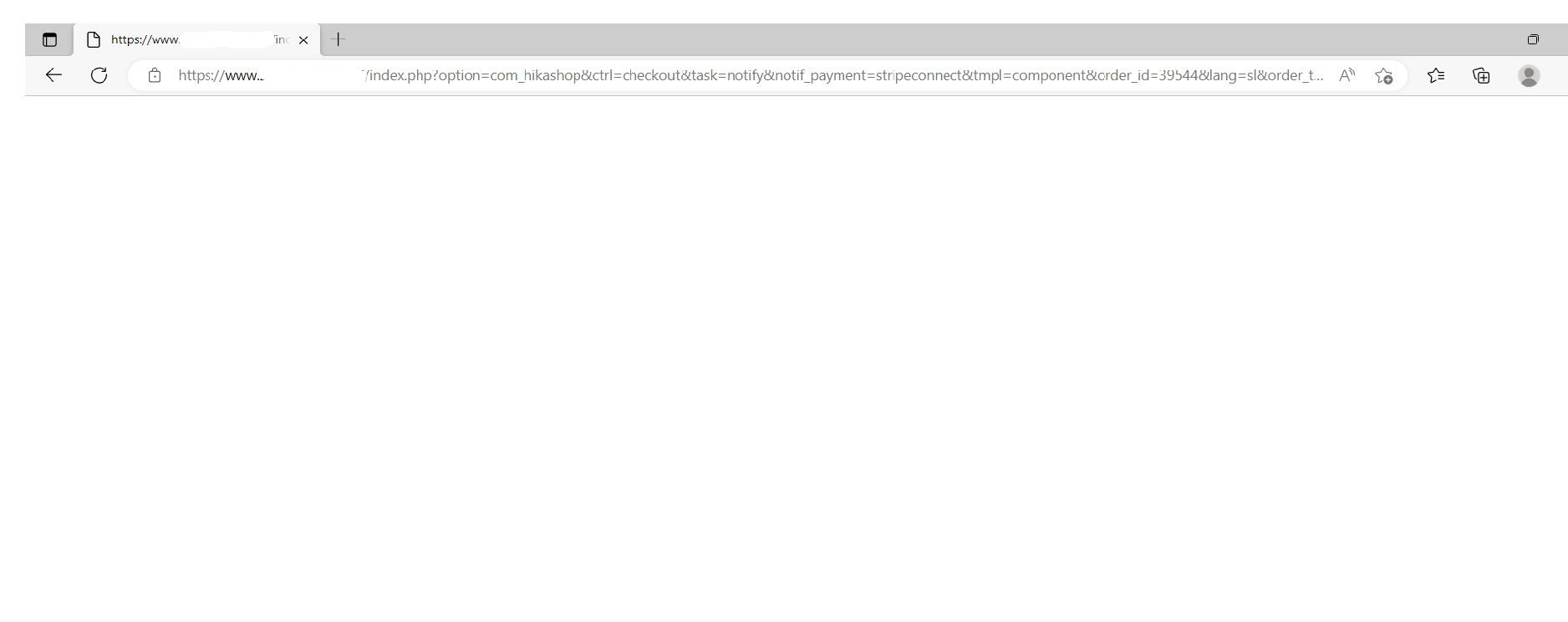
We try to replicate, but it happens to random. So any address, shipping or coupons can have that problem.
You talk about js conflicts. I notice, that mootols is loading in cart. You can see taht in server log (first atached). I dont know where is that coming from.
With some of them, we concluded that they cant enter credit card data becouse there is no form (blank page...).
This is one of them (screenshot).
We try to replicate, but it happens to random. So any address, shipping or coupons can have that problem.
You talk about js conflicts. I notice, that mootols is loading in cart. You can see taht in server log (first atached). I dont know where is that coming from.
Please Log in or Create an account to join the conversation.
3 years 9 months ago #347442
by Jerome
Jerome - Obsidev.com
HikaMarket & HikaSerial developer / HikaShop core dev team.
Replied by Jerome on topic Blank page at Stripe end checkout
Hello,
Can you please check the version of your Stripe Connect plugin ?
The URL you have is related to the "notify" URL ; but the Stripe Connect plugin is just using Ajax calls using JavaScript.
Since the payment form does have the notify URL as target, it looks like your custom has JavaScript issues and somehow submitting the form (but I would need to understand how since the button in the form is not a submit button).
Regards,
Can you please check the version of your Stripe Connect plugin ?
The URL you have is related to the "notify" URL ; but the Stripe Connect plugin is just using Ajax calls using JavaScript.
Since the payment form does have the notify URL as target, it looks like your custom has JavaScript issues and somehow submitting the form (but I would need to understand how since the button in the form is not a submit button).
Regards,
Jerome - Obsidev.com
HikaMarket & HikaSerial developer / HikaShop core dev team.
Please Log in or Create an account to join the conversation.
3 years 9 months ago - 3 years 9 months ago #347477
by mojweb
Replied by mojweb on topic Blank page at Stripe end checkout
We use stripeconnect_hikashoppayment_beta from 28.9.2022. In extension manager I see version 1.2.0.
I updated now with latest 1.2.1
For the rest I dont know what to say.
I updated now with latest 1.2.1
For the rest I dont know what to say.
Last edit: 3 years 9 months ago by mojweb. Reason: plugin update
Please Log in or Create an account to join the conversation.
3 years 9 months ago #347482
by Jerome
Jerome - Obsidev.com
HikaMarket & HikaSerial developer / HikaShop core dev team.
Replied by Jerome on topic Blank page at Stripe end checkout
Hello,
It would be interesting to know what your customer have just before having that blank page, if they can reproduce the issue, if it's working with another browser, and if they have special add-on for the browser.
As previously wrote, I will try to handle that kind of issue (which should not happen) but the root of the problem won't be solved.
If Stripe JavaScript is blocked by an add-on and some of your customers can't have the payment form ; I won't be able to fix that.
Regards,
I do think it's something related to JavaScript and some of your customers environment.Some customers have problem with Stripe checkout.
It would be interesting to know what your customer have just before having that blank page, if they can reproduce the issue, if it's working with another browser, and if they have special add-on for the browser.
As previously wrote, I will try to handle that kind of issue (which should not happen) but the root of the problem won't be solved.
If Stripe JavaScript is blocked by an add-on and some of your customers can't have the payment form ; I won't be able to fix that.
Regards,
Jerome - Obsidev.com
HikaMarket & HikaSerial developer / HikaShop core dev team.
Please Log in or Create an account to join the conversation.
Time to create page: 0.298 seconds