

- Posts: 75
- Thank you received: 3
google product category is missing
13 years 3 months ago #108608
by kubwit
google product category is missing was created by kubwit
Hallo.
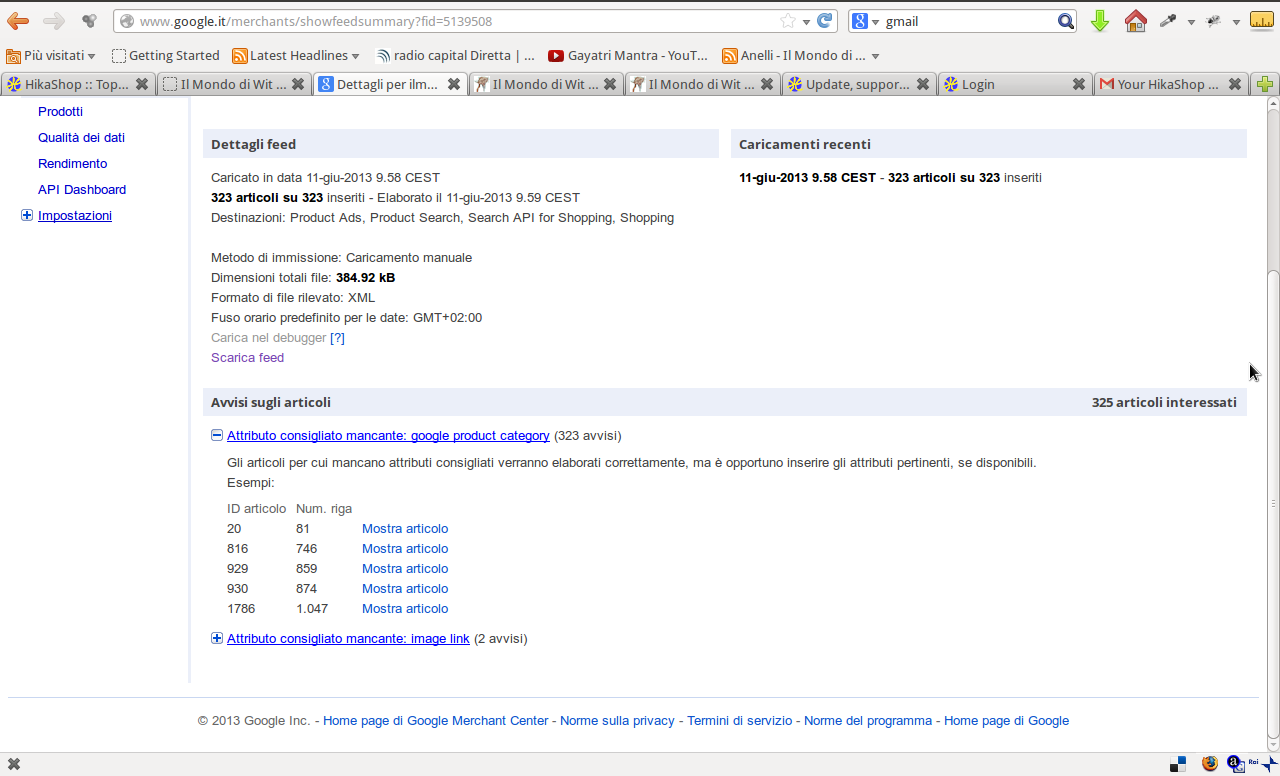
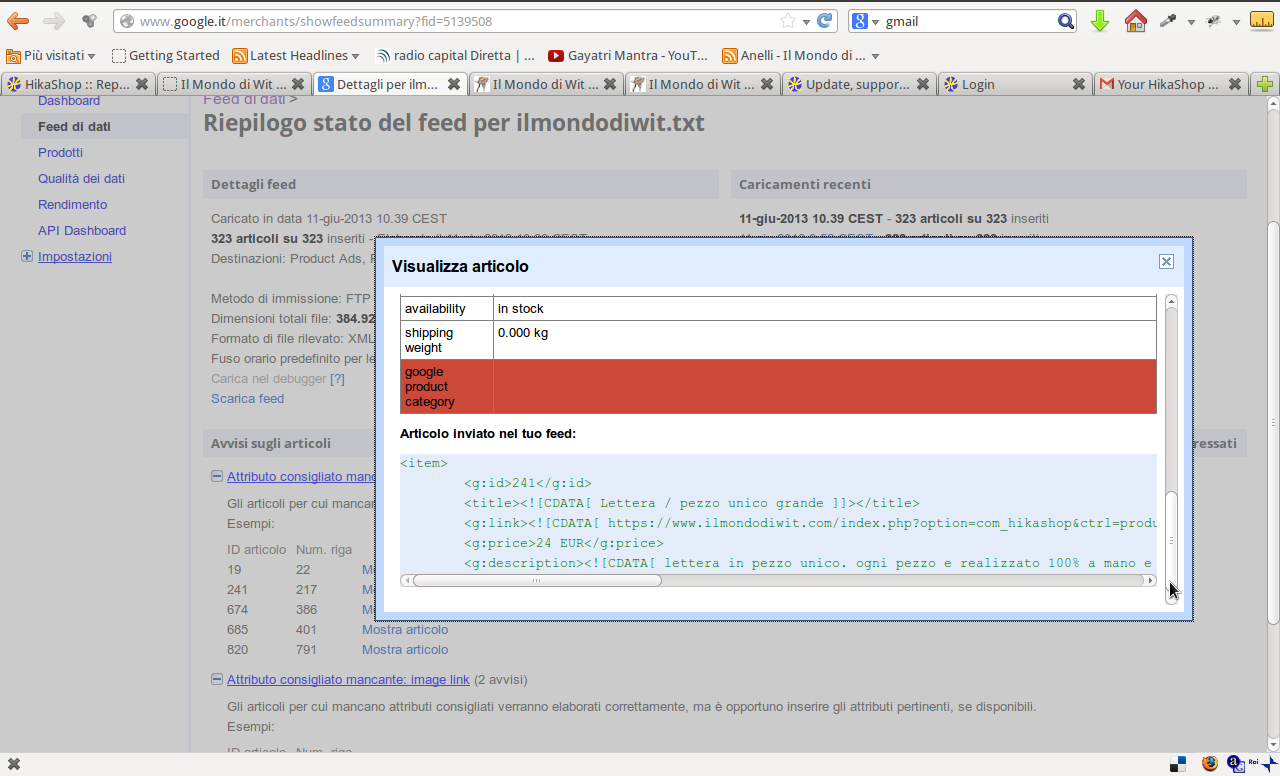
I uploaded manually the googlemerchantfile downloaded from the plugin. Google replyed that the google product category is missing on all products.
Where can i apply the category ??
Thanks for reply
I uploaded manually the googlemerchantfile downloaded from the plugin. Google replyed that the google product category is missing on all products.
Where can i apply the category ??
Thanks for reply
Please Log in or Create an account to join the conversation.

13 years 3 months ago #108640
by Eliot
Replied by Eliot on topic google product category is missing
Hi there,
Could you post a small example of the file you used with google product?
Could you post a small example of the file you used with google product?
Please Log in or Create an account to join the conversation.
13 years 3 months ago #108641
by kubwit
Replied by kubwit on topic google product category is missing
Hallo.
I have also tried to create a cron job but it told me that i have no subscription for site ilmondodiwit.com. I have buyed business edition some weeks ago.
How comes ?
I have also tried to create a cron job but it told me that i have no subscription for site ilmondodiwit.com. I have buyed business edition some weeks ago.
How comes ?
Please Log in or Create an account to join the conversation.

13 years 3 months ago - 13 years 3 months ago #108647
by Cattelan
Here is the file i downloaded.
The subscription i resolved because i didn't add the website when i downloaded the businessedition. sorry
Replied by Cattelan on topic google product category is missing
This attachment is hidden for guests.
Please log in or register to see it.
Please log in or register to see it.
Here is the file i downloaded.
The subscription i resolved because i didn't add the website when i downloaded the businessedition. sorry
Last edit: 13 years 3 months ago by Cattelan.
Please Log in or Create an account to join the conversation.
13 years 3 months ago #108652
by Cattelan
Replied by Cattelan on topic google product category is missing
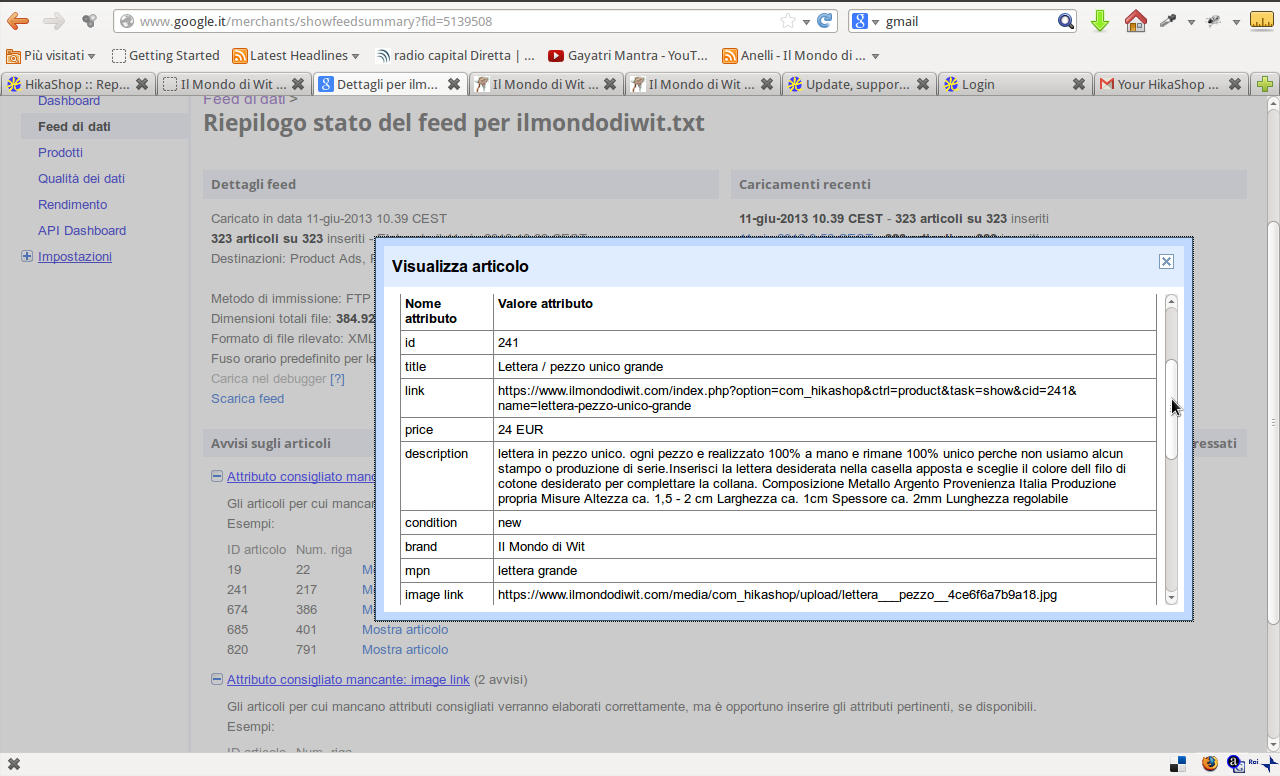
here is a screenshot of google merchants
Please Log in or Create an account to join the conversation.
13 years 3 months ago #108672
by Cattelan
Replied by Cattelan on topic google product category is missing
wouldn't it easy to add the possibility to add the field when you add the product category? and the general category in the shop settings or for who has multiple main categorys like explained here:
google product categorys
So for an single category shop like mine you could set in the shop settings:
and then each defined under category
and then
and so one.
A mall which many product types leafes it blank and specifies in the product categories
Thanks
So for an single category shop like mine you could set in the shop settings:
Code:
Apparel & Accessories
Code:
Jewelry
Code:
rings
Code:
bracelets
and so one.
A mall which many product types leafes it blank and specifies in the product categories
Thanks
Please Log in or Create an account to join the conversation.
13 years 3 months ago #108708
by Eliot
Replied by Eliot on topic google product category is missing
Could you tell me exactly what your problem is?
Actually, the category tag used by google is just made to fit their specification and help them to determine the product code needed (like UPC, EAN...).
But your product categories are already specified by our plugin in the "type" tag, which is (as said on this page support.google.com/merchants/answer/1884...en&ref_topic=2473824 your categories of the item).
To sum up, the category tag isn't necessary if you don't sell goods in one of this free categories: 'Apparel & Accessories', 'Media', and 'Software'.
If your product aren't in one of these categories, the category tag is optional.
Actually, the category tag used by google is just made to fit their specification and help them to determine the product code needed (like UPC, EAN...).
But your product categories are already specified by our plugin in the "type" tag, which is (as said on this page support.google.com/merchants/answer/1884...en&ref_topic=2473824 your categories of the item).
To sum up, the category tag isn't necessary if you don't sell goods in one of this free categories: 'Apparel & Accessories', 'Media', and 'Software'.
If your product aren't in one of these categories, the category tag is optional.
Please Log in or Create an account to join the conversation.
13 years 3 months ago - 13 years 3 months ago #108725
by Cattelan
Replied by Cattelan on topic google product category is missing
Hallo. Thanks for reply.
There is no problem. Just i've seen that google said that the attribute was missing and i wondered how to insert it. I just wondered that there is a plugin for this and there is not the possibility to add the categorys.
I sell in the categorys 'Apparel & Accessories'. So how can i do
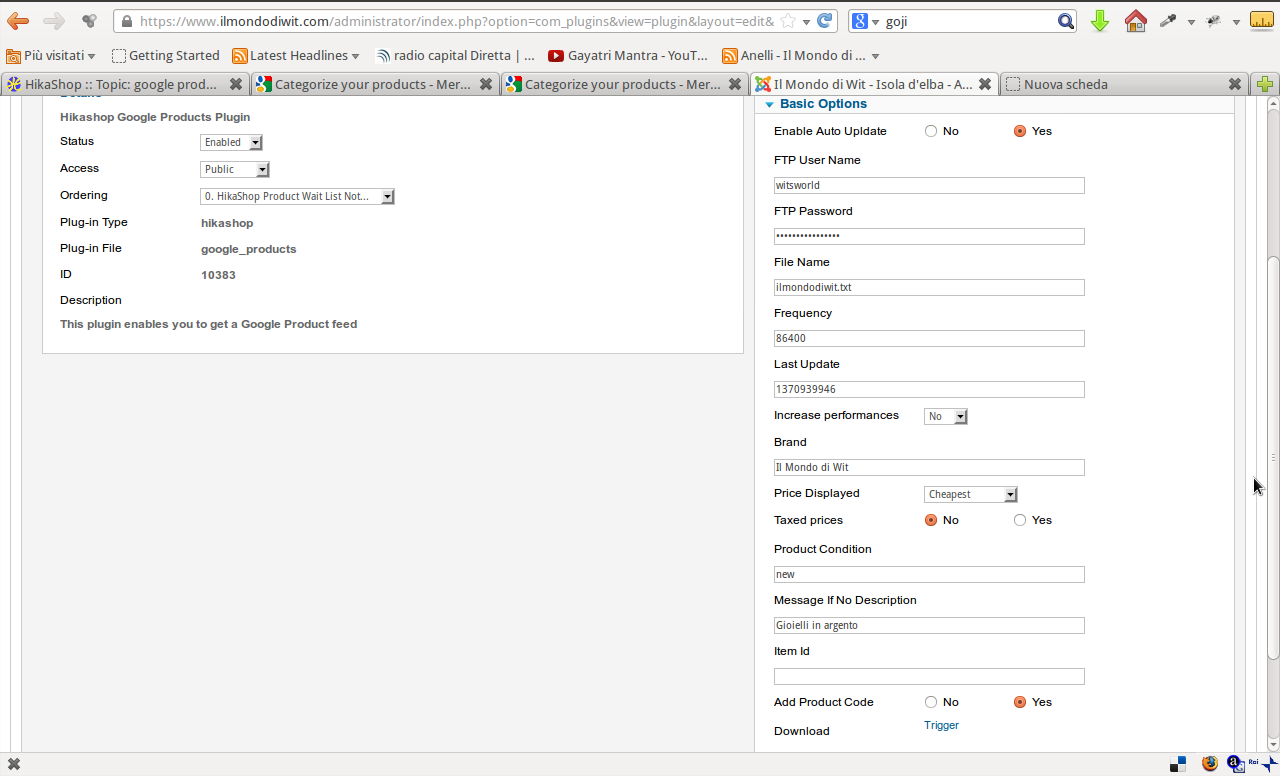 i find no tag to insert
Thanks and best regards
There is no problem. Just i've seen that google said that the attribute was missing and i wondered how to insert it. I just wondered that there is a plugin for this and there is not the possibility to add the categorys.
the category tag isn't necessary if you don't sell goods in one of this free categories: 'Apparel & Accessories',
I sell in the categorys 'Apparel & Accessories'. So how can i do
Thanks and best regards
Last edit: 13 years 3 months ago by Cattelan.
Please Log in or Create an account to join the conversation.
13 years 3 months ago #108745
by Eliot
Replied by Eliot on topic google product category is missing
Try to install this plugin and tell me if it works.
Attachment not found
Please Log in or Create an account to join the conversation.
13 years 3 months ago #108752
by Cattelan
Replied by Cattelan on topic google product category is missing
hallo.
for me it looks the same which it was already installed, enabled and confugured (like screenshot)
This is the output of the first item in the new xml file.
For me it seems nothing changed
for me it looks the same which it was already installed, enabled and confugured (like screenshot)
Code:
<rss version="2.0"><channel><title> Il Mondo di Wit - Isola d'elba </title><description> Creazione e vendita di gioielli d' argento oro e altri materiali preziosi e semipreziose con pietre dure e semipreziose. Tanti trucchi su Cura di gioielli e informazione su Lifestyle salute , cristalloterapia ecc. </description><link> https://www.ilmondodiwit.com/ </link><item><g:id>18</g:id><title> Bracciale Elba a Porter - Elba </title><g:link> https://www.ilmondodiwit.com/index.php?option=com_hikashop&ctrl=product&task=show&cid=18&name=bracciale-elba-a-porter-elba </g:link><g:price>32 EUR</g:price><g:description> Bracciale sportivo unisex. Questo Bracciale rappresenta i colori della bandiera elbana - rosso, bianco e oro. Il rosso viene rappresentato da rubini, il bianco dall cordino in nylon cotonato e il colore oro dall argento dorato</g:description><g:condition> new </g:condition><g:brand> Il Mondo di Wit </g:brand><g:mpn>bpap1</g:mpn><g:image_link>https://www.ilmondodiwit.com/media/com_hikashop/upload/bracciale_elba_a_4cd315a446248.jpg</g:image_link><g:product_type> "Elba a Porter" </g:product_type><g:availability>in stock</g:availability><g:shipping_weight>0.000 kg</g:shipping_weight></item>
This is the output of the first item in the new xml file.
For me it seems nothing changed
Please Log in or Create an account to join the conversation.
13 years 3 months ago #108762
by Cattelan
Replied by Cattelan on topic google product category is missing
hallo.
I looked the plugin. i don't know because i'm not able to write a single line of code and i'm not able to read. but i tried to have a look on the plugin.
i found a line
i don't know if this should get the category of the product. I saw tha all others had a line where is the
inside
but i didn't find anything for the category.
For sure that has nothing to do with it
I looked the plugin. i don't know because i'm not able to write a single line of code and i'm not able to read. but i tried to have a look on the plugin.
i found a line
Code:
//Getting path to the product => Categories
$type='';
foreach($product->categories_id as $catID){
foreach($category_path as $id=>$catPath){
if($id==$catID){
$type.='"'.$catPath['path'].'",';
}
}
}
i don't know if this should get the category of the product. I saw tha all others had a line where is the
Code:
$xml.="\t".'<g:p..........
but i didn't find anything for the category.
For sure that has nothing to do with it
Please Log in or Create an account to join the conversation.
13 years 3 months ago #108835
by Eliot
Replied by Eliot on topic google product category is missing
Did you installed the plugin I gave you?
With it you should be able to specify a category for your product in the plugin configuration.
With it you should be able to specify a category for your product in the plugin configuration.
Please Log in or Create an account to join the conversation.
13 years 3 months ago - 13 years 3 months ago #108844
by Cattelan
Replied by Cattelan on topic google product category is missing
Yes. Sorry. i didn't see the field.
I still get error:
Maybe the field description is not right ?
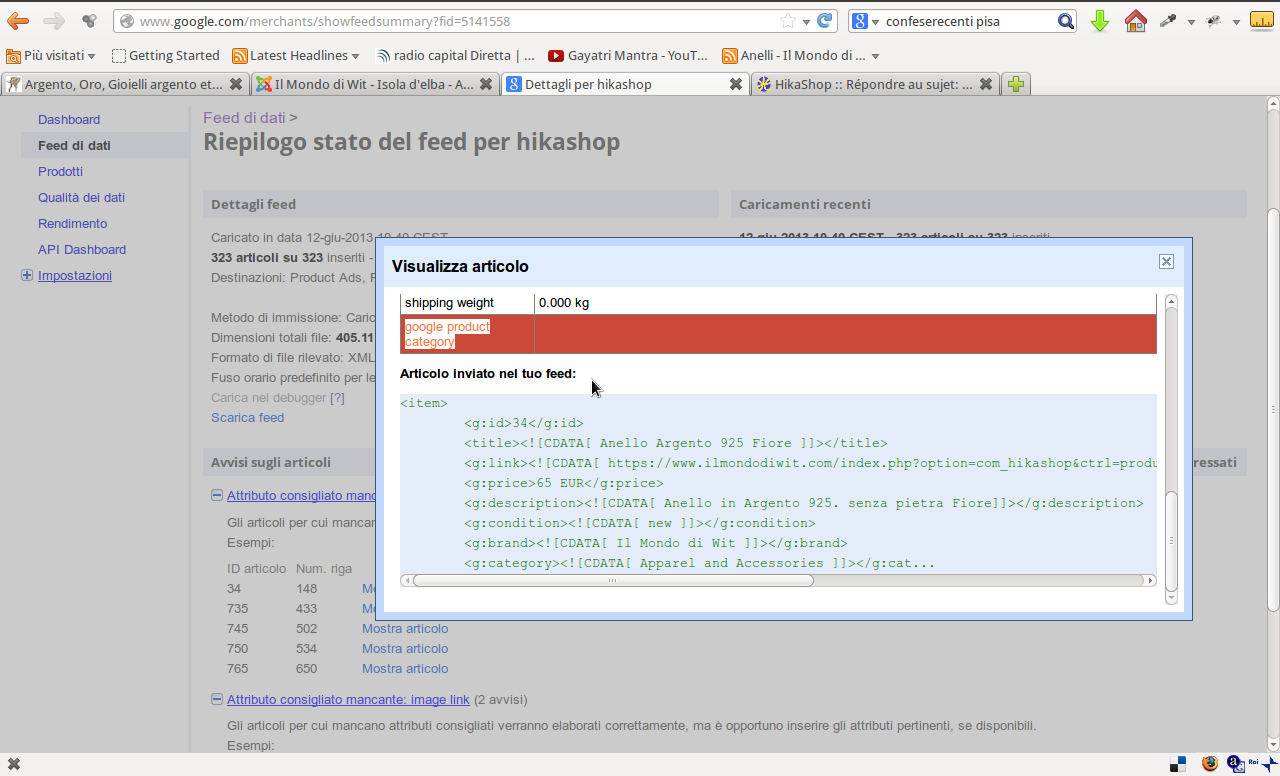
I still get error:
Code:
<g:category><![CDATA[ Apparel and Accessories ]]></g:cat...
Maybe the field description is not right ?
Last edit: 13 years 3 months ago by Cattelan.
Please Log in or Create an account to join the conversation.
13 years 3 months ago #108861
by Cattelan
Replied by Cattelan on topic google product category is missing
i changed manually the .xml file and i changed the
with
and now it seems to accept the xml file without complaining that something is missing.
I also change the line
to
and now the output is ok and accepted by google.
Is there anything you could do about adding the hikashop behind the google_product_category.
Because there is some specification on google:
Code:
g:category
Code:
g:google_product_category
and now it seems to accept the xml file without complaining that something is missing.
I also change the line
Code:
//add the brand if specify
if(!empty($plugin->params['category'])){
$column = $plugin->params['category'];
if(isset($product->$column)){
$text = $product->$column;
}else{
$text = $column;
}
$xml.="\t".'<g:category><![CDATA[ '.$text.' ]]></g:category>'."\n";
}
Code:
//add the brand if specify
if(!empty($plugin->params['category'])){
$column = $plugin->params['category'];
if(isset($product->$column)){
$text = $product->$column;
}else{
$text = $column;
}
$xml.="\t".'<g:google_product_category><![CDATA[ '.$text.' ]]></g:google_product_category>'."\n";
}
and now the output is ok and accepted by google.
Is there anything you could do about adding the hikashop behind the google_product_category.
Because there is some specification on google:
Examples of ‘google product category’ submissions:
Leggings fall under the 'Apparel & Accessories > Clothing' category specified above. When submitting leggings:
Acceptable categories:
'Apparel & Accessories > Clothing'
'Apparel & Accessories > Clothing' > Pants'
'Apparel & Accessories > Clothing' > Pants > Leggings'
Invalid categories
'Apparel & Accessories' !!!
Thanks for reply
Failing to provide any 'google product category'
Please Log in or Create an account to join the conversation.
13 years 3 months ago #108883
by Eliot
Replied by Eliot on topic google product category is missing
Sorry about this mistake, it's fixed.
I don't understand what your mean by "adding the hikashop behind the google_product_category" since you can now set whatever you in the plugin configuration.
I don't understand what your mean by "adding the hikashop behind the google_product_category" since you can now set whatever you in the plugin configuration.
Please Log in or Create an account to join the conversation.
13 years 3 months ago #108914
by Cattelan
That's right. I can set what i want. But the plugin provides the general category -> means for example
Apparel & Accessories
But this is for EVERY product of the shop. I'm ,for example, running category shop in this category.
Like google explains
So if i set for example Apparel & Accessories in the plugin it does not add the categorys for example 'Clothing' which i set in the product category in the shop article settings.
Another example.
I set in the plugin Apparel & Accessories -> so every product gets the google_product_category Apparel & Accessories
I have in my shop the product categorys
-> Rings
-> Necklaces
-> Bracelets
ecc
Second the google directives all my products could be good in Apparel & Accessories > jewelry
But it would be better in:
Apparel & Accessories (set in plugin)> jewelry (set in plugin)> rings (comes from DB $category)
Apparel & Accessories (set in plugin)> jewelry (set in plugin)> bracelets (comes from DB $category)
Apparel & Accessories (set in plugin)> jewelry (set in plugin)> Necklaces (comes from DB $category)
I hope i explained better.
Maybe it is interesting for you to put in a further release.
If you want me to test it let me know
Thanks and best regards
Replied by Cattelan on topic google product category is missing
I don't understand what your mean by "adding the hikashop behind the google_product_category" since you can now set whatever you in the plugin configuration.
That's right. I can set what i want. But the plugin provides the general category -> means for example
Apparel & Accessories
But this is for EVERY product of the shop. I'm ,for example, running category shop in this category.
Like google explains
Acceptable categories:
'Apparel & Accessories > Clothing'
'Apparel & Accessories > Clothing' > Pants'
'Apparel & Accessories > Clothing' > Pants > Leggings'
Invalid categories
'Apparel & Accessories' !!!
So if i set for example Apparel & Accessories in the plugin it does not add the categorys for example 'Clothing' which i set in the product category in the shop article settings.
Another example.
I set in the plugin Apparel & Accessories -> so every product gets the google_product_category Apparel & Accessories
I have in my shop the product categorys
-> Rings
-> Necklaces
-> Bracelets
ecc
Second the google directives all my products could be good in Apparel & Accessories > jewelry
But it would be better in:
Apparel & Accessories (set in plugin)> jewelry (set in plugin)> rings (comes from DB $category)
Apparel & Accessories (set in plugin)> jewelry (set in plugin)> bracelets (comes from DB $category)
Apparel & Accessories (set in plugin)> jewelry (set in plugin)> Necklaces (comes from DB $category)
I hope i explained better.
Maybe it is interesting for you to put in a further release.
If you want me to test it let me know
Thanks and best regards
Please Log in or Create an account to join the conversation.
13 years 3 months ago #108918
by Eliot
Replied by Eliot on topic google product category is missing
Indeed, this is a legitimate request  .
.
Actually, you can already do that with the plugin I gave you, waht you ahve to do is to create a product custom field with the type "text" (for example named google_product_category).
Then edit your product and give this field the desired value (Apparel & Accessories > jewelry).
Finally, in the google product plugin, just set the category field to the custom field name (here, google_product_category).
In this case, the plugin will look for each product if they have this custom field, if yes, the custom field will be used. If no, it will use it name.
I hope it's clear enough
.Actually, you can already do that with the plugin I gave you, waht you ahve to do is to create a product custom field with the type "text" (for example named google_product_category).
Then edit your product and give this field the desired value (Apparel & Accessories > jewelry).
Finally, in the google product plugin, just set the category field to the custom field name (here, google_product_category).
In this case, the plugin will look for each product if they have this custom field, if yes, the custom field will be used. If no, it will use it name.
I hope it's clear enough
The following user(s) said Thank You: Cattelan
Please Log in or Create an account to join the conversation.
13 years 3 months ago #108919
by Cattelan
Replied by Cattelan on topic google product category is missing
Yes !!! Very NICE !! Thanks. I'll try and then i reply
Regards
Regards
Please Log in or Create an account to join the conversation.
13 years 3 months ago - 13 years 3 months ago #108921
by Cattelan
Replied by Cattelan on topic google product category is missing
You said to set the custom field for the product ?
Why not the Category? So you set it once and not for every product.
I made a custom field for the category
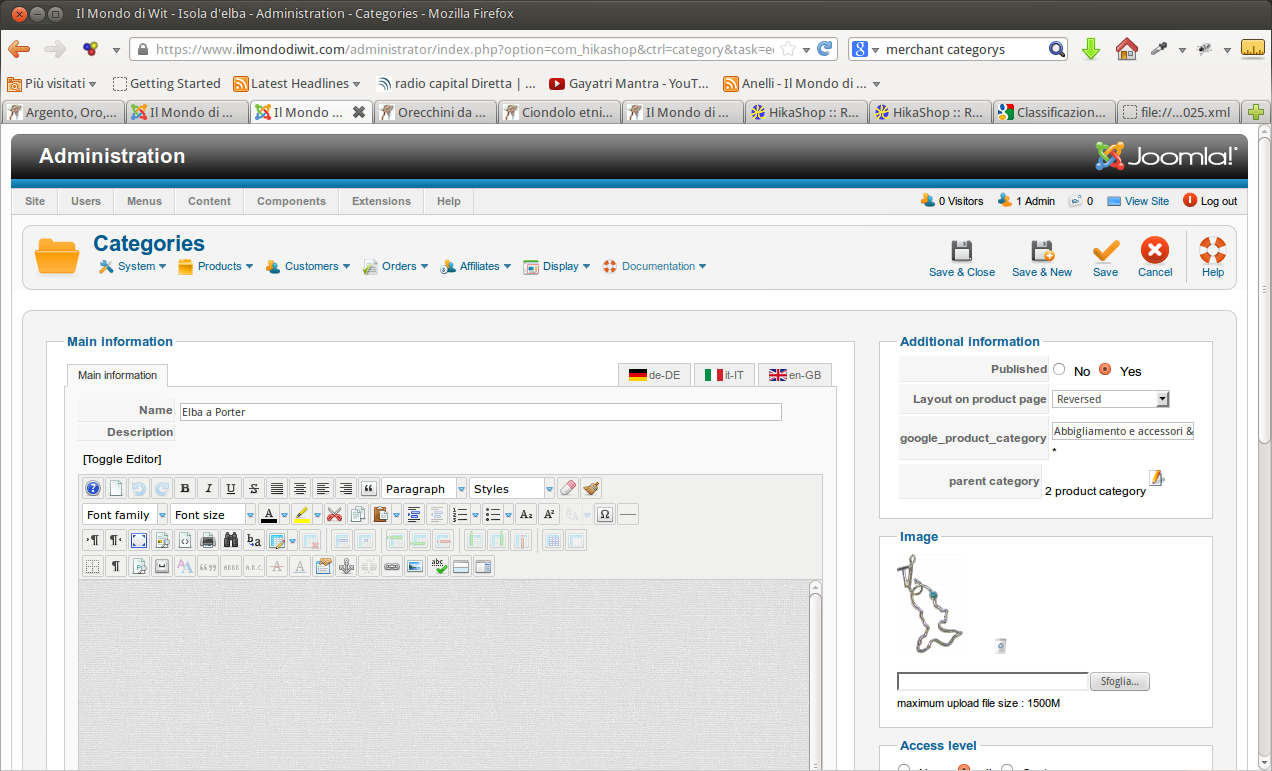
I suppose that it don't work with the plugin
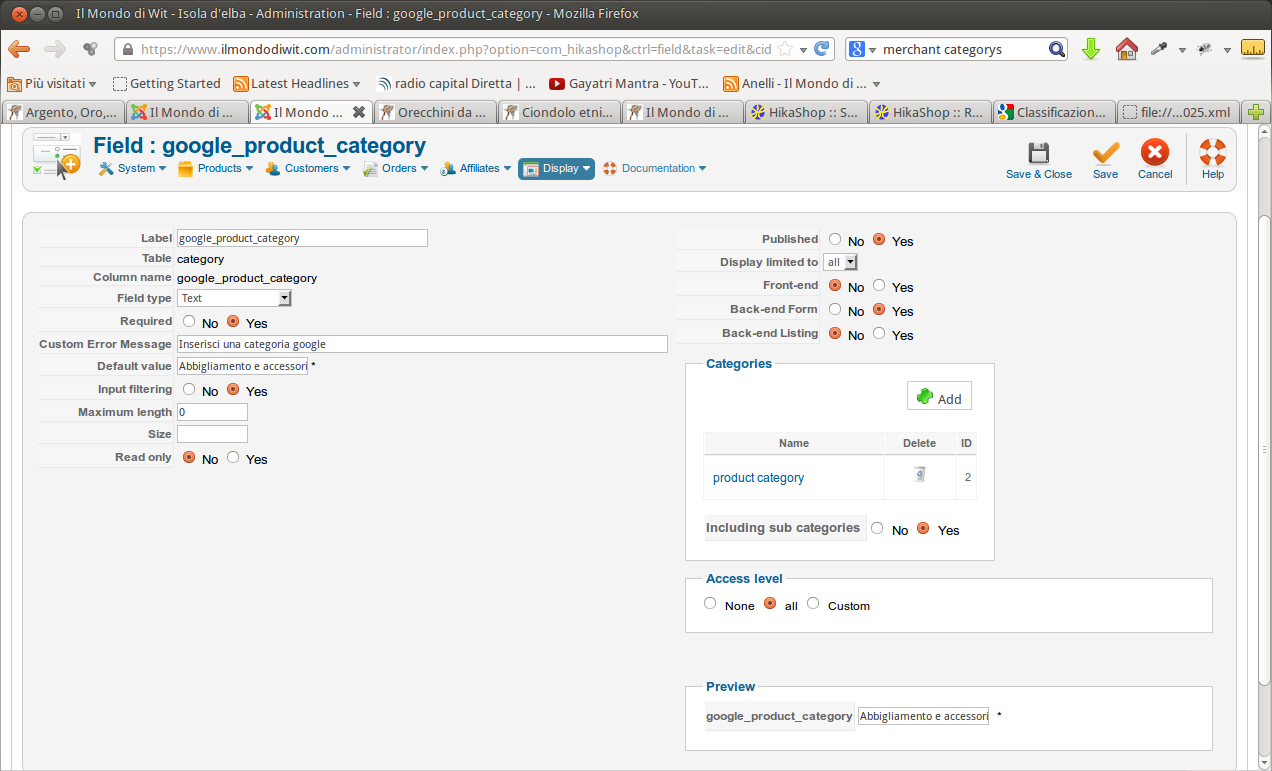
Why not the Category? So you set it once and not for every product.
I made a custom field for the category
I suppose that it don't work with the plugin
Code:
<item><g:id>18</g:id><title> Bracciale Elba a Porter - Elba </title><g:link> https://www.ilmondodiwit.com/index.php?option=com_hikashop&ctrl=product&task=show&cid=18&name=bracciale-elba-a-porter-elba </g:link><g:price>32 EUR</g:price><g:description> Bracciale sportivo unisex. Questo Bracciale rappresenta i colori della bandiera elbana - rosso, bianco e oro. Il rosso viene rappresentato da rubini, il bianco dall cordino in nylon cotonato e il colore oro dall argento dorato</g:description><g:condition> new </g:condition><g:brand> Il Mondo di Wit </g:brand><g:google_product_category> here, google_product_category </g:google_product_category><g:mpn>bpap1</g:mpn><g:image_link>https://www.ilmondodiwit.com/media/com_hikashop/upload/bracciale_elba_a_4cd315a446248.jpg</g:image_link><g:product_type> "Elba a Porter" </g:product_type><g:availability>in stock</g:availability><g:shipping_weight>0.000 kg</g:shipping_weight></item>
Last edit: 13 years 3 months ago by Cattelan.
Please Log in or Create an account to join the conversation.
13 years 3 months ago #108927
by Eliot
Replied by Eliot on topic google product category is missing
This can't work in the way the plugin has been made.
I don't think it's a good solution since the gdata ask only for one category and your products can have more than one category.
So if your product are in 2 different categories and have 2 different custom field you don't know which one to choose.
Prefer the product custom field it's a better solution.
I don't think it's a good solution since the gdata ask only for one category and your products can have more than one category.
So if your product are in 2 different categories and have 2 different custom field you don't know which one to choose.
Prefer the product custom field it's a better solution.
Please Log in or Create an account to join the conversation.
Time to create page: 0.357 seconds