

- Posts: 36
- Thank you received: 2
Hikashop - USPS Plugin
13 years 1 month ago #118934
by heart0
Hikashop - USPS Plugin was created by heart0
-
www.tammytrent.com/store
-- HikaShop version -- : HikaShop Business: 2.2.0
-- Joomla version -- .1.5
.1.5
-- PHP version -- : 5.3.3
I'm a Pro Member at Ostraining.com and Nick spent quite a bit of time this morning trouble shooting this for me and he couldn't find out what's causing it. So, it said it must be a bug...and told me to contact you
I have the USPS Plugin all set up and the USPS plugin is published...but when I check out...it's saying there are no shipping options. So, I have a manual shipping plugin set up and that's working fine. But I can't get the USPS one to showup...
-- HikaShop version -- : HikaShop Business: 2.2.0
-- Joomla version --
.1.5-- PHP version -- : 5.3.3
I'm a Pro Member at Ostraining.com and Nick spent quite a bit of time this morning trouble shooting this for me and he couldn't find out what's causing it. So, it said it must be a bug...and told me to contact you
I have the USPS Plugin all set up and the USPS plugin is published...but when I check out...it's saying there are no shipping options. So, I have a manual shipping plugin set up and that's working fine. But I can't get the USPS one to showup...
Please Log in or Create an account to join the conversation.

13 years 1 month ago #118953
by nicolas
Replied by nicolas on topic Hikashop - USPS Plugin
The USPS plugin is working fine, so it has to be a configuration issue.
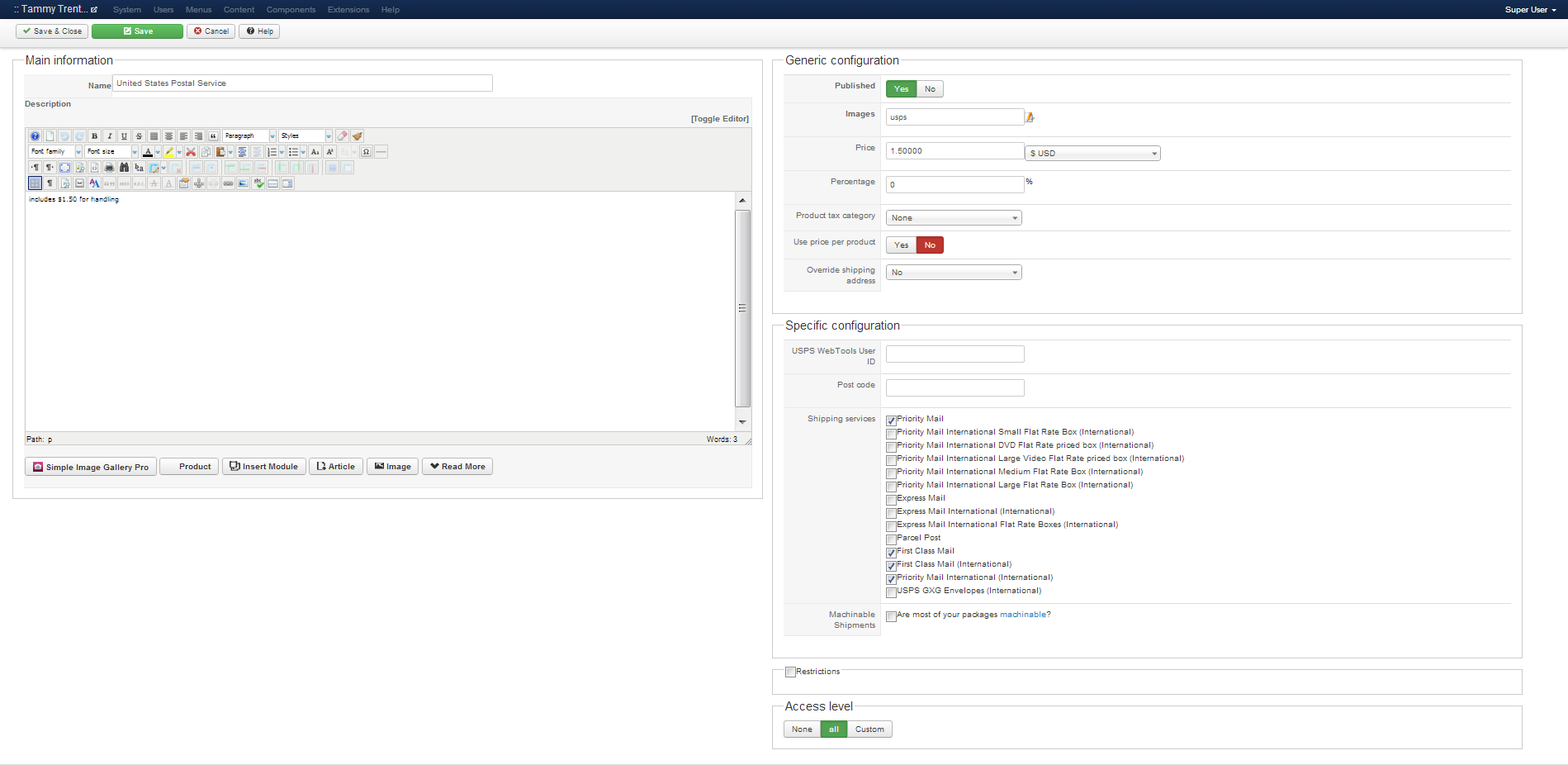
Please provide a screenshot of your USPS plugin options (you can remove the credentials).
Please provide a screenshot of your USPS plugin options (you can remove the credentials).
Please Log in or Create an account to join the conversation.
13 years 1 month ago #119075
by heart0
Replied by heart0 on topic Hikashop - USPS Plugin
Here you go. I took out my web tools ID and zip code.
Please Log in or Create an account to join the conversation.
13 years 1 month ago #119093
by nicolas
Replied by nicolas on topic Hikashop - USPS Plugin
These settings are fine. Please make sure that you entered a weight and dimensions for your products.
Then, if you publish only the USPS plugin and unpublish the other shipping methods, you should see an error message of why you don't see the USPS methods once you're logged on your checkout (after entering/selecting your address).
That will tell you what's going on.
If you don't see that error message, it's possible that your template is not displaying error messages:
www.hikashop.com/support/documentation/6...tibility-issues.html
Then, if you publish only the USPS plugin and unpublish the other shipping methods, you should see an error message of why you don't see the USPS methods once you're logged on your checkout (after entering/selecting your address).
That will tell you what's going on.
If you don't see that error message, it's possible that your template is not displaying error messages:
www.hikashop.com/support/documentation/6...tibility-issues.html
Please Log in or Create an account to join the conversation.
13 years 3 weeks ago #121872
by heart0
Replied by heart0 on topic Hikashop - USPS Plugin
The error it's giving to me when I unpublish alll other shipping methods and only have the USPS one published is this:
×
Message
No shipping method found
×
Message
No shipping method found
Please Log in or Create an account to join the conversation.

Less
More
- Posts: 12953
- Thank you received: 1778
13 years 3 weeks ago #121881
by Mohamed Thelji
Replied by Mohamed Thelji on topic Hikashop - USPS Plugin
Hi,
Firstly, can you follow each step of the "shipping methods" section of the FAQ ? And then if your shipping method steal doesn't show, can you send me a temporary access to your back-end through a private message ?
Firstly, can you follow each step of the "shipping methods" section of the FAQ ? And then if your shipping method steal doesn't show, can you send me a temporary access to your back-end through a private message ?
Please Log in or Create an account to join the conversation.
13 years 3 weeks ago #121922
by heart0
Replied by heart0 on topic Hikashop - USPS Plugin
Hi - I looked through it all..and I have done everything... I'll send you a private message with my back-end access info.
Please Log in or Create an account to join the conversation.
Less
More
- Posts: 12953
- Thank you received: 1778
13 years 3 weeks ago #121953
by Mohamed Thelji
Replied by Mohamed Thelji on topic Hikashop - USPS Plugin
The problem was coming from your checkout workflow, have set the shipping step before address and login, so your website wasn't able to send the delivery address to the USPS platform.
It should works fine now.
It should works fine now
. Please Log in or Create an account to join the conversation.
13 years 3 weeks ago #121981
by heart0
Replied by heart0 on topic Hikashop - USPS Plugin
YOU ROCK!! Thank you so much!!
Thank you so much!! Please Log in or Create an account to join the conversation.
13 years 3 weeks ago #122011
by flabango
Replied by flabango on topic Hikashop - USPS Plugin
Hello, I'm getting the same error. I can get the manual shipping plugin to show up but not this one. I also tried moving the shipping step in my checkout workflow before address and login. I've went over the FAQs page and everything is in order. I've tried everything I can think of.
Will you please check into this for me? Let me know if you need an admin login.
lyceumtrainingcenter.com/shop
If relevant, I'm using the PayPal Pro payment plugin. Thanks
Will you please check into this for me? Let me know if you need an admin login.
lyceumtrainingcenter.com/shop
If relevant, I'm using the PayPal Pro payment plugin. Thanks
Please Log in or Create an account to join the conversation.
Less
More
- Posts: 12953
- Thank you received: 1778
13 years 3 weeks ago #122085
by Mohamed Thelji
Replied by Mohamed Thelji on topic Hikashop - USPS Plugin
Hi,
Firstly, are you sure that your products have weight and dimensions ? Can you send me a screenshot of how did you configured your USPS shipping method, and of how are you setting your delivery address through your checkout process ?
Thanks.
Firstly, are you sure that your products have weight and dimensions ? Can you send me a screenshot of how did you configured your USPS shipping method, and of how are you setting your delivery address through your checkout process ?
Thanks.
Please Log in or Create an account to join the conversation.
13 years 3 weeks ago #122104
by flabango
Replied by flabango on topic Hikashop - USPS Plugin
So I have weights entered for all the products but not dimensions. Do I need dimensions too? I thought only weights were necessary.
Here are the screen shots...
checkout configuration
awesomescreenshot.com/0151oiv2a6
USPS Shipping Method configuration (user id removed)
awesomescreenshot.com/0881oiwn1d
Here are the screen shots...
checkout configuration
awesomescreenshot.com/0151oiv2a6
USPS Shipping Method configuration (user id removed)
awesomescreenshot.com/0881oiwn1d
Please Log in or Create an account to join the conversation.
Less
More
- Posts: 12953
- Thank you received: 1778
13 years 3 weeks ago #122109
by Mohamed Thelji
Replied by Mohamed Thelji on topic Hikashop - USPS Plugin
Ok, Can I have a link to your website for testing purpose ? .
. Please Log in or Create an account to join the conversation.
13 years 3 weeks ago #122110
by flabango
Replied by flabango on topic Hikashop - USPS Plugin
I included a link in my original post. Here you go. Thanks.
lyceumtrainingcenter.com/shop
lyceumtrainingcenter.com/shop
Please Log in or Create an account to join the conversation.
Less
More
- Posts: 12953
- Thank you received: 1778
13 years 3 weeks ago #122119
by Mohamed Thelji
Replied by Mohamed Thelji on topic Hikashop - USPS Plugin
I'll need more information, so can you send me a temporary access to your back-end through a private message ?
Please Log in or Create an account to join the conversation.
13 years 3 weeks ago #122128
by flabango
Replied by flabango on topic Hikashop - USPS Plugin
Private message sent
Please Log in or Create an account to join the conversation.
Less
More
- Posts: 12953
- Thank you received: 1778
13 years 3 weeks ago #122297
by Mohamed Thelji
Replied by Mohamed Thelji on topic Hikashop - USPS Plugin
The problem was coming from the fact that you have changed the address_state custom field type to text, also can you download the last Hikashop version, install it, and test it again ?
Please Log in or Create an account to join the conversation.
13 years 2 weeks ago #122774
by flabango
Replied by flabango on topic Hikashop - USPS Plugin
Ok, I installed the latest version com_hikashop_essential_2.2.1_2013-09-09.tar. I was using com_hikashop_essential_2.2.1_2013-08-30.tar
I'm not sure you if you changed the address_state custom field type back??? Cause I'm not sure how I did that or where I need to change it if you didn't already.
And I'm still getting the same error... please advise. Thanks!
I'm not sure you if you changed the address_state custom field type back??? Cause I'm not sure how I did that or where I need to change it if you didn't already.
And I'm still getting the same error... please advise. Thanks!
Please Log in or Create an account to join the conversation.
Less
More
- Posts: 12953
- Thank you received: 1778
13 years 2 weeks ago #122853
by Mohamed Thelji
Replied by Mohamed Thelji on topic Hikashop - USPS Plugin
Hi,
After some tests your problem don't seems to be coming from your shippings configuration anymore, but from Community Builder, Actually when I'm loging in, I login as a community Builder user and not a Joomla User. Hikashop use Joomla user so I can't get over the login step of your checkout workflow.
After some tests your problem don't seems to be coming from your shippings configuration anymore, but from Community Builder, Actually when I'm loging in, I login as a community Builder user and not a Joomla User. Hikashop use Joomla user so I can't get over the login step of your checkout workflow.
Please Log in or Create an account to join the conversation.
13 years 2 weeks ago - 13 years 2 weeks ago #123002
by flabango
Replied by flabango on topic Hikashop - USPS Plugin
Actually, I don't want the users to be able to register in Hika Shop. I want them to have to put there info in each time. I've been troubleshooting this so much that the settings have been jumbled around. I went in and set it for NO login or registration in the Hika shop settings. (FYI - when you registered your test account it still needed to be enabled. But now that registration in Hika Shop is disabled that shouldn't be an issue)
Will you go in and look at this again? And feel free to mess with the workflow to get it working. I'm going to a multi-page workflow anyway as soon as I get it working. Thank you!
Also, what I find confusing is when I disable login and registration in Hika Shop, it still says REGISTRATION on the shopping cart page and as well the button still says REGISTER. Shouldn't it just say NEXT or something. Is this a sign that's it's not working correctly or do I just need to change the display text in the language file?
Will you go in and look at this again? And feel free to mess with the workflow to get it working. I'm going to a multi-page workflow anyway as soon as I get it working. Thank you!
Also, what I find confusing is when I disable login and registration in Hika Shop, it still says REGISTRATION on the shopping cart page and as well the button still says REGISTER. Shouldn't it just say NEXT or something. Is this a sign that's it's not working correctly or do I just need to change the display text in the language file?
Last edit: 13 years 2 weeks ago by flabango.
Please Log in or Create an account to join the conversation.
Time to create page: 0.424 seconds