

- Posts: 20
- Thank you received: 0
HikaShop2.0.0 on Joomla 3.0 several problems
13 years 10 months ago #77943
by Ted
HikaShop2.0.0 on Joomla 3.0 several problems was created by Ted
I've encountered several problems with HikaShop2.0.0 on Joomla 3.0
- Status is not changable whether in list nor in order; a white, empty popup opens without any text
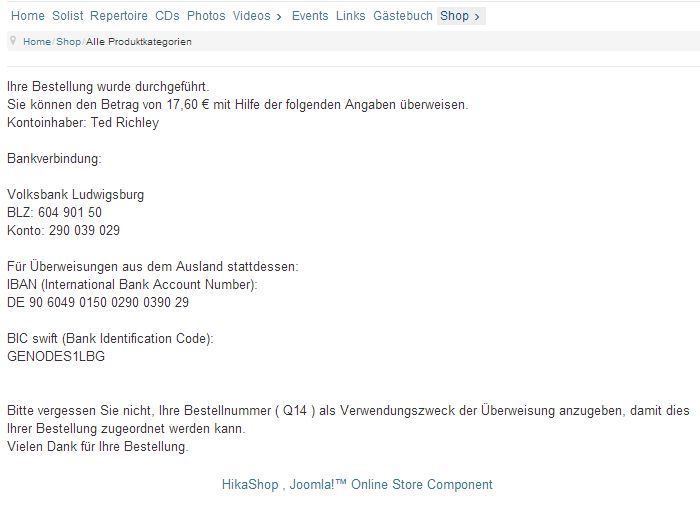
- payment mode "Prepaid" via Bank transfer: except of the confirmation page after checkout no further bank transfer information is given too the customer (nor email, nor anywhere else on shop)
- "HikaShop Cart Module" visibility in menus does work vice versa ('all but' instead of 'all chosen')
- Status is not changable whether in list nor in order; a white, empty popup opens without any text
- payment mode "Prepaid" via Bank transfer: except of the confirmation page after checkout no further bank transfer information is given too the customer (nor email, nor anywhere else on shop)
- "HikaShop Cart Module" visibility in menus does work vice versa ('all but' instead of 'all chosen')
Please Log in or Create an account to join the conversation.

13 years 10 months ago #78051
by Jerome
Jerome - Obsidev.com
HikaMarket & HikaSerial developer / HikaShop core dev team.
Also helping the HikaShop support team when having some time or couldn't sleep.
By the way, do not send me private message, use the "contact us" form instead.
Replied by Jerome on topic HikaShop2.0.0 on Joomla 3.0 several problems
Hi,
* What do you mean by "status is not changable" ? Do you mean "editable" ?
We have several forum threads which talk about it.
Default order status should no be modified, you have to use translations override if you want to change the name.
Otherwise, if you want to create new order status, we made a patch today in order to improve and fix a bug.
* I don't understand. Could you provide us a screenshot ?
* I am not sure but I can't reproduce your problem in my Joomla 3 local website.
Can you give me more details to reproduce it ?
Regards,
* What do you mean by "status is not changable" ? Do you mean "editable" ?
We have several forum threads which talk about it.
Default order status should no be modified, you have to use translations override if you want to change the name.
Otherwise, if you want to create new order status, we made a patch today in order to improve and fix a bug.
* I don't understand. Could you provide us a screenshot ?
* I am not sure but I can't reproduce your problem in my Joomla 3 local website.
Can you give me more details to reproduce it ?
Regards,
Jerome - Obsidev.com
HikaMarket & HikaSerial developer / HikaShop core dev team.
Also helping the HikaShop support team when having some time or couldn't sleep.
By the way, do not send me private message, use the "contact us" form instead.
Please Log in or Create an account to join the conversation.
13 years 10 months ago #78142
by Ted
Replied by Ted on topic HikaShop2.0.0 on Joomla 3.0 several problems
Hi Jerome, thanks for your quick response!
1. I meant, the status cannot be changed, will say, status "created" can't be changed in any of the other statuses. Trying this will result in an empty popup window (regard attached screenshot)
2. History was: When I setup module visibility "only at selected menus" an deselect homepage, the module will appear at the homepage only. If I switch to "all menus except selected" (also with homepage deselected), the module will appear at all menus except from homepage. This issue seems to be solved, maybe there was a cache problem...
3. I'll send you an PN with my page access test account. If you make an order with this test account, you'll see... Of course, nothing will delivered to you
1. I meant, the status cannot be changed, will say, status "created" can't be changed in any of the other statuses. Trying this will result in an empty popup window (regard attached screenshot)
2. History was: When I setup module visibility "only at selected menus" an deselect homepage, the module will appear at the homepage only. If I switch to "all menus except selected" (also with homepage deselected), the module will appear at all menus except from homepage. This issue seems to be solved, maybe there was a cache problem...
3. I'll send you an PN with my page access test account. If you make an order with this test account, you'll see... Of course, nothing will delivered to you
Please Log in or Create an account to join the conversation.
13 years 10 months ago #78159
by Jerome
Jerome - Obsidev.com
HikaMarket & HikaSerial developer / HikaShop core dev team.
Also helping the HikaShop support team when having some time or couldn't sleep.
By the way, do not send me private message, use the "contact us" form instead.
Replied by Jerome on topic HikaShop2.0.0 on Joomla 3.0 several problems
Hi,
1. Without a backend access with can't test it in your webstore.
With don't have such problem with HikaShop 2.0 on Joomla 3, please re-download HikaShop 2.0, it should fix the problem.
3. I think I could not reproduce the problem in your website.
Regards,
1. Without a backend access with can't test it in your webstore.
With don't have such problem with HikaShop 2.0 on Joomla 3, please re-download HikaShop 2.0, it should fix the problem.
3. I think I could not reproduce the problem in your website.
Regards,
Jerome - Obsidev.com
HikaMarket & HikaSerial developer / HikaShop core dev team.
Also helping the HikaShop support team when having some time or couldn't sleep.
By the way, do not send me private message, use the "contact us" form instead.
Please Log in or Create an account to join the conversation.
13 years 10 months ago #78165
by Ted
Replied by Ted on topic HikaShop2.0.0 on Joomla 3.0 several problems
I've received the email of you order, is without given bank transfer info. The only part where this data is shown to the customer, ist on the checkout screen, which you've postet above...
Sorry, I forgot, that with the customer account I've handed to you, you'll not even receive an email nor can change tha order status. I've created a special account for you with mor rights Regard PN
Sorry, I forgot, that with the customer account I've handed to you, you'll not even receive an email nor can change tha order status. I've created a special account for you with mor rights
Regard PN Please Log in or Create an account to join the conversation.
13 years 10 months ago #78191
by Jerome
Jerome - Obsidev.com
HikaMarket & HikaSerial developer / HikaShop core dev team.
Also helping the HikaShop support team when having some time or couldn't sleep.
By the way, do not send me private message, use the "contact us" form instead.
Replied by Jerome on topic HikaShop2.0.0 on Joomla 3.0 several problems
Hi,
The payment plugin can't modify the email content but you can do it using translation overrides or email modifications (using Essential or Business version of HikaShop).
So, you would be able to put your bank transfer info into the customer email.
Regards,
The payment plugin can't modify the email content but you can do it using translation overrides or email modifications (using Essential or Business version of HikaShop).
So, you would be able to put your bank transfer info into the customer email.
Regards,
Jerome - Obsidev.com
HikaMarket & HikaSerial developer / HikaShop core dev team.
Also helping the HikaShop support team when having some time or couldn't sleep.
By the way, do not send me private message, use the "contact us" form instead.
Please Log in or Create an account to join the conversation.
13 years 10 months ago #78198
by Ted
Replied by Ted on topic HikaShop2.0.0 on Joomla 3.0 several problems
Email notification incl. bank data: does this mean that there's now way to realize this in the starter version of hilka shop? 
Once again to item 1.
You can verify this issue by means of the special account I've sent you via PN
Once again to item 1.
I meant, the status cannot be changed, will say, status "created" can't be changed in any of the other statuses. Trying this will result in an empty popup window (regard attached screenshot)
You can verify this issue by means of the special account I've sent you via PN
Please Log in or Create an account to join the conversation.
13 years 10 months ago #78211
by Jerome
Jerome - Obsidev.com
HikaMarket & HikaSerial developer / HikaShop core dev team.
Also helping the HikaShop support team when having some time or couldn't sleep.
By the way, do not send me private message, use the "contact us" form instead.
Replied by Jerome on topic HikaShop2.0.0 on Joomla 3.0 several problems
Hi,
As I said, you can use a translation override.
Translation override does not require commercial version of HikaShop.
You can use the translation key "THANK_YOU_FOR_YOUR_ORDER" which is displayed at the end of the email.
I tried on your website and I could see the popup content. I did not change the order status but I can't have the empty popup like in your screenshot.
We would investigate it.
Regards,
As I said, you can use a translation override.
Translation override does not require commercial version of HikaShop.
You can use the translation key "THANK_YOU_FOR_YOUR_ORDER" which is displayed at the end of the email.
I tried on your website and I could see the popup content. I did not change the order status but I can't have the empty popup like in your screenshot.
We would investigate it.
Regards,
Jerome - Obsidev.com
HikaMarket & HikaSerial developer / HikaShop core dev team.
Also helping the HikaShop support team when having some time or couldn't sleep.
By the way, do not send me private message, use the "contact us" form instead.
Please Log in or Create an account to join the conversation.
13 years 10 months ago #79261
by Ted
Replied by Ted on topic HikaShop2.0.0 on Joomla 3.0 several problems
Thanks for your hint!
Concerning the other issue (order status not changeable):
I've updated to the most recent version (com_hikashop_starter_2.0.0_2012-11-28.zip) but still it doesn't work. Overmore I recognized that within orders none of these pull down buttons work correctly - an empty window appears in every case
Unfortunately this variable doesn't support <br/>, so instead I used the variable "BEST_REGARDS_CUSTOMER" which makes my bank transfer data appear at the bottom of the emailTranslation override does not require commercial version of HikaShop.
You can use the translation key "THANK_YOU_FOR_YOUR_ORDER" which is displayed at the end of the email.
Concerning the other issue (order status not changeable):
I've updated to the most recent version (com_hikashop_starter_2.0.0_2012-11-28.zip) but still it doesn't work. Overmore I recognized that within orders none of these pull down buttons work correctly - an empty window appears in every case
Please Log in or Create an account to join the conversation.
13 years 10 months ago #79275
by Jerome
Jerome - Obsidev.com
HikaMarket & HikaSerial developer / HikaShop core dev team.
Also helping the HikaShop support team when having some time or couldn't sleep.
By the way, do not send me private message, use the "contact us" form instead.
Replied by Jerome on topic HikaShop2.0.0 on Joomla 3.0 several problems
Hi,
The order status not changeable have a first fix in the latest HikaShop 2.0 but another fix is in tests for the moment.
When it would be validated, it would be include in HikaShop package.
Regards,
The order status not changeable have a first fix in the latest HikaShop 2.0 but another fix is in tests for the moment.
When it would be validated, it would be include in HikaShop package.
Regards,
Jerome - Obsidev.com
HikaMarket & HikaSerial developer / HikaShop core dev team.
Also helping the HikaShop support team when having some time or couldn't sleep.
By the way, do not send me private message, use the "contact us" form instead.
Please Log in or Create an account to join the conversation.
13 years 8 months ago #84862
by Ted
Replied by Ted on topic HikaShop2.0.0 on Joomla 3.0 several problems
Hi Jerome, not even with today's update of Hika Shop the issue with 'status not changeable' is solved 
Any new insights?
Any new insights?
Please Log in or Create an account to join the conversation.
13 years 8 months ago #84870
by Jerome
Jerome - Obsidev.com
HikaMarket & HikaSerial developer / HikaShop core dev team.
Also helping the HikaShop support team when having some time or couldn't sleep.
By the way, do not send me private message, use the "contact us" form instead.
Replied by Jerome on topic HikaShop2.0.0 on Joomla 3.0 several problems
Hi,
The popup helper is right used in the order listing. So the result popup should be a Joomla 3.0 popup, not an "old" Joomla 2.5 style popup.
We have tried with the latest published version (12/12/12) and we do not have such problem.
Without more information, without access, it would not be possible to us to understand your problem and fix it.
Did you make a override on the backend order listing ?
Regards,
The popup helper is right used in the order listing. So the result popup should be a Joomla 3.0 popup, not an "old" Joomla 2.5 style popup.
We have tried with the latest published version (12/12/12) and we do not have such problem.
Without more information, without access, it would not be possible to us to understand your problem and fix it.
Did you make a override on the backend order listing ?
Regards,
Jerome - Obsidev.com
HikaMarket & HikaSerial developer / HikaShop core dev team.
Also helping the HikaShop support team when having some time or couldn't sleep.
By the way, do not send me private message, use the "contact us" form instead.
Please Log in or Create an account to join the conversation.
13 years 8 months ago - 13 years 8 months ago #84896
by Ted
Replied by Ted on topic HikaShop2.0.0 on Joomla 3.0 several problems
No, I didn't make an override on the backend order listing, but some other overrides...
Now, please tell my what kind of access you need? Is the previous account with Admin/Mod/Plugin-Access (Jerome) I set up for you not sufficient?
Addition:
When trying to change the order status, the Web Console of Firefox shows the following:
[16:50:56.464] Leerer String an getElementById() übergeben. @ www.tedrichley.de/media/jui/js/jquery.min.js:2
[16:50:58.445] GET http://www. tedrichley .de/administrator/index.php?option=com_hikashop&ctrl=order&task=changestatus&order_id=37&tmpl=component&status=confirmed [HTTP/1.1 200 OK 1281ms]
[16:50:59.658] Fehler beim Verarbeiten des Wertes für 'height'. Deklaration ignoriert. @ http://www. tedrichley .de/administrator/index.php?option=com_hikashop&ctrl=order&order_type=sale&filter_partner=0
[16:50:59.660] NS_ERROR_XPC_BAD_CONVERT_JS: Could not convert JavaScript argument arg 0 [nsIDOMHTMLDivElement.contains] @ www.tedrichley.de/media/system/js/modal.js:15
--
[16:52:26.947] Leerer String an getElementById() übergeben. @ http://www. tedrichley .de/media/jui/js/jquery.min.js:2
Now, please tell my what kind of access you need? Is the previous account with Admin/Mod/Plugin-Access (Jerome) I set up for you not sufficient?
Addition:
When trying to change the order status, the Web Console of Firefox shows the following:
[16:50:56.464] Leerer String an getElementById() übergeben. @ www.tedrichley.de/media/jui/js/jquery.min.js:2
[16:50:58.445] GET http://www. tedrichley .de/administrator/index.php?option=com_hikashop&ctrl=order&task=changestatus&order_id=37&tmpl=component&status=confirmed [HTTP/1.1 200 OK 1281ms]
[16:50:59.658] Fehler beim Verarbeiten des Wertes für 'height'. Deklaration ignoriert. @ http://www. tedrichley .de/administrator/index.php?option=com_hikashop&ctrl=order&order_type=sale&filter_partner=0
[16:50:59.660] NS_ERROR_XPC_BAD_CONVERT_JS: Could not convert JavaScript argument arg 0 [nsIDOMHTMLDivElement.contains] @ www.tedrichley.de/media/system/js/modal.js:15
--
[16:52:26.947] Leerer String an getElementById() übergeben. @ http://www. tedrichley .de/media/jui/js/jquery.min.js:2
Last edit: 13 years 8 months ago by Ted. Reason: Correction
Please Log in or Create an account to join the conversation.
13 years 8 months ago #84946
by Jerome
Jerome - Obsidev.com
HikaMarket & HikaSerial developer / HikaShop core dev team.
Also helping the HikaShop support team when having some time or couldn't sleep.
By the way, do not send me private message, use the "contact us" form instead.
Replied by Jerome on topic HikaShop2.0.0 on Joomla 3.0 several problems
Hi,
Your log seems right, the popup content is loaded.
A backend access should help. You can send it by private message. So we would test your website and check it.
With a backend access, we would be able to update your HikaShop store with a fixed package too.
Regards,
Your log seems right, the popup content is loaded.
A backend access should help. You can send it by private message. So we would test your website and check it.
With a backend access, we would be able to update your HikaShop store with a fixed package too.
Regards,
Jerome - Obsidev.com
HikaMarket & HikaSerial developer / HikaShop core dev team.
Also helping the HikaShop support team when having some time or couldn't sleep.
By the way, do not send me private message, use the "contact us" form instead.
Please Log in or Create an account to join the conversation.
13 years 8 months ago #85084
by Ted
Replied by Ted on topic HikaShop2.0.0 on Joomla 3.0 several problems
Thanks Jerome, I've done so, see your message board
Please Log in or Create an account to join the conversation.
13 years 8 months ago #85122
by Jerome
Jerome - Obsidev.com
HikaMarket & HikaSerial developer / HikaShop core dev team.
Also helping the HikaShop support team when having some time or couldn't sleep.
By the way, do not send me private message, use the "contact us" form instead.
Replied by Jerome on topic HikaShop2.0.0 on Joomla 3.0 several problems
Hi,
I don't know why but the old popup system (from J2.5) is loaded in your backend so, the status notification popup was not call the right system.
In Chrome, the popup works fine but in Firefox, not.
So I have made a little patch in your views and I will submit a little patch for HikaShop in order to add some checks.
Regards,
I don't know why but the old popup system (from J2.5) is loaded in your backend so, the status notification popup was not call the right system.
In Chrome, the popup works fine but in Firefox, not.
So I have made a little patch in your views and I will submit a little patch for HikaShop in order to add some checks.
Regards,
Jerome - Obsidev.com
HikaMarket & HikaSerial developer / HikaShop core dev team.
Also helping the HikaShop support team when having some time or couldn't sleep.
By the way, do not send me private message, use the "contact us" form instead.
The following user(s) said Thank You: Ted
Please Log in or Create an account to join the conversation.
13 years 8 months ago #85150
by Ted
Replied by Ted on topic HikaShop2.0.0 on Joomla 3.0 several problems
GREAT! Genious! It works Thank you so much Jerome!
---
By the way, there seem to be some other problems with different browsers. In IE8 the order schedule doesn't work, even with activated cookies (I've tested on two different PCs). Moreover I can't login on IE8, but that seems to be a matter of Joomla itself...
Thank you so much Jerome!---
By the way, there seem to be some other problems with different browsers. In IE8 the order schedule doesn't work, even with activated cookies (I've tested on two different PCs). Moreover I can't login on IE8, but that seems to be a matter of Joomla itself...
Please Log in or Create an account to join the conversation.
13 years 8 months ago #85163
by Jerome
Jerome - Obsidev.com
HikaMarket & HikaSerial developer / HikaShop core dev team.
Also helping the HikaShop support team when having some time or couldn't sleep.
By the way, do not send me private message, use the "contact us" form instead.
Replied by Jerome on topic HikaShop2.0.0 on Joomla 3.0 several problems
Hi,
The order schedule ?
Yes the login part is managed by Joomla itself. It is strange that it's not working on IE8. Do you use a compatibility mode ?
Regards,
The order schedule ?
Yes the login part is managed by Joomla itself. It is strange that it's not working on IE8. Do you use a compatibility mode ?
Regards,
Jerome - Obsidev.com
HikaMarket & HikaSerial developer / HikaShop core dev team.
Also helping the HikaShop support team when having some time or couldn't sleep.
By the way, do not send me private message, use the "contact us" form instead.
Please Log in or Create an account to join the conversation.
13 years 8 months ago #85249
by Ted
Replied by Ted on topic HikaShop2.0.0 on Joomla 3.0 several problems
Neither in Normal Mode nor in Compatibility Mode it works. On two PCs of mine (WinXP/IE8) and now a customer reports the same for her PC with IE
Hint: all these PCs use german language
Hint: all these PCs use german language
Please Log in or Create an account to join the conversation.
13 years 8 months ago #85269
by Jerome
Jerome - Obsidev.com
HikaMarket & HikaSerial developer / HikaShop core dev team.
Also helping the HikaShop support team when having some time or couldn't sleep.
By the way, do not send me private message, use the "contact us" form instead.
Replied by Jerome on topic HikaShop2.0.0 on Joomla 3.0 several problems
Hi,
Well, I don't know for the login problem on Joomla but yes, it is a joomla problem.
But I still don't understand what you mean by "order schedule".
Regards,
Well, I don't know for the login problem on Joomla but yes, it is a joomla problem.
But I still don't understand what you mean by "order schedule".
Regards,
Jerome - Obsidev.com
HikaMarket & HikaSerial developer / HikaShop core dev team.
Also helping the HikaShop support team when having some time or couldn't sleep.
By the way, do not send me private message, use the "contact us" form instead.
Please Log in or Create an account to join the conversation.
Time to create page: 0.318 seconds