

- Posts: 20
- Thank you received: 0
HikaShop2.0.0 on Joomla 3.0 several problems
13 years 8 months ago #85303
by Ted
Replied by Ted on topic HikaShop2.0.0 on Joomla 3.0 several problems
In IE the same thing happens as in Firefox with cookies deactivated:
- Put one product in the basket -> ok.
- Put the next product in the basket -> the first product has gone out of the basket, only the second one is in there.
- Now going to check out -> basket ist empty.
Please Log in or Create an account to join the conversation.
13 years 8 months ago #85304
by Ted
Replied by Ted on topic HikaShop2.0.0 on Joomla 3.0 several problems
In IE the same thing happens as in Firefox with cookies deactivated:
- Put one product in the basket -> ok.
- Put the next product in the basket -> the first product has gone out of the basket, only the second one is in there.
- Now going to check out -> basket ist empty.
- Put one product in the basket -> ok.
- Put the next product in the basket -> the first product has gone out of the basket, only the second one is in there.
- Now going to check out -> basket ist empty.
Please Log in or Create an account to join the conversation.

13 years 8 months ago #85485
by Jerome
Jerome - Obsidev.com
HikaMarket & HikaSerial developer / HikaShop core dev team.
Also helping the HikaShop support team when having some time or couldn't sleep.
By the way, do not send me private message, use the "contact us" form instead.
Replied by Jerome on topic HikaShop2.0.0 on Joomla 3.0 several problems
Hi,
Do you have some cache activated ?
Regards,
Do you have some cache activated ?
Regards,
Jerome - Obsidev.com
HikaMarket & HikaSerial developer / HikaShop core dev team.
Also helping the HikaShop support team when having some time or couldn't sleep.
By the way, do not send me private message, use the "contact us" form instead.
Please Log in or Create an account to join the conversation.
13 years 8 months ago #85834
by Ted
Replied by Ted on topic HikaShop2.0.0 on Joomla 3.0 several problems
I guess no:
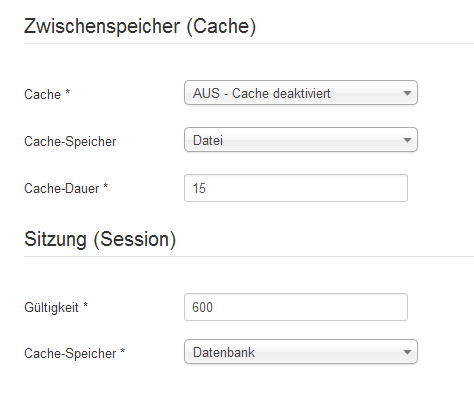
Please Log in or Create an account to join the conversation.

13 years 8 months ago #86112
by nicolas
Replied by nicolas on topic HikaShop2.0.0 on Joomla 3.0 several problems
Then, it could be that you use a CDN or that your template has caching activated or that there is an issue with your session handler (and you can try to change the session handler in the configuration of joomla).
Please Log in or Create an account to join the conversation.
13 years 8 months ago #86366
by Ted
Replied by Ted on topic HikaShop2.0.0 on Joomla 3.0 several problems
Hi Nicolas,
thanks for your response. I must admit, that I understand none of the 3 items you wrote :whistle:
What's CDN, and where can I change Theme Cache and Session Mgr?
thanks for your response. I must admit, that I understand none of the 3 items you wrote :whistle:
What's CDN, and where can I change Theme Cache and Session Mgr?
Please Log in or Create an account to join the conversation.
13 years 8 months ago #86537
by nicolas
Replied by nicolas on topic HikaShop2.0.0 on Joomla 3.0 several problems
Hi,
A CDN is an external caching service: en.wikipedia.org/wiki/Content_delivery_network
On some joomla templates there is a caching optino that can or cannot be activated. You can edit your templates options via the menu Extensions->Templates manager in Joomla.
In the main configuration page of Joomla there is the "session handler" option which can sometimes influence such things. So you can try to switch it.
A CDN is an external caching service: en.wikipedia.org/wiki/Content_delivery_network
On some joomla templates there is a caching optino that can or cannot be activated. You can edit your templates options via the menu Extensions->Templates manager in Joomla.
In the main configuration page of Joomla there is the "session handler" option which can sometimes influence such things. So you can try to switch it.
Please Log in or Create an account to join the conversation.
13 years 8 months ago #86572
by Ted
Replied by Ted on topic HikaShop2.0.0 on Joomla 3.0 several problems
Nicolas, thanks for your hints, I've checked them out:
- any combination of Cache/Session in <Configuration>-<System>, no success
- in Theme Protostar I've searched for the keyword "cach" - not found
I guess I'd give up and rather wait for the next Joomla Update... Or should I turn to Joomla 2.5.x? :S
- any combination of Cache/Session in <Configuration>-<System>, no success
- in Theme Protostar I've searched for the keyword "cach" - not found
I guess I'd give up and rather wait for the next Joomla Update... Or should I turn to Joomla 2.5.x? :S
Please Log in or Create an account to join the conversation.
13 years 8 months ago #86695
by nicolas
Replied by nicolas on topic HikaShop2.0.0 on Joomla 3.0 several problems
Can you try to turn on the "debug mode" option of the configuration and try again ? Do you get any error ?
Please Log in or Create an account to join the conversation.
13 years 8 months ago - 13 years 8 months ago #86709
by Ted
Replied by Ted on topic HikaShop2.0.0 on Joomla 3.0 several problems
Ups! When I turn on Debug Mode, not even the homepage will be displayed! Instead following message is shown:
Warning: simplexml_load_file(/mnt/web6/c1/51/5153151/htdocs/TedRichley/language/de-DE/de-DE.xml): failed to open stream: Too many open files in /mnt/web6/c1/51/5153151/htdocs/TedRichley/libraries/joomla/language/language.php on line 1302 Warning: simplexml_load_file(): I/O warning : failed to load external entity "/mnt/web6/c1/51/5153151/htdocs/TedRichley/language/de-DE/de-DE.xml" in /mnt/web6/c1/51/5153151/htdocs/TedRichley/libraries/joomla/language/language.php on line 1302 Warning: file_get_contents(/mnt/web6/c1/51/5153151/htdocs/TedRichley/language/overrides/de-DE.override.ini): failed to open stream: Too many open files in /mnt/web6/c1/51/5153151/htdocs/TedRichley/libraries/joomla/language/language.php on line 811 Warning: simplexml_load_file(/mnt/web6/c1/51/5153151/htdocs/TedRichley/language/de-DE/de-DE.xml): failed to open stream: Too many open files in /mnt/web6/c1/51/5153151/htdocs/TedRichley/libraries/joomla/language/language.php on line 1302 Warning: simplexml_load_file(): I/O warning : failed to load external entity "/mnt/web6/c1/51/5153151/htdocs/TedRichley/language/de-DE/de-DE.xml" in /mnt/web6/c1/51/5153151/htdocs/TedRichley/libraries/joomla/language/language.php on line 1302 Warning: file_get_contents(/mnt/web6/c1/51/5153151/htdocs/TedRichley/language/overrides/de-DE.override.ini): failed to open stream: Too many open files in /mnt/web6/c1/51/5153151/htdocs/TedRichley/libraries/joomla/language/language.php on line 811 Error displaying the error page: SplFileObject::__construct(/mnt/web6/c1/51/5153151/htdocs/TedRichley/language/overrides/de-DE.override.ini): failed to open stream: Too many open files
Furthermore:
If Debug mode for language is turned off, but still Debug Mode for System activated, when going to HikaShop following message is displayed:
Notice: Undefined variable: meta in /mnt/web6/c1/51/5153151/htdocs/TedRichley/templates/tr-protostar/index.php on line 103
----
Now I've commented out Line 103 (is part of an Facebook OpenGraph patch), but the error message still persists. This way I've mentioned, that it ain't possible no more to clear the cache [Message: "Error purging expired items"] - maybe this is the result of yesterday's trials with cache settings?!?
Warning: simplexml_load_file(/mnt/web6/c1/51/5153151/htdocs/TedRichley/language/de-DE/de-DE.xml): failed to open stream: Too many open files in /mnt/web6/c1/51/5153151/htdocs/TedRichley/libraries/joomla/language/language.php on line 1302 Warning: simplexml_load_file(): I/O warning : failed to load external entity "/mnt/web6/c1/51/5153151/htdocs/TedRichley/language/de-DE/de-DE.xml" in /mnt/web6/c1/51/5153151/htdocs/TedRichley/libraries/joomla/language/language.php on line 1302 Warning: file_get_contents(/mnt/web6/c1/51/5153151/htdocs/TedRichley/language/overrides/de-DE.override.ini): failed to open stream: Too many open files in /mnt/web6/c1/51/5153151/htdocs/TedRichley/libraries/joomla/language/language.php on line 811 Warning: simplexml_load_file(/mnt/web6/c1/51/5153151/htdocs/TedRichley/language/de-DE/de-DE.xml): failed to open stream: Too many open files in /mnt/web6/c1/51/5153151/htdocs/TedRichley/libraries/joomla/language/language.php on line 1302 Warning: simplexml_load_file(): I/O warning : failed to load external entity "/mnt/web6/c1/51/5153151/htdocs/TedRichley/language/de-DE/de-DE.xml" in /mnt/web6/c1/51/5153151/htdocs/TedRichley/libraries/joomla/language/language.php on line 1302 Warning: file_get_contents(/mnt/web6/c1/51/5153151/htdocs/TedRichley/language/overrides/de-DE.override.ini): failed to open stream: Too many open files in /mnt/web6/c1/51/5153151/htdocs/TedRichley/libraries/joomla/language/language.php on line 811 Error displaying the error page: SplFileObject::__construct(/mnt/web6/c1/51/5153151/htdocs/TedRichley/language/overrides/de-DE.override.ini): failed to open stream: Too many open files
Furthermore:
If Debug mode for language is turned off, but still Debug Mode for System activated, when going to HikaShop following message is displayed:
Notice: Undefined variable: meta in /mnt/web6/c1/51/5153151/htdocs/TedRichley/templates/tr-protostar/index.php on line 103
----
Now I've commented out Line 103 (is part of an Facebook OpenGraph patch), but the error message still persists. This way I've mentioned, that it ain't possible no more to clear the cache [Message: "Error purging expired items"] - maybe this is the result of yesterday's trials with cache settings?!?
Last edit: 13 years 8 months ago by Ted. Reason: addition
Please Log in or Create an account to join the conversation.
13 years 8 months ago #86874
by nicolas
Replied by nicolas on topic HikaShop2.0.0 on Joomla 3.0 several problems
And with the debug mode one, do you get any error on the page after adding a product to the cart ? That's actually was we need to know and if yes, what errors do you have ?
Please Log in or Create an account to join the conversation.
Time to create page: 0.228 seconds