

- Posts: 56
- Thank you received: 2
JFBConnect&Hikashop FBlogin button not showing
13 years 1 month ago #120834
by sideways
JFBConnect&Hikashop FBlogin button not showing was created by sideways
I have the FBlogin button in the login view but not in the registration view. I have followed the instructions in the documentation.
(edit the file "registration" of the view "user" via the menu Display->Views of HikaShop and add the tag {JFBCLogin} right at the beginning of the file)
But still - the button only show up in login and not in registration. I'm not sure how to proceed with this.
-- url of the page with the problem -- : www.dshop.se
-- HikaShop version -- : HikaShop Business: 2.2.0
-- Joomla version -- : Joomla! 3.1.0 Stable [ Ember ] 24-April-2013
-- PHP version -- : 5.4.10
-- Browser(s) name and version -- : Mozilla/5.0
(edit the file "registration" of the view "user" via the menu Display->Views of HikaShop and add the tag {JFBCLogin} right at the beginning of the file)
But still - the button only show up in login and not in registration. I'm not sure how to proceed with this.
-- url of the page with the problem -- : www.dshop.se
-- HikaShop version -- : HikaShop Business: 2.2.0
-- Joomla version -- : Joomla! 3.1.0 Stable [ Ember ] 24-April-2013
-- PHP version -- : 5.4.10
-- Browser(s) name and version -- : Mozilla/5.0
Please Log in or Create an account to join the conversation.

13 years 4 weeks ago #121113
by nicolas
Replied by nicolas on topic JFBConnect&Hikashop FBlogin button not showing
Hi,
I just checked your website and I can see the FBlogin button on both the login and the registration form on your checkout:
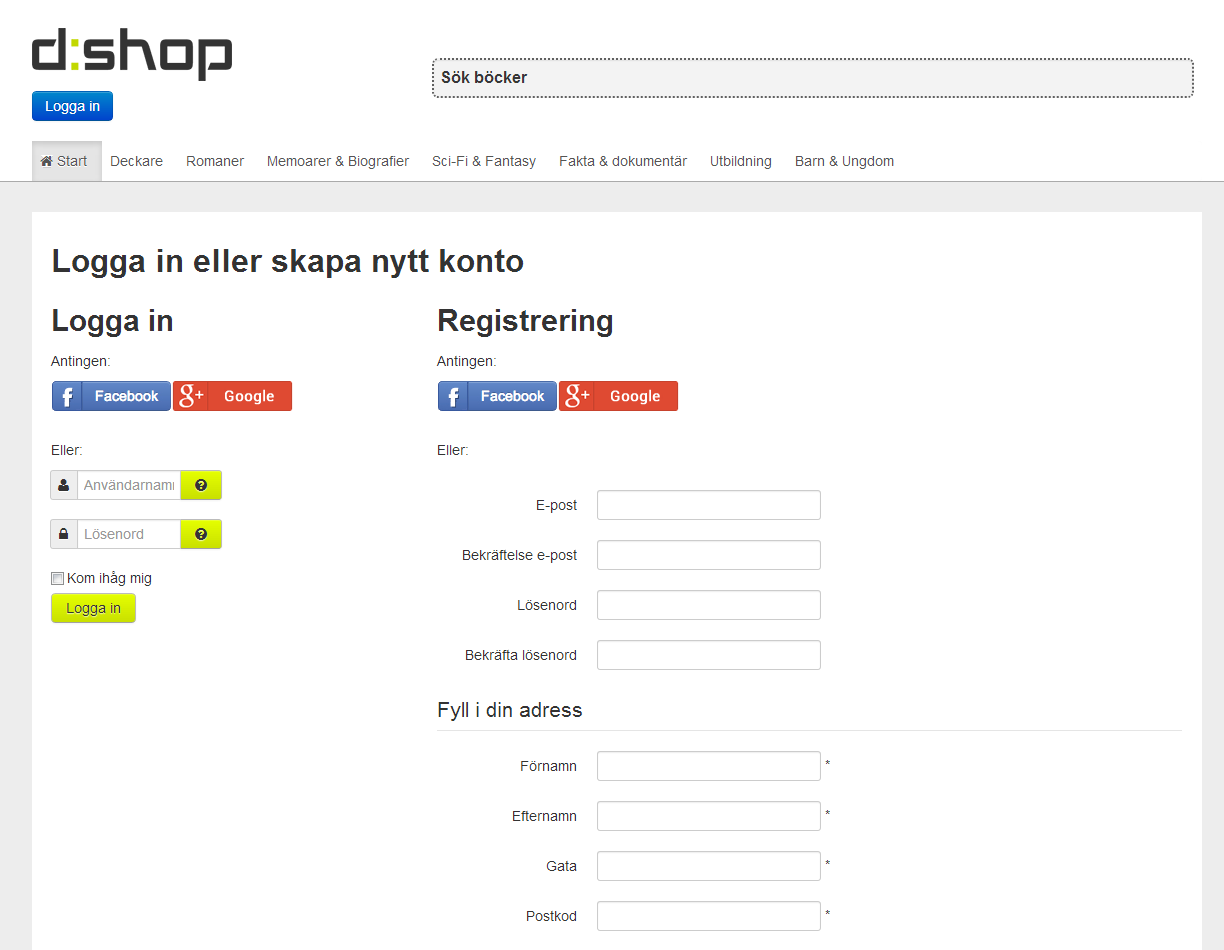
I just checked your website and I can see the FBlogin button on both the login and the registration form on your checkout:
Please Log in or Create an account to join the conversation.
13 years 4 weeks ago #121130
by sideways
Replied by sideways on topic JFBConnect&Hikashop FBlogin button not showing
Correct, I spent most of the day figuring out how to make it happen and finished up just a short while before you looked at my site. FYI the Hikashop documentation is indeed correct but somewhat incomplete regarding the various places you would want to add the buttons.
To get the JFBConnect buttons to show on all places where it would make sense (Login, Register and Login&Register @ checkout) you need to make a couple more code edits apart from the one suggested in the Hikashop documentation:
edit the file "registration" of the view "user" via the menu Display->Views of HikaShop and add the tag {JFBCLogin} right at the beginning of the file
You also need to override these files and insert the tag:
components/com_users/registration/default.php
components/com_hikashop/checkout/login.php
I think that was it. I hope I didn't forget anything.
To get the JFBConnect buttons to show on all places where it would make sense (Login, Register and Login&Register @ checkout) you need to make a couple more code edits apart from the one suggested in the Hikashop documentation:
edit the file "registration" of the view "user" via the menu Display->Views of HikaShop and add the tag {JFBCLogin} right at the beginning of the file
You also need to override these files and insert the tag:
components/com_users/registration/default.php
components/com_hikashop/checkout/login.php
I think that was it. I hope I didn't forget anything.
The following user(s) said Thank You: nicolas
Please Log in or Create an account to join the conversation.
13 years 4 weeks ago #121160
by nicolas
Replied by nicolas on topic JFBConnect&Hikashop FBlogin button not showing
If you want to have it on the login form of HikaShop, instead of editing the original file directly, you should rather edit the file login_form of the view checkout via the menu Display>Views. That way, you won't loose your changes when you update HikaShop.
Please Log in or Create an account to join the conversation.
13 years 4 weeks ago #121193
by sideways
Replied by sideways on topic JFBConnect&Hikashop FBlogin button not showing
Really? Will I loose the changes I made if I did a template override?
Please Log in or Create an account to join the conversation.
13 years 4 weeks ago #121219
by nicolas
Replied by nicolas on topic JFBConnect&Hikashop FBlogin button not showing
No, it's the opposite. If you modify directly the files via FTP, you will loose the changes.
If you do your changes via the menu Display>Views, you won't loose your changes.
If you do your changes via the menu Display>Views, you won't loose your changes.
Please Log in or Create an account to join the conversation.
13 years 4 weeks ago #121223
by sideways
Replied by sideways on topic JFBConnect&Hikashop FBlogin button not showing
Hold on a sec. I didn't just edit the original files residing in the hikashop component folder. I copied the files that needed modification into my own template, for example to this place: {my template name}/html/com_hikashop/checkout/login.php
Anyway, I do understand that I would have been better off doing like you suggest and I will make the neccessary changes to make it so.
Anyway, I do understand that I would have been better off doing like you suggest and I will make the neccessary changes to make it so.
Please Log in or Create an account to join the conversation.
13 years 4 weeks ago #121260
by nicolas
Replied by nicolas on topic JFBConnect&Hikashop FBlogin button not showing
Oh ok. I thought that you had edited them directly. If you proceeded with an override in your template, then it's actually the same than doing it via the menu Display>Views (the modified file is actually saved as a template override).
Then you're all good
Then you're all good
Please Log in or Create an account to join the conversation.
Time to create page: 0.178 seconds