

- Posts: 22
- Thank you received: 0
Hikashop ReCaptcha does not appear on Contact Page
11 years 1 month ago #211489
by sapura
Hikashop ReCaptcha does not appear on Contact Page was created by sapura
-- HikaShop version -- : 2.5.0
-- Joomla version -- : 3.4.1
-- PHP version -- : 5.6.3
-- Browser(s) name and version -- : Chrome 44.0.2403.155
I've installed the Hiksahop Recaptcha plugin, it works on the registration page but does not appear on the Contact form.
I have selected Yes in the Contact form under the options in the plugin and tried all 3 positions but still it does not appear.
Can you help? Thanks!
-- Joomla version -- : 3.4.1
-- PHP version -- : 5.6.3
-- Browser(s) name and version -- : Chrome 44.0.2403.155
I've installed the Hiksahop Recaptcha plugin, it works on the registration page but does not appear on the Contact form.
I have selected Yes in the Contact form under the options in the plugin and tried all 3 positions but still it does not appear.
Can you help? Thanks!
Please Log in or Create an account to join the conversation.

11 years 1 month ago #211499
by nicolas
Replied by nicolas on topic Hikashop ReCaptcha does not appear on Contact Page
Hi,
Can you provide a screenshot of the settings of your HikaShop ReCaptcha v2 plugin ? (with the keys blurred or removed)
Can you provide the URL of the page when the SEF settings of the Joomla configuration is turned off ?
Can you provide a screenshot of the settings of your HikaShop ReCaptcha v2 plugin ? (with the keys blurred or removed)
Can you provide the URL of the page when the SEF settings of the Joomla configuration is turned off ?
Please Log in or Create an account to join the conversation.
11 years 1 month ago #211667
by sapura
Replied by sapura on topic Hikashop ReCaptcha does not appear on Contact Page
Hi I've attached the settings of the Hikashop Recaptcha plugin.
Also, the URL of the contact page is [mydomain]/index.php?option=com_contact&view=contact&id=2
Please replace the domain with the private link on this thread. Thanks!
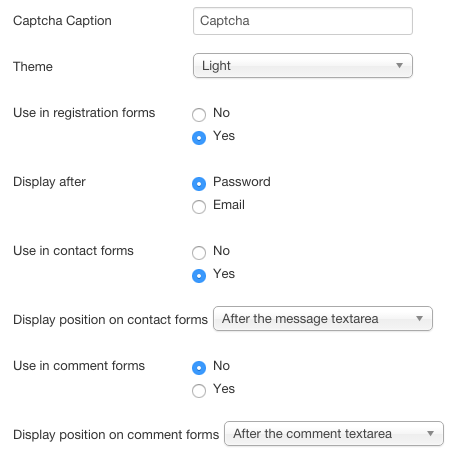
Also, the URL of the contact page is [mydomain]/index.php?option=com_contact&view=contact&id=2
Please replace the domain with the private link on this thread. Thanks!
Please Log in or Create an account to join the conversation.
11 years 1 month ago #211686
by nicolas
Replied by nicolas on topic Hikashop ReCaptcha does not appear on Contact Page
Hi,
From what I can see, it comes from a customization of the contact form in your template.
If you switch temporarily to the default template of Joomla and try again, I suppose that you see the captcha, right ?
In that case, remove the code:
from the file plugins/system/recaptcha2/recaptcha2.php and that should help with the customized contact form.
From what I can see, it comes from a customization of the contact form in your template.
If you switch temporarily to the default template of Joomla and try again, I suppose that you see the captcha, right ?
In that case, remove the code:
Code:
if($option=='com_contact' && version_compare(JVERSION,'3.0','>=')){
$return = '<div class="control-group"><div class="control-label"><label id="recaptcha_response_field-lbl" for="recaptcha_response_field" class="required">'.$subText.'<span class="star"> *</span></label></div>';
$return .= '<div class="controls">'.$c->recaptcha_get_html($this->params->get('public_key'),$this->params->get('theme')).'</div></div>';
$replace = 'id="'.$id.'".{0,'.$components[$option]['lengthafter'].'}(<\/div>\r?\n?\t*<\/div>)';
}else
Please Log in or Create an account to join the conversation.
11 years 1 month ago #211762
by sapura
Replied by sapura on topic Hikashop ReCaptcha does not appear on Contact Page
Great thanks! This works!
Please Log in or Create an account to join the conversation.
Time to create page: 0.173 seconds