

- Posts: 27
- Thank you received: 0
lost 0 points error
10 years 3 months ago - 10 years 3 months ago #242169
by hlv008
lost 0 points error was created by hlv008
-- HikaShop version -- : 2.6.3
-- Joomla version -- : 3.5.1
-- PHP version -- : 5.5.9-1
-- Browser(s) name and version -- : Firefox 46.0.1
-- Error-message(debug-mod must be tuned on) -- : easysocial Points History admin lost 0 points
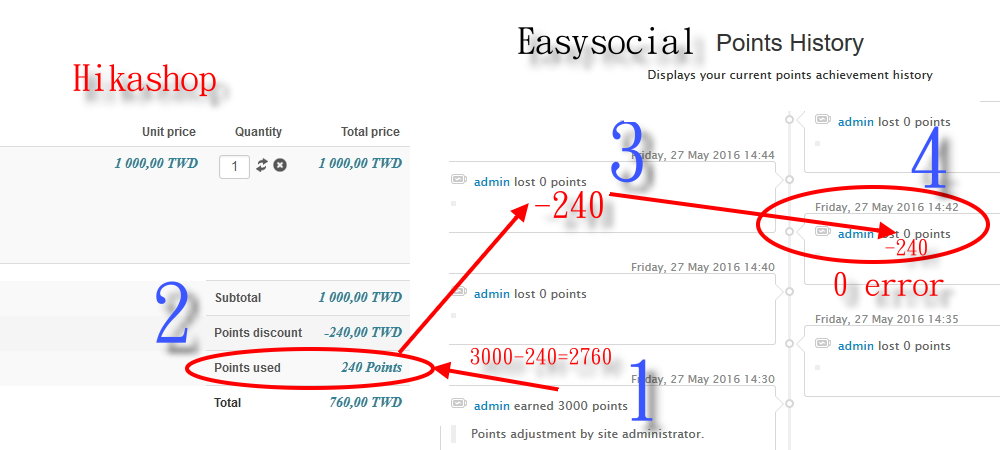
Correct -240
Used Points 240 Points
Hi:
process
1. right menu ->Products listing
123.mart168.com/hikashop-menu-for-products-listing.html
2.add to cart
Subtotal 1 000,00 TWD
Points discount -240,00 TWD
Points used 240 Points
Total 760,00 TWD
Button Finish
Your order is now complete.
The amount of 800,00 TWD will be collected upon delivery of your order (L10)
Thank you for your purchase.
Complete
3.right menu ->Community
admin->menu->points
123.mart168.com/community/points/history/135-admin.html
Screen Display
admin lost 0 points error
-240 is the correct
test HikaShop points Correct -240
test AltaUserPoints points Correct -240
test EasySocial points error 0
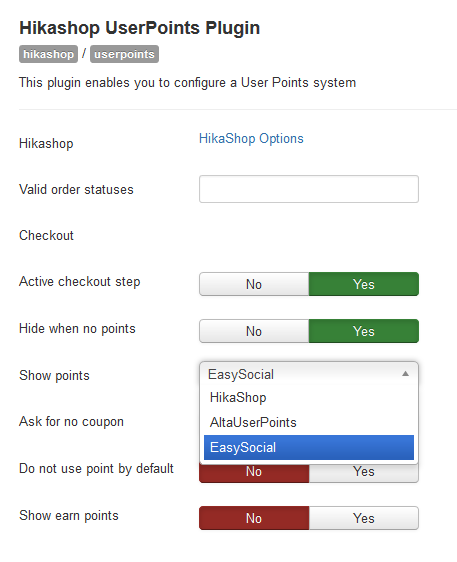
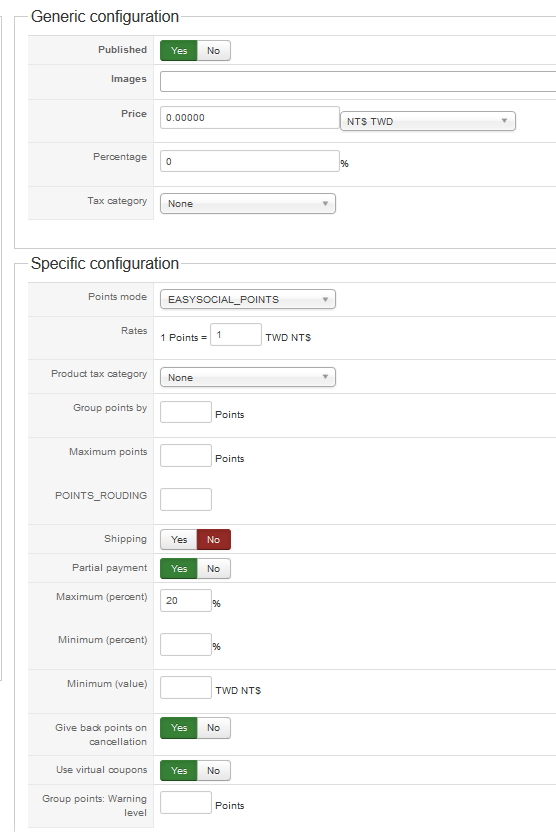
set up
Attach the picture, please see
thank you!
-- Joomla version -- : 3.5.1
-- PHP version -- : 5.5.9-1
-- Browser(s) name and version -- : Firefox 46.0.1
-- Error-message(debug-mod must be tuned on) -- : easysocial Points History admin lost 0 points
Correct -240
Used Points 240 Points
Hi:
process
1. right menu ->Products listing
123.mart168.com/hikashop-menu-for-products-listing.html
2.add to cart
Subtotal 1 000,00 TWD
Points discount -240,00 TWD
Points used 240 Points
Total 760,00 TWD
Button Finish
Your order is now complete.
The amount of 800,00 TWD will be collected upon delivery of your order (L10)
Thank you for your purchase.
Complete
3.right menu ->Community
admin->menu->points
123.mart168.com/community/points/history/135-admin.html
Screen Display
admin lost 0 points error
-240 is the correct
test HikaShop points Correct -240
test AltaUserPoints points Correct -240
test EasySocial points error 0
set up
Attach the picture, please see
thank you!
Last edit: 10 years 3 months ago by hlv008.
Please Log in or Create an account to join the conversation.

10 years 3 months ago #242174
by nicolas
Replied by nicolas on topic lost 0 points error
Hi,
I've had a long check on our end but I don't see why this would happen.
Here is the code you can find in plugins/hikashop/user_points/user_points.php:
take.ms/lyEMn
As you can see, the same variable is used for both AUP, HikaShop and EasySocial.
And if that variable is equal to 0, it is not added (so it shouldn't appear in the history of the points).
This leads me to believe that there is some kind of rule, limitation of points, or bug in your EasySocial which prevents the points from being added proprely to the user.
You'll find the function assignCustom in administrator/components/com_easysocial/includes/points/points.php
And you'll see that it does this:
which is what you have in the code you provided for the "unfriend" function.
I've had a long check on our end but I don't see why this would happen.
Here is the code you can find in plugins/hikashop/user_points/user_points.php:
take.ms/lyEMn
As you can see, the same variable is used for both AUP, HikaShop and EasySocial.
And if that variable is equal to 0, it is not added (so it shouldn't appear in the history of the points).
This leads me to believe that there is some kind of rule, limitation of points, or bug in your EasySocial which prevents the points from being added proprely to the user.
You'll find the function assignCustom in administrator/components/com_easysocial/includes/points/points.php
And you'll see that it does this:
Code:
public function assignCustom($userId, $points, $message = '')
{
$history = FD::table('PointsHistory');
$history->user_id = $userId;
$history->points = $points;
$history->state = SOCIAL_STATE_PUBLISHED;
$history->message = $message;
$state = $history->store();
if ($state) {
$this->updateUserPoints($userId, $points, 'custom');
}
return $state;
}
Please Log in or Create an account to join the conversation.
10 years 3 months ago #242329
by hlv008
Replied by hlv008 on topic lost 0 points error
Hi:
Arriving from
Stackideas easysocial reporting
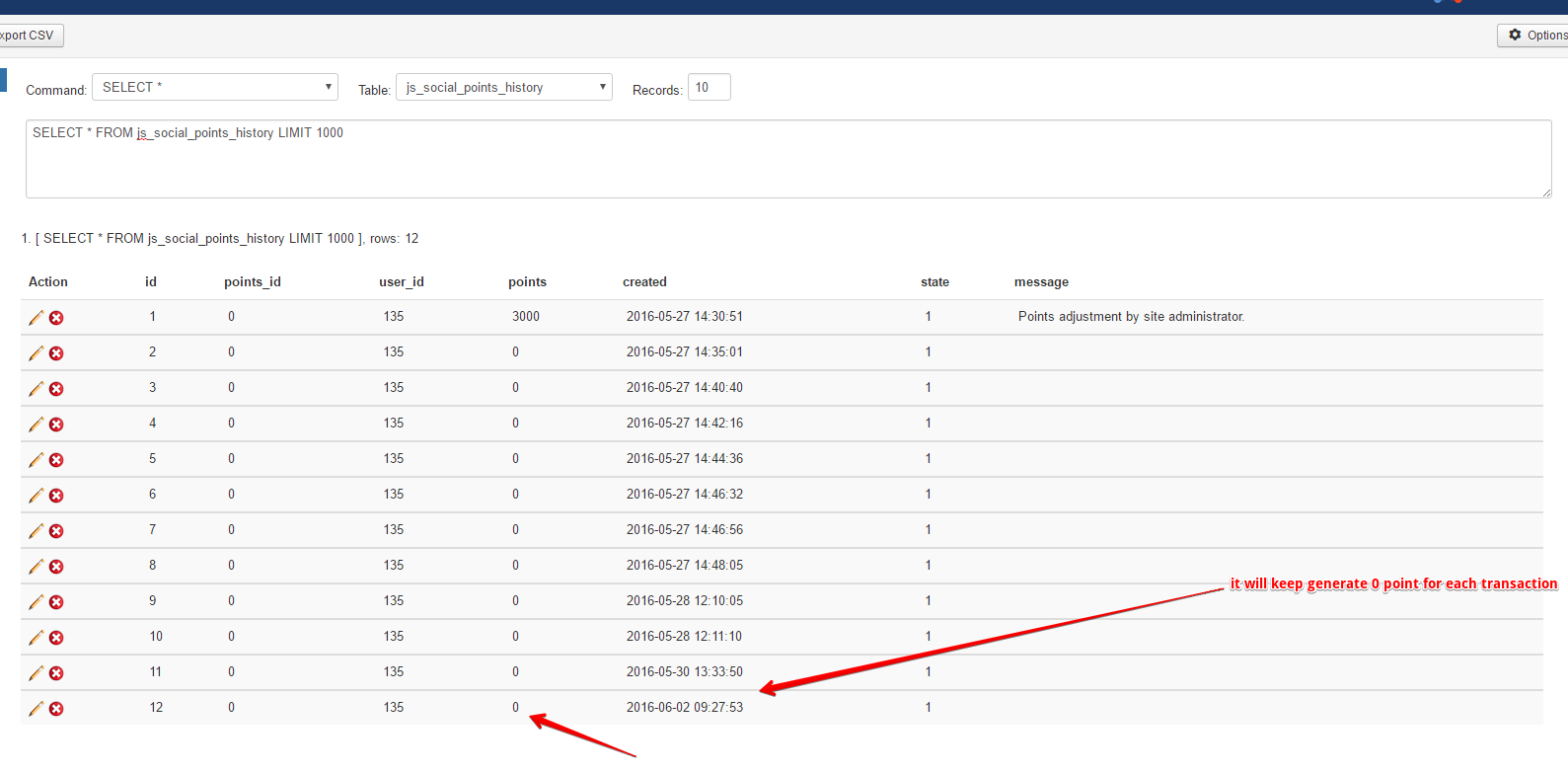
I've checked in your site, it seems like when the order is complete, the system didn't update the -240 point data into this table `js_social_points_history`, you can refer on my attached screenshot below.
May i know `Hikashop` is it can integration with Easysocial?
If yes, perhaps you can help us consult with `Hikashop` developer how it actually work once the payment is done, so the point will update it on Easysocial database table?
And which code file/ which function is go through this process?
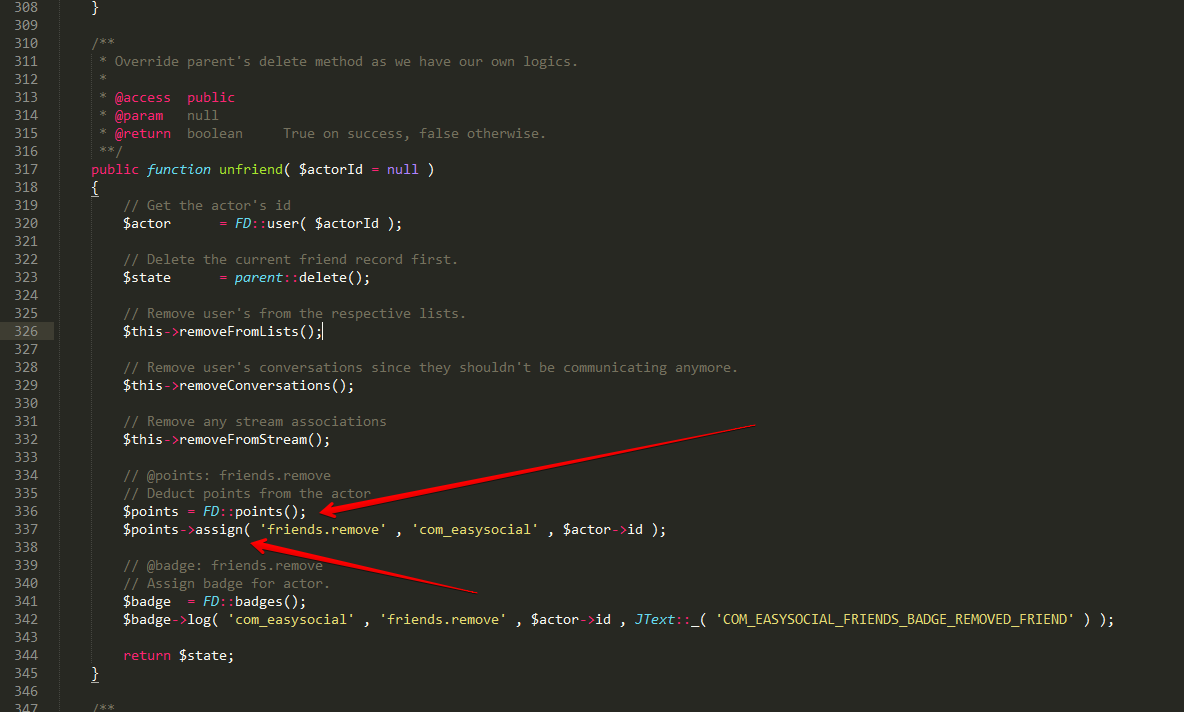
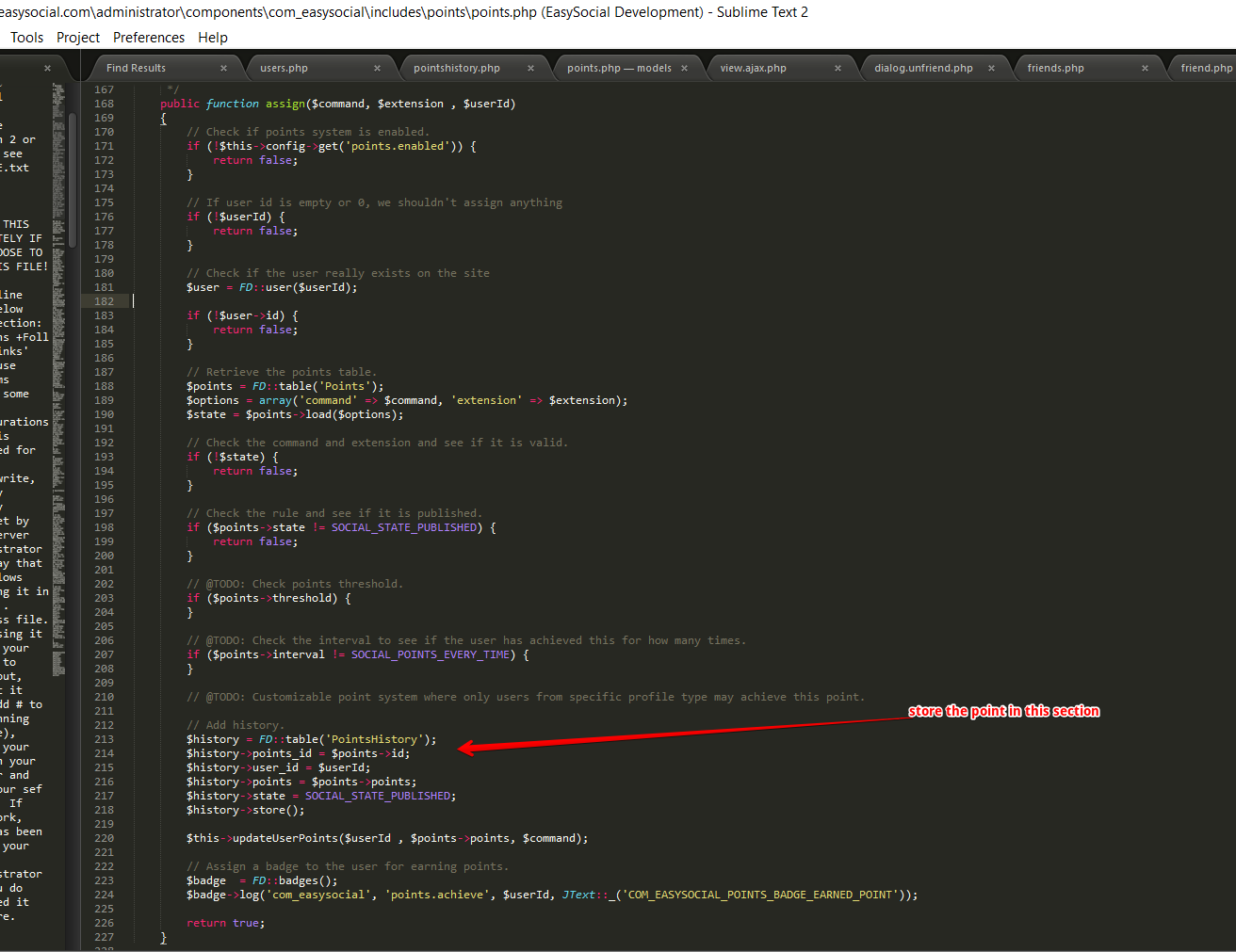
By the way, how the Easysocial minus point work is, we already have the assign function for store the point value in the database, the system will combine all the user existing point data from the database which point contain negative one then calculate it, then it will show the total point in user profile page.
You can take a look of my second /third screenshot below when the user delete a friend in Easysocial, system will deduct his point and how the function code being called.
Please look at the photos
Thank you!
Arriving from
Stackideas easysocial reporting
I've checked in your site, it seems like when the order is complete, the system didn't update the -240 point data into this table `js_social_points_history`, you can refer on my attached screenshot below.
May i know `Hikashop` is it can integration with Easysocial?
If yes, perhaps you can help us consult with `Hikashop` developer how it actually work once the payment is done, so the point will update it on Easysocial database table?
And which code file/ which function is go through this process?
By the way, how the Easysocial minus point work is, we already have the assign function for store the point value in the database, the system will combine all the user existing point data from the database which point contain negative one then calculate it, then it will show the total point in user profile page.
You can take a look of my second /third screenshot below when the user delete a friend in Easysocial, system will deduct his point and how the function code being called.
Please look at the photos
Thank you!
Please Log in or Create an account to join the conversation.
10 years 3 months ago #242364
by nicolas
Replied by nicolas on topic lost 0 points error
Hi,
Thank you for the additional information. We did some additional tests and found the issue. We've added a fix on our end so that it works fine.
Just download the install package of HikaShop on our website via the menu My account>My subscriptions and install it on yours and that will add the patch.
Thank you for the additional information. We did some additional tests and found the issue. We've added a fix on our end so that it works fine.
Just download the install package of HikaShop on our website via the menu My account>My subscriptions and install it on yours and that will add the patch.
Please Log in or Create an account to join the conversation.
10 years 3 months ago #242934
by hlv008
Replied by hlv008 on topic lost 0 points error
Hi:
Deduct Points Test OK!
Shopping 500 bit complimentary 500 points
no records
Please check the Get Points
Thank you!
Deduct Points Test OK!
Shopping 500 bit complimentary 500 points
no records
Please check the Get Points
Thank you!
Please Log in or Create an account to join the conversation.
10 years 3 months ago #242939
by nicolas
Replied by nicolas on topic lost 0 points error
Hi,
I'm sorry but I didn't understand what you meant in your last message.
Is it ok now for you ?
On our end, the patch fixed the problem.
I'm sorry but I didn't understand what you meant in your last message.
Is it ok now for you ?
On our end, the patch fixed the problem.
Please Log in or Create an account to join the conversation.
10 years 3 months ago - 10 years 3 months ago #243029
by hlv008
Replied by hlv008 on topic lost 0 points error
Hi:
1.admin lost xxx points (Correct lost)
2.admin earned xxx points (error earned )
admin earned 1000 points (Correct)
No Records (error)
Please see additional pictures
Thank you!
1.admin lost xxx points (Correct lost)
2.admin earned xxx points (error earned )
admin earned 1000 points (Correct)
No Records (error)
Please see additional pictures
Thank you!
Last edit: 10 years 3 months ago by hlv008.
Please Log in or Create an account to join the conversation.
10 years 3 months ago #243172
by nicolas
Replied by nicolas on topic lost 0 points error
Hi,
From what I can see, HikaShop is now sending the points to EasySocial with the code:
Looking at the code we have on our end for EasySocial that assignCustom function adds the points and the history.
It seems that you jsut get the points, not the history. So I'm afraid you'll have to check on that issue with EasySocial.
From what I can see, HikaShop is now sending the points to EasySocial with the code:
Code:
$eas_points = FD::points();
$userInfo = FD::user( $order->customer->user_cms_id );
return $eas_points->assignCustom( $userInfo->id, $points, $data );
It seems that you jsut get the points, not the history. So I'm afraid you'll have to check on that issue with EasySocial.
Please Log in or Create an account to join the conversation.
10 years 3 months ago #243189
by hlv008
Replied by hlv008 on topic lost 0 points error
HI:
can already a
thank you!
can already a
thank you!
Please Log in or Create an account to join the conversation.
10 years 3 months ago - 10 years 3 months ago #243217
by hlv008
Replied by hlv008 on topic lost 0 points error
Hi:
You fix 2.6.3 is missing
plugins\hikashop\userpoints\userpoints.php
if(!empty($this->plugin_params->notgivewhenuse) && (int)$this->plugin_params->notgivewhenuse == 1 && !empty($order->additional))
to
if(!empty($this->plugin_params->notgivewhenuse) && (int)$this->plugin_params->notgivewhenuse == 1 && (!empty($order->additional) || !empty($order->cart->additional)))
end.
hikashop record links
Can teach me how to add links?
Please see the attached picture
Pick digital link
Thank you!
You fix 2.6.3 is missing
plugins\hikashop\userpoints\userpoints.php
if(!empty($this->plugin_params->notgivewhenuse) && (int)$this->plugin_params->notgivewhenuse == 1 && !empty($order->additional))
to
if(!empty($this->plugin_params->notgivewhenuse) && (int)$this->plugin_params->notgivewhenuse == 1 && (!empty($order->additional) || !empty($order->cart->additional)))
end.
hikashop record links
Can teach me how to add links?
Please see the attached picture
Pick digital link
Thank you!
Last edit: 10 years 3 months ago by hlv008.
Please Log in or Create an account to join the conversation.
10 years 3 months ago #243270
by nicolas
Replied by nicolas on topic lost 0 points error
Hi,
I don't know if the EasySocial points history system can handle links.
If it does, you would need to edit the file plugins\hikashop\userpoints\userpoints.php and change the lines calling the method $this->addPoints and changing the third parameter in order to add your link's HTML code in it.
I don't know if the EasySocial points history system can handle links.
If it does, you would need to edit the file plugins\hikashop\userpoints\userpoints.php and change the lines calling the method $this->addPoints and changing the third parameter in order to add your link's HTML code in it.
Please Log in or Create an account to join the conversation.
10 years 3 months ago - 10 years 3 months ago #243280
by hlv008
Replied by hlv008 on topic lost 0 points error
Hi:
html is seo
no html
This is easysocial
link
<div>
<i class="icon-es-points"></i>
<?php if( $history->points > 0 ){ ?>
<?php echo JText::sprintf( 'COM_EASYSOCIAL_POINTS_HISTORY_USER_EARNED_POINTS' , $this->html( 'html.user' , $user->id ) ,
$history->getPoint()->id ? '<a href="' . $history->getPoint()->getPermalink() . '">' . abs( $history->points ) . '</a>' : abs( $history->points )
);
?>
<?php } else { ?>
<?php echo JText::sprintf( 'COM_EASYSOCIAL_POINTS_HISTORY_USER_LOST_POINTS' , $this->html( 'html.user' , $user->id ) ,
$history->getPoint()->id ? '<a href="' . $history->getPoint()->getPermalink() . '">' . abs( $history->points ) . '</a>' : abs( $history->points )
);
?>
<?php } ?>
</div>
Pick digital link order
Can you help me?
link code
thank you!
html is seo
no html
This is easysocial
link
<div>
<i class="icon-es-points"></i>
<?php if( $history->points > 0 ){ ?>
<?php echo JText::sprintf( 'COM_EASYSOCIAL_POINTS_HISTORY_USER_EARNED_POINTS' , $this->html( 'html.user' , $user->id ) ,
$history->getPoint()->id ? '<a href="' . $history->getPoint()->getPermalink() . '">' . abs( $history->points ) . '</a>' : abs( $history->points )
);
?>
<?php } else { ?>
<?php echo JText::sprintf( 'COM_EASYSOCIAL_POINTS_HISTORY_USER_LOST_POINTS' , $this->html( 'html.user' , $user->id ) ,
$history->getPoint()->id ? '<a href="' . $history->getPoint()->getPermalink() . '">' . abs( $history->points ) . '</a>' : abs( $history->points )
);
?>
<?php } ?>
</div>
Pick digital link order
Can you help me?
link code
thank you!
Last edit: 10 years 3 months ago by hlv008.
Please Log in or Create an account to join the conversation.
10 years 3 months ago #243288
by nicolas
Replied by nicolas on topic lost 0 points error
Hi,
I don't know what is in the function getPermalink() and if it's possible to modify it or do something else.
I would first recommend to ask EasySocial if it's possible to add a link there and if so, how. Then, once they provide some directions, we should be able to tell you how to get the order link.
I don't know what is in the function getPermalink() and if it's possible to modify it or do something else.
I would first recommend to ask EasySocial if it's possible to add a link there and if so, how. Then, once they provide some directions, we should be able to tell you how to get the order link.
Please Log in or Create an account to join the conversation.
10 years 3 months ago - 10 years 3 months ago #243378
by hlv008
Replied by hlv008 on topic lost 0 points error
Hi:
1.
plugins\hikashop\userpoints\userpoints.php 250 add link
$order_link = hikashop_completeLink('order&task=show&cid='.$order->order_id);
return JText::_('ORDER_NUMBER').' :<a href="' . $order_link. '">'.$number.'</a>';
Can you please modify correctly?
2.
Customer will be confused about
Excuse me
How to modify 0
Please see additional pictures
Thank you!
1.
plugins\hikashop\userpoints\userpoints.php 250 add link
$order_link = hikashop_completeLink('order&task=show&cid='.$order->order_id);
return JText::_('ORDER_NUMBER').' :<a href="' . $order_link. '">'.$number.'</a>';
Can you please modify correctly?
2.
Customer will be confused about
Excuse me
How to modify 0
Please see additional pictures
Thank you!
Last edit: 10 years 3 months ago by hlv008.
Please Log in or Create an account to join the conversation.
10 years 3 months ago - 10 years 3 months ago #243388
by nicolas
Replied by nicolas on topic lost 0 points error
Hi,
You should try with that code instead:
That way, the Itemid parameter will be in the URL and it should work better.
Regarding the default value of the radio button, you can edit the settings of the user points plugin via the Joomla plugins manager. There you'll find the setting "Do not use point by default" for that.
You should try with that code instead:
Code:
$menusClass = hikashop_get('class.menus');
$itemid = $menusClass->loadAMenuItemId('order','listing');
if(empty($itemid))
$itemid = $menusClass->loadAMenuItemId('','');
$number = '<a href="' . hikashop_completeLink('order&task=show&cid='.$order->order_id.'&Itemid='.$itemid) . '">'.$number.'</a>';
return JText::_('ORDER_NUMBER').' : '.$number;
Regarding the default value of the radio button, you can edit the settings of the user points plugin via the Joomla plugins manager. There you'll find the setting "Do not use point by default" for that.
Last edit: 10 years 3 months ago by nicolas.
Please Log in or Create an account to join the conversation.
10 years 3 months ago - 10 years 3 months ago #243514
by hlv008
Replied by hlv008 on topic lost 0 points error
Hi:
Link teaching guide
thank you very much.
Has not been able to deal with good
Will try my best to learn English
The second question about
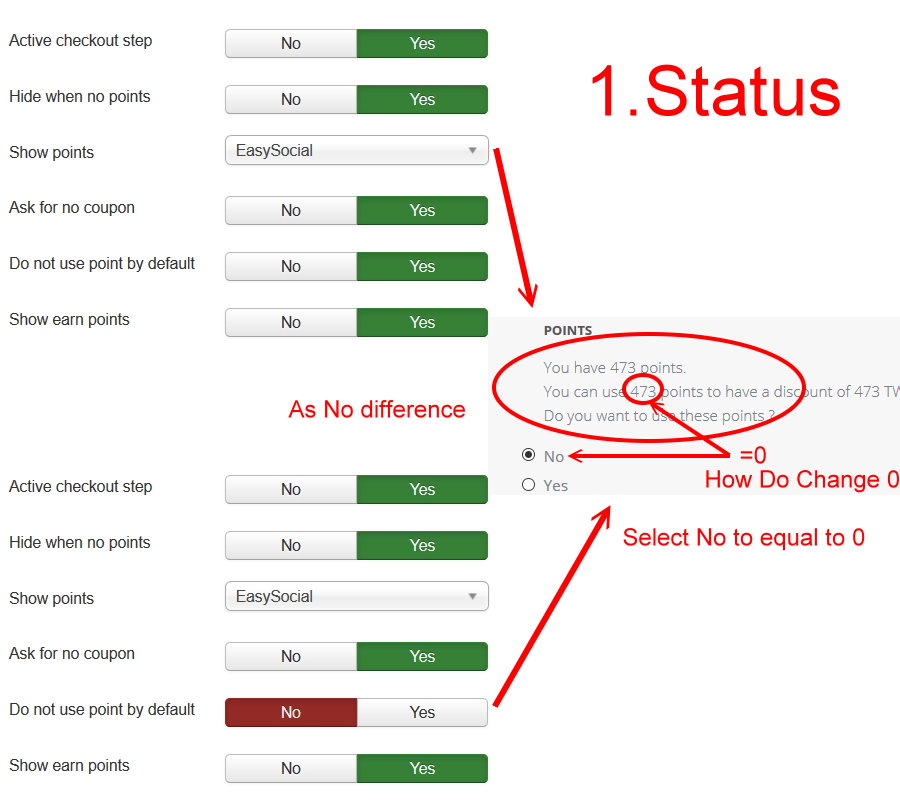
Do not use point by default Unrelated questions
Give virtual points Yes/No question
two displays an error
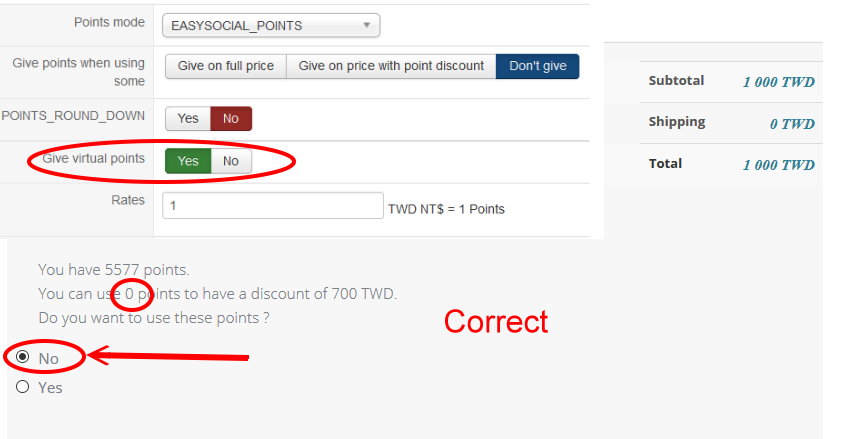
1.
Give virtual points No question ( No = 0 )
You can use 0 points to have a discount of 700 TWD
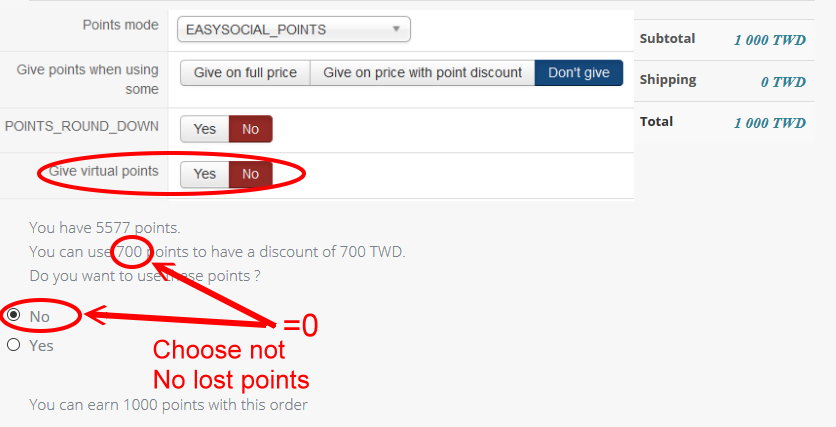
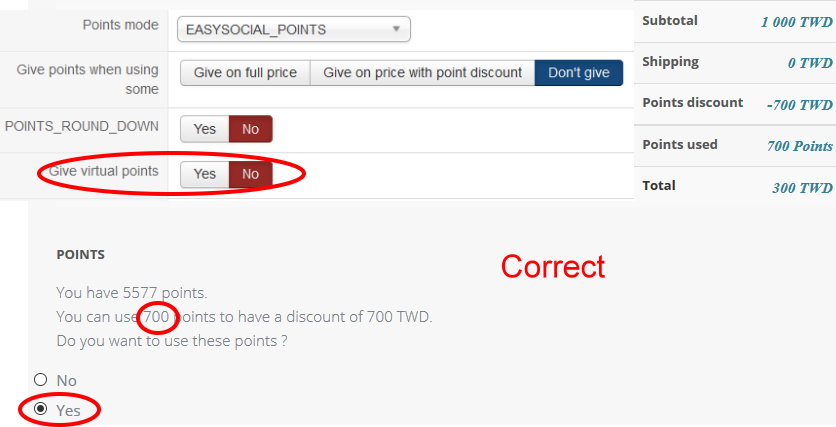
2.
Give virtual points Yes question
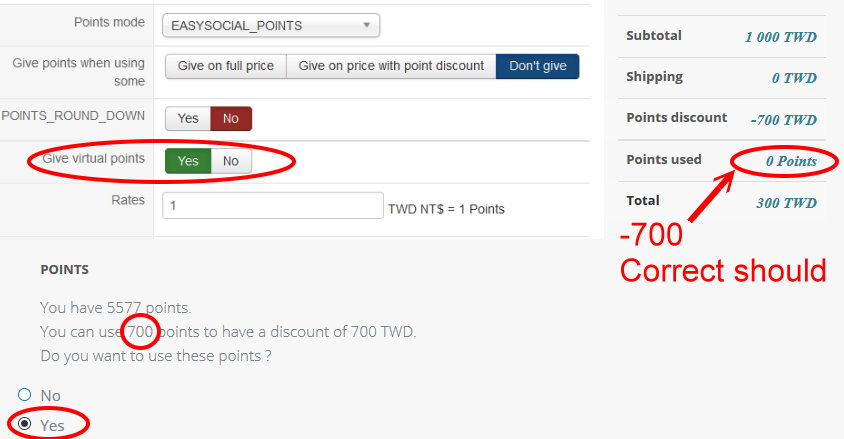
Points used 0 Points ( -700 )
Display is not clear
Customer misunderstanding
The calculation results are correct
Please tell me where to change.
Thank you!
Link teaching guide
thank you very much.
Has not been able to deal with good
Will try my best to learn English
The second question about
Do not use point by default Unrelated questions
Give virtual points Yes/No question
two displays an error
1.
Give virtual points No question ( No = 0 )
You can use 0 points to have a discount of 700 TWD
2.
Give virtual points Yes question
Points used 0 Points ( -700 )
Display is not clear
Customer misunderstanding
The calculation results are correct
Please tell me where to change.
Thank you!
Last edit: 10 years 3 months ago by hlv008.
Please Log in or Create an account to join the conversation.

10 years 3 months ago #243515
by Jerome
Jerome - Obsidev.com
HikaMarket & HikaSerial developer / HikaShop core dev team.
Also helping the HikaShop support team when having some time or couldn't sleep.
By the way, do not send me private message, use the "contact us" form instead.
Replied by Jerome on topic lost 0 points error
Hi,
Give virtual points - Allow the user to use points that he does not have yet.
If an order will give you X points, that setting allow you to use these X points directly.
So ; it's logical that you do not use/loose points because you didn't have these points...
That setting come from the old "alphauserpoints" (deprecated) plugin.
www.hikashop.com/support/documentation/i...userpoints-form.html
Regards,
Give virtual points - Allow the user to use points that he does not have yet.
If an order will give you X points, that setting allow you to use these X points directly.
So ; it's logical that you do not use/loose points because you didn't have these points...
That setting come from the old "alphauserpoints" (deprecated) plugin.
www.hikashop.com/support/documentation/i...userpoints-form.html
Regards,
Jerome - Obsidev.com
HikaMarket & HikaSerial developer / HikaShop core dev team.
Also helping the HikaShop support team when having some time or couldn't sleep.
By the way, do not send me private message, use the "contact us" form instead.
Please Log in or Create an account to join the conversation.
10 years 3 months ago - 10 years 3 months ago #243575
by hlv008
Replied by hlv008 on topic lost 0 points error
Hi:
i 'm sorry
I don't use AlphaUserPoints
Also did not install AlphaUserPoints
Did not ask questions AlphaUserPoints
Use easysocial
This is in easysocial
Test results!
Points hikashop
Same test
Don't understand what you mean!
According to the setting "Give virtual points", if I click it no, then it shows that "You can use 700 points to have a discount of 700 TWD". Hence I think you may need to change it to be like "You cannot use any points to get discount". By doing so, it would cause no more misunderstandings from the customers. Thank you.
Sorry my request is that if you can change the descriptions for the setting.
Your statement correct
I just want to display 0 to the customer does not misleading
Please ask
How to set
My need
thank you!
i 'm sorry
I don't use AlphaUserPoints
Also did not install AlphaUserPoints
Did not ask questions AlphaUserPoints
Use easysocial
This is in easysocial
Test results!
Points hikashop
Same test
Don't understand what you mean!
According to the setting "Give virtual points", if I click it no, then it shows that "You can use 700 points to have a discount of 700 TWD". Hence I think you may need to change it to be like "You cannot use any points to get discount". By doing so, it would cause no more misunderstandings from the customers. Thank you.
Sorry my request is that if you can change the descriptions for the setting.
Your statement correct
I just want to display 0 to the customer does not misleading
Please ask
How to set
My need
thank you!
Last edit: 10 years 3 months ago by hlv008.
Please Log in or Create an account to join the conversation.
10 years 3 months ago #243704
by nicolas
Replied by nicolas on topic lost 0 points error
Hi,
You need to turn off the option "Give virtual points". It will work like you want as far as I can see.
That option should only be turned on in some really rare cases and that's why you have a strange functioning.
You need to turn off the option "Give virtual points". It will work like you want as far as I can see.
That option should only be turned on in some really rare cases and that's why you have a strange functioning.
Please Log in or Create an account to join the conversation.
10 years 3 months ago - 10 years 3 months ago #243712
by hlv008
Replied by hlv008 on topic lost 0 points error
Hi:
Thank you for the reply. But I have tried it and it did not work.
123.mart168.com
Please test to see
I have changed the current setting
Choose No
You can use 700 points to have a discount of 700,00 TWD.
to
You can use 0 points to have a discount of 700,00 TWD.
I hope to change it to 0
Many customers reflect this problem must deal with trouble you
thank you!
Thank you for the reply. But I have tried it and it did not work.
123.mart168.com
Please test to see
I have changed the current setting
Choose No
You can use 700 points to have a discount of 700,00 TWD.
to
You can use 0 points to have a discount of 700,00 TWD.
I hope to change it to 0
Many customers reflect this problem must deal with trouble you
thank you!
Last edit: 10 years 3 months ago by hlv008.
Please Log in or Create an account to join the conversation.
Time to create page: 0.297 seconds