
- Posts: 58
- Thank you received: 0
Missing event for Google Analatics ecommerce transactions
- iconvisual
-
 Topic Author
- Offline
Less
More
8 years 3 weeks ago #297594
by iconvisual
-- HikaShop version -- : 3.5.1
-- Joomla version -- : 3.8.12
-- PHP version -- : 7.2.7
-- Browser(s) name and version -- : Firefox
When using google analytics with eCommerce transactions, i am not able to get proper value in datalayer when i finish the checkout process. I am getting event value as "user_loggedin" but need something when it says the order details.
I order and item it goes to homepage back i check the datalayer but no order details, what should i supply in google tag manager as even value.
Attached screenshot is after finishing cart.
Thanks.
-- Joomla version -- : 3.8.12
-- PHP version -- : 7.2.7
-- Browser(s) name and version -- : Firefox
When using google analytics with eCommerce transactions, i am not able to get proper value in datalayer when i finish the checkout process. I am getting event value as "user_loggedin" but need something when it says the order details.
I order and item it goes to homepage back i check the datalayer but no order details, what should i supply in google tag manager as even value.
Attached screenshot is after finishing cart.
Thanks.
Please Log in or Create an account to join the conversation.

8 years 3 weeks ago #297622
by nicolas
Replied by nicolas on topic Missing event for Google Analatics ecommerce transactions
Hi,
I'm sorry but I don't understand what you mean. Could you provide more context and more explanations of what is wrong and why and what should be done where ?
I'm sorry but I don't understand what you mean. Could you provide more context and more explanations of what is wrong and why and what should be done where ?
Please Log in or Create an account to join the conversation.
- iconvisual
-
Topic Author
- Offline
Less
More
- Posts: 58
- Thank you received: 0
8 years 3 weeks ago #297634
by iconvisual
Replied by iconvisual on topic Missing event for Google Analatics ecommerce transactions
Hi Nicolas,
Thanks for the reply, I am using the hikashop and google analytics plugin with google tag manager, SO when a transaction is complete I go to console and type datalayer, to get data from datalayer to provide a variable to an even in google tag manager.
Steps to reproduce:
Configure google tag manager and google analytics, it is tracking pages fine all connection are completed
Use Google analytics eCommerce to track sales, in order to do that u am trying to get the tag to provide to google tag manager to track transactions. This tag is not coming up in datalayer.
Thanks.
Thanks for the reply, I am using the hikashop and google analytics plugin with google tag manager, SO when a transaction is complete I go to console and type datalayer, to get data from datalayer to provide a variable to an even in google tag manager.
Steps to reproduce:
Configure google tag manager and google analytics, it is tracking pages fine all connection are completed
Use Google analytics eCommerce to track sales, in order to do that u am trying to get the tag to provide to google tag manager to track transactions. This tag is not coming up in datalayer.
Thanks.
Please Log in or Create an account to join the conversation.
8 years 3 weeks ago #297643
by nicolas
Replied by nicolas on topic Missing event for Google Analatics ecommerce transactions
Hi,
I'm not familiar with Google Tag Manager and never used it so far.
However, I've been trying to understand what is the problem you have and thus did some research.
From what I understand, what you want is to send the transaction information to GTM with an event you would fire through gtm.js
So it has no link with Google Analytics apparently.
If you already have some tool on your website to send events of your website to GTM, then you'll have to check with the developer of that tool so that they can add the sending of the order data in the event of the end of the order process.
Here is a page with the relevant information:
github.com/orangevalley/gtm_e-commerce
If you don't have a tool already on your website to send events to GTM, you would have to develop a new plugin from scratch to handle that based on the information on the link above, and using the display API triggers of HikaShop (for example, to insert the javascript in the thank you page).
I'm not familiar with Google Tag Manager and never used it so far.
However, I've been trying to understand what is the problem you have and thus did some research.
From what I understand, what you want is to send the transaction information to GTM with an event you would fire through gtm.js
So it has no link with Google Analytics apparently.
If you already have some tool on your website to send events of your website to GTM, then you'll have to check with the developer of that tool so that they can add the sending of the order data in the event of the end of the order process.
Here is a page with the relevant information:
github.com/orangevalley/gtm_e-commerce
If you don't have a tool already on your website to send events to GTM, you would have to develop a new plugin from scratch to handle that based on the information on the link above, and using the display API triggers of HikaShop (for example, to insert the javascript in the thank you page).
The following user(s) said Thank You: iconvisual
Please Log in or Create an account to join the conversation.
- iconvisual
-
Topic Author
- Offline
Less
More
- Posts: 58
- Thank you received: 0
8 years 2 weeks ago #297718
by iconvisual
Replied by iconvisual on topic Missing event for Google Analatics ecommerce transactions
I tried to follow the instructions on
www.hikashop.com/support/documentation/9...oogle-analytics.html
, but was unable to track sales. Can you please guid what am i doing wrong.
Thanks.
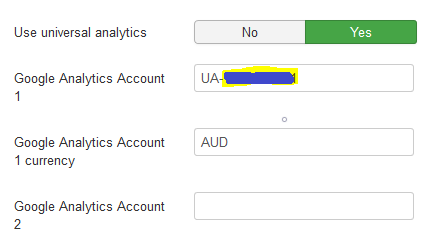
Thanks.
Please Log in or Create an account to join the conversation.
8 years 2 weeks ago #297735
by nicolas
Replied by nicolas on topic Missing event for Google Analatics ecommerce transactions
Hi,
Can you provide a screenshot of the rest of the settings of the plugin ?
Also, which payment method are you using ?
And finally, is the status of the orders getting changed from "created" to "confirmed" after the payment ?
Can you provide a screenshot of the rest of the settings of the plugin ?
Also, which payment method are you using ?
And finally, is the status of the orders getting changed from "created" to "confirmed" after the payment ?
Please Log in or Create an account to join the conversation.
- iconvisual
-
Topic Author
- Offline
Less
More
- Posts: 58
- Thank you received: 0
8 years 2 weeks ago #297828
by iconvisual
Replied by iconvisual on topic Missing event for Google Analatics ecommerce transactions
Hi,
I am using eway as sandbox account. Yes,when i process the order it comes as confirmed.
Thanks.
I am using eway as sandbox account. Yes,when i process the order it comes as confirmed.
Thanks.
Please Log in or Create an account to join the conversation.
8 years 2 weeks ago #297844
by nicolas
Replied by nicolas on topic Missing event for Google Analatics ecommerce transactions
Hi,
Since you're using the "direct call" mode of the plugin, it requires cURL to be activated on your server for your PHP and that outgoing connections are authorized by your hosting. So it might be the reason why the transactions don't appear in Google Analytics.
Otherwise, maybe you're not looking at the correct place in Google Analytics.
The transactions will end up in the menu “Conversions > Ecommerce > Sales Performance” and should look like that:
www.practicalecommerce.com/wp-content/up...nt-Transactions1.jpg
Turning off the direct call and / or the universal analytics settings might also help (so it would circumvent the connections being blocked on the hosting side by using javascript when the customer see the thank you page after the payment.
Since you're using the "direct call" mode of the plugin, it requires cURL to be activated on your server for your PHP and that outgoing connections are authorized by your hosting. So it might be the reason why the transactions don't appear in Google Analytics.
Otherwise, maybe you're not looking at the correct place in Google Analytics.
The transactions will end up in the menu “Conversions > Ecommerce > Sales Performance” and should look like that:
www.practicalecommerce.com/wp-content/up...nt-Transactions1.jpg
Turning off the direct call and / or the universal analytics settings might also help (so it would circumvent the connections being blocked on the hosting side by using javascript when the customer see the thank you page after the payment.
Please Log in or Create an account to join the conversation.
- iconvisual
-
Topic Author
- Offline
Less
More
- Posts: 58
- Thank you received: 0
8 years 2 weeks ago #297892
by iconvisual
Replied by iconvisual on topic Missing event for Google Analatics ecommerce transactions
Hi,
I did checked curl it is enabled on server, created 2 videos please help and let me know if i am missing anything.
aditya.iconvm.com.au/video/2018-09-13_10-16-07.mp4
aditya.iconvm.com.au/video/2018-09-13_10-18-01.mp4
I did checked curl it is enabled on server, created 2 videos please help and let me know if i am missing anything.
aditya.iconvm.com.au/video/2018-09-13_10-16-07.mp4
aditya.iconvm.com.au/video/2018-09-13_10-18-01.mp4
Please Log in or Create an account to join the conversation.
8 years 1 week ago #298075
by nicolas
Replied by nicolas on topic Missing event for Google Analatics ecommerce transactions
Hi,
Sorry for the delay.
Thanks for the videos.
Could you enable the debug mode setting of the plugin and try again while the console of the browser is open ?
You might get some information in the console.
Also, after that, please check the "payment log file" setting of the HikaShop configuration. It should contain some information about the sending of the data to google analytics.
Also, check the order statuses in the menu System>Order statuses. The "confirmed" status should be enabled for the "invoice" column there. Otherwise, it might be why the orders are not taken into account.
Sorry for the delay.
Thanks for the videos.
Could you enable the debug mode setting of the plugin and try again while the console of the browser is open ?
You might get some information in the console.
Also, after that, please check the "payment log file" setting of the HikaShop configuration. It should contain some information about the sending of the data to google analytics.
Also, check the order statuses in the menu System>Order statuses. The "confirmed" status should be enabled for the "invoice" column there. Otherwise, it might be why the orders are not taken into account.
Please Log in or Create an account to join the conversation.
- iconvisual
-
Topic Author
- Offline
Less
More
- Posts: 58
- Thank you received: 0
8 years 5 days ago #298250
by iconvisual
Replied by iconvisual on topic Missing event for Google Analatics ecommerce transactions
Hi,
Sorry for late reply please find the video below:
aditya.iconvm.com.au/video/2018-09-24_10-05-41.mp4
Thanks.
Sorry for late reply please find the video below:
aditya.iconvm.com.au/video/2018-09-24_10-05-41.mp4
Thanks.
Please Log in or Create an account to join the conversation.

Less
More
- Posts: 12953
- Thank you received: 1778
8 years 4 days ago #298332
by Mohamed Thelji
Replied by Mohamed Thelji on topic Missing event for Google Analatics ecommerce transactions
Hello,
As Nicolas said :
Can you enable the "Debug Mode (for ga.js)" option that you can find through your "Hikashop Google Analytics" plugin configuration page and test it again while having the console of the browser open ? Thank you.
To open your browser's console, you'll just have to press "F12" and check the "Console" tab.
Kind regards,
Mohamed Thelji.
As Nicolas said :
Could you enable the debug mode setting of the plugin and try again while the console of the browser is open ?
You might get some information in the console.
Can you enable the "Debug Mode (for ga.js)" option that you can find through your "Hikashop Google Analytics" plugin configuration page and test it again while having the console of the browser open ? Thank you.
To open your browser's console, you'll just have to press "F12" and check the "Console" tab.
Kind regards,
Mohamed Thelji.
Please Log in or Create an account to join the conversation.
- iconvisual
-
Topic Author
- Offline
Less
More
- Posts: 58
- Thank you received: 0
8 years 3 days ago #298346
by iconvisual
Replied by iconvisual on topic Missing event for Google Analatics ecommerce transactions
Hi Please find the video attached.
aditya.iconvm.com.au/video/2018-09-26_16-09-04.mp4
Thanks
aditya.iconvm.com.au/video/2018-09-26_16-09-04.mp4
Thanks
Please Log in or Create an account to join the conversation.
Less
More
- Posts: 12953
- Thank you received: 1778
8 years 2 days ago #298359
by Mohamed Thelji
Replied by Mohamed Thelji on topic Missing event for Google Analatics ecommerce transactions
Hello,
For information you won't be able to see any information on your browser with the "Always use direct call (UA)" option enabled as the communication will be server to server.
These information will be stored when the debug mode is enabled on your log file which can be found via "Hikashop->System->Configuration->Main" using the "Payment log file" option.
Can you give us a temporary access to your back-end so that we can directly check it and investigate on your issue ? Thank you.
You'll be able to send these information using our contact form (don't forget to add a link to that thread on your message) :
www.hikashop.com/support/contact-us.html
Kind regards,
Mohamed Thelji.
For information you won't be able to see any information on your browser with the "Always use direct call (UA)" option enabled as the communication will be server to server.
These information will be stored when the debug mode is enabled on your log file which can be found via "Hikashop->System->Configuration->Main" using the "Payment log file" option.
Can you give us a temporary access to your back-end so that we can directly check it and investigate on your issue ? Thank you.
You'll be able to send these information using our contact form (don't forget to add a link to that thread on your message) :
www.hikashop.com/support/contact-us.html
Kind regards,
Mohamed Thelji.
Please Log in or Create an account to join the conversation.
- iconvisual
-
Topic Author
- Offline
Less
More
- Posts: 58
- Thank you received: 0
8 years 2 days ago #298381
by iconvisual
Replied by iconvisual on topic Missing event for Google Analatics ecommerce transactions
Auth sent.
Please Log in or Create an account to join the conversation.
- iconvisual
-
Topic Author
- Offline
Less
More
- Posts: 58
- Thank you received: 0
8 years 2 days ago #298382
by iconvisual
Replied by iconvisual on topic Missing event for Google Analatics ecommerce transactions
it will be under for url aditya.iconvisual.com.au
Please Log in or Create an account to join the conversation.
Less
More
- Posts: 12953
- Thank you received: 1778
8 years 2 days ago #298420
by Mohamed Thelji
Replied by Mohamed Thelji on topic Missing event for Google Analatics ecommerce transactions
Hello,
We just tested it on your end and the plugin debug mode was disabled that's why your payment log was empty. So we enabled it and tested id by using the same test credit card on the eWay payment method and the keyboard product.
The order was confirmed and a "direct call" request was correctly sent to Google analytics (cf screenshot).
Can you check through your analytics that you correctly received these information ? If not, can you download, install and test it with the attached version of the "Hikashop Analytics" plugin which contain code displaying more information about requests in your log file ? Thank you.
Kind regards,
Mohamed Thelji.
We just tested it on your end and the plugin debug mode was disabled that's why your payment log was empty. So we enabled it and tested id by using the same test credit card on the eWay payment method and the keyboard product.
The order was confirmed and a "direct call" request was correctly sent to Google analytics (cf screenshot).
Can you check through your analytics that you correctly received these information ? If not, can you download, install and test it with the attached version of the "Hikashop Analytics" plugin which contain code displaying more information about requests in your log file ? Thank you.
Kind regards,
Mohamed Thelji.
Please Log in or Create an account to join the conversation.
- iconvisual
-
Topic Author
- Offline
Less
More
- Posts: 58
- Thank you received: 0
8 years 1 day ago - 8 years 1 day ago #298438
by iconvisual
Replied by iconvisual on topic Missing event for Google Analatics ecommerce transactions
Hi,
Thanks for your help order went through to ga. But looks like the its sending incorrect price is there anything i can do to make the price as same in hikashop.
Thanks.
Thanks for your help order went through to ga. But looks like the its sending incorrect price is there anything i can do to make the price as same in hikashop.
Thanks.
Last edit: 8 years 1 day ago by iconvisual.
Please Log in or Create an account to join the conversation.
Less
More
- Posts: 12953
- Thank you received: 1778
8 years 1 day ago #298449
by Mohamed Thelji
Replied by Mohamed Thelji on topic Missing event for Google Analatics ecommerce transactions
Hello,
The currencies aren't the same so it seems to be sending the correct price as 132.00 AUD is approximately equals to $95.81.
So everything should be properly sent to Google Analytics on your website.
Kind regards,
Mohamed Thelji.
The currencies aren't the same so it seems to be sending the correct price as 132.00 AUD is approximately equals to $95.81.
So everything should be properly sent to Google Analytics on your website.
Kind regards,
Mohamed Thelji.
Please Log in or Create an account to join the conversation.
- iconvisual
-
Topic Author
- Offline
Less
More
- Posts: 58
- Thank you received: 0
7 years 11 months ago #298551
by iconvisual
Replied by iconvisual on topic Missing event for Google Analatics ecommerce transactions
Thanks, I will check that.
Please Log in or Create an account to join the conversation.
Time to create page: 0.365 seconds