
- Posts: 303
- Thank you received: 18
Show ShipStation Tracking Number in Order History
- mojooutdoors-holden
-
 Topic Author
- Offline
Less
More
7 years 6 months ago #304650
by mojooutdoors-holden
-- HikaShop version -- : 3.5.1
-- Joomla version -- : 3.9.3
-- PHP version -- : 7.2
Shipstation is sending the shipping number to the order history page.
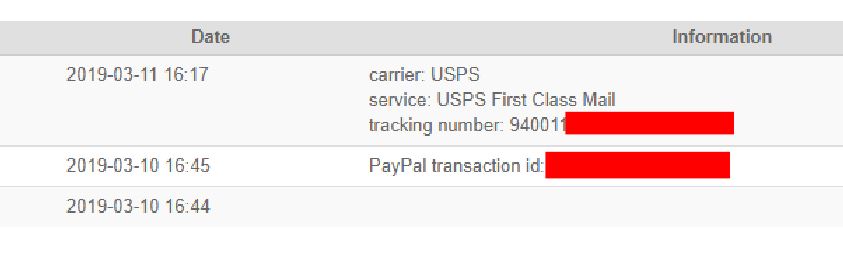
How would i go about including the tracking number in order listing page in the customer cPanel? The idea would be for the customer to go to order listing in cPanel, click the tracking number and go to the carrier page with tracking info (or modal).
-- Joomla version -- : 3.9.3
-- PHP version -- : 7.2
Shipstation is sending the shipping number to the order history page.
How would i go about including the tracking number in order listing page in the customer cPanel? The idea would be for the customer to go to order listing in cPanel, click the tracking number and go to the carrier page with tracking info (or modal).
Please Log in or Create an account to join the conversation.

7 years 6 months ago #304652
by nicolas
Replied by nicolas on topic Show ShipStation Tracking Number in Order History
HI,
In the cpanel_orders.php view file, that you can edit via the menu Display>Views, you would have to run a MySQL query to load the data from the hikashop_history table for the order based on $order->order_id.
We'll look at doing something on our end to be able to add that in the future. Thanks for the idea.
In the cpanel_orders.php view file, that you can edit via the menu Display>Views, you would have to run a MySQL query to load the data from the hikashop_history table for the order based on $order->order_id.
We'll look at doing something on our end to be able to add that in the future. Thanks for the idea.
Please Log in or Create an account to join the conversation.
- mojooutdoors-holden
-
Topic Author
- Offline
Less
More
- Posts: 303
- Thank you received: 18
7 years 6 months ago #304811
by mojooutdoors-holden
Replied by mojooutdoors-holden on topic Show ShipStation Tracking Number in Order History
This is probably not the most elegant solution, but it returns the tracking number, carrier and links to the respective carrier tracking page:
Code:
<?php
// Get a db connection.
$db = JFactory::getDbo();
// Create a new query object.
$query = $db->getQuery(true);
$query->select($db->quoteName(array('history_data')));
$query->from($db->quoteName('jml_hikashop_history'));
$query->where($db->quoteName('history_order_id') . ' = '. $db->quote($row->order_id));
$query->where($db->quoteName('history_new_status') . ' = '. $db->quote('shipped'));
// Reset the query using our newly populated query object.
$db->setQuery($query);
// Load the results as a list of stdClass objects (see later for more options on retrieving data).
$row = $db->loadAssoc();
// print_r($row['history_data']);
$shipdata = explode('::', $row['history_data']);
if ($shipdata[0] == 'USPS') {
$track_url = 'https://tools.usps.com/go/TrackConfirmAction?tLabels=' . $shipdata[2];}
elseif ($shipdata[0] == 'Fedex'){
$track_url = 'http://www.fedex.com/Tracking?action=track&tracknumbers=' . $shipdata[2];}
if($shipdata[2]){
echo '<span class=""> ' . $shipdata[1] . '<br/> Tracking Number: ' . '<a href="' . $track_url . '" target="_blank"> ' . $shipdata[2] . '</a></span>';
}
?>
The following user(s) said Thank You: nicolas
Please Log in or Create an account to join the conversation.
Time to create page: 0.188 seconds