
- Posts: 9
- Thank you received: 0
Proceed To Checkout Goes To Blank Page?
- dupree1015
-
 Topic Author
- Offline
Less
More
14 years 8 months ago #34187
by dupree1015
Proceed To Checkout Goes To Blank Page? was created by dupree1015
Hello,
I need some assistance. It seems when I add an order to the cart and click on Proceed to Checkout cart module, instead of going to the checkout page it goes to a blank page and two buttons appear that say next and continue shopping. (please see attached photo) Now if I click Proceed to Checkout again then it goes to the checkout page where it asks for payment. Is there a way to fix this because I don't want people to get confused and give up and leave the purchasing process.
Also, Is there a way to put the product the person is buying above the Billing and Shipping address in checkout instead of it being on the bottom of the page under the payment methods?
Thanks,
Cat'
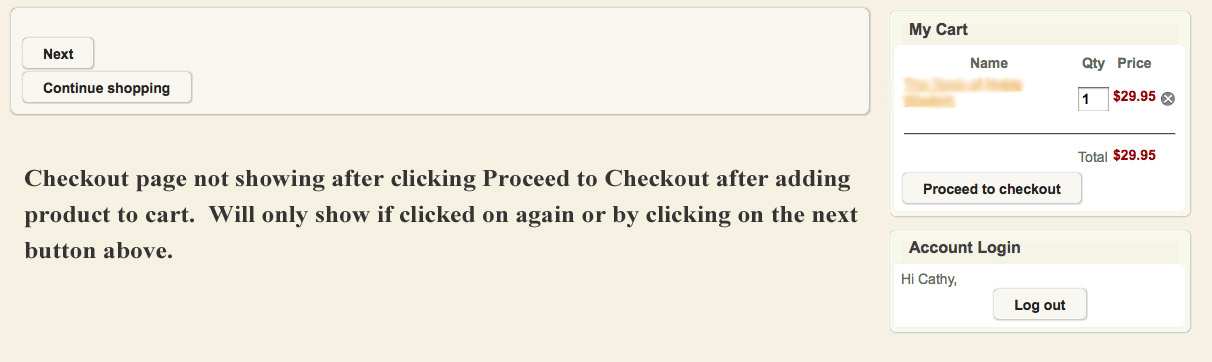
I need some assistance. It seems when I add an order to the cart and click on Proceed to Checkout cart module, instead of going to the checkout page it goes to a blank page and two buttons appear that say next and continue shopping. (please see attached photo) Now if I click Proceed to Checkout again then it goes to the checkout page where it asks for payment. Is there a way to fix this because I don't want people to get confused and give up and leave the purchasing process.
Also, Is there a way to put the product the person is buying above the Billing and Shipping address in checkout instead of it being on the bottom of the page under the payment methods?
Thanks,
Cat'
Please Log in or Create an account to join the conversation.

14 years 8 months ago #34199
by nicolas
Replied by nicolas on topic Re: Proceed To Checkout Goes To Blank Page?
Hi,
It seems that you set the option "After a product is added to the cart" of the Checkout tab of the configuration to "stay and display a popup notice" and that there is a javascript error or something like that on your website which creates that problem instead of displaying a popup notice.
Please check that option and make sure that you set it to "always go to the checkout".
If that doesn't solve your problem, please provide a link to your website so that we can have a look at the problem.
It seems that you set the option "After a product is added to the cart" of the Checkout tab of the configuration to "stay and display a popup notice" and that there is a javascript error or something like that on your website which creates that problem instead of displaying a popup notice.
Please check that option and make sure that you set it to "always go to the checkout".
If that doesn't solve your problem, please provide a link to your website so that we can have a look at the problem.
Please Log in or Create an account to join the conversation.

13 years 4 months ago #104232
by jeremy1128
Replied by jeremy1128 on topic Proceed To Checkout Goes To Blank Page?
I am having this same problem. However this does not happen all of the time. For example, this morning the site was working perfectly and now as of this afternoon the problem came back with the blank page problem. Whenever a customer clicks an item and selects the Add To Cart button the page opens to a blank page. Like I said though this does not happen all of the time. I am unaware of how to correct this.
matrixtreasures.com/
matrixtreasures.com/
Please Log in or Create an account to join the conversation.

13 years 4 months ago #104267
by Xavier
Replied by Xavier on topic Proceed To Checkout Goes To Blank Page?
Hi,
Do you have the latest version of hikaShop ? (2.1.3) you can download it from our website.
Have you edited any views related on the cart ? You have maybe wrongly edited the view.
Do you have the latest version of hikaShop ? (2.1.3) you can download it from our website.
Have you edited any views related on the cart ? You have maybe wrongly edited the view.
Please Log in or Create an account to join the conversation.
13 years 4 months ago #104327
by jeremy1128
Replied by jeremy1128 on topic Proceed To Checkout Goes To Blank Page?
I have uploaded the latest and will let you know if problems persist.
Thanks!
Thanks!
Please Log in or Create an account to join the conversation.
13 years 4 months ago #104395
by jeremy1128
Replied by jeremy1128 on topic Proceed To Checkout Goes To Blank Page?
OK, I have the new installation and I am experiencing the same thing as before. The blank page is coming up again. I do not know about editing any views. I do not think this has been touched.
Please Log in or Create an account to join the conversation.

13 years 4 months ago #104408
by Jerome
Jerome - Obsidev.com
HikaMarket & HikaSerial developer / HikaShop core dev team.
Also helping the HikaShop support team when having some time or couldn't sleep.
By the way, do not send me private message, use the "contact us" form instead.
Replied by Jerome on topic Proceed To Checkout Goes To Blank Page?
Hi,
Can you activate the Joomla debug mode ?
The blank page is generally a sign for a PHP error, you have to check your PHP error log in order to see the error.
I think you can have a memory limit problem. But it is just an idea, we need more information to determine the real problem.
Regards,
Can you activate the Joomla debug mode ?
The blank page is generally a sign for a PHP error, you have to check your PHP error log in order to see the error.
I think you can have a memory limit problem. But it is just an idea, we need more information to determine the real problem.
Regards,
Jerome - Obsidev.com
HikaMarket & HikaSerial developer / HikaShop core dev team.
Also helping the HikaShop support team when having some time or couldn't sleep.
By the way, do not send me private message, use the "contact us" form instead.
Please Log in or Create an account to join the conversation.
13 years 4 months ago #104413
by jeremy1128
Replied by jeremy1128 on topic Proceed To Checkout Goes To Blank Page?
Thank you for the quick response. The debug mode has been turned on. Please let me know if there is anything else I can do.
Thanks,
Jeremy Lee
Thanks,
Jeremy Lee
Please Log in or Create an account to join the conversation.
13 years 4 months ago #104414
by Jerome
Jerome - Obsidev.com
HikaMarket & HikaSerial developer / HikaShop core dev team.
Also helping the HikaShop support team when having some time or couldn't sleep.
By the way, do not send me private message, use the "contact us" form instead.
Replied by Jerome on topic Proceed To Checkout Goes To Blank Page?
Hi,
Test it again and check your PHP error log to get the PHP error message.
Regards,
Test it again and check your PHP error log to get the PHP error message.
Regards,
Jerome - Obsidev.com
HikaMarket & HikaSerial developer / HikaShop core dev team.
Also helping the HikaShop support team when having some time or couldn't sleep.
By the way, do not send me private message, use the "contact us" form instead.
Please Log in or Create an account to join the conversation.
13 years 4 months ago #104844
by jeremy1128
Replied by jeremy1128 on topic Proceed To Checkout Goes To Blank Page?
[16-May-2013 03:04:08] PHP Fatal error: Call to a member function get() on a non-object in /home/shop38/public_html/matrixtreasures/components/com_hikashop/views/cart/view.html.php on line 248
[16-May-2013 15:50:12] PHP Notice: Undefined offset: 2 in /home/shop38/public_html/matrixtreasures/modules/mod_rokslideshow/helper.php on line 59
[16-May-2013 15:50:12] PHP Notice: Undefined offset: 2 in /home/shop38/public_html/matrixtreasures/modules/mod_rokslideshow/helper.php on line 59
This is what I am getting for yesterday afternoon.
[16-May-2013 15:50:12] PHP Notice: Undefined offset: 2 in /home/shop38/public_html/matrixtreasures/modules/mod_rokslideshow/helper.php on line 59
[16-May-2013 15:50:12] PHP Notice: Undefined offset: 2 in /home/shop38/public_html/matrixtreasures/modules/mod_rokslideshow/helper.php on line 59
This is what I am getting for yesterday afternoon.
Please Log in or Create an account to join the conversation.
13 years 4 months ago #104865
by Jerome
Jerome - Obsidev.com
HikaMarket & HikaSerial developer / HikaShop core dev team.
Also helping the HikaShop support team when having some time or couldn't sleep.
By the way, do not send me private message, use the "contact us" form instead.
Replied by Jerome on topic Proceed To Checkout Goes To Blank Page?
Hi,
I am sorry but there is no such "get" call in the line 248 in the "com_hikashop/views/cart/view.html" for HikaShop 2.1.3
Are you really sure you have the latest version installed and all your files are updated ?
Regards,
I am sorry but there is no such "get" call in the line 248 in the "com_hikashop/views/cart/view.html" for HikaShop 2.1.3
Are you really sure you have the latest version installed and all your files are updated ?
Regards,
Jerome - Obsidev.com
HikaMarket & HikaSerial developer / HikaShop core dev team.
Also helping the HikaShop support team when having some time or couldn't sleep.
By the way, do not send me private message, use the "contact us" form instead.
Please Log in or Create an account to join the conversation.
13 years 4 months ago #104867
by jeremy1128
Replied by jeremy1128 on topic Proceed To Checkout Goes To Blank Page?
com_hikashop_business_2.1.3_2013-05-16.tar.gz
Version 2.1.3
This is what I downloaded from the Hika site yesterday.
Version 2.1.3
This is what I downloaded from the Hika site yesterday.
Please Log in or Create an account to join the conversation.
13 years 4 months ago #104884
by Jerome
Jerome - Obsidev.com
HikaMarket & HikaSerial developer / HikaShop core dev team.
Also helping the HikaShop support team when having some time or couldn't sleep.
By the way, do not send me private message, use the "contact us" form instead.
Replied by Jerome on topic Proceed To Checkout Goes To Blank Page?
Hi,
File: front/views/cart/view.html.php
line 248:
There is no "get" in this line. And it come from the latest package so I have to ask you the same question again.
Are you sure that your file "/home/shop38/public_html/matrixtreasures/components/com_hikashop/views/cart/view.html.php" is up to date ?
Best regards,
File: front/views/cart/view.html.php
line 248:
Code:
$this->assignRef('cartVal',$cartVal);
Are you sure that your file "/home/shop38/public_html/matrixtreasures/components/com_hikashop/views/cart/view.html.php" is up to date ?
Best regards,
Jerome - Obsidev.com
HikaMarket & HikaSerial developer / HikaShop core dev team.
Also helping the HikaShop support team when having some time or couldn't sleep.
By the way, do not send me private message, use the "contact us" form instead.
Please Log in or Create an account to join the conversation.
13 years 4 months ago - 13 years 4 months ago #104892
by jeremy1128
Replied by jeremy1128 on topic Proceed To Checkout Goes To Blank Page?
Inside the backend of my site, under extension manager, under components listed:
HikaShop 2.1.3
Is this the latest version of Hika that is out? This is what I have listed in my components.
This morning I was able to use the proceed to checkout button, but now again it is not working. It just takes me to a blank page. I just want it to work properly.
HikaShop 2.1.3
Is this the latest version of Hika that is out? This is what I have listed in my components.
This morning I was able to use the proceed to checkout button, but now again it is not working. It just takes me to a blank page. I just want it to work properly.
Last edit: 13 years 4 months ago by jeremy1128. Reason: adding
Please Log in or Create an account to join the conversation.
13 years 4 months ago #104918
by Jerome
Jerome - Obsidev.com
HikaMarket & HikaSerial developer / HikaShop core dev team.
Also helping the HikaShop support team when having some time or couldn't sleep.
By the way, do not send me private message, use the "contact us" form instead.
Replied by Jerome on topic Proceed To Checkout Goes To Blank Page?
Hi,
Please check your file "/home/shop38/public_html/matrixtreasures/components/com_hikashop/views/cart/view.html.php".
You can just read his content and check the header of the file (the first lines which indicates the version of HikaShop).
We have to be sure that this file (and so, the others) have been right updated.
The database can be up to date and store the "2.1.3" version in the config table, but the file have to be updated too.
Please check your PHP error log each time you have a full blank page.
And you can check the file (at the line indicated) in order to see where the error come from.
But my main problem is that, the file and the line you gave is not the same in the official 2.1.3 package (and we do not change the file in the package).
If your file is not the same than mine but the same version is indicated. I think you can understand that we can't provide you any usefull support, because we can't fix a problem if we don't have same files (pr your files are broken).
Best regards,
Please check your file "/home/shop38/public_html/matrixtreasures/components/com_hikashop/views/cart/view.html.php".
You can just read his content and check the header of the file (the first lines which indicates the version of HikaShop).
We have to be sure that this file (and so, the others) have been right updated.
The database can be up to date and store the "2.1.3" version in the config table, but the file have to be updated too.
Please check your PHP error log each time you have a full blank page.
And you can check the file (at the line indicated) in order to see where the error come from.
But my main problem is that, the file and the line you gave is not the same in the official 2.1.3 package (and we do not change the file in the package).
If your file is not the same than mine but the same version is indicated. I think you can understand that we can't provide you any usefull support, because we can't fix a problem if we don't have same files (pr your files are broken).
Best regards,
Jerome - Obsidev.com
HikaMarket & HikaSerial developer / HikaShop core dev team.
Also helping the HikaShop support team when having some time or couldn't sleep.
By the way, do not send me private message, use the "contact us" form instead.
Please Log in or Create an account to join the conversation.
Time to create page: 0.243 seconds