

- Posts: 293
- Thank you received: 9
[SOLVED] Add to Cart POPUP Window Cutting Off
14 years 4 months ago - 14 years 4 months ago #50581
by MSTACE
[SOLVED] Add to Cart POPUP Window Cutting Off was created by MSTACE
Joomla 2.5.4
HikaShop Business
The modal Add to Cart POPUP window is too small to show the contents of that window.
See attached.
How to make it larger so that people can actually see the buttons?
Thanks.
Development server: www.ivibes.co.nz/new/shop-online-now
HikaShop Business
The modal Add to Cart POPUP window is too small to show the contents of that window.
See attached.
How to make it larger so that people can actually see the buttons?
Thanks.
Development server: www.ivibes.co.nz/new/shop-online-now
Last edit: 14 years 4 months ago by MSTACE.
Please Log in or Create an account to join the conversation.

14 years 4 months ago #50672
by nicolas
Replied by nicolas on topic Re: Add to Cart POPUP Window Cutting Off the Contents
You can edit the file administrator/components/com_hikashop/helper/cart.php and change the line:
echo '<div style="display:none;"><a rel="{handler: \'iframe\',size: {x: 480, y: 140}}" id="hikashop_notice_box_trigger_link" href="'.hikashop_completeLink('checkout&task=notice'.$url_itemid,true).'"></a></div>';
echo '<div style="display:none;"><a rel="{handler: \'iframe\',size: {x: 480, y: 140}}" id="hikashop_notice_box_trigger_link" href="'.hikashop_completeLink('checkout&task=notice'.$url_itemid,true).'"></a></div>';
Please Log in or Create an account to join the conversation.
14 years 4 months ago #50674
by MSTACE
Replied by MSTACE on topic Re: Add to Cart POPUP Window Cutting Off the Contents
Yes, that works.
Thank you.
Thank you.
Please Log in or Create an account to join the conversation.

14 years 1 month ago - 14 years 1 month ago #59664
by Teto
Replied by Teto on topic Re: Add to Cart POPUP Window Cutting Off the Contents
Do you think is also possible to change the layout of the button in order to have the same shape of the other joomla button? It seems these button don't use the default template style.
I worldwide also change the color, i don't know why but the pop up is green instead all the other hika MessagePad are of a different color (Bordeaux)
here you find the standard color and button
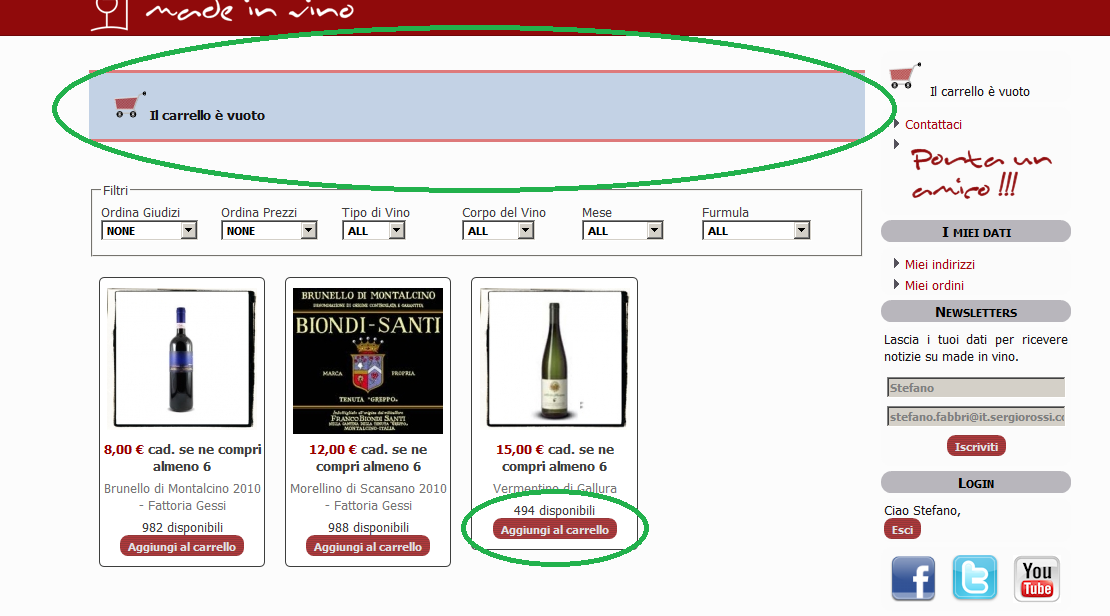
here you can see the button of the pop uo
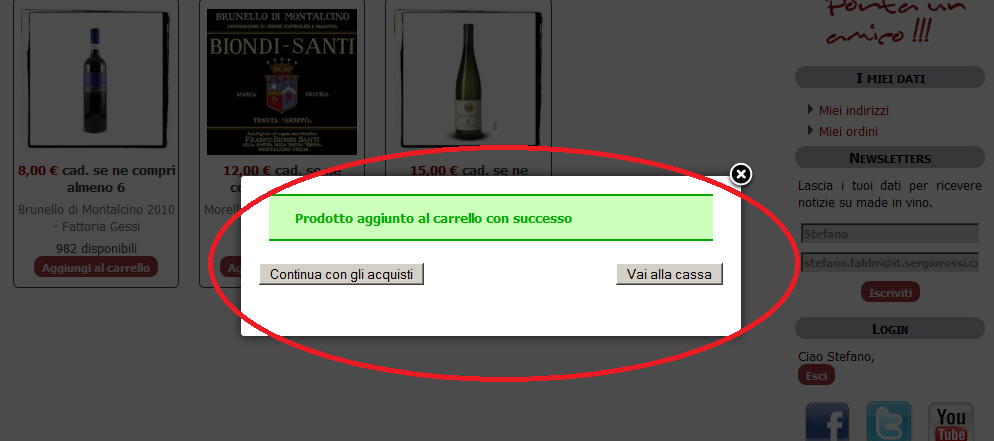
Thank you.
I worldwide also change the color, i don't know why but the pop up is green instead all the other hika MessagePad are of a different color (Bordeaux)
here you find the standard color and button
here you can see the button of the pop uo
Thank you.
Last edit: 14 years 1 month ago by Teto.
Please Log in or Create an account to join the conversation.
14 years 1 month ago #59738
by nicolas
Replied by nicolas on topic Re: Add to Cart POPUP Window Cutting Off the Contents
It's probably that the component.php file of your template doesn't load the styles like the index.php file of the template. You will have to add that. If you got your template via a template provider you should contact them regarding that.
For the message color, that's because most of the type the messages are not included by the template in the component.php so HikaShop displays the message itself instead of letting the template do it.
Because of that, it uses the styles of HikaShop. So you will have to edit the front end CSS file of HikaShop if you want to change the color of that notice message.
For the message color, that's because most of the type the messages are not included by the template in the component.php so HikaShop displays the message itself instead of letting the template do it.
Because of that, it uses the styles of HikaShop. So you will have to edit the front end CSS file of HikaShop if you want to change the color of that notice message.
Please Log in or Create an account to join the conversation.
14 years 1 month ago - 14 years 1 month ago #59929
by Teto
Replied by Teto on topic Re: Add to Cart POPUP Window Cutting Off the Contents
thank you nicolas
To create the template I used Artisteer 3.1.
The component.php of the template is this:
<?php
defined('_JEXEC') or die;
?>
<!DOCTYPE html PUBLIC "-//W3C//DTD XHTML 1.0 Transitional//EN" " www.w3.org/TR/xhtml1/DTD/xhtml1-transitional.dtd ">
<html xmlns=" www.w3.org/1999/xhtml " xml:lang="language; ?>" lang="language; ?>" >
<head>
<jdoc:include type="head" />
<link rel="stylesheet" href="<?php echo $this->baseurl; ?>/templates/system/css/system.css" type="text/css" />
<link rel="stylesheet" href="<?php echo $this->baseurl; ?>/templates/system/css/general.css" type="text/css" />
<link rel="stylesheet" href="<?php echo $this->baseurl . '/templates/' . $this->template; ?>/css/print.css" type="text/css" />
</head>
<body class="contentpane">
<jdoc:include type="message" />
<jdoc:include type="component" />
</body>
</html>
What do I have to add exaclty?
To create the template I used Artisteer 3.1.
The component.php of the template is this:
<?php
defined('_JEXEC') or die;
?>
<!DOCTYPE html PUBLIC "-//W3C//DTD XHTML 1.0 Transitional//EN" " www.w3.org/TR/xhtml1/DTD/xhtml1-transitional.dtd ">
<html xmlns=" www.w3.org/1999/xhtml " xml:lang="language; ?>" lang="language; ?>" >
<head>
<jdoc:include type="head" />
<link rel="stylesheet" href="<?php echo $this->baseurl; ?>/templates/system/css/system.css" type="text/css" />
<link rel="stylesheet" href="<?php echo $this->baseurl; ?>/templates/system/css/general.css" type="text/css" />
<link rel="stylesheet" href="<?php echo $this->baseurl . '/templates/' . $this->template; ?>/css/print.css" type="text/css" />
</head>
<body class="contentpane">
<jdoc:include type="message" />
<jdoc:include type="component" />
</body>
</html>
What do I have to add exaclty?
Last edit: 14 years 1 month ago by Teto.
Please Log in or Create an account to join the conversation.
14 years 1 month ago #59990
by nicolas
Replied by nicolas on topic Re: Add to Cart POPUP Window Cutting Off the Contents
You will need to add the CSS files of your template's index.php file.
Please Log in or Create an account to join the conversation.
14 years 1 month ago #60006
by Teto
Replied by Teto on topic Re: Add to Cart POPUP Window Cutting Off the Contents
Do i have to copy and past here all the content of index.php?
Please Log in or Create an account to join the conversation.
14 years 1 month ago #60089
by nicolas
Replied by nicolas on topic Re: Add to Cart POPUP Window Cutting Off the Contents
Well, since I don't know what you have in it, that would help me tell you what code to use from it.
Please Log in or Create an account to join the conversation.
14 years 1 month ago #60103
by Teto
Replied by Teto on topic Re: Add to Cart POPUP Window Cutting Off the Contents
Sorry to bother you about this thing. :blush:
this is the index.php, could you just give me a little advice? Then I will start from that in order to understand how it works.
<?php
defined('_JEXEC') or die;
/* Template for Joomla! CMS, created with Artisteer. */
require_once dirname(__FILE__) . DIRECTORY_SEPARATOR . 'functions.php';
// Create alias for $this object reference:
$document = & $this;
// Shortcut for template base url:
$templateUrl = $document->baseurl . '/templates/' . $document->template;
// Initialize $view:
$view = $this->artx = new ArtxPage($this);
// Decorate component with Artisteer style:
$view->componentWrapper();
?>
<!DOCTYPE html PUBLIC "-//W3C//DTD XHTML 1.0 Transitional//EN" " www.w3.org/TR/xhtml1/DTD/xhtml1-transitional.dtd ">
<html xmlns=" www.w3.org/1999/xhtml " xml:lang="language; ?>" lang="language; ?>" dir="ltr">
<head>
<jdoc:include type="head" />
<link rel="stylesheet" href="<?php echo $document->baseurl; ?>/templates/system/css/system.css" type="text/css" />
<link rel="stylesheet" href="<?php echo $document->baseurl; ?>/templates/system/css/general.css" type="text/css" />
<link rel="stylesheet" type="text/css" href="<?php echo $templateUrl; ?>/css/template.css" media="screen" />
<!--[if IE 6]><link rel="stylesheet" href="<?php echo $templateUrl; ?>/css/template.ie6.css" type="text/css" media="screen" /><![endif]-->
<!--[if IE 7]><link rel="stylesheet" href="<?php echo $templateUrl; ?>/css/template.ie7.css" type="text/css" media="screen" /><![endif]-->
<script type="text/javascript">if ('undefined' != typeof jQuery) document._artxJQueryBackup = jQuery;</script>
<script type="text/javascript" src="<?php echo $templateUrl; ?>/jquery.js"></script>
<script type="text/javascript">jQuery.noConflict();</script>
<script type="text/javascript" src="<?php echo $templateUrl; ?>/script.js"></script>
<script type="text/javascript">if (document._artxJQueryBackup) jQuery = document._artxJQueryBackup;</script>
</head>
<body>
<div id="art-main">
<div class="cleared reset-box"></div>
<?php if ($view->containsModules('user3', 'extra1', 'extra2')) : ?>
<div class="art-bar art-nav">
<div class="art-nav-outer">
<div class="art-nav-wrapper">
<div class="art-nav-inner">
<?php if ($view->containsModules('extra1')) : ?>
<div class="art-hmenu-extra1"><?php echo $view->position('extra1'); ?></div>
<?php endif; ?>
<?php if ($view->containsModules('extra2')) : ?>
<div class="art-hmenu-extra2"><?php echo $view->position('extra2'); ?></div>
<?php endif; ?>
<?php echo $view->position('user3'); ?>
</div>
</div>
</div>
</div>
<div class="cleared reset-box"></div>
<?php endif; ?>
<div class="art-header">
<div class="art-header-position">
<div class="art-header-wrapper">
<div class="cleared reset-box"></div>
<div class="art-header-inner">
<div class="art-headerobject"></div>
<div class="art-logo">
</div>
</div>
</div>
</div>
</div>
<div class="cleared reset-box"></div>
<div class="art-box art-sheet">
<div class="art-box-body art-sheet-body">
<?php echo $view->position('banner1', 'art-nostyle'); ?>
<?php echo $view->positions(array('top1' => 33, 'top2' => 33, 'top3' => 34), 'art-block'); ?>
<div class="art-layout-wrapper">
<div class="art-content-layout">
<div class="art-content-layout-row">
<?php if ($view->containsModules('left')) : ?>
<div class="art-layout-cell art-sidebar1">
<?php echo $view->position('left', 'art-block'); ?>
<div class="cleared"></div>
</div>
<?php endif; ?>
<div class="art-layout-cell art-content">
<?php
echo $view->position('banner2', 'art-nostyle');
if ($view->containsModules('breadcrumb'))
echo artxPost($view->position('breadcrumb'));
echo $view->positions(array('user1' => 50, 'user2' => 50), 'art-article');
echo $view->position('banner3', 'art-nostyle');
if ($view->hasMessages())
echo artxPost('<jdoc:include type="message" />');
echo '<jdoc:include type="component" />';
echo $view->position('banner4', 'art-nostyle');
echo $view->positions(array('user4' => 50, 'user5' => 50), 'art-article');
echo $view->position('banner5', 'art-nostyle');
?>
<div class="cleared"></div>
</div>
<?php if ($view->containsModules('right')) : ?>
<div class="art-layout-cell art-sidebar2">
<?php echo $view->position('right', 'art-block'); ?>
<div class="cleared"></div>
</div>
<?php endif; ?>
</div>
</div>
</div>
<div class="cleared"></div>
<?php echo $view->positions(array('bottom1' => 33, 'bottom2' => 33, 'bottom3' => 34), 'art-block'); ?>
<?php echo $view->position('banner6', 'art-nostyle'); ?>
<div class="cleared"></div>
</div>
</div>
<div class="art-footer">
<div class="art-footer-body">
<div class="art-footer-center">
<div class="art-footer-wrapper">
<div class="art-footer-text">
<?php echo $view->position('syndicate'); ?>
<?php if ($view->containsModules('copyright')): ?>
<?php echo $view->position('copyright', 'art-nostyle'); ?>
<?php else: ?>
<?php ob_start(); ?>
<p><a href="#">Link1</a> | <a href="#">Link2</a> | <a href="#">Link3</a></p><p>Copyright © 2012. All Rights Reserved.</p>
<div class="cleared"></div>
<p class="art-page-footer"><a href=" www.artisteer.com/?p=joomla_templates " target="_blank">Joomla template created with Artisteer by Stefano Fabbri.
<?php echo str_replace('%YEAR%', date('Y'), ob_get_clean()); ?>
<?php endif; ?>
</div>
</div>
</div>
<div class="cleared"></div>
</div>
</div>
<div class="cleared"></div>
</div>
<?php echo $view->position('debug'); ?>
</body>
</html>
this is the index.php, could you just give me a little advice? Then I will start from that in order to understand how it works.
<?php
defined('_JEXEC') or die;
/* Template for Joomla! CMS, created with Artisteer. */
require_once dirname(__FILE__) . DIRECTORY_SEPARATOR . 'functions.php';
// Create alias for $this object reference:
$document = & $this;
// Shortcut for template base url:
$templateUrl = $document->baseurl . '/templates/' . $document->template;
// Initialize $view:
$view = $this->artx = new ArtxPage($this);
// Decorate component with Artisteer style:
$view->componentWrapper();
?>
<!DOCTYPE html PUBLIC "-//W3C//DTD XHTML 1.0 Transitional//EN" " www.w3.org/TR/xhtml1/DTD/xhtml1-transitional.dtd ">
<html xmlns=" www.w3.org/1999/xhtml " xml:lang="language; ?>" lang="language; ?>" dir="ltr">
<head>
<jdoc:include type="head" />
<link rel="stylesheet" href="<?php echo $document->baseurl; ?>/templates/system/css/system.css" type="text/css" />
<link rel="stylesheet" href="<?php echo $document->baseurl; ?>/templates/system/css/general.css" type="text/css" />
<link rel="stylesheet" type="text/css" href="<?php echo $templateUrl; ?>/css/template.css" media="screen" />
<!--[if IE 6]><link rel="stylesheet" href="<?php echo $templateUrl; ?>/css/template.ie6.css" type="text/css" media="screen" /><![endif]-->
<!--[if IE 7]><link rel="stylesheet" href="<?php echo $templateUrl; ?>/css/template.ie7.css" type="text/css" media="screen" /><![endif]-->
<script type="text/javascript">if ('undefined' != typeof jQuery) document._artxJQueryBackup = jQuery;</script>
<script type="text/javascript" src="<?php echo $templateUrl; ?>/jquery.js"></script>
<script type="text/javascript">jQuery.noConflict();</script>
<script type="text/javascript" src="<?php echo $templateUrl; ?>/script.js"></script>
<script type="text/javascript">if (document._artxJQueryBackup) jQuery = document._artxJQueryBackup;</script>
</head>
<body>
<div id="art-main">
<div class="cleared reset-box"></div>
<?php if ($view->containsModules('user3', 'extra1', 'extra2')) : ?>
<div class="art-bar art-nav">
<div class="art-nav-outer">
<div class="art-nav-wrapper">
<div class="art-nav-inner">
<?php if ($view->containsModules('extra1')) : ?>
<div class="art-hmenu-extra1"><?php echo $view->position('extra1'); ?></div>
<?php endif; ?>
<?php if ($view->containsModules('extra2')) : ?>
<div class="art-hmenu-extra2"><?php echo $view->position('extra2'); ?></div>
<?php endif; ?>
<?php echo $view->position('user3'); ?>
</div>
</div>
</div>
</div>
<div class="cleared reset-box"></div>
<?php endif; ?>
<div class="art-header">
<div class="art-header-position">
<div class="art-header-wrapper">
<div class="cleared reset-box"></div>
<div class="art-header-inner">
<div class="art-headerobject"></div>
<div class="art-logo">
</div>
</div>
</div>
</div>
</div>
<div class="cleared reset-box"></div>
<div class="art-box art-sheet">
<div class="art-box-body art-sheet-body">
<?php echo $view->position('banner1', 'art-nostyle'); ?>
<?php echo $view->positions(array('top1' => 33, 'top2' => 33, 'top3' => 34), 'art-block'); ?>
<div class="art-layout-wrapper">
<div class="art-content-layout">
<div class="art-content-layout-row">
<?php if ($view->containsModules('left')) : ?>
<div class="art-layout-cell art-sidebar1">
<?php echo $view->position('left', 'art-block'); ?>
<div class="cleared"></div>
</div>
<?php endif; ?>
<div class="art-layout-cell art-content">
<?php
echo $view->position('banner2', 'art-nostyle');
if ($view->containsModules('breadcrumb'))
echo artxPost($view->position('breadcrumb'));
echo $view->positions(array('user1' => 50, 'user2' => 50), 'art-article');
echo $view->position('banner3', 'art-nostyle');
if ($view->hasMessages())
echo artxPost('<jdoc:include type="message" />');
echo '<jdoc:include type="component" />';
echo $view->position('banner4', 'art-nostyle');
echo $view->positions(array('user4' => 50, 'user5' => 50), 'art-article');
echo $view->position('banner5', 'art-nostyle');
?>
<div class="cleared"></div>
</div>
<?php if ($view->containsModules('right')) : ?>
<div class="art-layout-cell art-sidebar2">
<?php echo $view->position('right', 'art-block'); ?>
<div class="cleared"></div>
</div>
<?php endif; ?>
</div>
</div>
</div>
<div class="cleared"></div>
<?php echo $view->positions(array('bottom1' => 33, 'bottom2' => 33, 'bottom3' => 34), 'art-block'); ?>
<?php echo $view->position('banner6', 'art-nostyle'); ?>
<div class="cleared"></div>
</div>
</div>
<div class="art-footer">
<div class="art-footer-body">
<div class="art-footer-center">
<div class="art-footer-wrapper">
<div class="art-footer-text">
<?php echo $view->position('syndicate'); ?>
<?php if ($view->containsModules('copyright')): ?>
<?php echo $view->position('copyright', 'art-nostyle'); ?>
<?php else: ?>
<?php ob_start(); ?>
<p><a href="#">Link1</a> | <a href="#">Link2</a> | <a href="#">Link3</a></p><p>Copyright © 2012. All Rights Reserved.</p>
<div class="cleared"></div>
<p class="art-page-footer"><a href=" www.artisteer.com/?p=joomla_templates " target="_blank">Joomla template created with Artisteer by Stefano Fabbri.
<?php echo str_replace('%YEAR%', date('Y'), ob_get_clean()); ?>
<?php endif; ?>
</div>
</div>
</div>
<div class="cleared"></div>
</div>
</div>
<div class="cleared"></div>
</div>
<?php echo $view->position('debug'); ?>
</body>
</html>
Please Log in or Create an account to join the conversation.
14 years 1 month ago - 14 years 1 month ago #60105
by nicolas
Replied by nicolas on topic Re: Add to Cart POPUP Window Cutting Off the Contents
You should try to add that line:
<link rel="stylesheet" type="text/css" href="<?php echo $this->baseurl . '/templates/' . $this->template; ?>/css/template.css" media="screen" />
after:
<link rel="stylesheet" href="<?php echo $this->baseurl . '/templates/' . $this->template; ?>/css/print.css" type="text/css" />
<link rel="stylesheet" type="text/css" href="<?php echo $this->baseurl . '/templates/' . $this->template; ?>/css/template.css" media="screen" />
after:
<link rel="stylesheet" href="<?php echo $this->baseurl . '/templates/' . $this->template; ?>/css/print.css" type="text/css" />
Last edit: 14 years 1 month ago by nicolas.
Please Log in or Create an account to join the conversation.

14 years 4 weeks ago #62829
by boopoo
Replied by boopoo on topic Re: Add to Cart POPUP Window Cutting Off the Contents
Hello Nicolas,
Could you kindly tell me which CSS file (its location) I need to edit in order to change the colour of the Hikashop 'add-to-cart' success pop up messages (which appear on the frontend)? I have looked on the forum and could not see this information.
Your time is greatly appreciated.
Could you kindly tell me which CSS file (its location) I need to edit in order to change the colour of the Hikashop 'add-to-cart' success pop up messages (which appear on the frontend)? I have looked on the forum and could not see this information.
Your time is greatly appreciated.
Please Log in or Create an account to join the conversation.
14 years 4 weeks ago #62991
by nicolas
Replied by nicolas on topic Re: Add to Cart POPUP Window Cutting Off the Contents
It's the hikashop front end CSS file which can be edited via the Display tab of the configuration page. That's where all the CSS of HikaShop is for the front end
Please Log in or Create an account to join the conversation.
14 years 4 weeks ago #63065
by boopoo
Replied by boopoo on topic Re: Add to Cart POPUP Window Cutting Off the Contents
Hi nicolas,
Thanks for your reply. I actually do not have a css file for the frontend listed in Display. I have 3 css files listed for the backend only. Is this (frontend CSS) only available on paid for versions?
Thanks for your reply. I actually do not have a css file for the frontend listed in Display. I have 3 css files listed for the backend only. Is this (frontend CSS) only available on paid for versions?
Please Log in or Create an account to join the conversation.
14 years 4 weeks ago #63155
by nicolas
Replied by nicolas on topic Re: Add to Cart POPUP Window Cutting Off the Contents
No, it's available for all versions of HikaShop and installed by default.
If you don't have it, it's either that it couldn't be copied during installation or that you deleted it.
you can find in the the folder media/css in install packages of HikaShop and put it manually in media/com_hikashop/css on your website and you will have it in the option.
If you don't have it, it's either that it couldn't be copied during installation or that you deleted it.
you can find in the the folder media/css in install packages of HikaShop and put it manually in media/com_hikashop/css on your website and you will have it in the option.
The following user(s) said Thank You: boopoo
Please Log in or Create an account to join the conversation.
13 years 1 month ago #117092
by ximbo
Replied by ximbo on topic [SOLVED] Add to Cart POPUP Window Cutting Off
I just have a quick question with your first post here nicolas - is there a way to make that modification via an override so settings are not lost on update?
Please Log in or Create an account to join the conversation.
13 years 1 month ago #117104
by nicolas
Replied by nicolas on topic [SOLVED] Add to Cart POPUP Window Cutting Off
Yes, you can do a button override by implementing the hikashop_popup_render function :
www.hikashop.com/support/support/documen...tation.html#override
www.hikashop.com/support/support/documen...tation.html#override
The following user(s) said Thank You: ximbo
Please Log in or Create an account to join the conversation.
12 years 5 months ago #151986
by Brunus
Hi Nicolas, sorry to up this thread but I had this problem after updating to last Hikashop release.
On the previous release I fixed the problem while giving a min-height to #sbox-window css selector.
Unfortunately I did it in the Joomla modal.css file and this file were replaced by Joomla update.
But it works also if I put the rule in the Hikashop custom frontend.css, then don't you think t's safer than to edit the cart.php file ? This file will not be modified by hikashop updates ?
Replied by Brunus on topic Re: Add to Cart POPUP Window Cutting Off the Contents
nicolas wrote: You can edit the file administrator/components/com_hikashop/helper/cart.php and change the line:
echo '<div style="display:none;"><a rel="{handler: \'iframe\',size: {x: 480, y: 140}}" id="hikashop_notice_box_trigger_link" href="'.hikashop_completeLink('checkout&task=notice'.$url_itemid,true).'"></a></div>';
Hi Nicolas, sorry to up this thread but I had this problem after updating to last Hikashop release.
On the previous release I fixed the problem while giving a min-height to #sbox-window css selector.
Unfortunately I did it in the Joomla modal.css file and this file were replaced by Joomla update.
But it works also if I put the rule in the Hikashop custom frontend.css, then don't you think t's safer than to edit the cart.php file ? This file will not be modified by hikashop updates ?
Please Log in or Create an account to join the conversation.
12 years 5 months ago #151994
by nicolas
Replied by nicolas on topic Re: Add to Cart POPUP Window Cutting Off the Contents
It's indeed better. If you edit the CSS via the interface in the Display tab of the configuration, you won't loose your changes when you update.
Please Log in or Create an account to join the conversation.
12 years 5 months ago #152922
by margknox
Replied by margknox on topic Re: Add to Cart POPUP Window Cutting Off the Contents
I have tried altering the cart.php to increase the width of the pop-up, but it needs to be 780 before the Proceed to Checkout button is included, which is way too wide. There's plenty of room in the default 480 for both buttons to display. How can I bring the Proceed to Checkout button closer to the Continue Shopping Button?
Please Log in or Create an account to join the conversation.
Time to create page: 0.312 seconds