

- Posts: 55
- Thank you received: 0
Small image div does not show
13 years 10 months ago - 13 years 10 months ago #74930
by jen168
Small image div does not show was created by jen168
Hi,
I'd basically like my product page to function thus:
The small image div is visible at all times, and when selecting a colour, the image will change to the corresponding colour (or any other characteristic that has a specific image).
Currently, the small image div shows only when i have multiple images added to the MAIN product, but no images associated with the VARIANT.
This would be OK, but I want the image to change colour when a colour is selected.
Please tell me what I need to alter in the code.
Thanks
PS - another thing. When attempting to configure the product page correctly, my Recently Viewed module has suddenly started displaying 12 products instead of 3. It did this before, and I believe it's to do with the changes I made to the pagination, so that it would show 12 by default instead of 20. However, before, I went to the module and made sure it was set to 'All sub elements' and 'Synchronize with currently displayed menu' was set to No. This fixed it. Now, it doesn't fix it, and I don't know which other settings could possibly have affected it. I also can't see how I did anything to affect it with the changes I made to the views. Very confusing
I'd basically like my product page to function thus:
The small image div is visible at all times, and when selecting a colour, the image will change to the corresponding colour (or any other characteristic that has a specific image).
Currently, the small image div shows only when i have multiple images added to the MAIN product, but no images associated with the VARIANT.
This would be OK, but I want the image to change colour when a colour is selected.
Please tell me what I need to alter in the code.
Thanks
PS - another thing. When attempting to configure the product page correctly, my Recently Viewed module has suddenly started displaying 12 products instead of 3. It did this before, and I believe it's to do with the changes I made to the pagination, so that it would show 12 by default instead of 20. However, before, I went to the module and made sure it was set to 'All sub elements' and 'Synchronize with currently displayed menu' was set to No. This fixed it. Now, it doesn't fix it, and I don't know which other settings could possibly have affected it. I also can't see how I did anything to affect it with the changes I made to the views. Very confusing
Last edit: 13 years 10 months ago by jen168. Reason: new problem
Please Log in or Create an account to join the conversation.

Less
More
- Posts: 12953
- Thank you received: 1778
13 years 10 months ago #74957
by Mohamed Thelji
Replied by Mohamed Thelji on topic Re: Small image div does not show
Hi,
1. Can you give me a link to your web site ? it would help me to understand the problem and how to solve it.
2. Can you show me a screenshot of your module ?
Thank you.
1. Can you give me a link to your web site ? it would help me to understand the problem and how to solve it.
2. Can you show me a screenshot of your module ?
Thank you.
Please Log in or Create an account to join the conversation.
13 years 10 months ago #74968
by jen168
Replied by jen168 on topic Re: Small image div does not show
Hmm, I just deleted the recently viewed module, as I couldn't get it working properly. I created a new one and I can get it to display as a module, but not under the product page. Here's the link to my site
commuter-hub.com/comhub
.
As I said, I deleted the module so I can't give you a screenshot, but I can give you a screenshot of the one I just made...
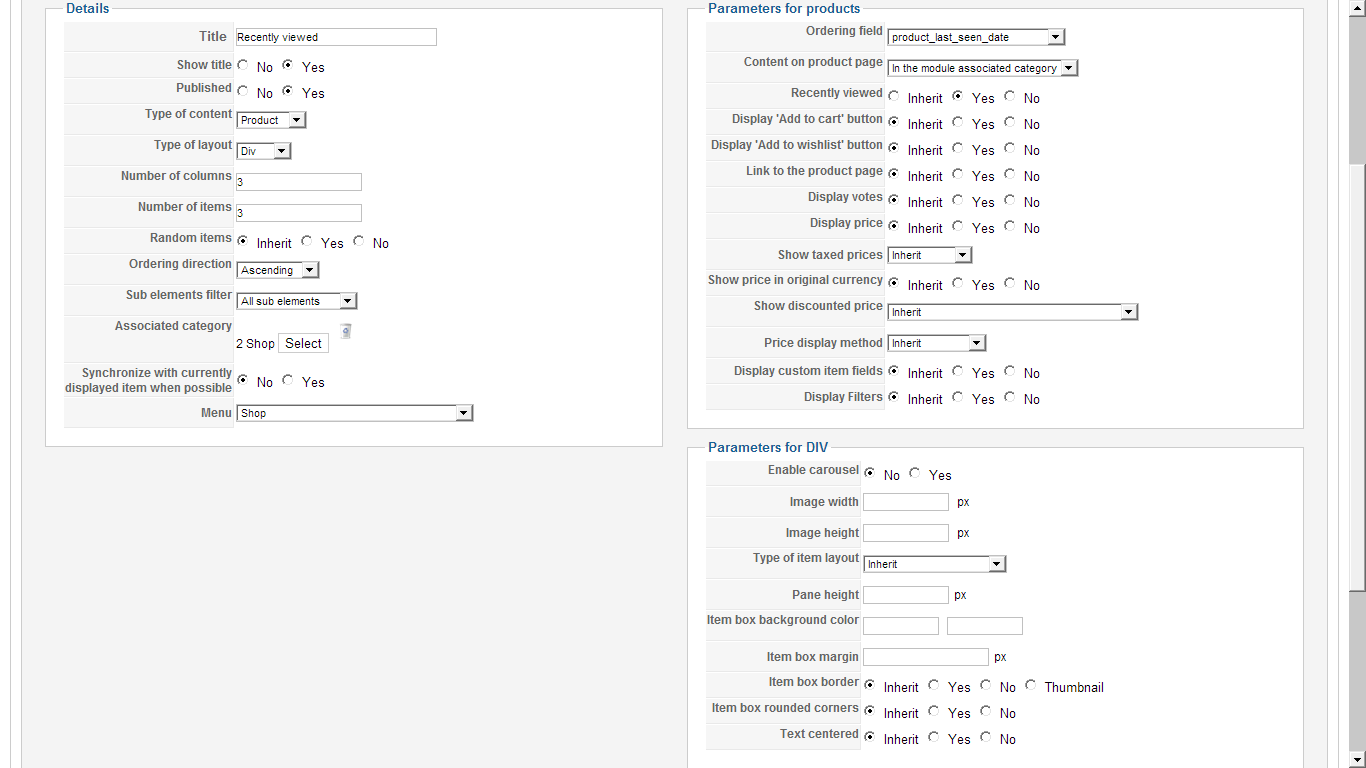
As I said, I deleted the module so I can't give you a screenshot, but I can give you a screenshot of the one I just made...
Please Log in or Create an account to join the conversation.

13 years 10 months ago #75628
by nicolas
Replied by nicolas on topic Re: Small image div does not show
I think that the problem could be that you restricted your module to only display on some menus with the "menu assignment" option of the module and that your product pages display via another menu that the ones selected for it.
Please Log in or Create an account to join the conversation.
13 years 10 months ago - 13 years 10 months ago #79040
by jen168
Replied by jen168 on topic Re: Small image div does not show
Thanks. I've got it looking right. Now, did you have any advice regarding the first question? I still can't get that small image div to display when i have images linked to variants. Take a look at the Defeet Neon Dura Glove for an example. Many thanks.
Last edit: 13 years 10 months ago by jen168.
Please Log in or Create an account to join the conversation.

13 years 10 months ago #79071
by Jerome
Jerome - Obsidev.com
HikaMarket & HikaSerial developer / HikaShop core dev team.
Also helping the HikaShop support team when having some time or couldn't sleep.
By the way, do not send me private message, use the "contact us" form instead.
Replied by Jerome on topic Re: Small image div does not show
Hi,
When a I look at the product page of "Defeet Neon Dura Glove", I can see that each variant have a special colored picture.
You have configured one image for each variant. So, when you select a variant, you can only see the single image that this variant have.
So, I am not sure that I have understand your problem.
Regards,
When a I look at the product page of "Defeet Neon Dura Glove", I can see that each variant have a special colored picture.
You have configured one image for each variant. So, when you select a variant, you can only see the single image that this variant have.
So, I am not sure that I have understand your problem.
Regards,
Jerome - Obsidev.com
HikaMarket & HikaSerial developer / HikaShop core dev team.
Also helping the HikaShop support team when having some time or couldn't sleep.
By the way, do not send me private message, use the "contact us" form instead.
Please Log in or Create an account to join the conversation.
13 years 10 months ago #79093
by jen168
Replied by jen168 on topic Re: Small image div does not show
The "small image div" which displays the other colour options below the main image on the main product page. When I add multiple images to the main product, I see the small images below. As soon as I add an image to the variant, the small images below disappear. Look at the Defeet Dura Glove (NOT the neon this time) to see what I mean, it has images attached to the main product but not to the variant. I just want to keep that small image div. It's a question of aesthetics, I just think it looks better that way.
Please Log in or Create an account to join the conversation.
13 years 10 months ago #79094
by Jerome
Jerome - Obsidev.com
HikaMarket & HikaSerial developer / HikaShop core dev team.
Also helping the HikaShop support team when having some time or couldn't sleep.
By the way, do not send me private message, use the "contact us" form instead.
Replied by Jerome on topic Re: Small image div does not show
Hi,
I don't want to repeat me but I don't see any bug.
A variant do overrides. It means that, if you include one image in your variants, it would override all images of the main product.
Regards,
I don't want to repeat me but I don't see any bug.
A variant do overrides. It means that, if you include one image in your variants, it would override all images of the main product.
Regards,
Jerome - Obsidev.com
HikaMarket & HikaSerial developer / HikaShop core dev team.
Also helping the HikaShop support team when having some time or couldn't sleep.
By the way, do not send me private message, use the "contact us" form instead.
Please Log in or Create an account to join the conversation.
13 years 10 months ago #79095
by jen168
Replied by jen168 on topic Re: Small image div does not show
I'm not saying it's a bug. I'm saying, how can I make it behave as I want it to? I want to show the small images below EVEN WHEN I have a image attached to the variant. That can't be difficult. It must be a question of changing a small bit of code, I just want to know where this code can be found. Thanks
Please Log in or Create an account to join the conversation.
13 years 10 months ago #79104
by Jerome
Jerome - Obsidev.com
HikaMarket & HikaSerial developer / HikaShop core dev team.
Also helping the HikaShop support team when having some time or couldn't sleep.
By the way, do not send me private message, use the "contact us" form instead.
Replied by Jerome on topic Re: Small image div does not show
Hi,
Sorry.
First I thought that it was not possible but, thinking twice about it, there might be a solution.
Using view override, it would be possible to get the main element images while displaying thumbnails for the variant images.
I have to check the code in order to see if it is really possible.
Regards,
Sorry.
First I thought that it was not possible but, thinking twice about it, there might be a solution.
Using view override, it would be possible to get the main element images while displaying thumbnails for the variant images.
I have to check the code in order to see if it is really possible.
Regards,
Jerome - Obsidev.com
HikaMarket & HikaSerial developer / HikaShop core dev team.
Also helping the HikaShop support team when having some time or couldn't sleep.
By the way, do not send me private message, use the "contact us" form instead.
Please Log in or Create an account to join the conversation.
13 years 10 months ago #79111
by jen168
Replied by jen168 on topic Re: Small image div does not show
Yes, that sounds encouraging. Thanks, I look forward to hearing your thoughts
Please Log in or Create an account to join the conversation.
12 years 6 months ago #147396
by TheBeacon
Replied by TheBeacon on topic Small image div does not show
This topic is exactly the issue I am having right now. I need to be able to continue to show the small image thumbnails, while still having an image in the product variants. Was a solution for this? This is a must have for my customers website. Hopefully this gets seen as I didnt want to post a duplicate topic.
Please Log in or Create an account to join the conversation.
12 years 6 months ago #147461
by Jerome
Jerome - Obsidev.com
HikaMarket & HikaSerial developer / HikaShop core dev team.
Also helping the HikaShop support team when having some time or couldn't sleep.
By the way, do not send me private message, use the "contact us" form instead.
Replied by Jerome on topic Small image div does not show
Hi,
Can you please clarify what you want to have ?
This thread have more than one year and HikaShop evolve since the last post.
Regards,
Can you please clarify what you want to have ?
This thread have more than one year and HikaShop evolve since the last post.
Regards,
Jerome - Obsidev.com
HikaMarket & HikaSerial developer / HikaShop core dev team.
Also helping the HikaShop support team when having some time or couldn't sleep.
By the way, do not send me private message, use the "contact us" form instead.
Please Log in or Create an account to join the conversation.
12 years 6 months ago #147598
by TheBeacon
Replied by TheBeacon on topic Small image div does not show
From what I can see, if you have multiple images in a main product, the small image thumbnails appear. As soon as you create a variant/characteristic and assign an image to it. you loose the ability to have thumbnails of say something like colors and only see the main product image which changes depending on the selection made.
We could just not assign images to the variants and this would be a quick fix, but this would lead to a red product image showing on checkout when blue was selected. This is the default behavior as red would be the default image for the main product.
I need to be able to display the thumbnails for each variant, as well as the main image for the variant selected. The icing on the cake would be for the images to be tied to the main image like it is with a normal multi-image product with no variants, but to also be linked to the select box so the variant and main image change when a thumbnail is selected.
Cheers!
Hope I made sense
We could just not assign images to the variants and this would be a quick fix, but this would lead to a red product image showing on checkout when blue was selected. This is the default behavior as red would be the default image for the main product.
I need to be able to display the thumbnails for each variant, as well as the main image for the variant selected. The icing on the cake would be for the images to be tied to the main image like it is with a normal multi-image product with no variants, but to also be linked to the select box so the variant and main image change when a thumbnail is selected.
Cheers!
Hope I made sense
Please Log in or Create an account to join the conversation.
Less
More
- Posts: 12953
- Thank you received: 1778
12 years 6 months ago #147613
by Mohamed Thelji
Replied by Mohamed Thelji on topic Small image div does not show
Hi,
Did you tried to attach more that one image through your product variant's configuration page ?As soon as you create a variant/characteristic and assign an image to it. you loose the ability to have thumbnails of say something like colors and only see the main product image which changes depending on the selection made.
Please Log in or Create an account to join the conversation.
12 years 6 months ago #147640
by TheBeacon
Replied by TheBeacon on topic Small image div does not show
Yes I am aware this would be one solution, however many of the products have 15+ color variations. This would require 225 images for one product in order to display correctly.Did you tried to attach more that one image through your product variant's configuration page ?
Please Log in or Create an account to join the conversation.
12 years 6 months ago #147676
by TheBeacon
Replied by TheBeacon on topic Small image div does not show
Found the following code in another thread that seams to be doing the trick. I am no php or javascript expert so i need some help getting this to work. Ive placed this code in show_block_img.php in the hikashop_small_image_div. I know need to change the javascript so that when hovered & clicked it updates/changes the main image and the select box for the product variants.
from: www.hikashop.com/forum/4-how-to/69981-ne...-images-at-once.html
from: www.hikashop.com/forum/4-how-to/69981-ne...-images-at-once.html
Code:
<?php
foreach($this->element->variants as $variant){
foreach($variant->characteristics as $k => $characteristic){
$char_id = $characteristic->variant_characteristic_id;
$cat_id = $k;
}
foreach($variant->images as $image){
echo '<img class="hikashop_child_image" onClick="document.getElementById(\'hikashop_product_characteristic_'.$cat_id.'\').value = '.$char_id.'; document.getElementById(\'hikashop_product_characteristic_'.$cat_id.'\').focus();" style="height:100px;" src="' . $this->image->uploadFolder_url . $image->file_path . '" alt="' . $image->file_name . '" />';
}
}
echo '<input type="hidden" onFocus="return hikashopUpdateVariant(this);" id="hikashop_product_characteristic_'.$cat_id.'" value="">';
?>
Please Log in or Create an account to join the conversation.
12 years 6 months ago #147680
by nicolas
Replied by nicolas on topic Small image div does not show
Hi,
If what mohamed proposes isn't a good enough solution for your case, then you would have to edit the file administrator/components/com_hikashop/classes/product.php and modify the _checkVariant function so that it adds the images of the main product to the images of the variants instead of doing nothing if the variant already has images.
I think that something like that should do the trick at the end of that function:
If you're not a developer and don't have a developer to help you with complex code modifications, I would recommend to contact our partners for a quote on such projects:
polishedgeek.com/
tcp-innovation.fr/
www.makedifferent.fr/
Or to find a developer via our commercial jobs forum, joomlancers.com or resources.joomla.org
If what mohamed proposes isn't a good enough solution for your case, then you would have to edit the file administrator/components/com_hikashop/classes/product.php and modify the _checkVariant function so that it adds the images of the main product to the images of the variants instead of doing nothing if the variant already has images.
I think that something like that should do the trick at the end of that function:
Code:
....
foreach($element->images as $image){
$variant->images[]=$image;
}
..etc...
polishedgeek.com/
tcp-innovation.fr/
www.makedifferent.fr/
Or to find a developer via our commercial jobs forum, joomlancers.com or resources.joomla.org
Please Log in or Create an account to join the conversation.
Time to create page: 0.298 seconds