
- Posts: 6
- Thank you received: 0
product prices on product listing in back-end
- Brooke-Reese
-
 Topic Author
- Offline
Less
More
13 years 10 months ago #78169
by Brooke-Reese
product prices on product listing in back-end was created by Brooke-Reese
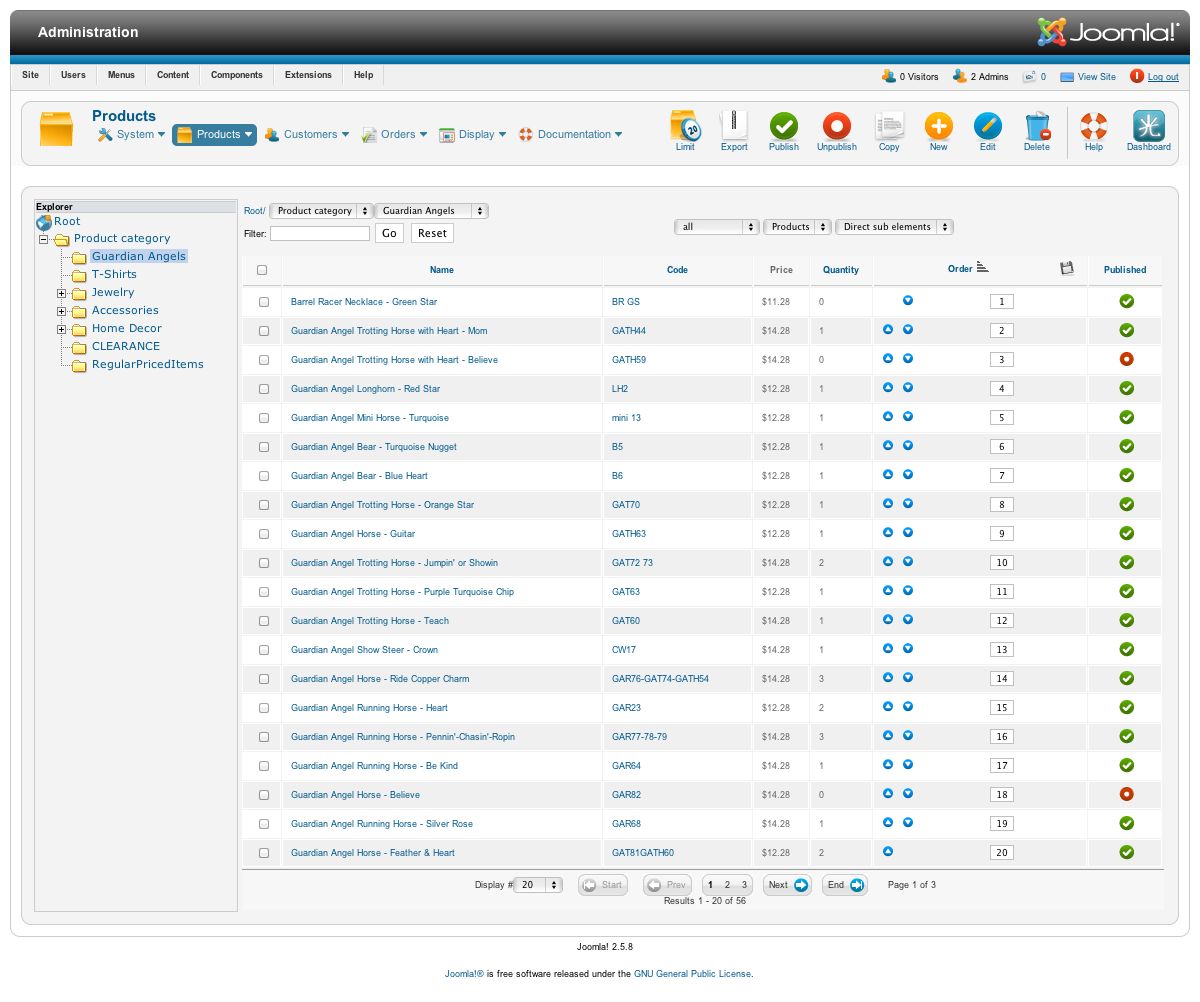
The site just had an upgrade to 2.0 and the store in the backend is not displaying all the product prices anymore. it is displaying the last price entered on the item.
how can i get it to either display all the prices or at least the highest price?
The screenshot is showing what it is displaying now. I need it to display the highest price of 19.98 or 19.98/11.28
What can I change to make this happen?
how can i get it to either display all the prices or at least the highest price?
The screenshot is showing what it is displaying now. I need it to display the highest price of 19.98 or 19.98/11.28
What can I change to make this happen?
Please Log in or Create an account to join the conversation.

13 years 10 months ago #78188
by Xavier
Replied by Xavier on topic product prices on product listing in back-end
Hi,
You can edit the view "product / listing" in HikaShop > Display > Views for the backend template.
And replace the line:
By:
You can edit the view "product / listing" in HikaShop > Display > Views for the backend template.
And replace the line:
Code:
echo $this->currencyHelper->displayPrices(@$row->prices);
Code:
foreach($row->prices as $price){
echo $this->currencyHelper->format($price->price_value, $price->price_currency_id);
}
Please Log in or Create an account to join the conversation.
- Brooke-Reese
-
Topic Author
- Offline
Less
More
- Posts: 6
- Thank you received: 0
13 years 10 months ago #78235
by Brooke-Reese
Replied by Brooke-Reese on topic product prices on product listing in back-end
made the change but had no effect. it is still only displaying the one price.
Please Log in or Create an account to join the conversation.
13 years 10 months ago #78305
by Xavier
Replied by Xavier on topic product prices on product listing in back-end
Hi,
Are you sure that you are editing the file in the good template ?
When you add, for example, echo "plop"; after the line previously given, is it displayed ?
Are you sure that you are editing the file in the good template ?
When you add, for example, echo "plop"; after the line previously given, is it displayed ?
Please Log in or Create an account to join the conversation.
- Brooke-Reese
-
Topic Author
- Offline
Less
More
- Posts: 6
- Thank you received: 0
13 years 10 months ago #78378
by Brooke-Reese
Replied by Brooke-Reese on topic product prices on product listing in back-end
yes, when I put in the echo code "plop" it is displayed. But I still cant see the prices that the user was able to see before I did the upgrade
Please Log in or Create an account to join the conversation.

13 years 10 months ago #78388
by Jerome
Jerome - Obsidev.com
HikaMarket & HikaSerial developer / HikaShop core dev team.
Also helping the HikaShop support team when having some time or couldn't sleep.
By the way, do not send me private message, use the "contact us" form instead.
Replied by Jerome on topic product prices on product listing in back-end
Hi,
Are you sure you have several prices for your products and it's not product variants ?
Regards,
Are you sure you have several prices for your products and it's not product variants ?
Regards,
Jerome - Obsidev.com
HikaMarket & HikaSerial developer / HikaShop core dev team.
Also helping the HikaShop support team when having some time or couldn't sleep.
By the way, do not send me private message, use the "contact us" form instead.
Please Log in or Create an account to join the conversation.
- Brooke-Reese
-
Topic Author
- Offline
Less
More
- Posts: 6
- Thank you received: 0
13 years 10 months ago - 13 years 10 months ago #78475
by Brooke-Reese
Replied by Brooke-Reese on topic product prices on product listing in back-end
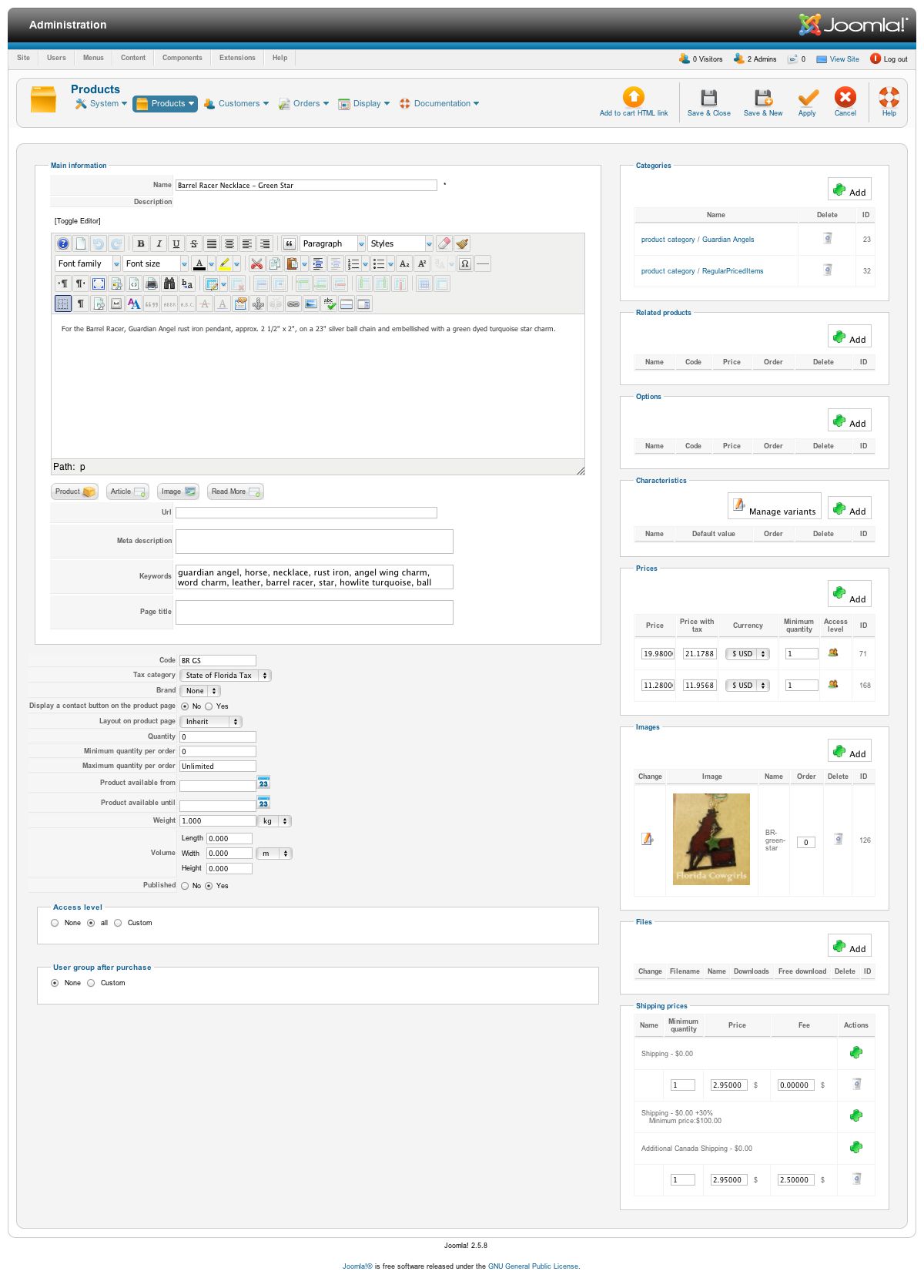
I have enclosed the following screenshots of the products listing page and then the first product in that list. i have also enclosed the SQL dump of the price table in the MySQL database. I am using the bluestork template for the backend.
We are running joomla 2.5.8 and PHP 5.3.17 on the apache server.
We are running joomla 2.5.8 and PHP 5.3.17 on the apache server.
Last edit: 13 years 10 months ago by Brooke-Reese.
Please Log in or Create an account to join the conversation.
13 years 10 months ago #78487
by Jerome
Jerome - Obsidev.com
HikaMarket & HikaSerial developer / HikaShop core dev team.
Also helping the HikaShop support team when having some time or couldn't sleep.
By the way, do not send me private message, use the "contact us" form instead.
Replied by Jerome on topic product prices on product listing in back-end
Hi,
When we gave you the PHP code, it as been test in a local website and it works.
But, I saw that your two prices are for the same quantity. Do you use ACL on prices ?
Regards,
When we gave you the PHP code, it as been test in a local website and it works.
But, I saw that your two prices are for the same quantity. Do you use ACL on prices ?
Regards,
Jerome - Obsidev.com
HikaMarket & HikaSerial developer / HikaShop core dev team.
Also helping the HikaShop support team when having some time or couldn't sleep.
By the way, do not send me private message, use the "contact us" form instead.
Please Log in or Create an account to join the conversation.
- Brooke-Reese
-
Topic Author
- Offline
Less
More
- Posts: 6
- Thank you received: 0
13 years 10 months ago - 13 years 10 months ago #78488
by Brooke-Reese
Replied by Brooke-Reese on topic product prices on product listing in back-end
Yes, we do use different ACLs for prices. if the user belongs to the wholesalers group they get the lower price.
The ACLs for the prices are working correctly on the site
The ACLs for the prices are working correctly on the site
Last edit: 13 years 10 months ago by Brooke-Reese.
Please Log in or Create an account to join the conversation.
13 years 10 months ago #78503
by Jerome
Jerome - Obsidev.com
HikaMarket & HikaSerial developer / HikaShop core dev team.
Also helping the HikaShop support team when having some time or couldn't sleep.
By the way, do not send me private message, use the "contact us" form instead.
Replied by Jerome on topic product prices on product listing in back-end
Hi,
The problem is that, HikaShop load by quantity.
So, I will generate a ticket for this.
You can edit the file administrator/com_hikashop/views/product/view.html.php and look at the line (in the function _loadPrices)
Just replace it by
It would load all prices.
Regards,
The problem is that, HikaShop load by quantity.
So, I will generate a ticket for this.
You can edit the file administrator/com_hikashop/views/product/view.html.php and look at the line (in the function _loadPrices)
Code:
$rows[$k]->prices[$price->price_min_quantity]=$price;
Code:
$rows[$k]->prices[]=$price;
It would load all prices.
Regards,
Jerome - Obsidev.com
HikaMarket & HikaSerial developer / HikaShop core dev team.
Also helping the HikaShop support team when having some time or couldn't sleep.
By the way, do not send me private message, use the "contact us" form instead.
Please Log in or Create an account to join the conversation.
- Brooke-Reese
-
Topic Author
- Offline
Less
More
- Posts: 6
- Thank you received: 0
13 years 10 months ago #78507
by Brooke-Reese
Replied by Brooke-Reese on topic product prices on product listing in back-end
thank you. that worked. I made the requested change to the view.html.php file and then it had both prices right next to each other. I then reset the product listing edited early and it is displaying just like before.
Please Log in or Create an account to join the conversation.
Time to create page: 0.222 seconds