
- Posts: 42
- Thank you received: 1
Paypal payment notification refused
- info@flashpoint.net.au
-
 Topic Author
- Offline
Less
More
13 years 8 months ago #86637
by info@flashpoint.net.au
Paypal payment notification refused was created by info@flashpoint.net.au
Hi,
I've been trying to work around this problem but it wont go away. Whenever a purchase is made I receive the error message:
Paypal payment notification refused: Connection to Paypal failed for the order ###
I have renamed .htaccess to htaccess.txt and tried following all the other recommended step found at:
www.hikashop.com/index.php?option=com_up...pal-error#connection
I've looked at the renamed htaccess.txt file and don't understand a word of it:
##
# @package Joomla
# @copyright Copyright (C) 2005 - 2012 Open Source Matters. All rights reserved.
# @license GNU General Public License version 2 or later; see LICENSE.txt
##
##
# READ THIS COMPLETELY IF YOU CHOOSE TO USE THIS FILE!
#
# The line just below this section: 'Options +FollowSymLinks' may cause problems
# with some server configurations. It is required for use of mod_rewrite, but may already
# be set by your server administrator in a way that dissallows changing it in
# your .htaccess file. If using it causes your server to error out, comment it out (add # to
# beginning of line), reload your site in your browser and test your sef url's. If they work,
# it has been set by your server administrator and you do not need it set here.
##
## Can be commented out if causes errors, see notes above.
Options +FollowSymLinks
## Mod_rewrite in use.
RewriteEngine On
## Begin - Rewrite rules to block out some common exploits.
# If you experience problems on your site block out the operations listed below
# This attempts to block the most common type of exploit `attempts` to Joomla!
#
# Block out any script trying to base64_encode data within the URL.
RewriteCond %{QUERY_STRING} base64_encode[^(]*\([^)]*\) [OR]
# Block out any script that includes a <script> tag in URL.
RewriteCond %{QUERY_STRING} (<|%3C)([^s]*s)+cript.*(>|%3E) [NC,OR]
# Block out any script trying to set a PHP GLOBALS variable via URL.
RewriteCond %{QUERY_STRING} GLOBALS( \[|\%[0-9A-Z]{0,2}) [OR]
# Block out any script trying to modify a _REQUEST variable via URL.
RewriteCond %{QUERY_STRING} _REQUEST(\[|\%[0-9A-Z]{0,2})
# Return 403 Forbidden header and show the content of the root homepage
RewriteRule .* index.php [F]
#
## End - Rewrite rules to block out some common exploits.
## Begin - Custom redirects
#
# If you need to redirect some pages, or set a canonical non-www to
# www redirect (or vice versa), place that code here. Ensure those
# redirects use the correct RewriteRule syntax and the [R=301,L] flags.
#
## End - Custom redirects
##
# Uncomment following line if your webserver's URL
# is not directly related to physical file paths.
# Update Your Joomla! Directory (just / for root).
##
# RewriteBase /
## Begin - Joomla! core SEF Section.
#
RewriteRule .* - [E=HTTP_AUTHORIZATION:%{HTTP:Authorization}]
#
# If the requested path and file is not /index.php and the request
# has not already been internally rewritten to the index.php script
RewriteCond %{REQUEST_URI} !^/index\.php
# and the request is for something within the component folder,
# or for the site root, or for an extensionless URL, or the
# requested URL ends with one of the listed extensions
RewriteCond %{REQUEST_URI} /component/|(/[^.]*|\.(php|html?|feed|pdf|vcf|raw))$ [NC]
# and the requested path and file doesn't directly match a physical file
RewriteCond %{REQUEST_FILENAME} !-f
# and the requested path and file doesn't directly match a physical folder
RewriteCond %{REQUEST_FILENAME} !-d
# internally rewrite the request to the index.php script
RewriteRule .* index.php [L]
#
## End - Joomla! core SEF Section.
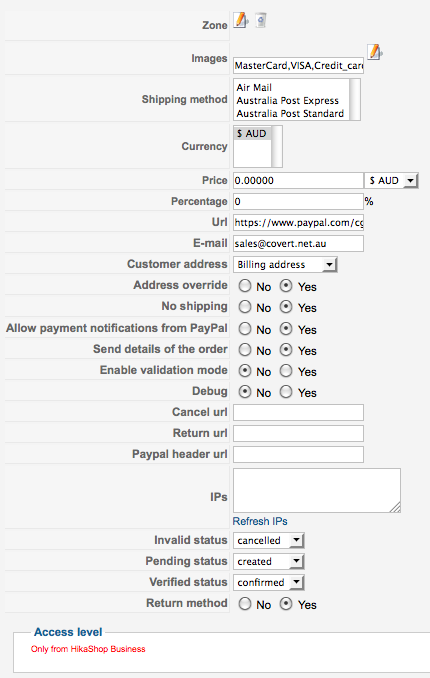
Below is my Paypal Plugin settings:
I've been trying to work around this problem but it wont go away. Whenever a purchase is made I receive the error message:
Paypal payment notification refused: Connection to Paypal failed for the order ###
I have renamed .htaccess to htaccess.txt and tried following all the other recommended step found at:
www.hikashop.com/index.php?option=com_up...pal-error#connection
I've looked at the renamed htaccess.txt file and don't understand a word of it:
##
# @package Joomla
# @copyright Copyright (C) 2005 - 2012 Open Source Matters. All rights reserved.
# @license GNU General Public License version 2 or later; see LICENSE.txt
##
##
# READ THIS COMPLETELY IF YOU CHOOSE TO USE THIS FILE!
#
# The line just below this section: 'Options +FollowSymLinks' may cause problems
# with some server configurations. It is required for use of mod_rewrite, but may already
# be set by your server administrator in a way that dissallows changing it in
# your .htaccess file. If using it causes your server to error out, comment it out (add # to
# beginning of line), reload your site in your browser and test your sef url's. If they work,
# it has been set by your server administrator and you do not need it set here.
##
## Can be commented out if causes errors, see notes above.
Options +FollowSymLinks
## Mod_rewrite in use.
RewriteEngine On
## Begin - Rewrite rules to block out some common exploits.
# If you experience problems on your site block out the operations listed below
# This attempts to block the most common type of exploit `attempts` to Joomla!
#
# Block out any script trying to base64_encode data within the URL.
RewriteCond %{QUERY_STRING} base64_encode[^(]*\([^)]*\) [OR]
# Block out any script that includes a <script> tag in URL.
RewriteCond %{QUERY_STRING} (<|%3C)([^s]*s)+cript.*(>|%3E) [NC,OR]
# Block out any script trying to set a PHP GLOBALS variable via URL.
RewriteCond %{QUERY_STRING} GLOBALS(
\[|\%[0-9A-Z]{0,2}) [OR]# Block out any script trying to modify a _REQUEST variable via URL.
RewriteCond %{QUERY_STRING} _REQUEST(
\[|\%[0-9A-Z]{0,2})# Return 403 Forbidden header and show the content of the root homepage
RewriteRule .* index.php [F]
#
## End - Rewrite rules to block out some common exploits.
## Begin - Custom redirects
#
# If you need to redirect some pages, or set a canonical non-www to
# www redirect (or vice versa), place that code here. Ensure those
# redirects use the correct RewriteRule syntax and the [R=301,L] flags.
#
## End - Custom redirects
##
# Uncomment following line if your webserver's URL
# is not directly related to physical file paths.
# Update Your Joomla! Directory (just / for root).
##
# RewriteBase /
## Begin - Joomla! core SEF Section.
#
RewriteRule .* - [E=HTTP_AUTHORIZATION:%{HTTP:Authorization}]
#
# If the requested path and file is not /index.php and the request
# has not already been internally rewritten to the index.php script
RewriteCond %{REQUEST_URI} !^/index\.php
# and the request is for something within the component folder,
# or for the site root, or for an extensionless URL, or the
# requested URL ends with one of the listed extensions
RewriteCond %{REQUEST_URI} /component/|(/[^.]*|\.(php|html?|feed|pdf|vcf|raw))$ [NC]
# and the requested path and file doesn't directly match a physical file
RewriteCond %{REQUEST_FILENAME} !-f
# and the requested path and file doesn't directly match a physical folder
RewriteCond %{REQUEST_FILENAME} !-d
# internally rewrite the request to the index.php script
RewriteRule .* index.php [L]
#
## End - Joomla! core SEF Section.
Below is my Paypal Plugin settings:
Please Log in or Create an account to join the conversation.

13 years 8 months ago #86860
by nicolas
Replied by nicolas on topic Paypal payment notification refused
Hi,
The error "Connection to Paypal failed" means that your hosting provider is either blocking outgoing connections from your web server or that the SSL is not activated. Because of that HikaShop cannot contact PayPal's servers to authenticate the payment notifications and the payment notifications are refused.
So you need to contact your hosting provider so that he can allow outgoing connections to PayPal servers or activate the SSL.
It all explained here:
www.hikashop.com/en/support/documentatio...rror.html#connection
The htaccess is in no way linked to your issue.
The error "Connection to Paypal failed" means that your hosting provider is either blocking outgoing connections from your web server or that the SSL is not activated. Because of that HikaShop cannot contact PayPal's servers to authenticate the payment notifications and the payment notifications are refused.
So you need to contact your hosting provider so that he can allow outgoing connections to PayPal servers or activate the SSL.
It all explained here:
www.hikashop.com/en/support/documentatio...rror.html#connection
The htaccess is in no way linked to your issue.
Please Log in or Create an account to join the conversation.
- info@flashpoint.net.au
-
Topic Author
- Offline
Less
More
- Posts: 42
- Thank you received: 1
13 years 8 months ago #86898
by info@flashpoint.net.au
Replied by info@flashpoint.net.au on topic Paypal payment notification refused
Thank you Nicolas,
I will check with my service provider. I see there is an option to disable the function. What purpose does a payment notification serve and is it advisable to disable it until I rectify the issue with my server?
I will check with my service provider. I see there is an option to disable the function. What purpose does a payment notification serve and is it advisable to disable it until I rectify the issue with my server?
Please Log in or Create an account to join the conversation.

Less
More
- Posts: 12953
- Thank you received: 1778
13 years 8 months ago #86975
by Mohamed Thelji
Replied by Mohamed Thelji on topic Paypal payment notification refused
Hi,
That option should stay on unless you don't want that PayPal confirms automatically the orders on your website so that you can do it manually yourself.
That option should stay on unless you don't want that PayPal confirms automatically the orders on your website so that you can do it manually yourself.
Please Log in or Create an account to join the conversation.
- info@flashpoint.net.au
-
Topic Author
- Offline
Less
More
- Posts: 42
- Thank you received: 1
13 years 8 months ago #87203
by info@flashpoint.net.au
Replied by info@flashpoint.net.au on topic Paypal payment notification refused
Is it possible to allow outgoing connections to PayPal servers without having SSL?
Please Log in or Create an account to join the conversation.
13 years 8 months ago #87343
by nicolas
Replied by nicolas on topic Paypal payment notification refused
You don't need a SSL certificate on your server.
But you do need to have the php openssl extension installed and activated.
But you do need to have the php openssl extension installed and activated.
The following user(s) said Thank You: info@flashpoint.net.au
Please Log in or Create an account to join the conversation.
- info@flashpoint.net.au
-
Topic Author
- Offline
Less
More
- Posts: 42
- Thank you received: 1
13 years 7 months ago #87734
by info@flashpoint.net.au
Replied by info@flashpoint.net.au on topic Paypal payment notification refused
Thank you, my server now allows connections, and Paypal notifications now work 
Please Log in or Create an account to join the conversation.
Time to create page: 0.258 seconds