

- Posts: 7
- Thank you received: 0
Registration or Joomla account required to shop
13 years 2 months ago - 13 years 2 months ago #115930
by pse
Registration or Joomla account required to shop was created by pse
I am using HikaShop Business 2.2.0 on Joomla 2.5.6 and have activated the no registration function.
pse.org/newsite/index.php/shop-hika
However, the user is required to either log in or register to process an order. I was using HikaShop Essential 1.5.5 on Joomla 1.5 and it worked fine.
www.pse.org/pse-shop
I do need to allow the purchasers to not register, but collect the data in the storefront. How do I set this up correctly? In addition, is it possible to turn off the "HikaShop , Joomla!™ Shopping Cart Extension" at the bottom of the page?
Thanks,
Tracy
Thanks,
Tracy
Last edit: 13 years 2 months ago by pse.
Please Log in or Create an account to join the conversation.

13 years 2 months ago #115947
by nicolas
Replied by nicolas on topic Registration or Joomla account required to shop
I can't see your website. It's protected by a htaccess.
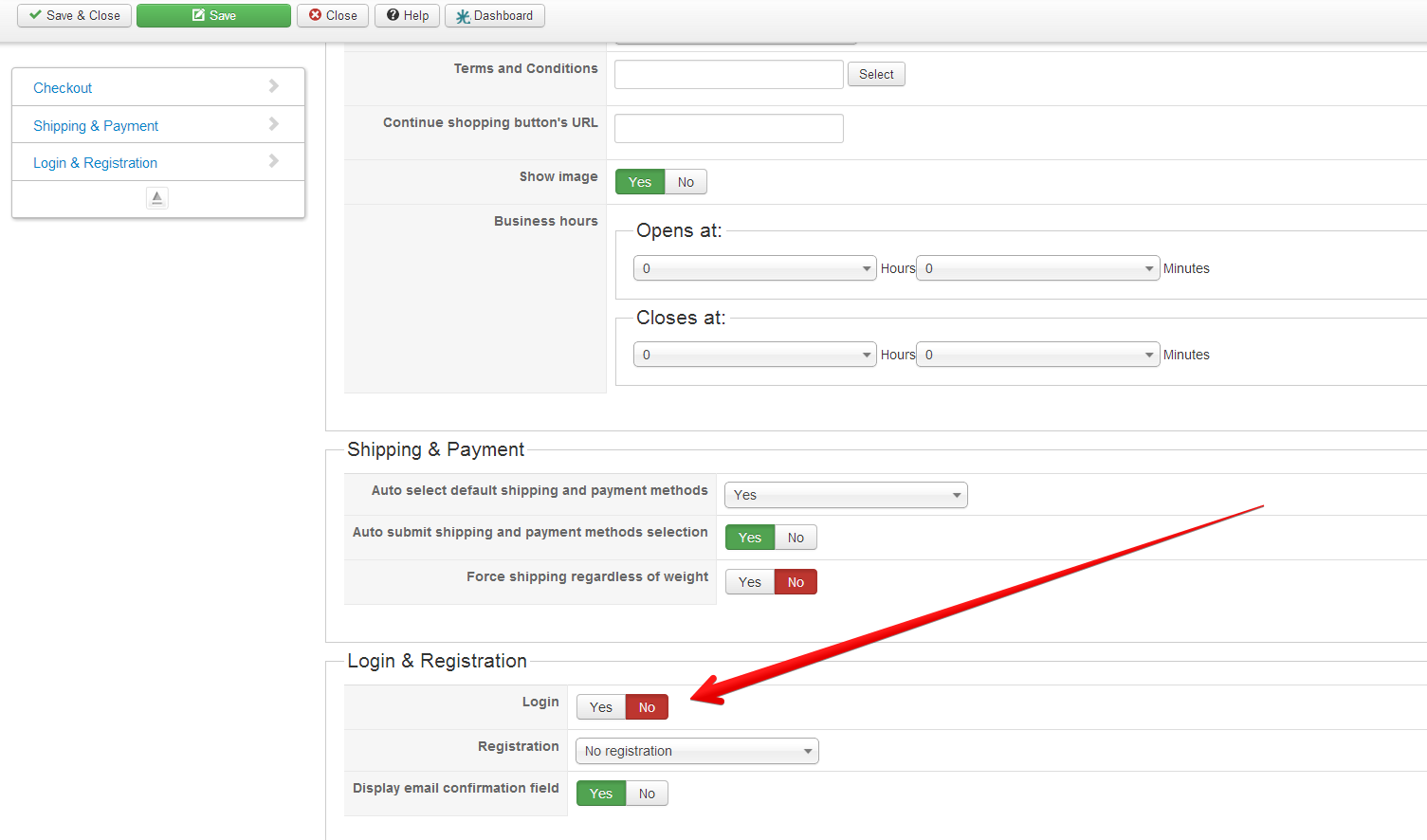
I would say that it's probably that you didn't turn off the "login" option of the Checkout tab of the configuration.
For the footer, you can turn off the "show footer" option of the configuration.
I would say that it's probably that you didn't turn off the "login" option of the Checkout tab of the configuration.
For the footer, you can turn off the "show footer" option of the configuration.
Please Log in or Create an account to join the conversation.
13 years 2 months ago - 13 years 2 months ago #116256
by pse
Replied by pse on topic Registration or Joomla account required to shop
Thank you I did find the "show footer" and I was able to get that turned off. However, if I remove the "login" option from the Checkout tab, my USPS shipping will not show up as an option. If they register does that create a Joomla account?
Thanks,
Tracy
Thanks,
Tracy
Last edit: 13 years 2 months ago by pse.
Please Log in or Create an account to join the conversation.
13 years 2 months ago #116260
by nicolas
Replied by nicolas on topic Registration or Joomla account required to shop
I'm talking about the login YES/NO option, not about removing the "login" view from your checkout workflow.
Please Log in or Create an account to join the conversation.
13 years 1 month ago #116270
by pse
Replied by pse on topic Registration or Joomla account required to shop
If I turn that login off, my members are not able to make a purchase. When they enter their email address it will not go forward as it recognizes the email as a member and is expecting it to create a new account. I am guessing there is no way around it.
Thanks,
Tracy
Thanks,
Tracy
Please Log in or Create an account to join the conversation.
13 years 1 month ago #116273
by nicolas
Replied by nicolas on topic Registration or Joomla account required to shop
I thought that it was what you wanted in fact 
If you want your registered users to be able to login, while you still want non registered users to be able to purchase without creating an account, you can change the "registration" option to "no registration" as you already did. That way, no account will be created and the users won't have to enter a username and a password during the checkout. Note that of course, someone which already used his email address to register previously on your website won't be able to enter it for a "no registration" checkout since that email is already linked to a user account so he will have to login, or use another email address.
If you want your registered users to be able to login, while you still want non registered users to be able to purchase without creating an account, you can change the "registration" option to "no registration" as you already did. That way, no account will be created and the users won't have to enter a username and a password during the checkout. Note that of course, someone which already used his email address to register previously on your website won't be able to enter it for a "no registration" checkout since that email is already linked to a user account so he will have to login, or use another email address.
The following user(s) said Thank You: pse
Please Log in or Create an account to join the conversation.
12 years 8 months ago - 12 years 8 months ago #138471
by webbits
Replied by webbits on topic Registration or Joomla account required to shop
Memory allocation - i forgot about the developer error reporting.
Hi - hope this thread is still active.
When I click View Cart, go to checkout, pages come up blank.
I have to login in order the view cart or check out.....
Joomla 3.1.5
Hika 2.2.3 Starter
PHP 5.3.6
I would like the public to see cart then make the decision to check out before asking for login or registration.
Thank you.
Login is set to NO
Email Confirmation field set to YES
I have not been able to modify Checkout work flow
Thank you for your help
Hi - hope this thread is still active.
When I click View Cart, go to checkout, pages come up blank.
I have to login in order the view cart or check out.....
Joomla 3.1.5
Hika 2.2.3 Starter
PHP 5.3.6
I would like the public to see cart then make the decision to check out before asking for login or registration.
Thank you.
Login is set to NO
Email Confirmation field set to YES
I have not been able to modify Checkout work flow
Thank you for your help
Last edit: 12 years 8 months ago by webbits.
Please Log in or Create an account to join the conversation.
12 years 8 months ago #138633
by nicolas
Replied by nicolas on topic Registration or Joomla account required to shop
Hi,
1. if you have a blank page because of memory allocation, you should increase your php memory_limit (you might want to ask your hosting company about how to do that).
2. You can change the checkout worklow option of the configuration in order to put the cart view on its own first step with the rest of the views on a second step.
1. if you have a blank page because of memory allocation, you should increase your php memory_limit (you might want to ask your hosting company about how to do that).
2. You can change the checkout worklow option of the configuration in order to put the cart view on its own first step with the rest of the views on a second step.
Please Log in or Create an account to join the conversation.
12 years 8 months ago #138801
by aleks59
Replied by aleks59 on topic Registration or Joomla account required to shop
Hi.
The shop I'm working on should have different prices for a certain group (merchants) and “normal” customers.
The normal customers do not have to register but the merchants certainly do (due to ACL). As far as I understood, this can only work if the site has joomla registration and log-in forms for the merchants. The merchants will get assigned to their group after registration.
The merchants should not only have different prices, but they also should see the prices without VAT. And that is the problem, since they can't fill the adress_company field.
Do you have any suggestions?
Thanks in advance
Aleks
The shop I'm working on should have different prices for a certain group (merchants) and “normal” customers.
The normal customers do not have to register but the merchants certainly do (due to ACL). As far as I understood, this can only work if the site has joomla registration and log-in forms for the merchants. The merchants will get assigned to their group after registration.
The merchants should not only have different prices, but they also should see the prices without VAT. And that is the problem, since they can't fill the adress_company field.
Do you have any suggestions?
Thanks in advance
Aleks
Please Log in or Create an account to join the conversation.
12 years 8 months ago #138925
by nicolas
Replied by nicolas on topic Registration or Joomla account required to shop
Hi,
When you create your tax rules, you can configure the access level for the tax rule. Simply restrict the tax rules to the user groups for which you want them. Then, the taxes will be based on the user group, not on the customer type (which is based on the address_company field).
When you create your tax rules, you can configure the access level for the tax rule. Simply restrict the tax rules to the user groups for which you want them. Then, the taxes will be based on the user group, not on the customer type (which is based on the address_company field).
Please Log in or Create an account to join the conversation.
12 years 8 months ago #138929
by aleks59
Replied by aleks59 on topic Registration or Joomla account required to shop
Perfect!
Thank you, Nicolas.
Thank you, Nicolas.
Please Log in or Create an account to join the conversation.
12 years 8 months ago #138974
by aleks59
Replied by aleks59 on topic Registration or Joomla account required to shop
Yet another problem. Now I have different tax rules and different prices for “normal” customers and for merchants.
The normals see the price with “(incl. VAT)” after if, which is OK. But the same happens to the merchants. How can get rid of (incl. VAT)-wording in case of the merchants, because they have prices without tax.
Thanks in advance
The normals see the price with “(incl. VAT)” after if, which is OK. But the same happens to the merchants. How can get rid of (incl. VAT)-wording in case of the merchants, because they have prices without tax.
Thanks in advance
Please Log in or Create an account to join the conversation.

12 years 8 months ago #139238
by Jerome
Jerome - Obsidev.com
HikaMarket & HikaSerial developer / HikaShop core dev team.
Also helping the HikaShop support team when having some time or couldn't sleep.
By the way, do not send me private message, use the "contact us" form instead.
Replied by Jerome on topic Registration or Joomla account required to shop
Hi,
"Incl. VAT" means that the price include the tax, even if the tax is "0".
Regards,
"Incl. VAT" means that the price include the tax, even if the tax is "0".
Regards,
Jerome - Obsidev.com
HikaMarket & HikaSerial developer / HikaShop core dev team.
Also helping the HikaShop support team when having some time or couldn't sleep.
By the way, do not send me private message, use the "contact us" form instead.
Please Log in or Create an account to join the conversation.
Time to create page: 0.201 seconds