

- Posts: 96
- Thank you received: 0
characteristics: product codes
13 years 1 month ago - 13 years 1 month ago #118720
by piggybank
characteristics: product codes was created by piggybank
-- HikaShop version -- : 2.2.0
-- Joomla version -- : 3.1.5
-- PHP version -- : 5.3.8
We are working on a new eCommerce site for our Client. They are migrating from a zencart site. In their current site, they have the product as 4 separate items. They'd like to move to 1 item with 4 variations.
I'm having a challenge with the use of characteristics...specifically, "base item" and product code for variants.
Note: Their item codes map to what's in their accounting system.
As a simplified example, they currently have 4 skus:
1. EO-1 $100 100mL
2. EO-2 $75 50mL
3. EO-3 $50 25mL
4. EO-4 $25 10Ml
They don't really have a "base item" per se.
QUESTION: Should I create a base item with a product code "EO" even if it doesn't actually exist as a sku in the accounting system?
Currently, I have created a base item with no price. When I view the product, I see the $100 price but the drop downs are for a different combination of characteristics. The price doesn't correspond with what the characteristics drop downs are showing.
-- Joomla version -- : 3.1.5
-- PHP version -- : 5.3.8
We are working on a new eCommerce site for our Client. They are migrating from a zencart site. In their current site, they have the product as 4 separate items. They'd like to move to 1 item with 4 variations.
I'm having a challenge with the use of characteristics...specifically, "base item" and product code for variants.
Note: Their item codes map to what's in their accounting system.
As a simplified example, they currently have 4 skus:
1. EO-1 $100 100mL
2. EO-2 $75 50mL
3. EO-3 $50 25mL
4. EO-4 $25 10Ml
They don't really have a "base item" per se.
QUESTION: Should I create a base item with a product code "EO" even if it doesn't actually exist as a sku in the accounting system?
Currently, I have created a base item with no price. When I view the product, I see the $100 price but the drop downs are for a different combination of characteristics. The price doesn't correspond with what the characteristics drop downs are showing.
Last edit: 13 years 1 month ago by piggybank. Reason: additional info
Please Log in or Create an account to join the conversation.

13 years 1 month ago #118740
by Jerome
Jerome - Obsidev.com
HikaMarket & HikaSerial developer / HikaShop core dev team.
Replied by Jerome on topic characteristics: product codes
Hi,
You can put the product code you want for the base item.
Because you can edit the product code, you can do nearly all you want, the single rule is that the product code must be unique.
The base item can be "free" without any problem. The customer wouldn't be able to buy it, it's a product with variants so, the user must select a variant.
In variants you can override a lot of fields, like the price. It is an override so it replace the value of the main (based) product.
I don't really understand your problem with the price in the front-end. Maybe with a screenshot or an example, it could be clearer.
Regards,
You can put the product code you want for the base item.
Because you can edit the product code, you can do nearly all you want, the single rule is that the product code must be unique.
The base item can be "free" without any problem. The customer wouldn't be able to buy it, it's a product with variants so, the user must select a variant.
In variants you can override a lot of fields, like the price. It is an override so it replace the value of the main (based) product.
I don't really understand your problem with the price in the front-end. Maybe with a screenshot or an example, it could be clearer.
Regards,
Jerome - Obsidev.com
HikaMarket & HikaSerial developer / HikaShop core dev team.
Please Log in or Create an account to join the conversation.
13 years 1 month ago #118743
by piggybank
Replied by piggybank on topic characteristics: product codes
Thank you for the quick reply.
This is a screen shot of the initial page...the price of $89.70 displays, but with the 2 drop down selections it looks like the $89.70 is for the 5mL/10% item variant which it's not.
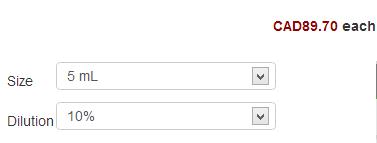
This is a screen shot of the initial page...the price of $89.70 displays, but with the 2 drop down selections it looks like the $89.70 is for the 5mL/10% item variant which it's not.
Please Log in or Create an account to join the conversation.

13 years 1 month ago #118790
by Xavier
Replied by Xavier on topic characteristics: product codes
Hi,
In the product edition page, you can select the default variant to display when arriving on the product page.
So you have to select the good variant, and set the good default price for this variant.
And on the product page, the customer will see all the correct informations.
In the product edition page, you can select the default variant to display when arriving on the product page.
So you have to select the good variant, and set the good default price for this variant.
And on the product page, the customer will see all the correct informations.
Please Log in or Create an account to join the conversation.
13 years 1 month ago #118874
by piggybank
Replied by piggybank on topic characteristics: product codes
OK...one issue solved. It's so obvious now that I "see it" right in front of me how to set default values...excellent.
However, I have now set the default values to a valid product (the second in the variants list) and the wrong price of 89.70 is still showing. The $89.70 price is coming from the first variant I see when I go into "manage variants".
However, I have now set the default values to a valid product (the second in the variants list) and the wrong price of 89.70 is still showing. The $89.70 price is coming from the first variant I see when I go into "manage variants".
Please Log in or Create an account to join the conversation.
13 years 1 month ago #118909
by Jerome
Jerome - Obsidev.com
HikaMarket & HikaSerial developer / HikaShop core dev team.
Replied by Jerome on topic characteristics: product codes
Hi,
I can't reproduce your problem in my local website.
The right variant is selected using the default values set in the product edit page ; his price is display and not the price of another variant.
The order of the variants in the "manage variants" does not impact anything for the product page. It try to load the variants with the default values. But if it can't find any valid variant with these characteristics, it will use the values from the base product.
Can you provide some screenshot of your configuration ? (main product, list of variants, characteristics values).
Thanks
I can't reproduce your problem in my local website.
The right variant is selected using the default values set in the product edit page ; his price is display and not the price of another variant.
The order of the variants in the "manage variants" does not impact anything for the product page. It try to load the variants with the default values. But if it can't find any valid variant with these characteristics, it will use the values from the base product.
Can you provide some screenshot of your configuration ? (main product, list of variants, characteristics values).
Thanks
Jerome - Obsidev.com
HikaMarket & HikaSerial developer / HikaShop core dev team.
Please Log in or Create an account to join the conversation.
13 years 1 month ago - 13 years 1 month ago #119040
by piggybank
Replied by piggybank on topic characteristics: product codes
Firstly...thank you for all this amazing and responsive support!

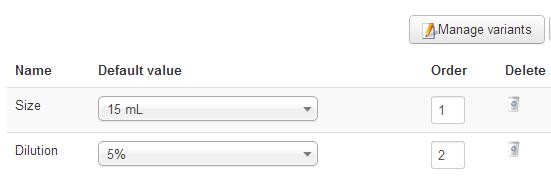
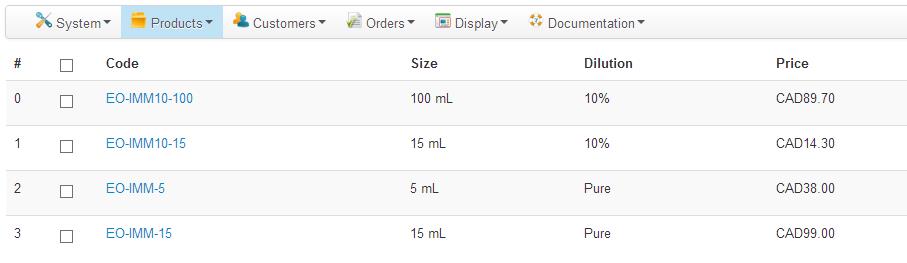
When I click on the screen with "choose options", I see this page:
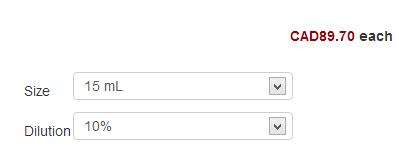
I'd like that page to show the $14.30 price that goes with the 15mL/10% variant instead of the $89 one.
When I click on the screen with "choose options", I see this page:
I'd like that page to show the $14.30 price that goes with the 15mL/10% variant instead of the $89 one.
Last edit: 13 years 1 month ago by piggybank.
Please Log in or Create an account to join the conversation.
13 years 1 month ago #119056
by Jerome
Jerome - Obsidev.com
HikaMarket & HikaSerial developer / HikaShop core dev team.
Replied by Jerome on topic characteristics: product codes
Hi,
Your default values are "15mL" and 5"%". Is there a variant with the characteristics "15 mL and 5%" ?
I don't see it in your screenshots.
Regards,
Your default values are "15mL" and 5"%". Is there a variant with the characteristics "15 mL and 5%" ?
I don't see it in your screenshots.
Regards,
Jerome - Obsidev.com
HikaMarket & HikaSerial developer / HikaShop core dev team.
Please Log in or Create an account to join the conversation.
13 years 1 month ago #119080
by piggybank
Replied by piggybank on topic characteristics: product codes
The variant is there in the screen shot...item EO-IMM10-15, second variant in the list.
Thanks,
Scott
Thanks,
Scott
Please Log in or Create an account to join the conversation.
13 years 1 month ago #119081
by Jerome
Jerome - Obsidev.com
HikaMarket & HikaSerial developer / HikaShop core dev team.
Replied by Jerome on topic characteristics: product codes
Hi,
Sorry but it's wrong.
The second variant in the list is "15 mL" and "10%", not "5%".
So it's not the right one. That's why I ask you this question.
Regards,
Sorry but it's wrong.
The second variant in the list is "15 mL" and "10%", not "5%".
So it's not the right one. That's why I ask you this question.
Regards,
Jerome - Obsidev.com
HikaMarket & HikaSerial developer / HikaShop core dev team.
Please Log in or Create an account to join the conversation.
13 years 1 month ago #119082
by piggybank
Replied by piggybank on topic characteristics: product codes
D'oh! Forgive me...I can't tell you how many times I've checked and double checked and kept seeing what's not there!
You're absolutely right...I've made the adjustment and it's working correctly. Sorry to waste your time on this issue...but I do appreciate the second set of eyes!!
Scott
You're absolutely right...I've made the adjustment and it's working correctly. Sorry to waste your time on this issue...but I do appreciate the second set of eyes!!
Scott
Please Log in or Create an account to join the conversation.
13 years 1 month ago #119085
by Jerome
Jerome - Obsidev.com
HikaMarket & HikaSerial developer / HikaShop core dev team.
Replied by Jerome on topic characteristics: product codes
Hi,
No problem.
Good to know that it's now working.
Regards,
No problem.
Good to know that it's now working.
Regards,
Jerome - Obsidev.com
HikaMarket & HikaSerial developer / HikaShop core dev team.
Please Log in or Create an account to join the conversation.
Time to create page: 0.230 seconds