

- Posts: 94
- Thank you received: 0
Admin area - categories now all caps
12 years 6 months ago #147131
by GB11
Admin area - categories now all caps was created by GB11
-- url of the page with the problem -- : (admin area of ginabsilkworks.co.uk)
-- HikaShop version -- : 2.2.1
-- Joomla version -- : 2.5.18
-- Browser(s) name and version -- : chrome
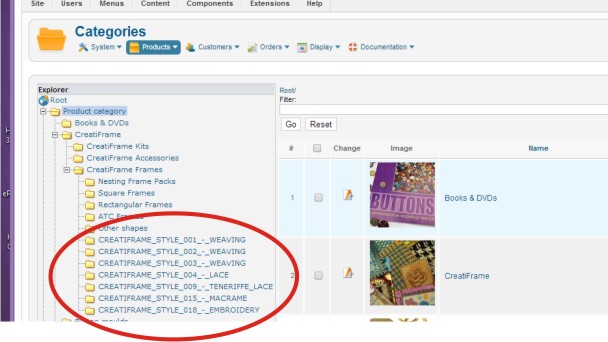
Hi, I have been making a few changes to what I thought was only the front-end category css. However, upon adding new categories in the back-end, they are now all showing oddly. I have attached an image to show what I mean. On the front end all is fine.
Can you point me in the direction of what I might need to fix? I just can't find it and it is now bothering me!
many thanks
-- HikaShop version -- : 2.2.1
-- Joomla version -- : 2.5.18
-- Browser(s) name and version -- : chrome
Hi, I have been making a few changes to what I thought was only the front-end category css. However, upon adding new categories in the back-end, they are now all showing oddly. I have attached an image to show what I mean. On the front end all is fine.
Can you point me in the direction of what I might need to fix? I just can't find it and it is now bothering me!
many thanks
Please Log in or Create an account to join the conversation.

12 years 6 months ago #147150
by Eliot
Replied by Eliot on topic Admin area - categories now all caps
Hi there,
If you just did css modification it obviously comes from this.
I would suggest to right click on it and use the "inspect element" feature of your browser.
You should be able to notice if there is some css that shouldn't be there. Do not hesitate to disable it to see the effect on the page.
If you just did css modification it obviously comes from this
.I would suggest to right click on it and use the "inspect element" feature of your browser.
You should be able to notice if there is some css that shouldn't be there. Do not hesitate to disable it to see the effect on the page.
Please Log in or Create an account to join the conversation.
12 years 6 months ago #147244
by GB11
Replied by GB11 on topic Admin area - categories now all caps
Thank you, I'll see if I can track it down.
I have not changed anything in the backend css - still using the default, which I why I'm a bit stuck.
I did update Joomla two days before though.
I have not changed anything in the backend css - still using the default, which I why I'm a bit stuck.
I did update Joomla two days before though.
Please Log in or Create an account to join the conversation.

12 years 6 months ago #147309
by Jerome
Jerome - Obsidev.com
HikaMarket & HikaSerial developer / HikaShop core dev team.
Replied by Jerome on topic Admin area - categories now all caps
Hi,
I am sorry but regarding your screenshot, there is any link with any kind of CSS.
Some categories have right names and just some have strange uppercase names.
I want to ask you if the names are the same in the category listing (not in the tree, in the table just near) and what is the content stored in the database.
Regards,
I am sorry but regarding your screenshot, there is any link with any kind of CSS.
Some categories have right names and just some have strange uppercase names.
I want to ask you if the names are the same in the category listing (not in the tree, in the table just near) and what is the content stored in the database.
Regards,
Jerome - Obsidev.com
HikaMarket & HikaSerial developer / HikaShop core dev team.
Please Log in or Create an account to join the conversation.
12 years 6 months ago #147688
by GB11
Replied by GB11 on topic Admin area - categories now all caps
Hi Jerome,
Thanks for replying.
Here's a new screenshot looking at the inspect element.
The right names are all categories that have been set up for some time.
The strange uppercase names are the way that new categories have written since I
a) updated Joomla
b) made a few css changes on the front end
I added these new categories after both of these changes, and they appear as uppercase in the backend only.
On the database - all lower case as it should be.
So, I'm a bit lost!
Thanks for replying.
Here's a new screenshot looking at the inspect element.
The right names are all categories that have been set up for some time.
The strange uppercase names are the way that new categories have written since I
a) updated Joomla
b) made a few css changes on the front end
I added these new categories after both of these changes, and they appear as uppercase in the backend only.
On the database - all lower case as it should be.
So, I'm a bit lost!
Please Log in or Create an account to join the conversation.
12 years 6 months ago #147690
by Jerome
Jerome - Obsidev.com
HikaMarket & HikaSerial developer / HikaShop core dev team.
Replied by Jerome on topic Admin area - categories now all caps
Hi,
It is not a CSS problem.
Please go in the category listing and provide us more details about these "special" categories.
You can also gave us information from your database.
The text which is displayed in logically the "category_name" get directly from the database. But you can translate it using the override language file.
It is done by the code:
Which mean that the text before the translation and after the translation is not the same.
And we have to discover why, by having more details about these categories.
Maybe there is an extra space, special characters removed during the translation... I can't say if I do not have enough information.
Hope it is clear enough.
Regards,,
I will reformulate :I am sorry but regarding your screenshot, there is any link with any kind of CSS.
It is not a CSS problem.
I am sorry but your screenshot does not reply to my request.I want to ask you if the names are the same in the category listing (not in the tree, in the table just near) and what is the content stored in the database.
Please go in the category listing and provide us more details about these "special" categories.
You can also gave us information from your database.
The text which is displayed in logically the "category_name" get directly from the database. But you can translate it using the override language file.
It is done by the code:
Code:
$val = str_replace(' ','_',strtoupper($element->category_name));
$element->value = JText::_($val);
if($val==$element->value){
$element->value = $element->category_name;
}
And we have to discover why, by having more details about these categories.
Maybe there is an extra space, special characters removed during the translation... I can't say if I do not have enough information.
Hope it is clear enough.
Regards,,
Jerome - Obsidev.com
HikaMarket & HikaSerial developer / HikaShop core dev team.
Please Log in or Create an account to join the conversation.
12 years 6 months ago #147914
by GB11
Replied by GB11 on topic Admin area - categories now all caps
I think I've got it. I have used the category description on these - and so added an image, and styled the text with the H3 tag for instance. Sorry, I didn't associate the two.
I've just created a test category, and that is fine.
I'm keen to keep the descriptions for these categories - they are very important, but at least I can see why it has happened.
Thank you!
I've just created a test category, and that is fine.
I'm keen to keep the descriptions for these categories - they are very important, but at least I can see why it has happened.
Thank you!
Please Log in or Create an account to join the conversation.
Time to create page: 0.195 seconds