

- Posts: 43
- Thank you received: 3
Backend product page not displaying correctly
12 years 3 months ago #161957
by SarahW
Backend product page not displaying correctly was created by SarahW
-- url of the page with the problem -- :
www.happenstancepress.org
- admin pages (can supply a login if required)
-- HikaShop version -- : 2.3.1
-- Joomla version -- : 2.5.22
-- PHP version -- : 5.4
-- Browser(s) name and version -- : Firefox 3.0
-- Error-message(debug-mod must be tuned on) -- : none
The admin product pages appear as in this screenshot, and are not usable.
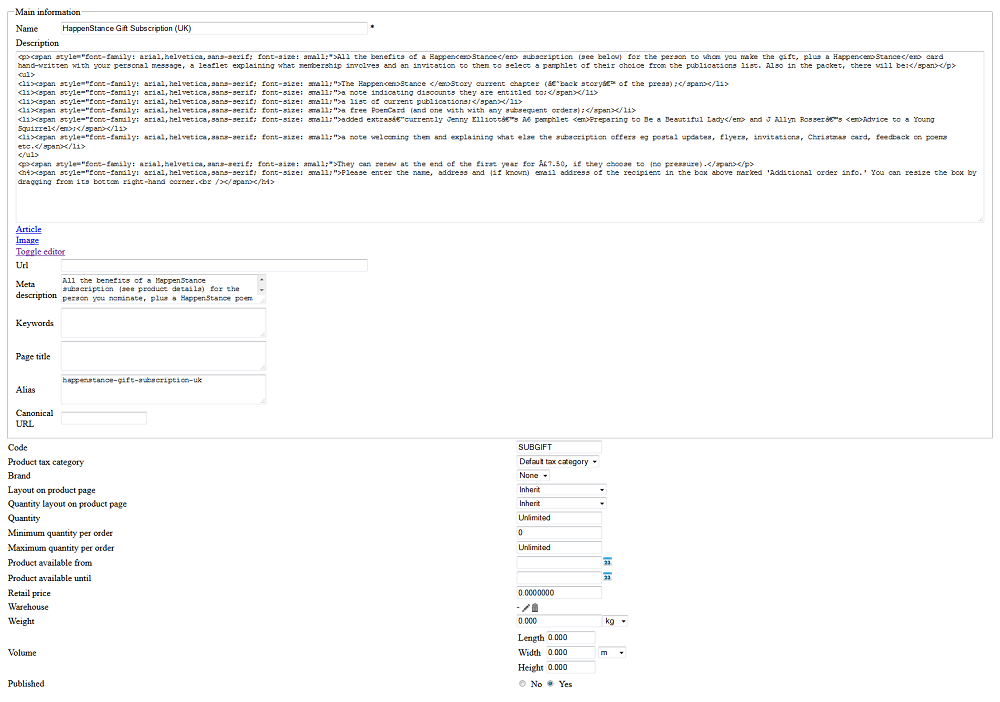
I also have a problem with products using Akeeba Subscriptions, in that trying to take them through the checkout results in a blank page. I have disabled those products, and the others seem to be working correctly in that respect. Could this problem be connected with the Akeeba Subs error? Thanks for any help you are able to give with this.
-- HikaShop version -- : 2.3.1
-- Joomla version -- : 2.5.22
-- PHP version -- : 5.4
-- Browser(s) name and version -- : Firefox 3.0
-- Error-message(debug-mod must be tuned on) -- : none
The admin product pages appear as in this screenshot, and are not usable.
I also have a problem with products using Akeeba Subscriptions, in that trying to take them through the checkout results in a blank page. I have disabled those products, and the others seem to be working correctly in that respect. Could this problem be connected with the Akeeba Subs error? Thanks for any help you are able to give with this.
Please Log in or Create an account to join the conversation.

Less
More
- Posts: 12953
- Thank you received: 1778
12 years 3 months ago #161966
by Mohamed Thelji
Replied by Mohamed Thelji on topic Backend product page not displaying correctly
Hello,
Can you :
- Active the Joomla debug mode ("Administration->Global configuration->System->Debug System/Language")
- Set the "error reporting" option of the Joomla configuration to "maximum"
- Test it again so that we can see if it display an error message.
Can you :
- Active the Joomla debug mode ("Administration->Global configuration->System->Debug System/Language")
- Set the "error reporting" option of the Joomla configuration to "maximum"
- Test it again so that we can see if it display an error message.
Please Log in or Create an account to join the conversation.
12 years 3 months ago #162093
by SarahW
Replied by SarahW on topic Backend product page not displaying correctly
Hi Mohamed. I've done that, and there is no error message - just the result that you see in the screenshot.
Please Log in or Create an account to join the conversation.
Less
More
- Posts: 12953
- Thank you received: 1778
12 years 3 months ago #162098
by Mohamed Thelji
Replied by Mohamed Thelji on topic Backend product page not displaying correctly
Ok so can you test it with another back-end template, like the default Joomla template ?
Please Log in or Create an account to join the conversation.
12 years 3 months ago #162175
by SarahW
Replied by SarahW on topic Backend product page not displaying correctly
I've already tried switching backend templates, and it made no difference.
Please Log in or Create an account to join the conversation.
12 years 3 months ago #162178
by SarahW
Replied by SarahW on topic Backend product page not displaying correctly
OK - it's fixed. See this thread:
www.hikashop.com/forum/orders-management...riptions.html#162176
It was the Akeeba Subscriptions plugin that was causing the problem, and once I'd changed all instances of FOF to F0F, everything started working again. Phew!
Thanks for the help
www.hikashop.com/forum/orders-management...riptions.html#162176
It was the Akeeba Subscriptions plugin that was causing the problem, and once I'd changed all instances of FOF to F0F, everything started working again. Phew!
Thanks for the help
The following user(s) said Thank You: Jerome
Please Log in or Create an account to join the conversation.
Time to create page: 0.217 seconds