

- Posts: 27
- Thank you received: 4
Multiple currencies with missing prices
11 years 3 months ago #205832
by fengel
Multiple currencies with missing prices was created by fengel
-- url of the page with the problem -- : localhost
-- HikaShop version -- : 2.4.0
-- Joomla version -- : 3.4.1
-- PHP version -- : 5.3.10
-- Browser(s) name and version -- : Firefox 38.0.5
SETUP
2 currencies: EUR and DKK
STEPS
1. I have a product where there are prices set only in DKK. None in EUR
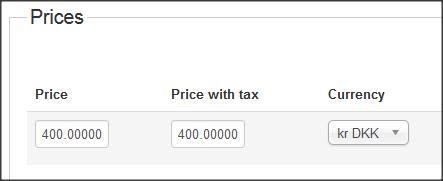
2. In the product listings, the product is showing correctly when the currency switcher is set to DKK

3. When I set the currency to EUR, the currency symbol changes, but the amount is still there. I expect the entire line to show "FREE_PRICE" or 0

Due to syncing, it's possible for some products/variants to be missing prices in some currencies. This post was made to cover all bases, in case there's data missing.
-- HikaShop version -- : 2.4.0
-- Joomla version -- : 3.4.1
-- PHP version -- : 5.3.10
-- Browser(s) name and version -- : Firefox 38.0.5
SETUP
2 currencies: EUR and DKK
STEPS
1. I have a product where there are prices set only in DKK. None in EUR
2. In the product listings, the product is showing correctly when the currency switcher is set to DKK
3. When I set the currency to EUR, the currency symbol changes, but the amount is still there. I expect the entire line to show "FREE_PRICE" or 0
Due to syncing, it's possible for some products/variants to be missing prices in some currencies. This post was made to cover all bases, in case there's data missing.
Please Log in or Create an account to join the conversation.

11 years 3 months ago #205841
by nicolas
Replied by nicolas on topic Multiple currencies with missing prices
Hi,
The system automatically converts the prices from one currency to another based on the currency rate that you configured in your currencies.
So edit your currencies via the menu System>Currencies and set the currency rate you want and that will do the conversion.
The system automatically converts the prices from one currency to another based on the currency rate that you configured in your currencies.
So edit your currencies via the menu System>Currencies and set the currency rate you want and that will do the conversion.
Please Log in or Create an account to join the conversation.
11 years 3 months ago #205972
by fengel
Replied by fengel on topic Multiple currencies with missing prices
Hi there,
What if automatic conversion is not wanted/needed? I am capable in PHP but not sure which parts to modify.
What if automatic conversion is not wanted/needed? I am capable in PHP but not sure which parts to modify.
Please Log in or Create an account to join the conversation.

Less
More
- Posts: 12953
- Thank you received: 1778
11 years 3 months ago #205980
by Mohamed Thelji
Replied by Mohamed Thelji on topic Multiple currencies with missing prices
Hello,
What do you exactly mean by it ? do you want different product prices per currency ?What if automatic conversion is not wanted/needed? I am capable in PHP but not sure which parts to modify.
Please Log in or Create an account to join the conversation.
11 years 3 months ago #206119
by fengel
Replied by fengel on topic Multiple currencies with missing prices
The reason for not wanting automatic conversion is because of business decisions. They want a fixed price per currency, rather than an automatic conversion.
This decision implies that if a variant is missing price data in a currency (let's say Euro), it's better to not show anything rather than show an incorrect price.
This decision implies that if a variant is missing price data in a currency (let's say Euro), it's better to not show anything rather than show an incorrect price.
Please Log in or Create an account to join the conversation.
Less
More
- Posts: 12953
- Thank you received: 1778
11 years 3 months ago #206149
by Mohamed Thelji
Replied by Mohamed Thelji on topic Multiple currencies with missing prices
Hello,
Then to do what you want, you'll have to :
- Make sure that your product have one price per currency
- Directly edit the code of the files of your "product" view via "Hikashop->Display->Views" to add a check for products without a price for every currency.
Then to do what you want, you'll have to :
- Make sure that your product have one price per currency
- Directly edit the code of the files of your "product" view via "Hikashop->Display->Views" to add a check for products without a price for every currency.
The following user(s) said Thank You: fengel
Please Log in or Create an account to join the conversation.
Time to create page: 0.212 seconds