

- Posts: 177
- Thank you received: 8
category came on top of my root
10 years 6 months ago #234611
by UserB
category came on top of my root was created by UserB
-- HikaShop version -- : 2.6.1
-- Joomla version -- : 3.4
-- PHP version -- : 5
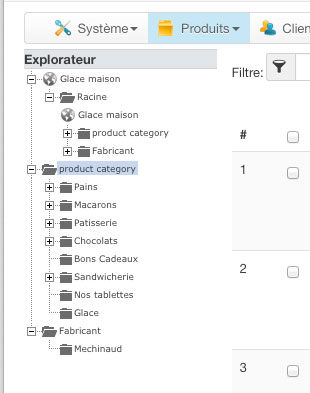
Hi, I need to remove a category that came ontop of my root. I wanted to modify a subcategory and accidently did not give it any parents... Now, it just lies ontop of my root and I just don't know how to remove it or remove the parenthood between my root and the category... The root category does not give me any parent to remove if I try to modify it.
Please help.
-- Joomla version -- : 3.4
-- PHP version -- : 5
Hi, I need to remove a category that came ontop of my root. I wanted to modify a subcategory and accidently did not give it any parents... Now, it just lies ontop of my root and I just don't know how to remove it or remove the parenthood between my root and the category... The root category does not give me any parent to remove if I try to modify it.
Please help.
Please Log in or Create an account to join the conversation.

10 years 6 months ago #234660
by Xavier
Replied by Xavier on topic category came on top of my root
Hi,
The category has been created before the root ? or right after root and next to the "product category" ?
If it is the second case, in the tree you can click on "root" and delete this category.
The category has been created before the root ? or right after root and next to the "product category" ?
If it is the second case, in the tree you can click on "root" and delete this category.
Please Log in or Create an account to join the conversation.
10 years 6 months ago #234700
by UserB
Replied by UserB on topic category came on top of my root
No, the category was created after the root but for some reasons, it came ontop of the root. when I click on the root to modify it, it doesn't give me any option to choose its parent and get back on the root level. see the attachment. I don't get it.
Please Log in or Create an account to join the conversation.

10 years 6 months ago #234705
by nicolas
Replied by nicolas on topic category came on top of my root
Hi,
You'll have to go in your PHPMyAdmin and open the hikashop_category table. There, fix the category_parent_id of the categories:
0 for the root category, and the id of the parent category for the others.
Then, click on the "rebuild" button of the categories listing in the backend and that will fix the problem.
You'll have to go in your PHPMyAdmin and open the hikashop_category table. There, fix the category_parent_id of the categories:
0 for the root category, and the id of the parent category for the others.
Then, click on the "rebuild" button of the categories listing in the backend and that will fix the problem.
The following user(s) said Thank You: UserB
Please Log in or Create an account to join the conversation.
10 years 6 months ago #234795
by UserB
Replied by UserB on topic category came on top of my root
Suggestion was good.
We're back on track for that issue.
Thanks Nicolas
I know this is not the place but if you have a minute to look this up, it just drives me insane.
www.hikashop.com/forum/product-category-...from-categories.html
We're back on track for that issue.
Thanks Nicolas
I know this is not the place but if you have a minute to look this up, it just drives me insane.
www.hikashop.com/forum/product-category-...from-categories.html
Please Log in or Create an account to join the conversation.
Time to create page: 0.229 seconds