

- Posts: 281
- Thank you received: 3
change price when user chose a caracteristic
9 years 11 months ago #253102
by francota
change price when user chose a caracteristic was created by francota
-- HikaShop version -- : 2.6.4
-- Joomla version -- : 3.6.3
Hello i have a question about a new web site
I make an example just to explain also if the produc is not true.
Well they sell shoes but they need that a produc has 2 caracteristic color and size that user can chose, but the color makes change the price.
It is possible to do that??
Thanks
Frank
-- Joomla version -- : 3.6.3
Hello i have a question about a new web site
I make an example just to explain also if the produc is not true.
Well they sell shoes but they need that a produc has 2 caracteristic color and size that user can chose, but the color makes change the price.
It is possible to do that??
Thanks
Frank
Please Log in or Create an account to join the conversation.

9 years 11 months ago #253118
by nicolas
Replied by nicolas on topic change price when user chose a caracteristic
Hi,
Yes, it's possible. You just need to set different prices for the different variants of the products, like it's done here:
demo.hikashop.com/index.php/en/hikashop/...with-characteristics
Yes, it's possible. You just need to set different prices for the different variants of the products, like it's done here:
demo.hikashop.com/index.php/en/hikashop/...with-characteristics
Please Log in or Create an account to join the conversation.
9 years 11 months ago #253208
by francota
Replied by francota on topic change price when user chose a caracteristic
ok thanks
I will try
I will try
Please Log in or Create an account to join the conversation.
9 years 11 months ago #253239
by francota
Replied by francota on topic change price when user chose a caracteristic
Well Nicolas I am doing some test following your suggestion
Can i show some size in base of the color?
For example I select the color green and it shows just some size, I select an other color and it shoes other size.
THank
FRank
Can i show some size in base of the color?
For example I select the color green and it shows just some size, I select an other color and it shoes other size.
THank
FRank
Please Log in or Create an account to join the conversation.
9 years 11 months ago #253257
by nicolas
Replied by nicolas on topic change price when user chose a caracteristic
Hi,
No. But you can change the "characteristics selection method" setting of the HikaShop configuration to "list" or "table" to not be able to see impossible variants.
No. But you can change the "characteristics selection method" setting of the HikaShop configuration to "list" or "table" to not be able to see impossible variants.
Please Log in or Create an account to join the conversation.
9 years 11 months ago #253764
by francota
Replied by francota on topic change price when user chose a caracteristic
Well Nicolas I am using the list, but there is a problem when I add a product to the cart, I need to refresh the page to see it in the cart ..
What is the problem???
Thanks
FRank
What is the problem???
Thanks
FRank
Please Log in or Create an account to join the conversation.

9 years 11 months ago - 9 years 11 months ago #253801
by Philip
Replied by Philip on topic change price when user chose a caracteristic
Hello,
can you try to switch on the "Use AJAX when possible for add to cart buttons" option to "Yes", see if that works ?
You can reach this option, in Components => HikaShop => Configuration, and in Main tab, go to Advanced settings to find this option.
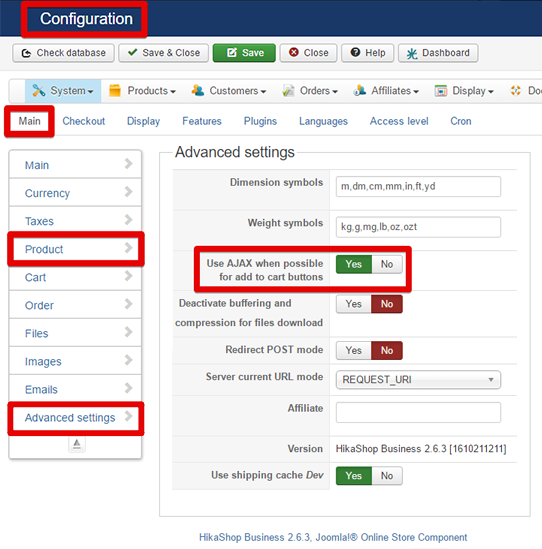
Hope this will solve this point.
Regards
can you try to switch on the "Use AJAX when possible for add to cart buttons" option to "Yes", see if that works ?
You can reach this option, in Components => HikaShop => Configuration, and in Main tab, go to Advanced settings to find this option.
Hope this will solve this point.
Regards
Last edit: 9 years 11 months ago by Philip.
Please Log in or Create an account to join the conversation.
9 years 11 months ago #253825
by francota
Replied by francota on topic change price when user chose a caracteristic
Hello
I changed the setting but the problem is not solved :oops:
This is the page:
redskull.it/index.php/aghi-principale/ag...oduct/18-round-liner
Maybe is better to watch directly on the page
Thanks
FRank
I changed the setting but the problem is not solved :oops:
This is the page:
redskull.it/index.php/aghi-principale/ag...oduct/18-round-liner
Maybe is better to watch directly on the page
Thanks
FRank
Please Log in or Create an account to join the conversation.
9 years 11 months ago - 9 years 11 months ago #253867
by francota
Replied by francota on topic change price when user chose a caracteristic
I noticed right now that If I active Use AJAX when possible for add to cart buttons I have that problem on all product.
While if i set that on NO I have that problem just on product with list of options.
I hope to solve this problem :oops:
thanks
Frank
While if i set that on NO I have that problem just on product with list of options.
I hope to solve this problem :oops:
thanks
Frank
Last edit: 9 years 11 months ago by francota.
Please Log in or Create an account to join the conversation.
9 years 11 months ago #253833
by nicolas
Replied by nicolas on topic change price when user chose a caracteristic
Hi,
The issue is that you removed the DIV with the id hikashop_cart_module in the view file of the module.
So the AJAX system cannot refresh the cart module as it bases itself on that.
The issue is that you removed the DIV with the id hikashop_cart_module in the view file of the module.
So the AJAX system cannot refresh the cart module as it bases itself on that.
Please Log in or Create an account to join the conversation.
9 years 11 months ago #253896
by francota
Replied by francota on topic change price when user chose a caracteristic
oooo really!!!
How can I restore That??
Thanks
Frank
How can I restore That??
Thanks
Frank
Please Log in or Create an account to join the conversation.
9 years 11 months ago #253902
by nicolas
Replied by nicolas on topic change price when user chose a caracteristic
Hi,
I don't know how that change was done. It could be that it has been done in modules/mod_hikashop_cart/tmpl/default.php
or in templates/YOUR_TEMPLATE/html/mod_hikashop/default.php
I don't know how that change was done. It could be that it has been done in modules/mod_hikashop_cart/tmpl/default.php
or in templates/YOUR_TEMPLATE/html/mod_hikashop/default.php
Please Log in or Create an account to join the conversation.
9 years 11 months ago - 9 years 11 months ago #253928
by francota
Replied by francota on topic change price when user chose a caracteristic
Ooo im very worried i dont want to do everything again..
Can i overwrite those files?
If i instal hikashop in other hosting for now and copy the code of the files?
Frank
Can i overwrite those files?
If i instal hikashop in other hosting for now and copy the code of the files?
Frank
Last edit: 9 years 11 months ago by francota.
Please Log in or Create an account to join the conversation.
9 years 11 months ago #253942
by francota
Replied by francota on topic change price when user chose a caracteristic
Hello Nicolas
The cart works again, I had a file in templates/MY_TEMPLATE/html/mod_hikashop_cart/default.php I actually dont know why there was an override of tha cart module.
For now I deleted just the file default.php, can I delete completely the folder mod_hikashop_cart that there in in my template?
Thank you soooo much
Frank
The cart works again, I had a file in templates/MY_TEMPLATE/html/mod_hikashop_cart/default.php I actually dont know why there was an override of tha cart module.
For now I deleted just the file default.php, can I delete completely the folder mod_hikashop_cart that there in in my template?
Thank you soooo much
Frank
Please Log in or Create an account to join the conversation.
9 years 11 months ago #254000
by nicolas
Replied by nicolas on topic change price when user chose a caracteristic
Hi,
Yes, you can delete the whole folder. I would recommend to notify your template provider about that. If it's not you, it's probably them who added the override and other persons using their template will have the same issue.
Yes, you can delete the whole folder. I would recommend to notify your template provider about that. If it's not you, it's probably them who added the override and other persons using their template will have the same issue.
Please Log in or Create an account to join the conversation.
9 years 11 months ago #254034
by francota
Replied by francota on topic change price when user chose a caracteristic
OK I did
Frank
Frank
Please Log in or Create an account to join the conversation.
Time to create page: 0.367 seconds