

- Posts: 42
- Thank you received: 1
changing "à l'unité" and problem with position
9 years 5 months ago #267969
by anouk3177
changing "à l'unité" and problem with position was created by anouk3177
-- HikaShop version -- : 3.0.1
-- Joomla version -- : 3.6.5
-- Browser(s) name and version -- : chrome
Hi
i would like to change "à l'unité" for "les trois" just for one product, is it possible ?
i have another question :
when i m on the list of product the position with a diaporama of photos is on the right as i want but when i m on the poruct itself the photos of the diaporamas is going down ? how come ?
Thanks for your reply^^
Regards
-- Joomla version -- : 3.6.5
-- Browser(s) name and version -- : chrome
Hi
i would like to change "à l'unité" for "les trois" just for one product, is it possible ?
i have another question :
when i m on the list of product the position with a diaporama of photos is on the right as i want but when i m on the poruct itself the photos of the diaporamas is going down ? how come ?
Thanks for your reply^^
Regards
Please Log in or Create an account to join the conversation.

9 years 5 months ago #268008
by Jerome
Jerome - Obsidev.com
HikaMarket & HikaSerial developer / HikaShop core dev team.
Replied by Jerome on topic changing "à l'unité" and problem with position
Hello,
1 - Such thing is possible but would require some customization.
If you want to change that only for specific products ; best would be to use a product custom field so you can then determine if you want to display the classical translation or a specific translation.
Then, thanks to view override, you can change there the "PER_UNIT" translation is display and read the product custom field to determine which text you want to display.
www.hikashop.com/support/documentation/1...-display.html#layout
2 - I'm sorry but I don't understand what you want to do.
Regards,
1 - Such thing is possible but would require some customization.
If you want to change that only for specific products ; best would be to use a product custom field so you can then determine if you want to display the classical translation or a specific translation.
Then, thanks to view override, you can change there the "PER_UNIT" translation is display and read the product custom field to determine which text you want to display.
www.hikashop.com/support/documentation/1...-display.html#layout
2 - I'm sorry but I don't understand what you want to do.
Regards,
Jerome - Obsidev.com
HikaMarket & HikaSerial developer / HikaShop core dev team.
Please Log in or Create an account to join the conversation.
9 years 5 months ago #268013
by anouk3177
Replied by anouk3177 on topic changing "à l'unité" and problem with position
thanks
when you are on the list of product for exemple "manager" there is photos on the right
problem is when you are in one product only the photos are going down not on the right anymore
when you are on the list of product for exemple "manager" there is photos on the right
problem is when you are in one product only the photos are going down not on the right anymore
Please Log in or Create an account to join the conversation.

9 years 5 months ago #268030
by nicolas
Replied by nicolas on topic changing "à l'unité" and problem with position
Hi,
The issue is that the right sidebar HTML is outside of the layout structure on the product page:
monosnap.com/file/3A7kgkW3JnNNSFqjozlXzqNWT4YfR7
On the left of the screenshot (the listing), the sp-right div is just after the sp-(none) one (for the main content). But on the right (the product page), the sp-right is completely outside the structure and that lead to the display problem you're talking about.
Two possible things:
- either there is a problem with the way the template handles the right sidebar in some cases.
- the product page has been customized and there are some </div> tags missing in these customized layout pushing the sidebar out of the structure of the template.
To verify that, switch to the default template of Joomla temporarily and you should have the module displaying on the side on the listing and on the product page in the same manner.
The issue is that the right sidebar HTML is outside of the layout structure on the product page:
monosnap.com/file/3A7kgkW3JnNNSFqjozlXzqNWT4YfR7
On the left of the screenshot (the listing), the sp-right div is just after the sp-(none) one (for the main content). But on the right (the product page), the sp-right is completely outside the structure and that lead to the display problem you're talking about.
Two possible things:
- either there is a problem with the way the template handles the right sidebar in some cases.
- the product page has been customized and there are some </div> tags missing in these customized layout pushing the sidebar out of the structure of the template.
To verify that, switch to the default template of Joomla temporarily and you should have the module displaying on the side on the listing and on the product page in the same manner.
Please Log in or Create an account to join the conversation.
9 years 5 months ago #268060
by anouk3177
Replied by anouk3177 on topic changing "à l'unité" and problem with position
Well i don t know how to fix it
look on the same template (with a free version of hikashop) it s working well
www.ek-kinox.com/NewSite/index.php?optio...e=cabbage&Itemid=215
i didn t touch anything on the html code
look on the same template (with a free version of hikashop) it s working well
www.ek-kinox.com/NewSite/index.php?optio...e=cabbage&Itemid=215
i didn t touch anything on the html code
Please Log in or Create an account to join the conversation.
9 years 5 months ago #268062
by anouk3177
Replied by anouk3177 on topic changing "à l'unité" and problem with position
it s exactly the same position : right
everything is the same
everything is the same
Please Log in or Create an account to join the conversation.
9 years 5 months ago #268063
by anouk3177
Replied by anouk3177 on topic changing "à l'unité" and problem with position
do i have to reinstall hikashop ?
Please Log in or Create an account to join the conversation.

Less
More
- Posts: 12953
- Thank you received: 1778
9 years 5 months ago #268084
by Mohamed Thelji
Replied by Mohamed Thelji on topic changing "à l'unité" and problem with position
Hello,
I don't think that re-installing Hikashop will help, if you don't have any customization of files of the "product" view of your front-end template via "Hikashop->Display->Views". Then your issue is probably related to your template so you should probably contact your template provider or directly check the code of that template.
I don't think that re-installing Hikashop will help, if you don't have any customization of files of the "product" view of your front-end template via "Hikashop->Display->Views". Then your issue is probably related to your template so you should probably contact your template provider or directly check the code of that template.
Please Log in or Create an account to join the conversation.
9 years 5 months ago #268117
by anouk3177
Replied by anouk3177 on topic changing "à l'unité" and problem with position
i have to fix the problem at this part views but wich files it s i l check ?
Please Log in or Create an account to join the conversation.

9 years 5 months ago - 9 years 5 months ago #268123
by Philip
Replied by Philip on topic changing "à l'unité" and problem with position
Hello,
you will find your template file in your website root file :
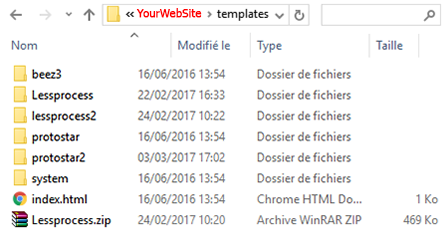
Go in YourWebSite/templates/TemplateName.
Regards
you will find your template file in your website root file :
Go in YourWebSite/templates/TemplateName.
Regards
Last edit: 9 years 5 months ago by Philip.
Please Log in or Create an account to join the conversation.
Time to create page: 0.217 seconds