

- Posts: 35
- Thank you received: 1
Downloadable products larger than 1GB
9 years 3 months ago #272247
by beanman1
Downloadable products larger than 1GB was created by beanman1
-- HikaShop version -- : 3.1.1
-- Joomla version -- : 3.7.2
-- PHP version -- : 7.0
I've attached a copy of my php.ini file settings (I can't change anything though.)
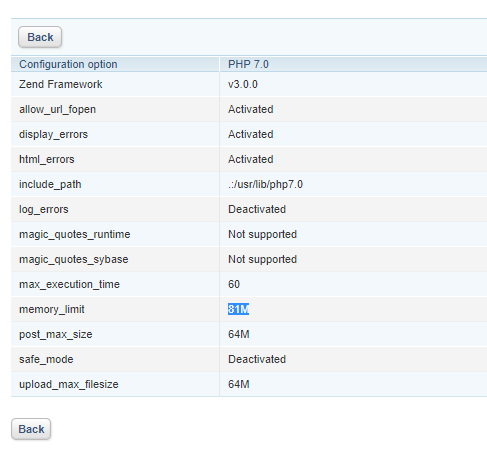
Was wondering if there was a way to overcome the limitations of this file or is there another way I can go to make it so I can sell files that are 5+ GB?
-- Joomla version -- : 3.7.2
-- PHP version -- : 7.0
I've attached a copy of my php.ini file settings (I can't change anything though.)
Was wondering if there was a way to overcome the limitations of this file or is there another way I can go to make it so I can sell files that are 5+ GB?
Please Log in or Create an account to join the conversation.

9 years 3 months ago #272252
by Jerome
Jerome - Obsidev.com
HikaMarket & HikaSerial developer / HikaShop core dev team.
Replied by Jerome on topic Downloadable products larger than 1GB
Hello,
The memory limit is not the problem in your case ; but the "max execution time".
It means that if the user haven't download the file within 60 seconds, the server will shut down the PHP process and the user download in the same time.
In order to secure the download, the server need PHP or a specific module.
So if you want to deliver large files and PHP do not give you the possibility ; you'll need to use server systems like "X-Transfer" or "mod secure download".
These are features/modules for Web Servers, and if your hosting do not provide them, I'm afraid that it will be complicated for you to provide secured downloadable files.
Regards,
The memory limit is not the problem in your case ; but the "max execution time".
It means that if the user haven't download the file within 60 seconds, the server will shut down the PHP process and the user download in the same time.
In order to secure the download, the server need PHP or a specific module.
So if you want to deliver large files and PHP do not give you the possibility ; you'll need to use server systems like "X-Transfer" or "mod secure download".
These are features/modules for Web Servers, and if your hosting do not provide them, I'm afraid that it will be complicated for you to provide secured downloadable files.
Regards,
Jerome - Obsidev.com
HikaMarket & HikaSerial developer / HikaShop core dev team.
The following user(s) said Thank You: beanman1
Please Log in or Create an account to join the conversation.
9 years 2 months ago #273465
by beanman1
Replied by beanman1 on topic Downloadable products larger than 1GB
Jerome,
You recommended 2 different Apache modules (X-Transfer & mod secure download) and Phillip recommended mod_XSendfile ( tn123.org/mod_xsendfile/ )
I'm a complete newbie when it comes to Linux and Apache, but I've gotten my site transferred to a Linux Server and I have Root access to it so I can finally add the module(s) I need, but I have no idea on how to go about doing that. Do I need all 3 modules to push files larger than 3 GB or do I just need 1 of them? How do I download the file, and get it working with Apache?
I'm positive that these questions are outside the scope of what you guys do here, but I really have no where else to turn. Any assistance would be appreciated.
You recommended 2 different Apache modules (X-Transfer & mod secure download) and Phillip recommended mod_XSendfile ( tn123.org/mod_xsendfile/ )
I'm a complete newbie when it comes to Linux and Apache, but I've gotten my site transferred to a Linux Server and I have Root access to it so I can finally add the module(s) I need, but I have no idea on how to go about doing that. Do I need all 3 modules to push files larger than 3 GB or do I just need 1 of them? How do I download the file, and get it working with Apache?
I'm positive that these questions are outside the scope of what you guys do here, but I really have no where else to turn. Any assistance would be appreciated.
Please Log in or Create an account to join the conversation.
9 years 2 months ago - 9 years 2 months ago #273469
by Jerome
Jerome - Obsidev.com
HikaMarket & HikaSerial developer / HikaShop core dev team.
Replied by Jerome on topic Downloadable products larger than 1GB
Hello,
"X-Transfer" is xsendfile apache2 module.
It's also a feature from lighttpd and which is supported by nginx via X-Acel ( www.nginx.com/resources/wiki/start/topics/examples/xsendfile/ )
HikaShop will detect if the xsendfile module is available and will use it if so. So all you need to do is follow the install and configuration procedure at tn123.org/mod_xsendfile/ to get it added to your apache:
Regards,
"X-Transfer" is xsendfile apache2 module.
It's also a feature from lighttpd and which is supported by nginx via X-Acel ( www.nginx.com/resources/wiki/start/topics/examples/xsendfile/ )
HikaShop will detect if the xsendfile module is available and will use it if so. So all you need to do is follow the install and configuration procedure at tn123.org/mod_xsendfile/ to get it added to your apache:
There is nothing to do in HikaShop.Grab the source.
Compile and install
apxs -cia mod_xsendfile.c
Restart apache
That's all.
Regards,
Jerome - Obsidev.com
HikaMarket & HikaSerial developer / HikaShop core dev team.
Last edit: 9 years 2 months ago by nicolas.
Please Log in or Create an account to join the conversation.
9 years 2 months ago #273519
by beanman1
Replied by beanman1 on topic Downloadable products larger than 1GB
I just don't now the Linux syntax to "Grab the source". I'm thinking it's wget and then the address to the github repository, but I'm not sure and I don't wanna mess this up.
Please Log in or Create an account to join the conversation.

9 years 2 months ago - 9 years 2 months ago #273521
by nicolas
Replied by nicolas on topic Downloadable products larger than 1GB
It's indeed wget and the URL of the file that you want to download.
The link to download it is also on that same page:
[strike][/strike]
tn123.org/mod_xsendfile/mod_xsendfile.c
The link to download it is also on that same page:
[strike][/strike]
tn123.org/mod_xsendfile/mod_xsendfile.c
Last edit: 9 years 2 months ago by Jerome. Reason: fix link
Please Log in or Create an account to join the conversation.
9 years 2 months ago - 9 years 2 months ago #273643
by beanman1
Replied by beanman1 on topic Downloadable products larger than 1GB
Do I Need the has at the end?
#hash(sha256:8e8c21ef39bbe86464d3831fd30cc4c51633f6e2e002204509e55fc7c8df9cf9)
#hash(sha256:8e8c21ef39bbe86464d3831fd30cc4c51633f6e2e002204509e55fc7c8df9cf9)
Last edit: 9 years 2 months ago by beanman1.
Please Log in or Create an account to join the conversation.
9 years 2 months ago #273644
by beanman1
Replied by beanman1 on topic Downloadable products larger than 1GB
Compile and install
apxs -cia mod_xsendfile.c
Getting an apxs command not found error....
apxs -cia mod_xsendfile.c
Getting an apxs command not found error....
Please Log in or Create an account to join the conversation.
9 years 2 months ago #273645
by beanman1
Replied by beanman1 on topic Downloadable products larger than 1GB
ok, figured out why I was getting that error and I think I have that resolved, but now I'm getting this when I go to compile the mod.
Please Log in or Create an account to join the conversation.
9 years 2 months ago #273648
by nicolas
Replied by nicolas on topic Downloadable products larger than 1GB
Hi,
It says that you don't have gcc. So you'll have to first install gcc on your server.
It says that you don't have gcc. So you'll have to first install gcc on your server.
Please Log in or Create an account to join the conversation.
9 years 2 months ago #273702
by beanman1
Replied by beanman1 on topic Downloadable products larger than 1GB
Thanks a ton for all of the assistance! I know it's outside the realm of supporting Hikashop. The xsendfile mod is now installed on my server and ready to go. Now to just test the downloading of a full length HD video....
The following user(s) said Thank You: Jerome
Please Log in or Create an account to join the conversation.
Time to create page: 0.242 seconds