

- Posts: 107
- Thank you received: 3
Find the product page template...
8 years 6 months ago #290547
by Uniweb
Find the product page template... was created by Uniweb
-- HikaShop version -- : 3.4.0
-- Joomla version -- : 3.8.6
-- PHP version -- : 7.0
-- Browser(s) name and version -- : Firefox
Hi all
I am trying to find the product page template so i can add some information to it and chage the look of it....
Can any one plese help me..
Thanks for all your help.
-- Joomla version -- : 3.8.6
-- PHP version -- : 7.0
-- Browser(s) name and version -- : Firefox
Hi all
I am trying to find the product page template so i can add some information to it and chage the look of it....
Can any one plese help me..
Thanks for all your help.
Please Log in or Create an account to join the conversation.

8 years 6 months ago #290548
by nicolas
Replied by nicolas on topic Find the product page template...
Hi,
Follow the instructions here and you'll find which view file to edit and how to edit it:
www.hikashop.com/support/documentation/1...-display.html#layout
Follow the instructions here and you'll find which view file to edit and how to edit it:
www.hikashop.com/support/documentation/1...-display.html#layout
Please Log in or Create an account to join the conversation.
8 years 6 months ago #290576
by Uniweb
Replied by Uniweb on topic Find the product page template...
Hi thanks for all your help - but what i am looking to change the look of the product page via the FTP and i need to change the layout of some of the other pages....
Thanks
Thanks
Please Log in or Create an account to join the conversation.
8 years 6 months ago #290587
by nicolas
Replied by nicolas on topic Find the product page template...
Hi,
If you change the layout directly in the view file via FTP, you'll loose your changes when you update your HikaShop. So it's better to use a view override.
Still, once you find the view file as explained in the docuemntation, you can easily find it in the folder components/com_hikashop/views/{view name}/tmpl/{file name}.php
so you can edit it directly via FTP if you want.
If you change the layout directly in the view file via FTP, you'll loose your changes when you update your HikaShop. So it's better to use a view override.
Still, once you find the view file as explained in the docuemntation, you can easily find it in the folder components/com_hikashop/views/{view name}/tmpl/{file name}.php
so you can edit it directly via FTP if you want.
Please Log in or Create an account to join the conversation.
8 years 6 months ago #290612
by Uniweb
Replied by Uniweb on topic Find the product page template...
Hi Nicolas
What is the file name i am looking for...
Thanks
What is the file name i am looking for...
Thanks
Please Log in or Create an account to join the conversation.
8 years 6 months ago #290613
by Uniweb
Replied by Uniweb on topic Find the product page template...
Hi Nicolas
All i wont to do is to pur the worrd price next to the price of the item -- so when ever you see a price i would like the word price in front of it can you pleaase help me ...
Thank
All i wont to do is to pur the worrd price next to the price of the item -- so when ever you see a price i would like the word price in front of it can you pleaase help me ...
Thank
Please Log in or Create an account to join the conversation.
8 years 6 months ago #290629
by nicolas
Replied by nicolas on topic Find the product page template...
Hi,
The exact file name will depend on how you configured HikaShop and what you want to do exactly.
So I can't say for sure.
Most likely, it's the file "show_default" of the view "product" and thus you would have to edit the file components/com_hikashop/views/product/tmpl/show_default.php
But to be sure, the best is to follow the instructions I gave previously...
If you activate the "Display view files" setting of the Hikashop configuration as explained in the documentation link I gave, it will display the different view files used on your frontend and you'll be able to easily see which view file you need to edit.
The exact file name will depend on how you configured HikaShop and what you want to do exactly.
So I can't say for sure.
Most likely, it's the file "show_default" of the view "product" and thus you would have to edit the file components/com_hikashop/views/product/tmpl/show_default.php
But to be sure, the best is to follow the instructions I gave previously...
If you activate the "Display view files" setting of the Hikashop configuration as explained in the documentation link I gave, it will display the different view files used on your frontend and you'll be able to easily see which view file you need to edit.
Please Log in or Create an account to join the conversation.
8 years 6 months ago #290688
by Uniweb
Replied by Uniweb on topic Find the product page template...
hi is there a member how can help me because i do not under stand what you are telling me i edited the file are it stoped my shop from working...
what i thing i need is a devalaper to help me that i can tak to or shoe me what o do..
Thanks Nicolas
what i thing i need is a devalaper to help me that i can tak to or shoe me what o do..
Thanks Nicolas
Please Log in or Create an account to join the conversation.
8 years 6 months ago #290689
by Uniweb
Replied by Uniweb on topic Find the product page template...
Hi Nicolas
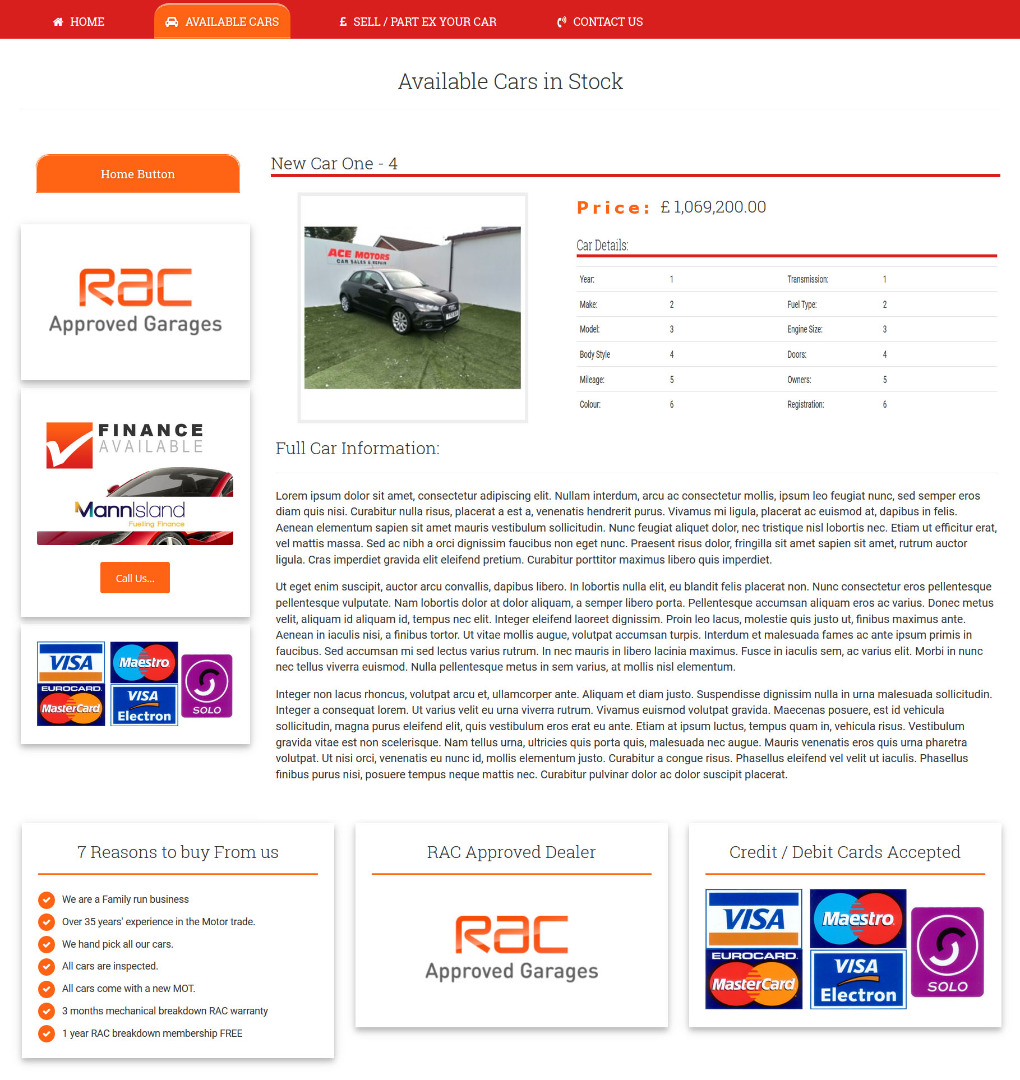
This is what i would like myy pruuct page to look like....
Thanks
This is what i would like myy pruuct page to look like....
Thanks
Please Log in or Create an account to join the conversation.

8 years 6 months ago - 8 years 6 months ago #290701
by Philip
Replied by Philip on topic Find the product page template...
Hello,
Html & php knowledge and a good understood of HikaShop view is required to perform an override view.
You can contact one of our partner to perform this, here on the partner page .
Regards
Html & php knowledge and a good understood of HikaShop view is required to perform an override view.
You can contact one of our partner to perform this, here on the partner page .
Regards
Last edit: 8 years 6 months ago by Philip.
Please Log in or Create an account to join the conversation.
Time to create page: 0.248 seconds