

- Posts: 293
- Thank you received: 9
Please Allow for Some HTML in Product NAME
8 years 1 month ago - 8 years 1 month ago #297054
by MSTACE
Please Allow for Some HTML in Product NAME was created by MSTACE
-- HikaShop version -- : 3.5.1
-- Joomla version -- : 3.8.11
-- PHP version -- : 7.2
I have been asked now by several clients to be able to put some HTML, like <br>,in the PRODUCT NAME.
The reason for this is fairly obvious for long product names:
How it is showing now on the front end:
How it would be more appropriate to show by using a <br> in the name:
RocketTheme does this by default for the Titles on all of their plug-ins. Can add css classes too. It really helps make the site a lot more professional looking.
Thank you.
-- Joomla version -- : 3.8.11
-- PHP version -- : 7.2
I have been asked now by several clients to be able to put some HTML, like <br>,in the PRODUCT NAME.
The reason for this is fairly obvious for long product names:
How it is showing now on the front end:
How to Mix Colours When Painting with Artist Gerda
Smit
Smit
How it would be more appropriate to show by using a <br> in the name:
How to Mix Colours When Painting
with Artist Gerda Smit
with Artist Gerda Smit
RocketTheme does this by default for the Titles on all of their plug-ins. Can add css classes too. It really helps make the site a lot more professional looking.
Thank you.
Last edit: 8 years 1 month ago by MSTACE.
Please Log in or Create an account to join the conversation.

8 years 1 month ago #297058
by Jerome
Jerome - Obsidev.com
HikaMarket & HikaSerial developer / HikaShop core dev team.
Replied by Jerome on topic Please Allow for Some HTML in Product NAME
Hello,
Since product names can be displayed elsewhere than an HTML page, that other fields can be relied on that name ; no we won't allow that.
Regards,
Since product names can be displayed elsewhere than an HTML page, that other fields can be relied on that name ; no we won't allow that.
Regards,
Jerome - Obsidev.com
HikaMarket & HikaSerial developer / HikaShop core dev team.
Please Log in or Create an account to join the conversation.
8 years 1 month ago #297114
by MSTACE
Replied by MSTACE on topic Please Allow for Some HTML in Product NAME
OK, I understand that.
How about a separate Product Name field that allows basic HTML for displaying on the Category and Product Grid/List only?
This would fix a lot of visual issues with long product names.
How about a separate Product Name field that allows basic HTML for displaying on the Category and Product Grid/List only?
This would fix a lot of visual issues with long product names.
Please Log in or Create an account to join the conversation.
8 years 1 month ago #297123
by Jerome
Jerome - Obsidev.com
HikaMarket & HikaSerial developer / HikaShop core dev team.
Replied by Jerome on topic Please Allow for Some HTML in Product NAME
Hello,
You're free to create product custom fields and customize your views accordingly to your needs.
Regards,
You're free to create product custom fields and customize your views accordingly to your needs.
Regards,
Jerome - Obsidev.com
HikaMarket & HikaSerial developer / HikaShop core dev team.
Please Log in or Create an account to join the conversation.
8 years 1 month ago - 8 years 1 month ago #297157
by MSTACE
Replied by MSTACE on topic Please Allow for Some HTML in Product NAME
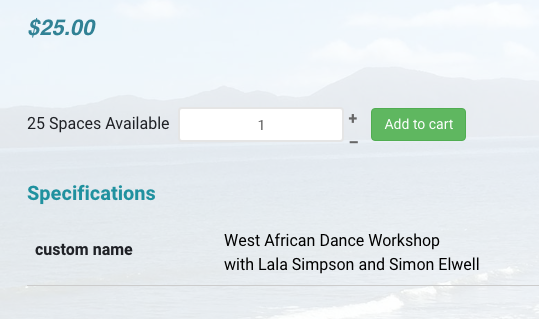
I have created a product custom field alright and have modified the correct view.
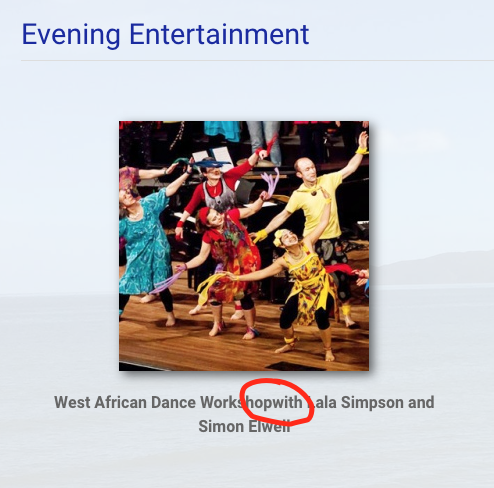
However, adding a <br> is working correctly in the product display, but not in the Products Listing.
The <br> is being ignored. It is there in the page html though.
www.kapitisummerschool.co.nz/new/adult-c...vening-entertainment
However, adding a <br> is working correctly in the product display, but not in the Products Listing.
The <br> is being ignored. It is there in the page html though.
www.kapitisummerschool.co.nz/new/adult-c...vening-entertainment
Last edit: 8 years 1 month ago by MSTACE.
Please Log in or Create an account to join the conversation.
8 years 1 month ago - 8 years 1 month ago #297159
by MSTACE
Replied by MSTACE on topic Please Allow for Some HTML in Product NAME
OK, I did a hack to fix the issue.
Changed the data field to WYSIWYG instead of Text.
Added hard <p> breaks instead of <br> then changed the line-height to compensate.
This works most of the time, but screws up when screen size is portrait for pad, but definitely a better look than the original wrap-around text.
The <br> approach would work in all cases, but I can't get it to work.
Changed the data field to WYSIWYG instead of Text.
Added hard <p> breaks instead of <br> then changed the line-height to compensate.
This works most of the time, but screws up when screen size is portrait for pad, but definitely a better look than the original wrap-around text.
The <br> approach would work in all cases, but I can't get it to work.
Last edit: 8 years 1 month ago by MSTACE.
Please Log in or Create an account to join the conversation.
8 years 1 month ago #297174
by Jerome
Jerome - Obsidev.com
HikaMarket & HikaSerial developer / HikaShop core dev team.
Replied by Jerome on topic Please Allow for Some HTML in Product NAME
Hello,
You might want to see the advanced options for the fields, like the "input filtering" one.
www.hikashop.com/support/documentation/1...ld-form.html#ex-attr
Regards,
You might want to see the advanced options for the fields, like the "input filtering" one.
www.hikashop.com/support/documentation/1...ld-form.html#ex-attr
Regards,
Jerome - Obsidev.com
HikaMarket & HikaSerial developer / HikaShop core dev team.
Please Log in or Create an account to join the conversation.
8 years 1 month ago #297220
by MSTACE
Replied by MSTACE on topic Please Allow for Some HTML in Product NAME
INPUT FILTERING was off.
The <br> was present on both pages, so HTML was not being filtered out.
The <br> was present on both pages, so HTML was not being filtered out.
Please Log in or Create an account to join the conversation.

8 years 1 month ago #297239
by nicolas
Replied by nicolas on topic Please Allow for Some HTML in Product NAME
Hi,
Then, it means that you must have had some CSS either in the template, a module, or some custom CSS, which would hide the br tags ( with a display:none; ).
Then, it means that you must have had some CSS either in the template, a module, or some custom CSS, which would hide the br tags ( with a display:none; ).
Please Log in or Create an account to join the conversation.
8 years 1 month ago - 8 years 1 month ago #297240
by MSTACE
Replied by MSTACE on topic Please Allow for Some HTML in Product NAME
Your are correct! AND it is the HikaShop style_default.css!!!
I changed the 'none' to 'block' and it is now working!
Thanks! The product listing is looking great now.
Code:
.hikashop_subcontainer br {
display: none;
}
I changed the 'none' to 'block' and it is now working!
Thanks! The product listing is looking great now.
Last edit: 8 years 1 month ago by MSTACE.
Please Log in or Create an account to join the conversation.
Time to create page: 0.258 seconds