
- Posts: 424
- Thank you received: 11
popup helper
- BluepointWebdesign
-
 Topic Author
- Offline
Less
More
5 years 8 months ago #328524
by BluepointWebdesign
popup helper was created by BluepointWebdesign
Hello,
I need some help to get the settings of the popup helper to be in percentages, instead of px to make it work better on our site..
<?php
$popupHelper = hikashop_get('helper.popup');
echo ' '.$popupHelper->display(
'<i class="hikabtn" style="background: transparent; border-color: #3182CE;" ><img src="/images//Plusje.png"/></i>',
'HIKASHOP_EDIT_CART_PRODUCT',
hikashop_completeLink('product&task=show&cid='.$this->row->product_id.'&name='.$this->row->alias . $this->itemid . $this->category_pathway, $this->row),
'edit_cart_product',
800, 600, 'title="'.JText::_('CHOOSE_OPTIONS').'"', '', 'link'
);
?>
I have this code.
Please Help and see attachement.
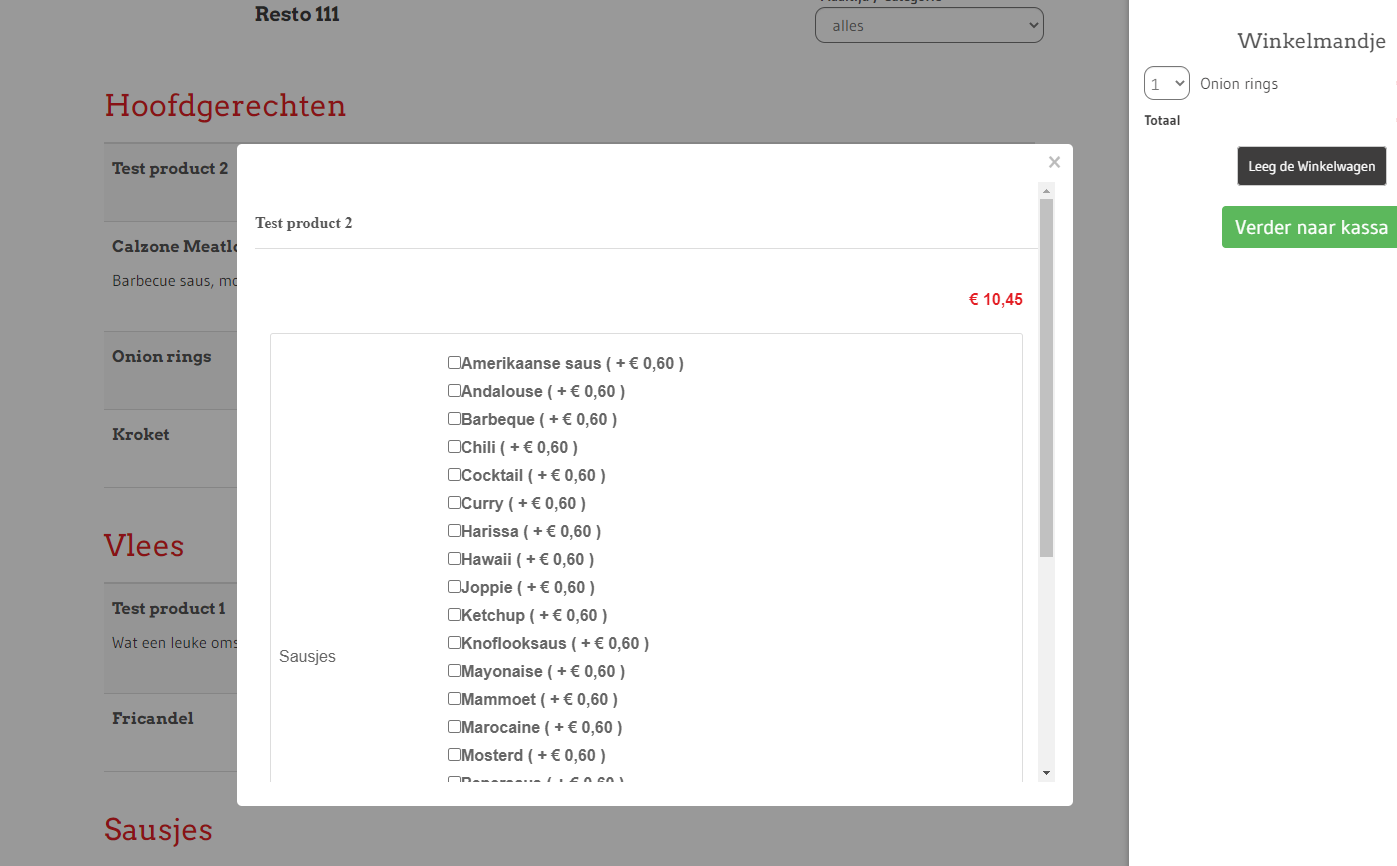
I need some help to get the settings of the popup helper to be in percentages, instead of px to make it work better on our site..
<?php
$popupHelper = hikashop_get('helper.popup');
echo ' '.$popupHelper->display(
'<i class="hikabtn" style="background: transparent; border-color: #3182CE;" ><img src="/images//Plusje.png"/></i>',
'HIKASHOP_EDIT_CART_PRODUCT',
hikashop_completeLink('product&task=show&cid='.$this->row->product_id.'&name='.$this->row->alias . $this->itemid . $this->category_pathway, $this->row),
'edit_cart_product',
800, 600, 'title="'.JText::_('CHOOSE_OPTIONS').'"', '', 'link'
);
?>
I have this code.
Please Help and see attachement.
Please Log in or Create an account to join the conversation.

5 years 8 months ago #328535
by nicolas
Replied by nicolas on topic popup helper
Hi,
As a quick and dirty way, you could try changing the code:
to have % instead of px in the file media/com_hikashop/css/hikashop.js
But that will cause many problems :
- popups are used in other places and if you change px to % for all of them, then it will break the other popups. So you would need some more complex code.
- this requires modifying a core file of hikashop. So when you update, you'll have to reapply your change.
A nicer way would be to redefine the window.hikashop.openBox_vex function with custom javascript in your view override.
For example:
Now this supposes that the width function of vex supports percentages, which might not be the case. But at least you won't have an issue with popups on other places of your website, and no problem with updates (at least until we remove the vex popup system for a better one, but we don't have such plans).
As a quick and dirty way, you could try changing the code:
Code:
settings.content = '<iframe style="border:0;margin:0;padding:0;" name="hikashop_popup_iframe" width="'+settings.x+'px" height="'+settings.y+'px" src="'+href+'"></iframe>';
settings.afterOpen = function(context) { context.width(settings.x + 'px'); };
But that will cause many problems :
- popups are used in other places and if you change px to % for all of them, then it will break the other popups. So you would need some more complex code.
- this requires modifying a core file of hikashop. So when you update, you'll have to reapply your change.
A nicer way would be to redefine the window.hikashop.openBox_vex function with custom javascript in your view override.
For example:
Code:
<script>
window.hikashop.openBox_vex = function(elem, url) {
if(typeof(vex) == "undefined")
return false;
var href = elem.href || null;
if(url !== undefined && url !== null)
href = url;
if(!href) href = elem.getAttribute('href');
settings = window.Oby.evalJSON(elem.getAttribute('data-vex'));
if(settings.x && settings.y && href) {
settings.content = '<iframe style="border:0;margin:0;padding:0;" name="hikashop_popup_iframe" width="'+settings.x+'%" height="'+settings.y+'%" src="'+href+'"></iframe>';
settings.afterOpen = function(context) { context.width(settings.x + '%'); };
}
vex.defaultOptions.className = 'vex-theme-default';
vex.open( settings );
</script>
Please Log in or Create an account to join the conversation.
- BluepointWebdesign
-
Topic Author
- Offline
Less
More
- Posts: 424
- Thank you received: 11
5 years 8 months ago #328577
by BluepointWebdesign
Replied by BluepointWebdesign on topic popup helper
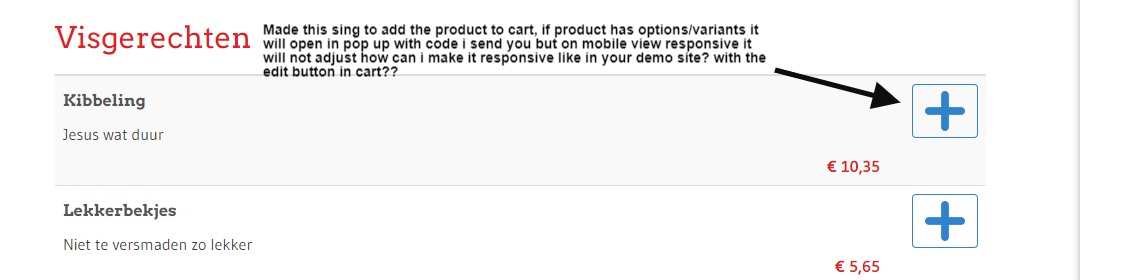
I put this in my product / add_to_cart_ajax.php to show the options in a pop up like you have in checkout.
But responsive this is not working correctly? Not in the checkout and not here ?? please help..
<?php
$popupHelper = hikashop_get('helper.popup');
echo ' '.$popupHelper->display(
'<i class="hikabtn" style="background: transparent; border-color: #3182CE;" ><img src="/images//Plusje.png"/></i>',
'HIKASHOP_EDIT_CART_PRODUCT',
hikashop_completeLink('product&task=show&cid='.$this->row->product_id.'&name='.$this->row->alias . $this->itemid . $this->category_pathway, $this->row),
'edit_cart_product',
600, 600, 'title="'.JText::_('CHOOSE_OPTIONS').'"', '', 'link'
);
?>
I
But responsive this is not working correctly? Not in the checkout and not here ?? please help..
<?php
$popupHelper = hikashop_get('helper.popup');
echo ' '.$popupHelper->display(
'<i class="hikabtn" style="background: transparent; border-color: #3182CE;" ><img src="/images//Plusje.png"/></i>',
'HIKASHOP_EDIT_CART_PRODUCT',
hikashop_completeLink('product&task=show&cid='.$this->row->product_id.'&name='.$this->row->alias . $this->itemid . $this->category_pathway, $this->row),
'edit_cart_product',
600, 600, 'title="'.JText::_('CHOOSE_OPTIONS').'"', '', 'link'
);
?>
I
Please Log in or Create an account to join the conversation.
5 years 8 months ago #328585
by nicolas
Replied by nicolas on topic popup helper
Hi,
We would need a link to the page to check on the situation. To be able to say anything.
Could you provide that ?
We would need a link to the page to check on the situation. To be able to say anything.
Could you provide that ?
Please Log in or Create an account to join the conversation.
- BluepointWebdesign
-
Topic Author
- Offline
Less
More
- Posts: 424
- Thank you received: 11
5 years 8 months ago #328638
by BluepointWebdesign
Replied by BluepointWebdesign on topic popup helper
Hello,
The link to the page: 06.bluepoint-concept.nl/resto-111.html
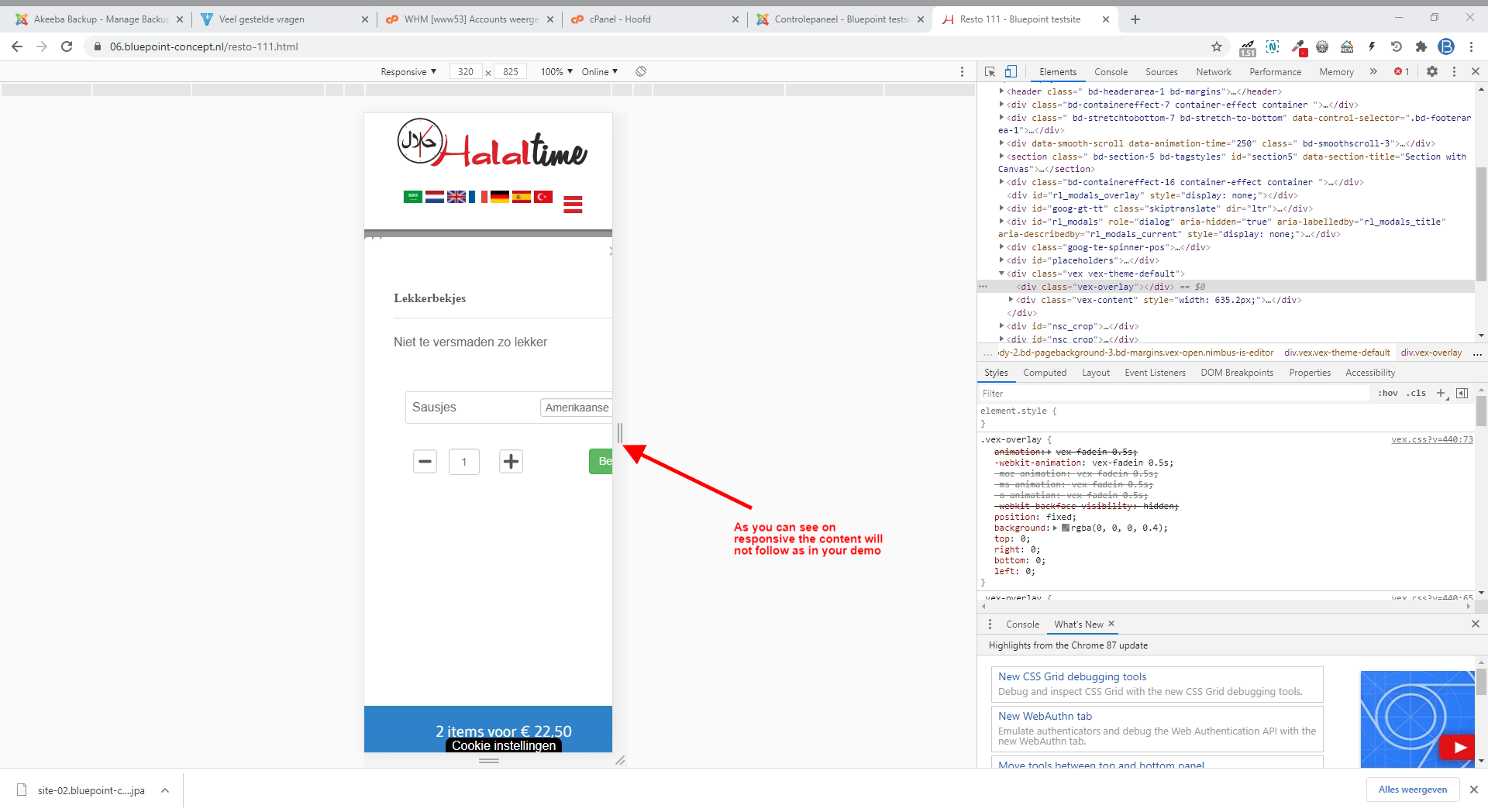
when clicking on the plus, i made the pop up.
But responsive this is not working as on your demo site..
See screenshot.
The link to the page: 06.bluepoint-concept.nl/resto-111.html
when clicking on the plus, i made the pop up.
But responsive this is not working as on your demo site..
See screenshot.
Please Log in or Create an account to join the conversation.
5 years 8 months ago #328652
by nicolas
Replied by nicolas on topic popup helper
Hi,
I didn't find the code I provided before on your URL.
But even without it, I can see that the popup automatically resizes to the page width.
So to me, it looks like it works just fine:
monosnap.com/file/3kkfQge67xWdctZOJ7Z8ONqsUIeLpx
The problem is with the content inside the popup which isn't made to adapt to the small width available, not the popup itself.
I see you've already added CSS to cope with that for the top area of the product page:
@media (max-width: 767px){
.hikashop_product_top_part {
width: 60%;
}
}
in the file media/com_hikashop/css/style_custom1.css
a similar CSS could be added for the main area:
@media (max-width: 767px){
.hk-row-fluid {
width: 60%;
}
}
I didn't find the code I provided before on your URL.
But even without it, I can see that the popup automatically resizes to the page width.
So to me, it looks like it works just fine:
monosnap.com/file/3kkfQge67xWdctZOJ7Z8ONqsUIeLpx
The problem is with the content inside the popup which isn't made to adapt to the small width available, not the popup itself.
I see you've already added CSS to cope with that for the top area of the product page:
@media (max-width: 767px){
.hikashop_product_top_part {
width: 60%;
}
}
in the file media/com_hikashop/css/style_custom1.css
a similar CSS could be added for the main area:
@media (max-width: 767px){
.hk-row-fluid {
width: 60%;
}
}
Please Log in or Create an account to join the conversation.
Time to create page: 0.196 seconds