

- Posts: 49
- Thank you received: 0
the layout of user control panel page gets strang
10 years 9 months ago #223696
by likunzhou
the layout of user control panel page gets strang was created by likunzhou
-- url of the page with the problem -- :
market.zaihaiwai.net/index.php/mypage.html
-- HikaShop version -- : 2.6.0
-- Joomla version -- : 3.4.5
-- PHP version -- : 5.5.9
-- Browser(s) name and version -- : chrome 47
-- Error-message(debug-mod must be tuned on) -- : the layout of user control panel page gets strange.
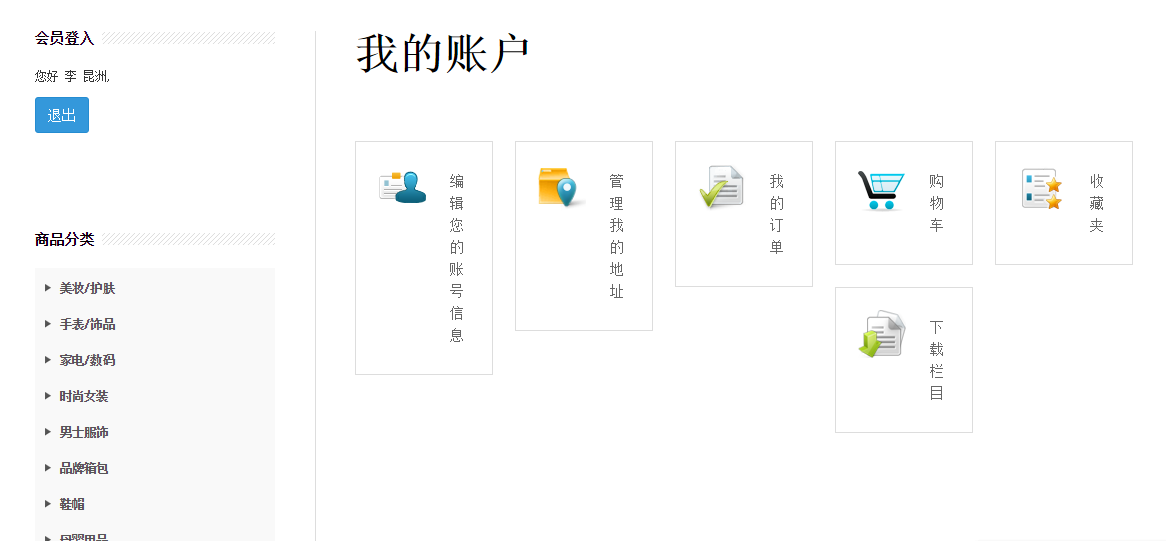
the layout of user control panel page gets strange as show in the image:
you can login using id: maggie pw: 3828079
I'm only using the default css settings.
I did remember it works well long time ago ( with hikashop 2.5.0, Hikamarket 1.6.5). how to fix it?
I just want to make it as your demo
Thank you!
Regards,
Kunzhou
-- HikaShop version -- : 2.6.0
-- Joomla version -- : 3.4.5
-- PHP version -- : 5.5.9
-- Browser(s) name and version -- : chrome 47
-- Error-message(debug-mod must be tuned on) -- : the layout of user control panel page gets strange.
the layout of user control panel page gets strange as show in the image:
you can login using id: maggie pw: 3828079
I'm only using the default css settings.
I did remember it works well long time ago ( with hikashop 2.5.0, Hikamarket 1.6.5). how to fix it?
I just want to make it as your demo
Thank you!
Regards,
Kunzhou
Please Log in or Create an account to join the conversation.

10 years 9 months ago #223700
by lousyfool
Need help with customisations of layouts, style or other site development? PM me!
(Don't forget to turn on "E-mail notification of new messages" )
Replied by lousyfool on topic the layout of user control panel page gets strang
Hi,
It's coming from the following CSS on your site:
Obviously, it limits any element with the class "icon" on your site to a width of 160px max, including the ones in the cPanel.
Please note, it's not part of any HikaShop CSS, and since it's in the file /t3-assets/css/css-da207.css, it seems to come from your template, or someone else has added it.
However, you can override it for this particular instance by adding this CSS:
www.hikashop.com/support/support/documen...ize-the-display.html
It's coming from the following CSS on your site:
Code:
.icon {
max-width: 160px;
}
Obviously, it limits any element with the class "icon" on your site to a width of 160px max, including the ones in the cPanel.
Please note, it's not part of any HikaShop CSS, and since it's in the file /t3-assets/css/css-da207.css, it seems to come from your template, or someone else has added it.
However, you can override it for this particular instance by adding this CSS:
Code:
#hikashopcpanel div.icon {
max-width: none;
}
www.hikashop.com/support/support/documen...ize-the-display.html
Need help with customisations of layouts, style or other site development? PM me!
(Don't forget to turn on "E-mail notification of new messages" )
Please Log in or Create an account to join the conversation.
10 years 9 months ago #223701
by likunzhou
Replied by likunzhou on topic the layout of user control panel page gets strang
The problem was solved.
Thank you!
Thank you!
Please Log in or Create an account to join the conversation.
Time to create page: 0.183 seconds