

- Posts: 177
- Thank you received: 4
Modules Display on User Control Panel
9 years 1 month ago #277120
by kchahine
Modules Display on User Control Panel was created by kchahine
-- url of the page with the problem -- :
morenadancewear.com.au
-- HikaShop version -- : 3.1.1
-- Joomla version -- : 3.7.5
-- PHP version -- : 7.x
I created a top menu item called "My Account", which is a user control panel with link morenadancewear.com.au/my-account.html. If user is logged in then all is OK however if new user click on my account (without logging in or needs to register) then some modules of the website will appear. I am not able to find a way to disable some of these modules! Can someone help please?
-- HikaShop version -- : 3.1.1
-- Joomla version -- : 3.7.5
-- PHP version -- : 7.x
I created a top menu item called "My Account", which is a user control panel with link morenadancewear.com.au/my-account.html. If user is logged in then all is OK however if new user click on my account (without logging in or needs to register) then some modules of the website will appear. I am not able to find a way to disable some of these modules! Can someone help please?
Please Log in or Create an account to join the conversation.

9 years 4 weeks ago #277122
by nicolas
Replied by nicolas on topic Modules Display on User Control Panel
Hi,
As you can see there, the URL of the page is: morenadancewear.com.au/component/users/?...bXktYWNjb3VudC5odG1s
This means that on that page, you are in the menu item with the id 101.
So if you edit your modules and remove their assignation from that menu item, they won't display on that page.
Otherwise, you also have extensions like Advanced Modules Manager in order to have a greater control of where a module should and shouldn't display and they would allow you to really target the display of the modules on that particular page.
As you can see there, the URL of the page is: morenadancewear.com.au/component/users/?...bXktYWNjb3VudC5odG1s
This means that on that page, you are in the menu item with the id 101.
So if you edit your modules and remove their assignation from that menu item, they won't display on that page.
Otherwise, you also have extensions like Advanced Modules Manager in order to have a greater control of where a module should and shouldn't display and they would allow you to really target the display of the modules on that particular page.
Please Log in or Create an account to join the conversation.
9 years 4 weeks ago #277183
by kchahine
Replied by kchahine on topic Modules Display on User Control Panel
Hi Nicolas
Item ID 101 is the homepage and changing module assignment will change my homepage. I am bit confused about your first suggestion.
Item ID 101 is the homepage and changing module assignment will change my homepage. I am bit confused about your first suggestion.
Please Log in or Create an account to join the conversation.

9 years 4 weeks ago - 9 years 4 weeks ago #277212
by Philip
Replied by Philip on topic Modules Display on User Control Panel
Hello,
I think there is misunderstanding, Nicolas give you the menu id where you don't want to display your modules.
From this you can set where modules will be displayed see this screenshot :
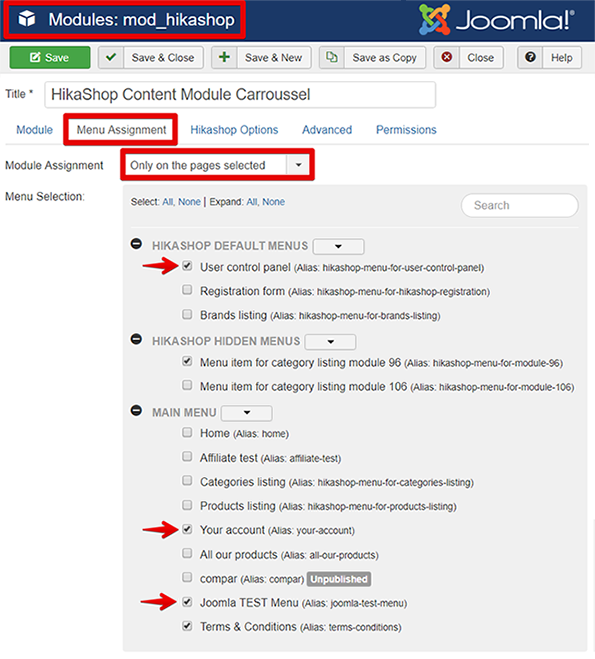
On this screenshot the module will be displayed only on the menu spotted with a red arrow.
Hope this will fit your needs.
Regards
I think there is misunderstanding, Nicolas give you the menu id where you don't want to display your modules.
From this you can set where modules will be displayed see this screenshot :
On this screenshot the module will be displayed only on the menu spotted with a red arrow.
Hope this will fit your needs.
Regards
Last edit: 9 years 4 weeks ago by Philip.
The following user(s) said Thank You: kchahine
Please Log in or Create an account to join the conversation.
Time to create page: 0.169 seconds