

- Posts: 104
- Thank you received: 5
Control Panel Look
8 years 10 months ago #283246
by p3.chuck
Control Panel Look was created by p3.chuck
-- url of the page with the problem -- :
www.p3proswing.com/
-- HikaShop version -- : 3.2.1
-- Joomla version -- : 3.8.2
Hi,
I'm not sure if this happened during an update or not, but all of a sudden my User Control Panel looks odd. It has only buttons and they are not properly sized. Could you please take a look and let me know what is wrong?
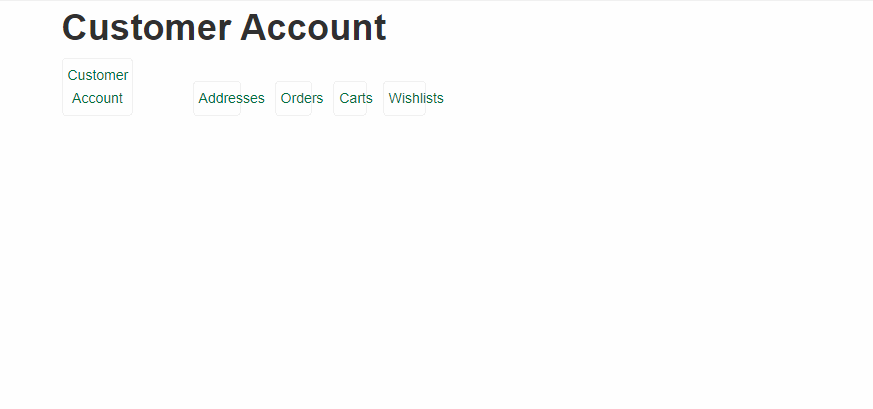
Thanks,
Chuck W.
-- HikaShop version -- : 3.2.1
-- Joomla version -- : 3.8.2
Hi,
I'm not sure if this happened during an update or not, but all of a sudden my User Control Panel looks odd. It has only buttons and they are not properly sized. Could you please take a look and let me know what is wrong?
Thanks,
Chuck W.
Please Log in or Create an account to join the conversation.

8 years 10 months ago #283284
by nicolas
Replied by nicolas on topic Control Panel Look
Hi,
Yes, we've redesigned the frontend control panel of HikaShop with new icons and CSS.
Your "frontend CSS" of HikaShop has been customized based on a previous version of the file and thus doesn't contain that new CSS.
Instead of modifying directly the CSS of the frontend CSS file of HikaShop, I would rather recommend to add your custom CSS in your style file or your template CSS file so that you still get the CSS modifications in future versions of HikaShop.
If you select "default" in the "frontend CSS" setting of the HikaShop configuration and clear the cache of your browser and your website, you should get a nice looking user control panel.
Yes, we've redesigned the frontend control panel of HikaShop with new icons and CSS.
Your "frontend CSS" of HikaShop has been customized based on a previous version of the file and thus doesn't contain that new CSS.
Instead of modifying directly the CSS of the frontend CSS file of HikaShop, I would rather recommend to add your custom CSS in your style file or your template CSS file so that you still get the CSS modifications in future versions of HikaShop.
If you select "default" in the "frontend CSS" setting of the HikaShop configuration and clear the cache of your browser and your website, you should get a nice looking user control panel.
The following user(s) said Thank You: p3.chuck
Please Log in or Create an account to join the conversation.
8 years 9 months ago #283416
by p3.chuck
Replied by p3.chuck on topic Control Panel Look
Worked perfectly and looks good now.
Please Log in or Create an account to join the conversation.
Time to create page: 0.149 seconds