
- Posts: 51
- Thank you received: 4
404 error when trying to access Customer Account
- anders.drejer
-
 Topic Author
- Offline
Less
More
7 years 2 months ago #308650
by anders.drejer
404 error when trying to access Customer Account was created by anders.drejer
-- HikaShop version -- : 4.2.0
-- Joomla version -- : 3.9.10
-- PHP version -- : 7.2
-- Error-message(debug-mod must be tuned on) -- : 404 error
When I try to access Customer Account I get a 404 error. Is this a known issue?
Best Regards,
Anders
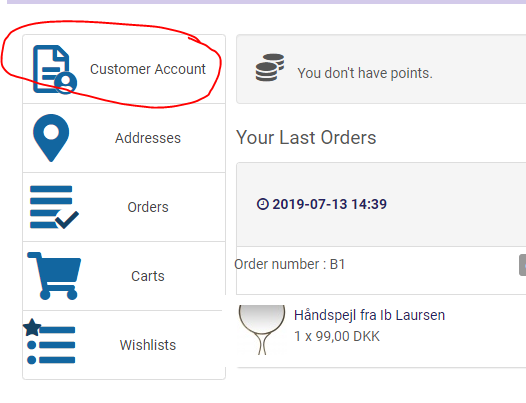
-- Joomla version -- : 3.9.10
-- PHP version -- : 7.2
-- Error-message(debug-mod must be tuned on) -- : 404 error
When I try to access Customer Account I get a 404 error. Is this a known issue?
Best Regards,
Anders
Please Log in or Create an account to join the conversation.

7 years 2 months ago #308672
by nicolas
Replied by nicolas on topic 404 error when trying to access Customer Account
Hi,
The "Customer account" element is a link to the Joomla user profile page.
As it's not a HikaShop page, it's possible that you get a 404 error if you didn't configure the "Force menu" setting with the id of a menu item of the com_users Joomla component in the "HikaShop joomla user account link plugin" via the Joomla plugins manager.
The "Customer account" element is a link to the Joomla user profile page.
As it's not a HikaShop page, it's possible that you get a 404 error if you didn't configure the "Force menu" setting with the id of a menu item of the com_users Joomla component in the "HikaShop joomla user account link plugin" via the Joomla plugins manager.
Please Log in or Create an account to join the conversation.
- anders.drejer
-
Topic Author
- Offline
Less
More
- Posts: 51
- Thank you received: 4
7 years 2 months ago #308706
by anders.drejer
Replied by anders.drejer on topic 404 error when trying to access Customer Account
I am not sure what to to about this. Is it something HikaShop specifik? And is there some "How to do"?
Best Regards,
Anders
Best Regards,
Anders
Please Log in or Create an account to join the conversation.

7 years 2 months ago - 7 years 2 months ago #308712
by Philip
Replied by Philip on topic 404 error when trying to access Customer Account
Hello,
It's a plugin that manage a link between Joomla User and HikaShop, I will guide you step by step to check it :
- Go to Extensions => Plugins
- Use filter to better find the HikaShop joomla user account link plugin

- If it's not already the case enable the plugin
-Then as Nicolas told you, add in this input the id of a menu item of the com_users Joomla

Hope this will help you.
regards
It's a plugin that manage a link between Joomla User and HikaShop, I will guide you step by step to check it :
- Go to Extensions => Plugins
- Use filter to better find the HikaShop joomla user account link plugin
- If it's not already the case enable the plugin
-Then as Nicolas told you, add in this input the id of a menu item of the com_users Joomla
Hope this will help you.
regards
Last edit: 7 years 2 months ago by Philip.
The following user(s) said Thank You: n00bster
Please Log in or Create an account to join the conversation.
- anders.drejer
-
Topic Author
- Offline
Less
More
- Posts: 51
- Thank you received: 4
7 years 2 months ago - 7 years 2 months ago #308747
by anders.drejer
Replied by anders.drejer on topic 404 error when trying to access Customer Account
Sorry, no that did not help me.
No problem understanding the HikaShop joomla user account link plugin part, but I have no clue what the id of a menu item of the com_users Joomla is.
Do you need access to the website?
Best Regards,
Anders
No problem understanding the HikaShop joomla user account link plugin part, but I have no clue what the id of a menu item of the com_users Joomla is.
Do you need access to the website?
Best Regards,
Anders
Last edit: 7 years 2 months ago by anders.drejer.
Please Log in or Create an account to join the conversation.
7 years 2 months ago #308749
by nicolas
Replied by nicolas on topic 404 error when trying to access Customer Account
Hi,
You need to create a menu item with one of the types from com_users (the components of Joomla to handle the user manager):
monosnap.com/file/48gCgdFIDEpHS3oY19sBmKirAI3nx0
Then, enter the id of that menu item in the force menu setting of the plugin.
You need to create a menu item with one of the types from com_users (the components of Joomla to handle the user manager):
monosnap.com/file/48gCgdFIDEpHS3oY19sBmKirAI3nx0
Then, enter the id of that menu item in the force menu setting of the plugin.
The following user(s) said Thank You: anders.drejer
Please Log in or Create an account to join the conversation.
Time to create page: 0.187 seconds