
- Posts: 279
- Thank you received: 1
Qty on invoice not matching order - no price
- trogladyte
-
 Topic Author
- Offline
Less
More
12 years 10 months ago #132919
by trogladyte
Qty on invoice not matching order - no price was created by trogladyte
-- url of the page with the problem -- :
www.digitalguarddawg.com/motorcycles/rfi...ty/dgd-kim-u/product
-- HikaShop version -- : 2.2.2
-- Joomla version -- : 2.5.14
-- PHP version -- : 5.3.x
The client received an order over the weekend from this page (image of invoice is attached).
The "Want an extra fob?" is an option which inserts the Fob product, which has 4 variations - 0, 1, 2, or 3. I have confirmed that adding 1, 2, or 3 alters the price correctly and transfers through to the checkout. However, as can be seen from the invoice, something strange is happening. There is a "0" after the name, a QTY of 2, but no cost assigned. Neither does the cost per item show.
What have I done wrong, or what is going wrong please?
-- HikaShop version -- : 2.2.2
-- Joomla version -- : 2.5.14
-- PHP version -- : 5.3.x
The client received an order over the weekend from this page (image of invoice is attached).
The "Want an extra fob?" is an option which inserts the Fob product, which has 4 variations - 0, 1, 2, or 3. I have confirmed that adding 1, 2, or 3 alters the price correctly and transfers through to the checkout. However, as can be seen from the invoice, something strange is happening. There is a "0" after the name, a QTY of 2, but no cost assigned. Neither does the cost per item show.
What have I done wrong, or what is going wrong please?
Please Log in or Create an account to join the conversation.

Less
More
- Posts: 12953
- Thank you received: 1778
12 years 10 months ago #133105
by Mohamed Thelji
Replied by Mohamed Thelji on topic Qty on invoice not matching order - no price
Hi,
1. Can you show me how did you configured your product and it's variants through some screenshots ?
2. Did you edit the "invoice" file of the "order" view of your back-end template through "Hikashop->DIsplay->Views" ?
1. Can you show me how did you configured your product and it's variants through some screenshots ?
2. Did you edit the "invoice" file of the "order" view of your back-end template through "Hikashop->DIsplay->Views" ?
Please Log in or Create an account to join the conversation.

12 years 10 months ago #133163
by nicolas
Replied by nicolas on topic Qty on invoice not matching order - no price
Hi,
I don't see the problem here. The user added the product in the cart, with the product and a "no extra fob" option. Then, he later changed the option quantity from 1 to 2, but since the "no extra fob" option is free, 0*2 or 0*1, it's still equal to 0.
Usually though, you don't allow users to change the quantity of the options and group them with their products thanks to the "group options with product" option of the configuration.
PS: please post your replies on the forum not via email.
I don't see the problem here. The user added the product in the cart, with the product and a "no extra fob" option. Then, he later changed the option quantity from 1 to 2, but since the "no extra fob" option is free, 0*2 or 0*1, it's still equal to 0.
Usually though, you don't allow users to change the quantity of the options and group them with their products thanks to the "group options with product" option of the configuration.
PS: please post your replies on the forum not via email.
Please Log in or Create an account to join the conversation.
- trogladyte
-
Topic Author
- Offline
Less
More
- Posts: 279
- Thank you received: 1
12 years 10 months ago #133210
by trogladyte
Replied by trogladyte on topic Qty on invoice not matching order - no price
Got to disagree Nicolas. The extra fob option is not free. As seen in the image FOB product.jpg, the product is set at $49 each. However, the default variant on the (in this case) KIM-U is 0 extra Fobs = $0. However, the base Fob product still is set at $49.
So I disagree it's working correctly (and obviously it isn't).
So I disagree it's working correctly (and obviously it isn't).
Please Log in or Create an account to join the conversation.
12 years 10 months ago #133349
by nicolas
Replied by nicolas on topic Qty on invoice not matching order - no price
It seems that you're missing something.
Look carefully at your screenshot. The option selected for your product says that you selected the option choice "0". And if you look on your product page, the "0" choice costs really $0. So it's normal that it is $0 in the cart...
Look carefully at your screenshot. The option selected for your product says that you selected the option choice "0". And if you look on your product page, the "0" choice costs really $0. So it's normal that it is $0 in the cart...
Please Log in or Create an account to join the conversation.
- trogladyte
-
Topic Author
- Offline
Less
More
- Posts: 279
- Thank you received: 1
12 years 10 months ago #133354
by trogladyte
Replied by trogladyte on topic Qty on invoice not matching order - no price
I'm still not following how something which costs $49 can appear with a Qty of 2 on an invoice but cost nothing, but let's leave that.
Then... how do I set this up so it works like I want? If someone adds an extra one or ones, as an option to the main product, the price reflects on the invoice. Right now, if you select one before adding to the cart the price is updated to include the extra $49.
Then... how do I set this up so it works like I want? If someone adds an extra one or ones, as an option to the main product, the price reflects on the invoice. Right now, if you select one before adding to the cart the price is updated to include the extra $49.
Please Log in or Create an account to join the conversation.
12 years 10 months ago - 12 years 10 months ago #133401
by nicolas
Replied by nicolas on topic Qty on invoice not matching order - no price
You're wrong. The 0 option doesn't cost $49, it cost $0. See the screenshot:
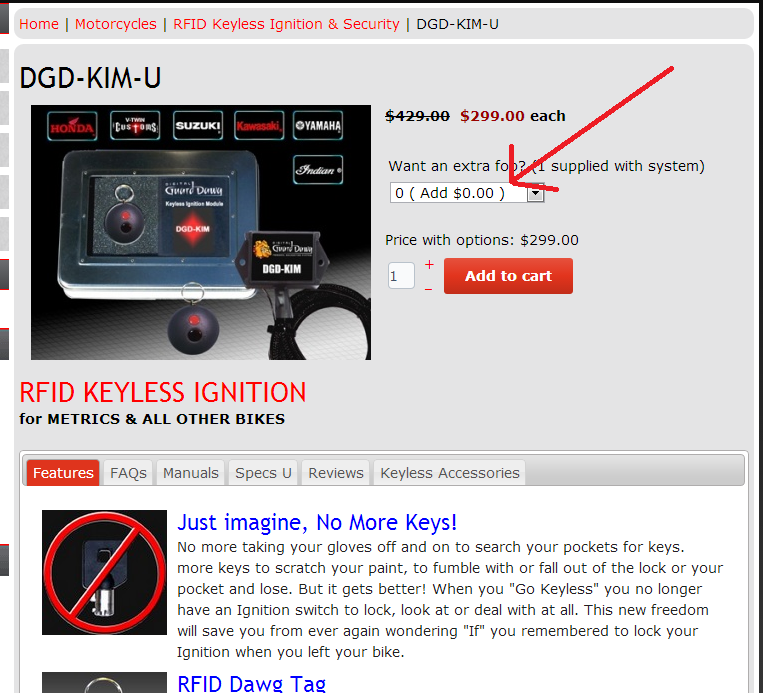
And $0*2 is still $0 in my book.
You can't update the selection of the option after the product is in the cart.
That's why I recommended to turn on the "group options with product" option of the configuration in order to avoid any confusion between the option selection and the quantity of each option...
You need to understand what an option is.
When you buy a computer with an option for an integrated webcam, if you set the quantity of the webcam to 2 in the cart while you leave the quantity of the computer to 1 in the cart, it is not possible. That's why by default that "group options with product" option is turned on. So that the options are associated with the products directly in the cart and when you change the quantity, you change the quantity of the whole set, not of each one.
And $0*2 is still $0 in my book.
You can't update the selection of the option after the product is in the cart.
That's why I recommended to turn on the "group options with product" option of the configuration in order to avoid any confusion between the option selection and the quantity of each option...
You need to understand what an option is.
When you buy a computer with an option for an integrated webcam, if you set the quantity of the webcam to 2 in the cart while you leave the quantity of the computer to 1 in the cart, it is not possible. That's why by default that "group options with product" option is turned on. So that the options are associated with the products directly in the cart and when you change the quantity, you change the quantity of the whole set, not of each one.
Last edit: 12 years 10 months ago by nicolas.
Please Log in or Create an account to join the conversation.
Time to create page: 0.242 seconds