

- Posts: 214
- Thank you received: 1
Unable to Edit Order Infomation
12 years 8 months ago #141466
by matps
Unable to Edit Order Infomation was created by matps
Hi There,
I've come across something which I'm sure I was able to do in previous versions of Hikashop. If I go to the Orders page and open up an order, if I click on the Edit Icon for either Shipping or Billing Address I am then able to edit the information as expected.
However, I've found that when I click the green tick to save the changes, it does not actually update any of the fields I've just edited. As I mention I'm sure I was able to do this in previous versions.
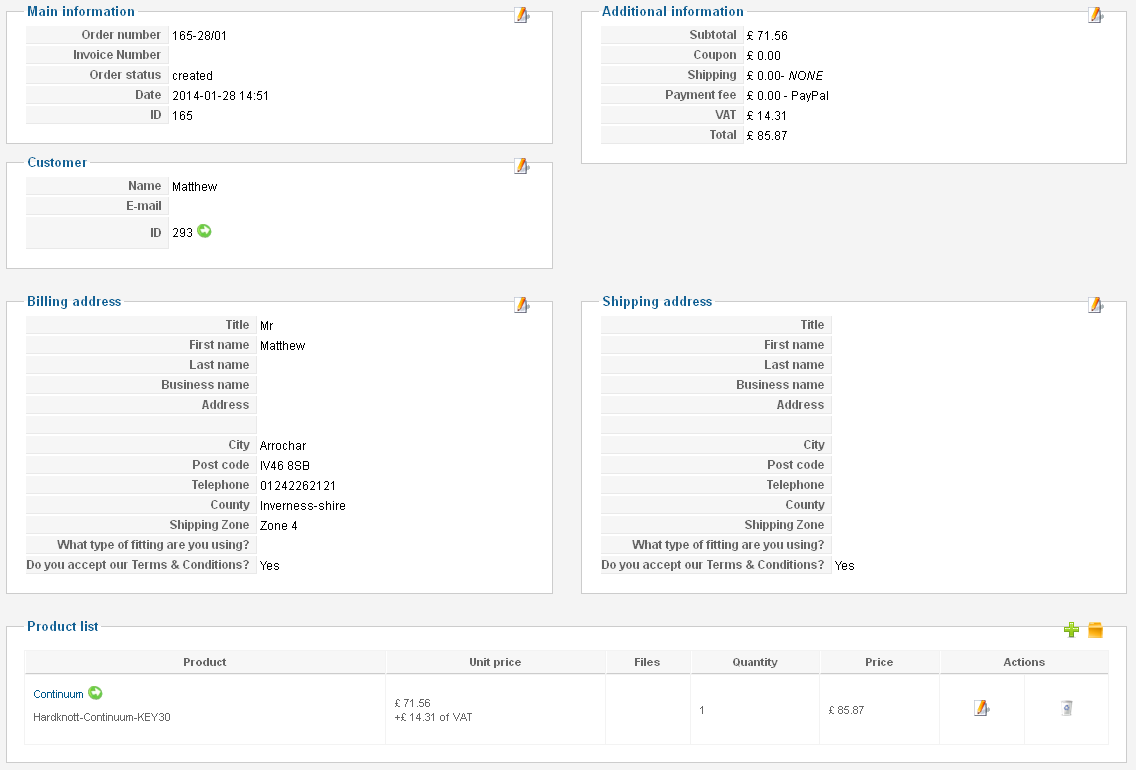
I've come across something which I'm sure I was able to do in previous versions of Hikashop. If I go to the Orders page and open up an order, if I click on the Edit Icon for either Shipping or Billing Address I am then able to edit the information as expected.
However, I've found that when I click the green tick to save the changes, it does not actually update any of the fields I've just edited. As I mention I'm sure I was able to do this in previous versions.
Please Log in or Create an account to join the conversation.

12 years 8 months ago #141495
by Jerome
Jerome - Obsidev.com
HikaMarket & HikaSerial developer / HikaShop core dev team.
Replied by Jerome on topic Unable to Edit Order Infomation
Hi,
When you are in edit mode, do you see some required fields ?
Because if a required field is not fill, the save of the address won't be allowed.
Regards,
When you are in edit mode, do you see some required fields ?
Because if a required field is not fill, the save of the address won't be allowed.
Regards,
Jerome - Obsidev.com
HikaMarket & HikaSerial developer / HikaShop core dev team.
Please Log in or Create an account to join the conversation.
12 years 8 months ago - 12 years 8 months ago #141530
by matps
Replied by matps on topic Unable to Edit Order Infomation
Hi Jerome, thanks for your reply.
I've looked into it and thought that it might have been because I seem unable to select a County because for some reason I couldn't use the dropdown in the back end.
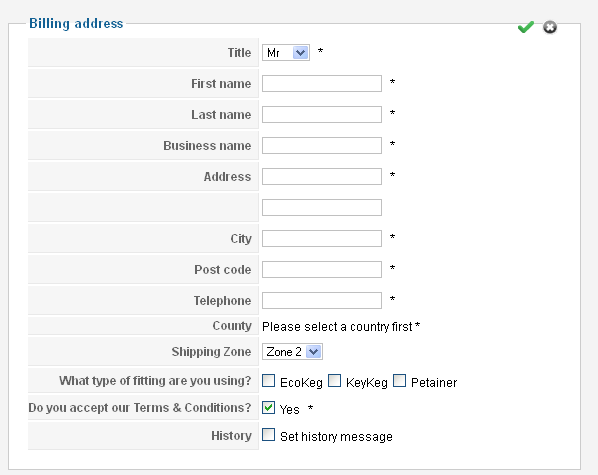
I've however removed the County from the back end listing from the Custom fields menu and, despite making sure all fields are entered, I am still finding it won't save.
Regards,
Matthew
PS, I've also found out it if I open the Addresses popup in the User page, make some changes, click OK and then close the box, it doesn't save my updates either.
I've looked into it and thought that it might have been because I seem unable to select a County because for some reason I couldn't use the dropdown in the back end.
I've however removed the County from the back end listing from the Custom fields menu and, despite making sure all fields are entered, I am still finding it won't save.
Regards,
Matthew
PS, I've also found out it if I open the Addresses popup in the User page, make some changes, click OK and then close the box, it doesn't save my updates either.
Last edit: 12 years 8 months ago by matps.
Please Log in or Create an account to join the conversation.

12 years 8 months ago #141793
by nicolas
Replied by nicolas on topic Unable to Edit Order Infomation
Hi,
So it looks like an issue with the way you configured your custom address fields.
Could you please provide a screenshot of the listing of your custom fields in the menu Display->Custom fields so that we can see how you set them up ?
So it looks like an issue with the way you configured your custom address fields.
Could you please provide a screenshot of the listing of your custom fields in the menu Display->Custom fields so that we can see how you set them up ?
Please Log in or Create an account to join the conversation.

12 years 6 months ago #147385
by vaughan
Replied by vaughan on topic Unable to Edit Order Infomation
I have the same problem, did you solved it?
Please Log in or Create an account to join the conversation.
12 years 6 months ago #147388
by Jerome
Jerome - Obsidev.com
HikaMarket & HikaSerial developer / HikaShop core dev team.
Replied by Jerome on topic Unable to Edit Order Infomation
Hi,
Can you please the information that Nicolas asked just in the previous post ?
We will also require your HikaShop version number, your joomla version and other information which could be useful to understand your configuration and your website.
Regards,
Can you please the information that Nicolas asked just in the previous post ?
We will also require your HikaShop version number, your joomla version and other information which could be useful to understand your configuration and your website.
Regards,
Jerome - Obsidev.com
HikaMarket & HikaSerial developer / HikaShop core dev team.
The following user(s) said Thank You: vaughan
Please Log in or Create an account to join the conversation.
12 years 6 months ago - 12 years 6 months ago #147490
by vaughan
Replied by vaughan on topic Unable to Edit Order Infomation
of course
Hikashop version 2.2.3
Joomla version 3.2.1
PHP 5.4
My web www.wpb.es
The products are variants, there is a problem?
I need to change sometimes the product in the order to other product (variant), change item custom field, or modify the product to add other product (variant) but if i push edit or delete (to add the correct product) hikashop do nothing.
Thanks
Hikashop version 2.2.3
Joomla version 3.2.1
PHP 5.4
My web www.wpb.es
The products are variants, there is a problem?
I need to change sometimes the product in the order to other product (variant), change item custom field, or modify the product to add other product (variant) but if i push edit or delete (to add the correct product) hikashop do nothing.
Thanks
Last edit: 12 years 6 months ago by vaughan.
Please Log in or Create an account to join the conversation.
12 years 6 months ago #147568
by Jerome
Jerome - Obsidev.com
HikaMarket & HikaSerial developer / HikaShop core dev team.
Replied by Jerome on topic Unable to Edit Order Infomation
Hi,
As you can see in the screenshot of post #141530, the address contains several required fields.
If you try to edit the address but some required fields are missing, the address won't be saved.
Please verify that when you edit an element, the required fields are right filled.
Regards,
As you can see in the screenshot of post #141530, the address contains several required fields.
If you try to edit the address but some required fields are missing, the address won't be saved.
Please verify that when you edit an element, the required fields are right filled.
Regards,
Jerome - Obsidev.com
HikaMarket & HikaSerial developer / HikaShop core dev team.
Please Log in or Create an account to join the conversation.
12 years 6 months ago #147579
by vaughan
Replied by vaughan on topic Unable to Edit Order Infomation
Hi
I disabled all address fields, because I use custom fields in table user to know the address (there isn't any shipping, I use hikashop to register events)
I try to delete this code (billing address and shipping address) and the error persists
I attach a screenshot to view i have any fields in address (all disabled)
I disabled all address fields, because I use custom fields in table user to know the address (there isn't any shipping, I use hikashop to register events)
I try to delete this code (billing address and shipping address) and the error persists
I attach a screenshot to view i have any fields in address (all disabled)
Please Log in or Create an account to join the conversation.
12 years 6 months ago #147581
by Jerome
Jerome - Obsidev.com
HikaMarket & HikaSerial developer / HikaShop core dev team.
Replied by Jerome on topic Unable to Edit Order Infomation
Hi,
Why ?!
I never said to unpublished them.. I said that you have to not put them as "required".
Please explain your problem.
A blank screenshot will not help us to help you.
Regards,
Why ?!
I never said to unpublished them.. I said that you have to not put them as "required".
Please explain your problem.
A blank screenshot will not help us to help you.
Regards,
Jerome - Obsidev.com
HikaMarket & HikaSerial developer / HikaShop core dev team.
Please Log in or Create an account to join the conversation.
12 years 6 months ago #147841
by vaughan
Replied by vaughan on topic Unable to Edit Order Infomation
It is very rare, I test in a new installation and works fine, but in my production site don´t work, I test to delete all customization code and still work with fail.
What view use this code? to review it....
What view use this code? to review it....
Please Log in or Create an account to join the conversation.

12 years 6 months ago #147926
by Xavier
Replied by Xavier on topic Unable to Edit Order Infomation
The views could be :
order / show_products
order / product_select
order / product_delete
But as Jerome asked mode informations about your problem could help us.
You have maybe a javascript error, or something else. Thanks to check that with your browser console (F12).
order / show_products
order / product_select
order / product_delete
But as Jerome asked mode informations about your problem could help us.
You have maybe a javascript error, or something else. Thanks to check that with your browser console (F12).
The following user(s) said Thank You: vaughan
Please Log in or Create an account to join the conversation.
12 years 6 months ago #148352
by vaughan
Replied by vaughan on topic Unable to Edit Order Infomation
I found my error....
I'm mixing hikashop with the component fabrik to view a especific custom reports, and the structure of the database is altered in hikashop_order_product table, order_id was "not autoincrement", I changed this field and works fine!
I disable the address because I use user table custom fields to directions, I had to migrate around 10.000 users from the old site, and I thought that was the best option, but at this time I was wrong... soon I will try to migrate to its original address table of HikaShop
thanks for all
Regards
I'm mixing hikashop with the component fabrik to view a especific custom reports, and the structure of the database is altered in hikashop_order_product table, order_id was "not autoincrement", I changed this field and works fine!
I disable the address because I use user table custom fields to directions, I had to migrate around 10.000 users from the old site, and I thought that was the best option, but at this time I was wrong... soon I will try to migrate to its original address table of HikaShop
thanks for all
Regards
Please Log in or Create an account to join the conversation.
Time to create page: 0.244 seconds